Skip to content
Grav 2.0 is officially stable. Read the announcement →

Community guidelines

Please keep discussions civil and on-topic. Repeated violations may lead to a temporary ban.

Support

Grav + gantry. eportfolio skeleton. How to remove/replace coffee cup image?

first-time

Started by Norma White 9 years ago · 44 replies · 3223 views
9 years ago

Ok, I've found the problem and have a fix - a file did not get carried over during a theme update. You can see it in action at http://demo.hibbittsdesign.org/grav-eportfolio-blog/

I will release an update to the skeleton, but for you to make an update on your own copy please do the following:

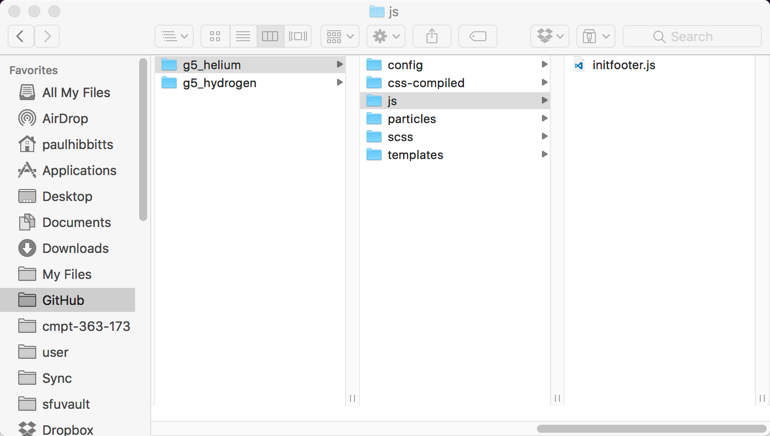
1) Locate the folder user/data/gantry5/themes/g5_helium
2) Create a file called initfooter.js in the folder g5_helium and in that file put the following:

JS
jQuery(document).ready(function() {

var footer, pagespace;

function doResponsive() {
    footer = jQuery("#g-footer").height();
    pagespace = jQuery("#g-page-surround").css('padding-bottom', footer);
}

doResponsive();

jQuery(window).resize(function() {
    doResponsive();
});

});

3) Save and reload your site

Please let me know if this works.

Cheers,
Paul
ps - the updated skeleton is also now available at https://getgrav.org/downloads/skeletons

last edited 08/24/17 by Paul Hibbitts
9 years ago

Hi Paul

Sorry, it did not work for me. No change at all.

You can see my site at testgrav.battycom.com http://testgrav.battycom.com/

Here is what I changed

Incidentally, the navigation area of the site has a similar problem - the particles in there should not float onto the content in a narrow window.

Norma

<img src='//cdck-file-uploads-canada1.s3.dualstack.ca-central-1.amazonaws.com/flex036/uploads/getgrav/original/1X/223d054379b3c62eddeed268dc42d5c8cc74df65.png' width='256' height='241'>

9 years ago

Hi Norma,

Did you clear the Grav and Gantry caches? That might be the reason you are not seeing any change re: footer?

I think the second issue re: navigation area of the site is really the same issue that is addressed with the missing JS file.

Cheers,
Paul

9 years ago

Hi Paul

I have both gantry and grav in development mode so clearing cache should not be necessary.

I just cleared them both manually to be sure and it made no difference.

Norma

9 years ago

Oh! Looking at your screenshot again you need that .js file in a folder called js - try that and let me know how it goes.

2017-08-24_15-26-49|690x390

9 years ago

Sorry. Failed again!
!

<img src='//cdck-file-uploads-canada1.s3.dualstack.ca-central-1.amazonaws.com/flex036/uploads/getgrav/original/1X/a2290a2560968c92f3c841ce58898540d85a6057.png' width='320' height='181'>

9 years ago

Not sure what the issue is then. If you ZIP your site (user folder) I could take a look... likely best way is to join Grav Slack room and DM me your file.

9 years ago

Hi Paul
I am now using the latest version of eportfolio. I see that the overflowing the page has been fixed.

Now, I am trying to incorporate the very nice blog implementation into my site.
I find that the page "blog" does not want to be moved in the menu - I changed it to 07.blog. (I also published Home and made it Home). Blog insists on being in the 2nd position in the rendered menu. Blog is no 7 in both the administrator and the file system.

Further, when I change its name to "Archive" and change the root in 4 places in gantry, It does not work. I can make it sit in position 7 in the displayed menu.

Any ideas? Thanks. Norma

9 years ago

Hi Norma, this is due to the use of Gantry in the skeleton. You will need to re-order the menu via Gantry, which you can do easily by going to:

Admin -> Gantry -> Menu (top right of screen)

Once on that screen you should be able to reorder the menu as you like. Let me know if things work out a-ok. More info is at: http://docs.gantry.org/gantry5/configure/menu-editor

Not sure about the renaming issue, might be related to the menu label?

Cheers,
Paul
ps - make sure you are either in Gantry 'Development' mode or clear the Gantry cache after this change

9 years ago

Hi Paul
It seems that portfolio has somehow made “blog” special in the gantry menu. Any other page name happily goes in the right place in the menu. I want mine to be called “Archive” - when I call it that it goes wherever I want it in the menu displayed to the user - but the blog stuff does not work.

One curiosity is that the children of blog do not show in a dropdown, the children of Archive do. I fixed that by making them invisible - they still display when the user selects “Archive”. I just remembered to assign the Archive to the blog outline in Gantry, so now they are properly presented in two columns.

The remaining issue is that the sidebar does not display the search and other stuff. I wonder if somehow the “blog root" that I set (to Archive) in gantry is not getting through from gantry to the four blog yaml’s. I notice that they have a default of ‘blog’?

Norma

I changed

9 years ago

Hi Norma,

Yes, the name "blog" is used by default by all the blog-related particles such as Popular Tags, Archive, etc. To make these work with your revised structure go into Gantry -> Layout and edit the options for these blog-related and enter "archive" for the blog root (instead of the default "blog"). Let me know if that works for you.

Cheers,
Paul

9 years ago

That is what I did! But it seems that somehow the value I put in Gantry layout for blog root was not getting passed through the blog-root variable - I just found out why not! Because the internal name of Archive is archive. Working now - thanks for pointing me in the right direction.

Norma

9 years ago

Great catch, glad you got it working 🙂

9 years ago

Hi Paul

I thought my site was beginning to work … until I uploaded it to Siteground from MAMP. I did it twice with the same results.

First the archive sidebar failed to display - I found some errors in gantry assignment, which fixed that.

What is not fixed is that some of the archive images fail to display. All other images in the site behave as intended and as they do on my MAC.

I have cleared caches at site ground, gantry, grav and several browsers. I have checked that the images are where they are supposed to be, tried path from /user. Nothing works.

Until I cycled through the posts and all the images came back, and stayed back.

Pleased with my success, but unhappy as to not knowing what brought success, I moved the site into my preferred subdomain.

Guess what - the same images disappeared again, and did not come back.

Any idea what might be going on?

The site is at carryon.battycom.com http://carryon.battycom.com/.

Thanks

Norma

9 years ago

Hi Paul

Not going well. I had already flushed and disabled the cache. So I totally flushed and disabled for my entire domain to no effect.

I had a chat with a helpful fellow at Siteground - also no ideas. He has assured me that I have no more caches anywhere there.

They have referred it to tech support.

This has to be really simple and stupid or really complex!!

So looking at the HTML on the server the Spring Social is like this
<div class="e-content">
<style>.myimage{width: 30%; margin-bottom: 1em;padding: 1em;}</style>
<h2>full path</h2>
<p><img src="/user/pages/Archives/SpringSocial2016/social12_16.jpg http://carryon.battycom.com/user/pages/Archives/SpringSocial2016/social12_16.jpg" alt="Social12_16.jpg" class="max_width-50%" /></p>
<h2>original</h2>
<p><img src="/archives/springsocial2016/Social12_16.jpg http://carryon.battycom.com/archives/springsocial2016/Social12_16.jpg" alt="Social1_16.jpg" class="myimage" /></p>

<p><img src="/archives/springsocial2016/Social1_16.jpg http://carryon.battycom.com/archives/springsocial2016/Social1_16.jpg" alt="Social1_16.jpg" class="myimage" />
<img src="/archives/springsocial2016/Social2_16.jpg http://carryon.battycom.com/archives/springsocial2016/Social2_16.jpg" alt="Social2_16.jpg" class="myimage" />
<img src="/archives/springsocial2016/Social3_16.jpg http://carryon.battycom.com/archives/springsocial2016/Social3_16.jpg" alt="Social3_16.jpg" class="myimage" />
<img src="/archives/springsocial2016/Social4_16.jpg http://carryon.battycom.com/archives/springsocial2016/Social4_16.jpg" alt="Social4_16.jpg" class="myimage" />
<img src="/archives/springsocial2016/Social5_16.jpg http://carryon.battycom.com/archives/springsocial2016/Social5_16.jpg" alt="Social5_16.jpg" class="myimage" />
<img src="/archives/springsocial2016/Social6_16.jpg http://carryon.battycom.com/archives/springsocial2016/Social6_16.jpg" alt="Social6_16.jpg" class="myimage" />
<img src="/archives/springsocial2016/Social7_16.jpg http://carryon.battycom.com/archives/springsocial2016/Social7_16.jpg" alt="Social7_16.jpg" class="myimage" />
<img src="/archives/springsocial2016/Social8_16.jpg http://carryon.battycom.com/archives/springsocial2016/Social8_16.jpg" alt="Social8_16.jpg" class="myimage" />

and at home it is
<html lang="en" dir="ltr">
<head>
<meta name="viewport" content="width=device-width, initial-scale=1.0">
<meta http-equiv="X-UA-Compatible" content="IE=edge" />

HTML
            <meta charset="utf-8" />
<title>Spring Social 2016 | Grav</title>
<meta name="generator" content="GravCMS" />

<meta name="description" content="ePortfolio Blog" />
<link rel="canonical" href="http://localhost:8888/carrytwo/archives/springsocial2016" />

TXT
        <link href="/carrytwo/user/plugins/gantry5/assets/css/font-awesome.min.css" type="text/css" rel="stylesheet" />

<link href="/carrytwo/user/plugins/gantry5/engines/nucleus/css-compiled/nucleus.css" type="text/css" rel="stylesheet" />
<link href="/carrytwo/user/data/gantry5/themes/g5_helium/css-compiled/helium_header-no-bside.css" type="text/css" rel="stylesheet" />
<link href="/carrytwo/user/data/gantry5/themes/g5_helium/css-compiled/helium-grav_header-no-bside.css" type="text/css" rel="stylesheet" />
<link href="/carrytwo/user/data/gantry5/themes/g5_helium/css-compiled/custom_header-no-bside.css" type="text/css" rel="stylesheet" />
<link href="/carrytwo/user/plugins/breadcrumbs/css/breadcrumbs.css" type="text/css" rel="stylesheet" />
<link href="/carrytwo/user/plugins/form/assets/form-styles.css" type="text/css" rel="stylesheet" />
<link href="/carrytwo/user/plugins/simplesearch/css/simplesearch.css" type="text/css" rel="stylesheet" />
<link href="/carrytwo/user/plugins/login/css/login.css" type="text/css" rel="stylesheet" />

I wonder if this is something to do with page media.
I developed this section in admin and dragged those images into the page. And then dragged from there into the page.
On the server in admin they also appear in the page media at the bottom, but they were not dragged in.

This was the case also for most of the archive pages, I think.
Is there something about page media that does not transfer well?

Norma

9 years ago

Extending that idea the BANDS archive is rendered like this and works.
Now I am really puzzled as the full path is not in there either.
Norma

<div class="list-blog-meta">
<span class="separator">/</span> <i class="fa fa-tags" aria-hidden="true"></i>
<span class="tags">
<a href="/archives/tag:2016 http://carryon.battycom.com/archives/tag:2016" class="p-category">2016</a>, <a href="/archives/tag:bands http://carryon.battycom.com/archives/tag:bands" class="p-category">bands</a> </span>
</div>
</div>

<div class="list-blog-padding">

<div class="e-content">
<style>.myimage{width: 48%; margin-bottom: 1em;padding: 1em;}</style>
<p><img alt="Green Band" src="/user/pages/06.Archives/01.2016BandPics/2016GreenBand.jpg http://carryon.battycom.com/user/pages/06.Archives/01.2016BandPics/2016GreenBand.jpg" /> </p>

<p><img alt="Jubilee" class="myimage" src="/user/pages/06.Archives/01.2016BandPics/2016Jubilee.jpg http://carryon.battycom.com/user/pages/06.Archives/01.2016BandPics/2016Jubilee.jpg" /> <img alt="Allegro" class="myimage" src="/user/pages/06.Archives/01.2016BandPics/2016Allegro.jpg http://carryon.battycom.com/user/pages/06.Archives/01.2016BandPics/2016Allegro.jpg" /> <img alt="Skylark" class="myimage" src="/user/pages/06.Archives/01.2016BandPics/2016Skylark.jpg http://carryon.battycom.com/user/pages/06.Archives/01.2016BandPics/2016Skylark.jpg" /> <img alt="Odyssey" class="myimage" src="/user/pages/06.Archives/01.2016BandPics/2016Odyssey.jpg http://carryon.battycom.com/user/pages/06.Archives/01.2016BandPics/2016Odyssey.jpg" /></p>
</div>

9 years ago

Some progress!

The images in SpringSocial all had capital S Social in MAMP. Should be lowercase s.
That change and they all come up at Siteground!

I also changed Archives to Archive as I thought there might be a conflict between your blog archive and mine?

There is still a missing Cuba pic. Will look for it tomorrow.

Norma

9 years ago

Yeah, Cuba works too now.

Looking in the wrong part of the haystack!

Strange that case should matter in an image name at Siteground and not on MAMP.

So happy the issue is fixed for now, but uncomfortable about not understanding why.

Thanks for listening, and I hope it might help someone else.

Norma

9 years ago

Glad you got it going @normawhite , I don't know myself what the reason for the issue is.

Suggested topics

Topic Participants Replies Views Activity
Support · by Thomas, 1 week ago
2 60 16 hours ago
Support · by Anna, 3 days ago
2 66 19 hours ago
Support · by Justin Young, 20 hours ago
1 34 20 hours ago
Support · by Duc , 1 week ago
2 70 6 days ago
Support · by Colin Hume, 1 week ago
2 61 6 days ago