Skip to content
Grav 2.0 is officially stable. Read the announcement →

Community guidelines

Please keep discussions civil and on-topic. Repeated violations may lead to a temporary ban.

Support

Admin > Navigation > Drop Down > Override folder position for 'child' from root? [Quark inheritor]

admin

Solved by Timothy Bradley View solution

Started by Timothy Bradley 7 years ago · 1 replies · 710 views
7 years ago

Purely to create a drop down list in main navigation, I have a parent page and then added desired pages as children.

That gives the desired pages this child-URL structure:

root/parent/page-slug

However, what I really want is to have those pages nested in the drop down but have this URL off the root:

root/page-slug

Is there a graceful way in Admin to declare a nav drop down item structure like that like, for example, declaring at the folder level that all children are to come off the root?

If not, is there a not-so-graceful way in Admin to do this like, for example, a page-level path override?

Though less important to me, is there also a way to declare the parent as "not-a-page" so that it simply acts as a drop down revealer in the nav?

I hope I make sense, and thank you for any help in advance.
7 years ago Solution

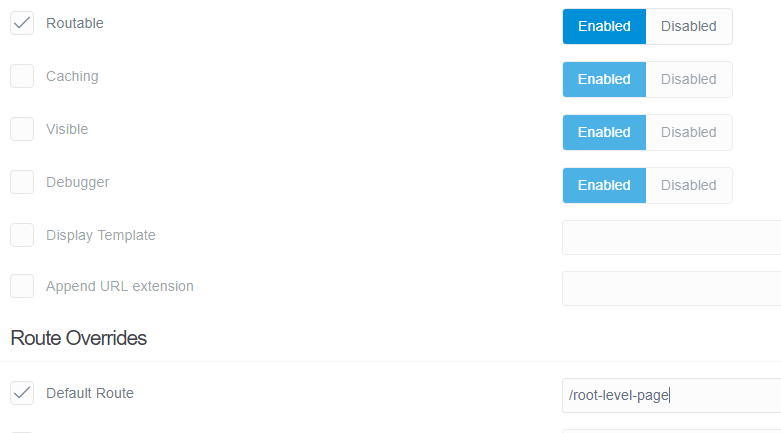
There may be a better way, but what I did (using the Admin plugin interface) was the following on one each child page I wanted to get from the root/ of the site:

  1. Go to the page in the Admin editor;
  2. Go to the Advanced Tab;
  3. Scroll down to the "Route Overrides" section;
  4. For "Default Route", set that to the desired path from root.

For the example pic below, the desired overide path was "/root-level-page" off root, which would give the page a URL like "htttps://www.example.com/root-level-page" instead of something like "htttps://www.example.com/unwanted-extra-folder/root-level-page".

image|690x382

Note

  • I am using a Quark inheritance theme
  • The page is still in the drop down menu as a "child" (as wanted)
  • The unwanted version still exists but its meta canonical reference points to the wanted version using the new default route
  • I did try disabling "Routable" further up the Advanced Tab and in the hope that the unwanted version wouldn't be built but the wanted version would be (because of the default route declaration), BUT that did work and both versions weren't built - so I turned that back on.
  • A WARNING: Apart from the obvious Admin plugin, I haven't yet tested this with other plugins that reference routes (e.g. sitemaps etc) which may include both routes (or the wrong one) but I am encouraged that at least the canonical reference changed to pick up the new default route - so if sticks to a default route referencing it should hopefully be fine.

Hope this helps someone.

Suggested topics

Topic Participants Replies Views Activity
Support · by Thomas, 1 week ago
2 60 16 hours ago
Support · by Anna, 3 days ago
2 66 19 hours ago
Support · by Justin Young, 20 hours ago
1 34 20 hours ago
Support · by Duc , 1 week ago
2 70 6 days ago
Support · by Colin Hume, 1 week ago
2 61 6 days ago