Hey all,
after figuring that the yaml-parser is quiet sensitive to the identation formatting, I found something that I'd like to ask regarding theme blueprints:
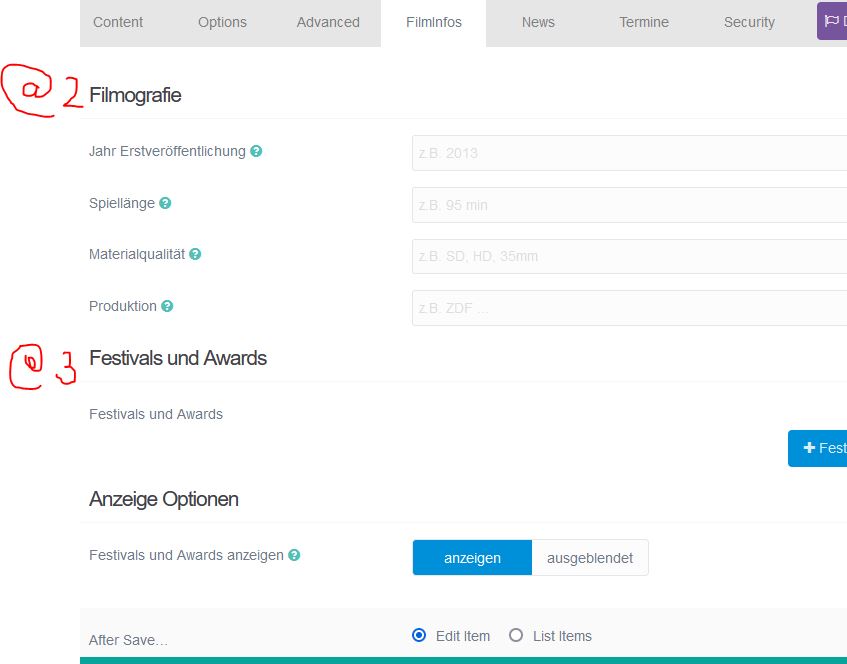
If I use multiple import@ statements (like mentioned here in the docs), the resulting forms are displayed in reversed order.
Here my example of my blueprint file:
'@extends':
    type: default
    context: blueprints://pages

form:
  fields:
    tabs:
      type: tabs
      active: 1

      fields:
        options:
            import@1:
              type: partials/gallery-bits
              context: theme://blueprints

        filminfo:
          type: tab
          title: FilmInfos

          fields:
              Awards:
                type: section
                title: Anzeige Optionen
                underline: true

              header.showaward:
                type: toggle
                label: Festivals und Awards anzeigen
                default: 1
                options:
                  1: anzeigen
                  0: ausgeblendet
                validate:
                  type: bool

          import@3:
            type: partials/awards-bits
            context: theme://blueprints

          import@2:
            type: partials/film-bits
            context: theme://blueprints
I observe that the "film-bits" blueprint from import@2 is shown first in the admin panel although it is used last in the yaml-file. Well, this may be worked around (although confusing) by reversing the imports in the yaml file. But more over and very inconvenient is that the 'Awards' section is displayed last in the admin panel, regardless where I put it with respect to the import@2 and import@3 statements.
see screenshot for example:
Does anyone have an idea how to control the appearance of the import@ fields in the admin panel?
Thanks for any help.