I try to design a website with the theme Hola for Grav CMS. It's really pretty. However I've detected a little bug in navigation menu. If I set two words in menu field, the smooth scroll doesn't work, properly.
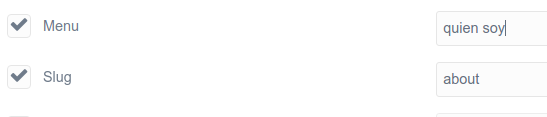
I'm Spanish and, for example, if I want to set in menu "Quien soy", similar to "about", in English, the effect smooth scroll not work. Also, if I set the Slug field with any name, this modular page doesn't show in navigation menu.
I hope your help in this issue.
Thanks so much.
Some captures about this issue:



The code of navigation.html.twig where I think is the problem in:
TWIG
<ul class="header-nav">
    {% macro pageLinkName(text) %}{{ text|lower|replace({' ':'_'}) }}
    {% endmacro %}
    {% set home = page.find('/') %}
    {% for module in home.collection %}
        {% set current_module = (module.active or module.activeChild) ? 'current' : '' %}

        {{ dump(module.redirect) }}

        {% if module.header.visible %}
            {% if page.slug == 'home' and module.modular_link %}
                <li class=" {{ current_module }} ">
                    <a class="smoothscroll"
                       href="#{% if module.redirect %}{{ module.redirect }}{% else %}{{ module.modular_link }}{% endif %}">{{ module.item_name }}</a>
                </li>
            {% elseif page.slug == 'home' and not module.modular_link %}
                <li class=" {{ current_module }} ">
                    <a class="smoothscroll"
                       href="#{% if module.redirect %}{{ module.redirect }}{% else %}{{ (module.menu) }}{% endif %}">{{ module.menu }}</a>
                </li>
            {% else %}
                <li class=" {{ current_module }} ">
                    <a href="{{ base_url_relative }}#{{ module.menu }}">
                        {{ module.menu }}
                    </a>
                </li>
            {% endif %}
        {% endif %}
    {% endfor %}

    {% for page in pages.children.visible %}
        {% set current_page = (page.active or page.activeChild) ? 'current' : '' %}
        <li class="{{ current_page }}">
            <a href="{{ page.url }}">
                {% if page.header.icon %}
                    <i class="fa fa-{{ page.header.icon }}"></i>
                {% endif %}
                {{ page.menu }}
            </a>
        </li>
    {% endfor %}
</ul>