Skip to content
Grav 2.0 is officially stable. Read the announcement →

Community guidelines

Please keep discussions civil and on-topic. Repeated violations may lead to a temporary ban.

Themes & Styling

3-nested Sub Menu

theme

Solved by desta View solution

Started by desta 4 years ago · 5 replies · 1135 views
4 years ago

Hi again,

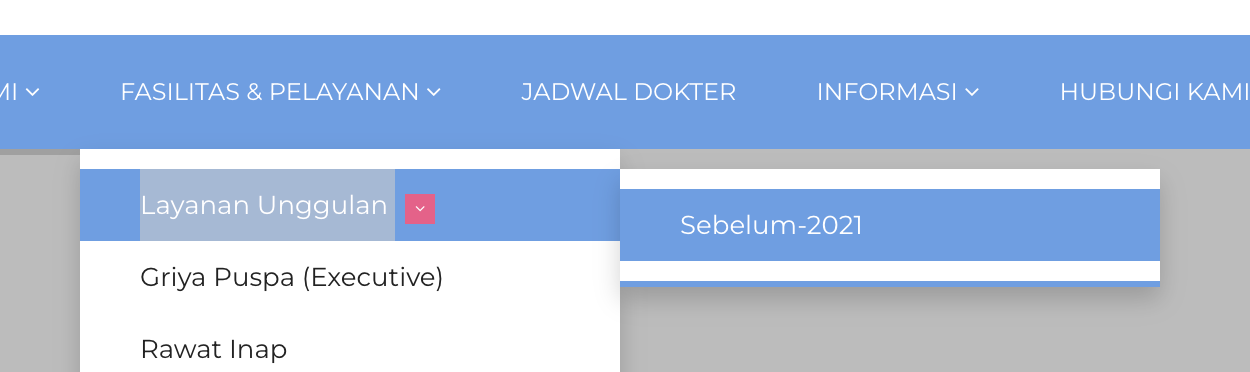
Longtime to continue my development web with grav, now i'm handle again, but i have problem in 3 nested menu, you can try at https://web.persahabatan.co.id/id/beranda when i click FASILITAS & PELAYANAN -> Layanan Unggulan -> Others Menu

but Others menu not show on the right menu, this is my code, im using macros

PHP
{% macro nav_loop(page) %}
    {% import _self as macros %}
    {% for p in page.children.visible %}
        {% set active_page = (p.active or p.activeChild) ? 'active' : '' %}
        {% if p.children.visible.count > 0 %}
            <li class="dropdown {{ active_page }}">
                <a href="{{ p.url }}" class="dropdown-toggle" data-toggle="dropdown">{{ p.menu }} <span><i class="fa fa-angle-down"></i></span></a>
                <ul class="dropdown-menu multi-level">
                    {{ macros.nav_loop(p) }}
                </ul>
            </li>
        {% else %}
        <li class="{{ active_page }}">
            <a href="{{ p.url }}">{{ p.menu }}</a>
        </li>
    {% endif %}
    {% endfor %}
{% endmacro %}

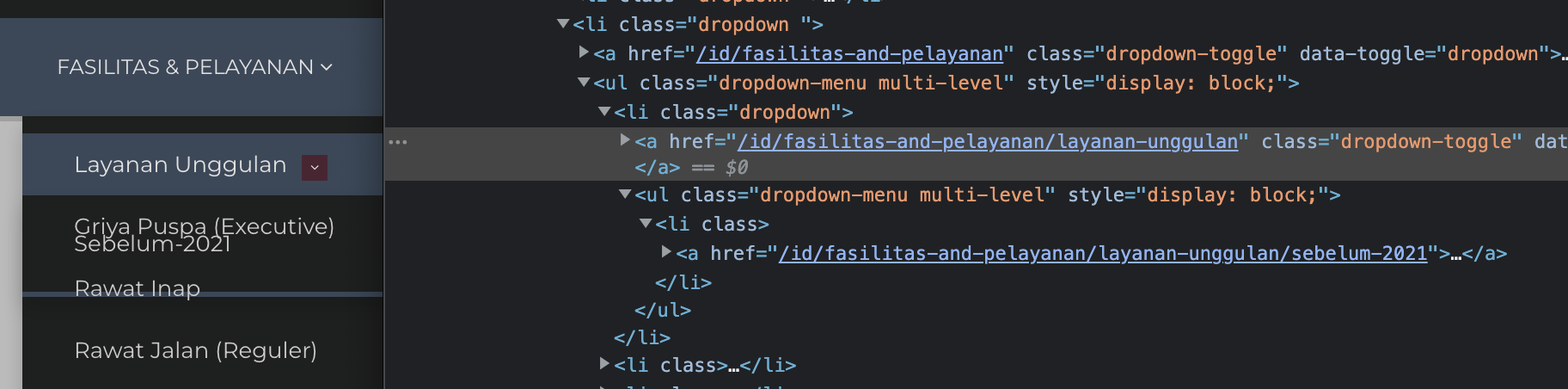
when i'm inspect element, <li class="dropdown">Others Menu</li> it's must <li class="dropdown-submenu">Others Menu</li>

can someone give me trick to add submenu in <li> class proprty, im try to dump(macros.nav_loop(p)) but i'm confused, it's show null

please someone, direction me. thanks.
4 years ago

I don't see any Others menu - only Sebelum 2021
image|690x170

What are you actually trying to achieve? Why do you need dropdown-submenu specifically? If you want it to expand on the side, you probably could get away with CSS

CSS
.dropdown > .multi-level > .dropdown-menu {
    position: absolute;
    top: 0;
    left: 100%;
    height: fit-content;
}

image|690x205

last edited 09/02/22 by Karmalakas
4 years ago

Yes, i want do with if else condition with {{ macros.nav_loop(p) }} object but, if blaa then dropdown-submenu else dropdown... but when i'm dump, it's null ... or, if i compare empty value, it's all true return..

i will test with your css condition.. thanks btw

4 years ago

i'm using some code from you

CSS
.ownmenu .nav .dropdown-menu .multi-level {
  position: absolute;
  top: 0;
  left: 100%;
  height: fit-content;
  display: none !important;
}

.ownmenu .nav .dropdown-menu:hover .multi-level {
  display: block !important;
}

but other menu has open too, where must i put :hover properties i must?

Thanks for you response

4 years ago

But your selector is nothing like in my example. And just a suggestion, never use !important - there's most likely a proper way to define styles without it.

You also didn't reply what you're actually trying to achieve. Do you have an image of the result you're looking for?

4 years ago Solution

No it's not about selector. it's just object from p.routable, i follow from other threas

/forum/general/down-arrow-in-main-menu-only-t2685

and tweak some my marcos

PHP
{% macro nav_loop(page) %}
    {% import _self as macros %}
    {% for p in page.children.visible %}
        {% set active_page = (p.active or p.activeChild) ? 'active' : '' %}
        {% set route_page = (p.routable and p.children.visible.count > 0) ? '-submenu' : '' %}
        {% set icon_submenu = (p.routable and p.children.visible.count > 0) ? '<span><i class="fa fa-angle-down"></i></span>' : '' %}

        <li class="dropdown{{ route_page }} {{ active_page }}">
            {% if p.children.visible.count > 0 %}
                <a href="{{ p.url }}">{{ p.menu }}</a>
                <ul class="dropdown-menu multi-level">
                    {{ macros.nav_loop(p) }}
                </ul>
            {% else %}
                <a href="{{ p.url }}">
                    {{ p.menu }} {{ icon_submenu }}
                </a>
            {% endif %}
        </li>

    {% endfor %}
{% endmacro %}

i'v just little problem now, <span><i class="fa fa-angle-down"></i></span> not work properly in first submenu, but nots problem.

Thanks karmalakas for your suggestions.

Suggested topics

Topic Participants Replies Views Activity
Themes & Styling · by Pedro M, 2 months ago
4 198 2 months ago
Themes & Styling · by Ian, 2 months ago
3 94 2 months ago
Themes & Styling · by Norbert, 2 years ago
11 455 3 months ago
Themes & Styling · by Lukáš Findeis, 3 months ago
0 48 3 months ago
Themes & Styling · by Sebadamus, 4 months ago
5 128 3 months ago