I signed into the admin interface for my site and saw that I needed to upgrade a bunch of plugins and grav itself. When I tried to do the grav upgrade, it said that I needed to upgrade the plugins first. So I tried to upgrade the plugins and that failed on the admin plugin and now the site is broken. I expect that I can fix it by signing into my VPS but I'm not sure how to go about it. Any help would be greatly appreciated!
Solved by Sjoerd Smeets View solution
Actually, the site itself still renders correctly. I just now have no access to the admin interface.
I have managed to upgrade everything through the command line but the admin interface is still broken.
What does it mean "broken"? What's the error?
A 404 error and it says that the page is not found.
Did you try searching the forum? Would this help?
/forum/plugins/update-to-grav-v1-7-50-2-destroys-admin-panel-t8209
I did but I obviously didn't use the correct keywords. Thank you though.
I'm not sure what I'm supposed to do here. If by root folder, they mean the folder containing "assets", "backup", "bin", "cache", etc., there is an index.php there.
Your admin is disabled. Go to user/plugins/admin/admin.yaml
If it says enabled: false change it to enabled: true
It appears to be enabled so that's not the problem.
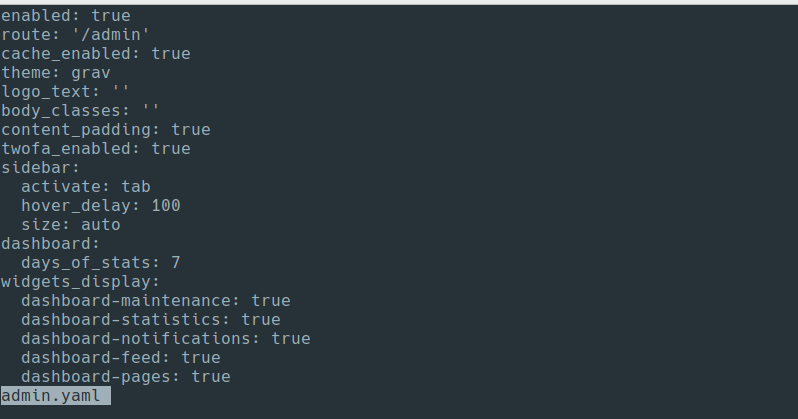
Oops wrong path.
/user/config/plugins/admin.yaml
Many thanks! All good now.
This exact thing just happened to me.
Something else to consider for those experiencing a similar behavior.
I had this experience a few times on multiple sites, all hosted on the same system. The Admin plugin was not disabled; instead, the update of the CORE ended with success, but upon completion, the site's main index.php file was missing.
My fix was to manually upload the index.php from the update package GitHub page.
I had meant to come here to alert users of the same problem so thanks for posting. Ive had the same missing index file in nearly every upgrade I've done since about 2024 (maybe even before that), so I always make a copy of my existing index.php before I upgrade.
Log in to reply.
Suggested topics
| Topic | Participants | Replies | Views | Activity |
|---|---|---|---|---|
| 4 | 241 | 2 weeks ago | ||
| 2 | 211 | 2 weeks ago | ||
| 5 | 456 | 3 weeks ago | ||
| 5 | 636 | 3 weeks ago | ||
| 6 | 429 | 4 weeks ago |