Hi,
I'm using Typhoon and it's a great template but on my homepage I've a bug with the display of the gallery's modular when I swith from development mode to production mode. It's seem the CSS generated was'nt correct.
any idea to solve this bug ?
Did you try to compare dev and prod both CSS and HTML output?
of course but can't identify where to change the property of the div in prod without supercharged the css
Not sure I understand what you're saying 🙂
So there's only one difference of some div property? If so, why would you need to change a CSS? Find out the template where this div is located

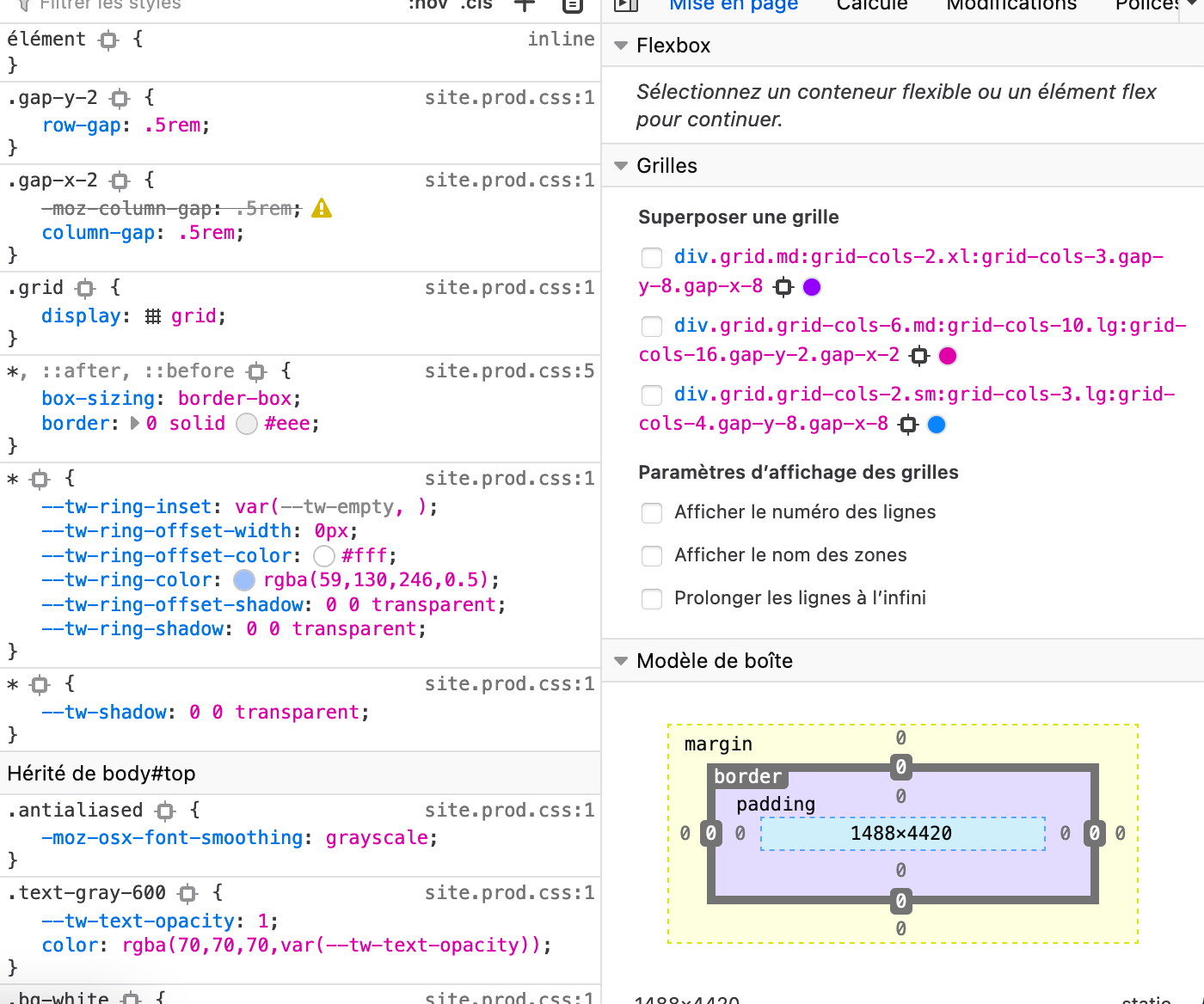
So the top version <div> has two additional classes of grid-cols-...
Find out the template which is rendering those classes
The "gallery‧thml‧twig" modular template content the div class "grid"
This is an extract of the template 🙂
{% extends 'modular/partials/base.html‧twig' %}
{% block module_content %}
{% include 'modular/partials/title.html‧twig' with {include_content: true} %}
{% set data = page‧header‧gallery %}
{% set grid_classes = data‧grid_classes|default('grid-cols-2 md:grid-cols-3 lg:grid-cols-4 gap-y-2 gap-x-2') %}
{% set thumb_width = data‧thumb‧width|default(600) %}
{% set thumb_height = data‧thumb‧height|default(450) %}/* <div class="grid {{ grid_classes }}" //
and the site‧css before processing
@import "./custom/dark‧css";
@import "./custom/fonts‧css";
@import "./custom/forms‧css";
@import "./custom/navigation‧css";
@import "./custom/plugins‧css";
@import "./custom/social‧css";
@import "./custom/typography‧css";
@import "./custom/bugs‧css";@tailwind utilities;
@tailwind base;
@tailwind components;
So, where could I set the grid's class without editing the site‧prod‧css ?
What's that symbol between data and grid (also other variables have it)?
data‧grid_classes
Also extends line is copied wrong I think. Please try to copy code as it is. Now it seems that you applied some formatting/encoding to it.
Which theme/plugin do you use with this template?
Do you extend this template by overriding module_content block? Do data‧grid_classes come from some config maybe (might be editable like header classes in Quark)?
just a normal point "." the forum change it :/
TWIG
{% extends 'modular/partials/base.html‧twig' %}

{% block module_content %}
  {% include 'modular/partials/title.html‧twig' with {include_content: true} %}
  {% set data = page‧header‧gallery %}
  {% set grid_classes = data‧grid_classes|default('grid-cols-2 md:grid-cols-3 lg:grid-cols-4 gap-y-2 gap-x-2') %}
  {% set thumb_width = data‧thumb‧width|default(600) %}
  {% set thumb_height = data‧thumb‧height|default(450) %}

  <div class="grid {{ grid_classes }}">
    {% set gallery = md5(page‧url) %}
    {% for item in data‧items %}
      <div class="inline-flex overflow-hidden rounded-md group safari-corner-overflow-fix">
        {% set item_image = page‧media[item‧image] %}
        {% if item‧title %}
          {% set title = item‧title %}
        {% endif %}
        {% if item‧desc %}
          {% set desc = ".desc-" ~ md5(item‧desc) %}
        {% endif %}
        {% set content = item_image‧cropZoom(thumb_width,thumb_height).classes('transform duration-200 group-hover:scale-110 group-hover:filter-more-bright').html(title, title) %}
        {% set image =  item_image‧url %}
        {% set class = 'inline-block' %}
        {% include "partials/lightbox.html‧twig" %}
      </div>
    {% endfor %}

    <div class="hidden">
      {% for item in data‧items %}
        {% if item‧desc %}
          <div class="glightbox-desc desc-{{ md5(item‧desc) }}">
            <div class="prose">
              <p>{{ item‧desc|markdown(false) }}</p>
            </div>
          </div>
        {% endif %}
      {% endfor %}
    </div>
  </div>
{% endblock %}
Theme typhoon
+
lightbox gallery
All the others "media" plugin are disabled
I assume this is a premium plugin, so I don't have access to the code, but I'll try my best...
I see grid_classes might come from page.header.gallery (forum doesn't change normal dots to these points 😕). I suggest you compare your page frontmatter dev and prod. Specifically gallery.md. I think one has classes set and other doesn't
thks I'm going to check this solution
Hello @PostHack ,
Have you tried applying the instructions on how to build the CSS for production that are in the documentation (https://getgrav.org/premium/typhoon/docs#developing-custom-css)?
Also if yo uare trying to create a custom version of that grid you might have to follow the Lightbox Gallery docs directions (https://getgrav.org/premium/lightbox-gallery/docs#displaying-a-gallery-of-thumbnails).
Lastly, I just wanted to mention that we do have a dedicated repository where you can post questions and issues about premium products (https://github.com/getgrav/grav-premium-issues), under the Issues section.
Thanks for your tips.
i'm going to have a look and back to you in the dedicated repo.
Rémi
Log in to reply.
Suggested topics
| Topic | Participants | Replies | Views | Activity |
|---|---|---|---|---|
| 4 | 171 | 1 week ago | ||
| 2 | 149 | 1 week ago | ||
| 5 | 380 | 2 weeks ago | ||
| 5 | 572 | 2 weeks ago | ||
| 6 | 360 | 3 weeks ago |