Hello, I want to remove a "Page Template" from my parent theme in my child theme, because there are too many page type in page Template selector (admin).
How I can do that ?
Thanks in advance
Hello, I want to remove a "Page Template" from my parent theme in my child theme, because there are too many page type in page Template selector (admin).
How I can do that ?
Thanks in advance
Maybe it's complicated to understand my question.
So an image is certainly better, I just want to remove template in this list.
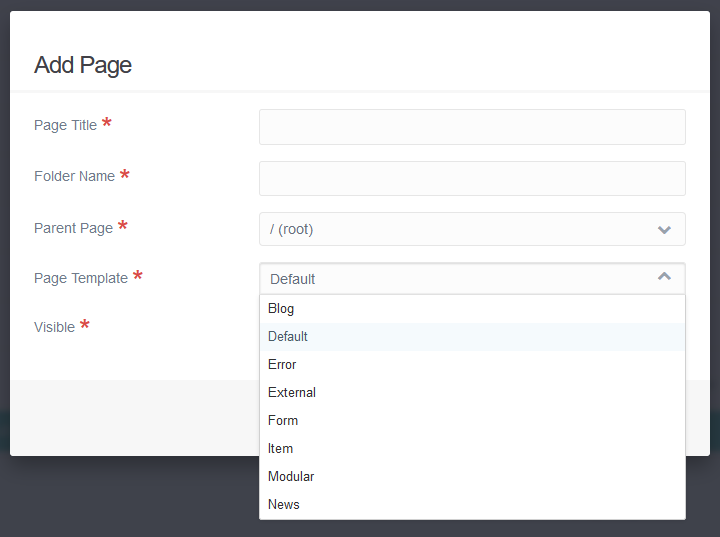
Hi @srg404, you can do this via the config for the Admin Plugin, here is an example for you:
https://github.com/hibbitts-design/grav-skeleton-course-hub-site/blob/master/user/config/plugins/admin.yaml#L59-L70
Let me know if that works for you too.
Paul
Hi @paulhibbitts, your solution works fine 😉
Big thanks
Serge
I know, this thread has been dormant for a long time, but it was actually super helpful just now.
Is there a way to do this only for specific users/groups?
Thanks so much
@Flop, AFAIK, there can only be a single config file for a plugin/theme.
You could try creating a plugin and inject JavaScript into Admin and hide page types based on the current user.
Log in to reply.
| Topic | Participants | Replies | Views | Activity |
|---|---|---|---|---|
| 4 | 245 | 2 weeks ago | ||
| 2 | 211 | 2 weeks ago | ||
| 5 | 457 | 3 weeks ago | ||
| 5 | 636 | 3 weeks ago | ||
| 6 | 429 | 4 weeks ago |