Skip to content
Grav 2.0 is officially stable. Read the announcement →
Support

Really need your help: 403 Forbbiden all of a sudden

admin

Started by Jimbo 4 years ago · 4 replies · 781 views
4 years ago

Hi there. All of my subpages return a 403 error when I try to save them. This only happened after I deleted a module. Here is exactly what I did.

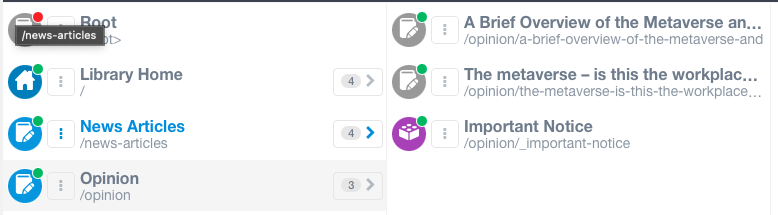
I have a folder called "Opinion." Inside it, I have two pages and one module. All of the items inside the Opinion page is "Page ordering is disabled."

Screen Shot 2022-04-14 at 11.35.34 PM|690x190

I added a module called "test" inside the "Opinion" folder.
Then I enabled the "Folder Numeric Prefix" for that module.
Then I deleted that module.

All of a sudden, all "item" pages inside Opinion and EVERY "item" page inside other root pages returns a 403 error when I click "Save"

Strangely, "module" items and "blog" folders save just fine. It's only "item" pages.

I tried setting param_sep: ';' to my user/config/system.yaml like this documentation.

No avail.

I am devastated. Please help.

last edited 04/15/22 by Jimbo
4 years ago

Hello, I figured out the issue. I believe this is a bug. Let me share exactly what I did to reproduce the bug.

  1. Install the Quart Publishing Theme
  2. Create an item under a menu page
  3. Set the following code for the "Front matter" (this should be the default setting anyway)
YAML
feed:
  limit: 10
  1. On the same page, go to "Advanced" tab
  2. Set "Folder Numeric Prefix" to Enabled
  3. Hit save.

Then, the page is saved. But after that, ALL item pages will always return a 403 error.

Now, this is not a global solution. But this can be fixed for the page with this issue via the following method:

  1. Go to your cPanel (or wherever you store your Grav pages)
  2. Navigate to /user/pages/[YOUR PARENT FOLDER]/[YOUR ITEM FOLDER]
  3. Download item.md
  4. Delete feed: limit: 10
  5. Save
  6. Upload/replace the original item.md

The item page should save normally again.

last edited 04/19/22 by Jimbo
4 years ago

@metaversepolicy, I cannot reproduce the issue... For two reasons:

  1. Your steps are not clear
  2. I've tried all permutations of what you could be meaning, but didn't getting any error...

My base was:

  • Fresh install of Grav 1.7.32
  • Installed and enabled Quark Open Publishing
  • Added a blog page with blog items copied from skeleton 'Blog Site'

Not sure what you mean with:

  1. Create an item under a menu page
  • What is "an item"?
    A blog item using template "item"? Or just a "default" page?
  • What is a "menu page".
    Any page that shows in the menu? Typography for example? Or should it be the blog page because you mention "item" above?
  • Anyway, as said, I've tried all possible permutations I could think of, but didn't get any errors.

Set the following code for the “Front matter”

  • Why do you add feed.limit: 10 to the new "item". This should be set in the "blog" page.
    • Again, adding/removing the setting in any page didn't make any difference.

Would you mind recreating the issue in a reproducible minimal setting?

  • Create a fresh install of Grav 1.7.32
  • Install theme Quark Open Publishing
  • Create any necessary pages.
  • Create your "item under a menu page" and see what happens.

We might then get a more clear view of what is happening and the possible cause if anything goes wrong.

4 years ago

Hey there! Thanks for the response. I tried repeating exactly what I did too on a test subdomain. I actually spent about two hours trying to replicate this issue. But everything seems to be working fine. It's really strange thing. On the other subdomain, this problem persisted. I will try to record my screen if this problem happens again. Thanks for looking into it!

3 years ago

Hi There, I had a similar problem and it seemed like something in the text was bothering the save submit, so I thought to split the post into small chunks to see if I can find the culprit. And I did, at least in my case: it was the word filestore (I hope I can post it here 😃 ) let's try it out
Suggested topics

Topic Participants Replies Views Activity
Support · by Thomas, 1 week ago
3 101 8 hours ago
Support · by Anna, 3 days ago
2 98 1 day ago
Support · by Justin Young, 1 day ago
1 66 1 day ago
Support · by Duc , 1 week ago
2 101 6 days ago
Support · by Colin Hume, 1 week ago
2 94 6 days ago