Skip to content
Grav 2.0 is officially stable. Read the announcement →

Community guidelines

Please keep discussions civil and on-topic. Repeated violations may lead to a temporary ban.

Support

How to redirect pages with php extension in GRAV

Started by Eric Dela Cruz 9 years ago · 25 replies · 4576 views
9 years ago

I created a new web site using Grav. The old site has pages that had to be accessed using urls ending .php
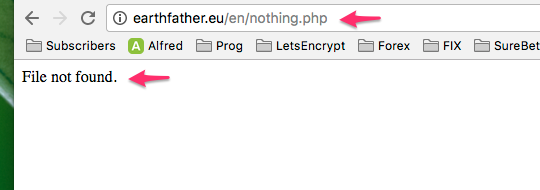
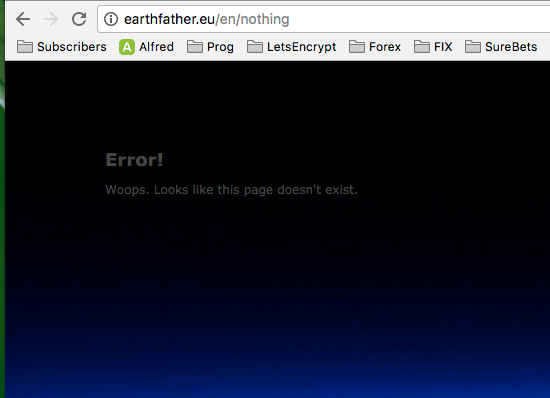
The url /somefolder/somepage.php just gives me "File not found". It does NOT lead me to the built-in Grav error page.

I disabled the error plugin of Grav so it does not get in the way.

How do I rewrite any url ending in .php to the homepage /

Also, how can I redirect any 404 error to the home page?

Thanks.

9 years ago

So you wish to redirect oldpage.php to the new page address?

9 years ago

Hi,

Actually I would like to redirect any non existing page to the homepage (/)

9 years ago

That's quite simple 🙂

  1. Enter the Error plugin on [yoursite:/admin/plugins/error]()
  2. Turn it on
  3. Set 404 Route pointing to your home page (/ should be enough)
    image|690x383
    Done!
9 years ago

I had the error page turned on at first.
But... it would not catch the .php URLs.
The browser would just say "file not found"

I'm not a PHP programmer but a Javascript one.
Could you give some guidance on how to set the 404 Route to /
I did try a few things but what I tried, didn't work.

9 years ago

Did you set up everything as I asked in above post?
Please, set the Error plugin as shown on the screenshot, and let me know. In my case it redirects all of the pages, those ending with .php as well. But you have to enable the plugin, and point it to the custom route, in this case / (enter only slash where it asks for 404 Route)
It still doesn't work?

9 years ago

I'm sorry but it does not work.
Error plugin is turned on.

php1|540x190

9 years ago

I changed

$page = $pages->dispatch($this->config->get('plugins.error.routes.404', '/error'), true);

to

$page = $pages->dispatch($this->config->get('plugins.error.routes.404', '/'), true);

9 years ago

@edelacruz:
$page = $pages->dispatch($this->config->get(‘plugins.error.routes.404’, ‘/error’), true);

Where did you change it?

9 years ago

I replaced the content of error.md with the content of the home page.
That solved one part of the problem.
Any non-existing page not ending in .php will show the home page.

But URLs ending in .php will still give "file not found"

Funny because any other extension will get you to the error page.
Extensions like .asp or .xml work as expected (redirect to error page)

9 years ago

Well, it's the plugin code, I wouldn't touch it if I were you ;)
Okay, are you using Admin panel at all? Or are you making all changes on the files?

9 years ago

I did change the files but it would be better to use the Admin panel.
I just don't know how to fix my problem using the admin panel.

I restored the changes I made to the plugin. I just replaced the content of error.md with the content of my homepage.
That solves one part of my problem.

Now only the .php error is left.

9 years ago

Okay. Beneath the 'enabled' part, you have a field to enter '404 Route', yes?
In this field, enter only the / symbol, nothing more, then save it

9 years ago

Could it be caused by the way Grav is setup?
I am using a Docker container so I did not have to install PHP and other stuff I don't know anything about.

I'm using this Docker container:

https://hub.docker.com/r/evns/grav/

Suggested topics

Topic Participants Replies Views Activity
Support · by Thomas, 1 week ago
2 57 14 hours ago
Support · by Anna, 3 days ago
2 65 17 hours ago
Support · by Justin Young, 18 hours ago
1 33 18 hours ago
Support · by Duc , 1 week ago
2 68 5 days ago
Support · by Colin Hume, 1 week ago
2 60 6 days ago