Hi there
May be this will be a stupid question, but... I can't find out any potential solution to my problem. I rather new to grav, creating a simple site, and I found this cms fantastic. but...
I want to add an iframe in a simple page. So I try, as I read it in another post, to insert my html code in the .md.
The result is just a render text with "<iframe..." . I thought markdown was simply accepting html tags.
I went in the system config, markdown is set to true, markdown_extra also (btw I don't know what it means). I parsed grav admin to ensure everything was ok, it seems too.
Other markdown styles are working like ## or ** and so on.
If anyone could give an idea, it would be great !
thanks a lot
Solved by pamtbaau View solution
Markdown in general accepts all HTML-tags, but the iFrame-tag and a few others are disabled by default because they pose a security risk. You can customize this in system.yaml.
Well How could could I missed it ! thanks a lot for answering.
But... I must be missing something else.
I remove the tag from xss_dangeroustag in user/config/security.yaml
I also tried to set dangerous_tags to false
I cleared cache (wich also touch the new security file)
And I still get an iframe text 😦
so what do I do wrong again ?
last edited 08/26/20 by Junillon
@Francois, Markdown is not being processed when embedded inside an HTML block element.
I added the following snippet (showing an OpenStreetMap) to a Markdown file using vscode. I made no changes to security.yaml.
HTML
<div>
  <iframe id="inlineFrameExample"
      title="Inline Frame Example"
      width="300"
      height="200"
      src="https://www.openstreetmap.org/export/embed.html?bbox=-0.004017949104309083%2C51.47612752641776%2C0.00030577182769775396%2C51.478569861898606&layer=mapnik">
  </iframe>
</div>
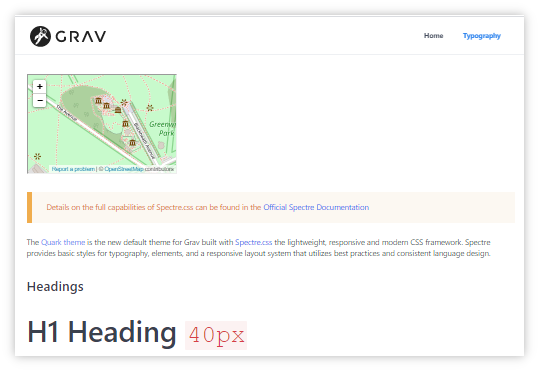
Note: I did not try adding the snippet from withing Admin plugin.
last edited 08/26/20 by pamtbaau
@pamtbaau @OleVik so kind to answer :) but no :( stills not working.... here is what I get.
Editing or not security.yaml going to the same result, there must be something stupidly wrong in my config. Is there any special command to reload part of the cms ?
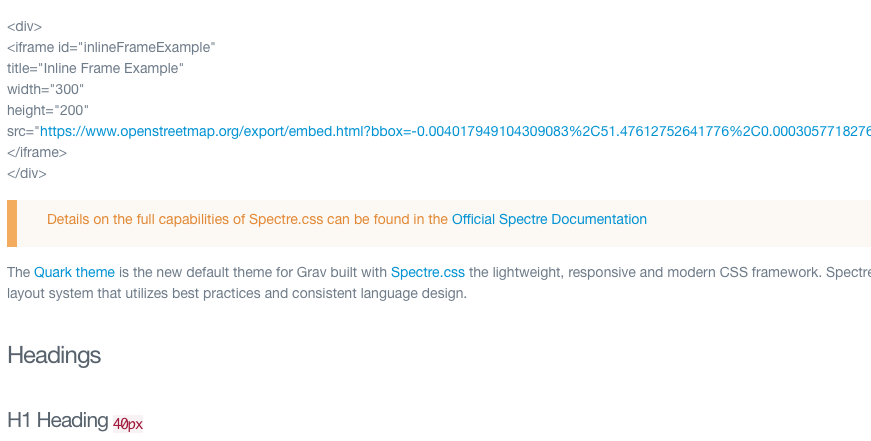
@Francois, I ran my test (again) on a fresh Grav 1.6.26 installation and it worked without any changes to Grav, except adding the snippet into '/pages/02.typography/default.md' using vscode.
Would you mind downloading a fresh copy of Grav 1.6.26 and try again? If that is working you can apply the changes of your original site into the new one, one by one.
OK ! you were right :) someting went wicked in my config 😦
after a fresh install, I can use iframe tag without any problem.
I tryed to copy all "user" dir from my sav dir to get my pages back, and problem starts again. If I've some time, I'll try to compare...
Actually I'm going to recreate. Second try is allaways better than first one ;)
thanks a lot for your time helping me !
@Francois, Copying entire /user folder might be too much, because it will be very likely the issue is somewhere in that folder...
My approach would be:
- Start with fresh install
- Copy from original site folders/files from low probable impact to high and check after each step.
- Create test page with working <iframe>
- Copy
/pagesfolder. Is <iframe> in copied page working?
If not, take a look at its frontmatter. - Install fresh theme
- Install fresh plugins one by one
- Copy theme config file
- Copy plugin config file
- Copy site.yaml into
/config - Copy system.yaml into
/config - ...
Please feed back to the community the cause of the issue.
last edited 08/28/20 by pamtbaau
Yes, found it, and it was a little stupid... from me !
in user/config/system I had place :
YAML
markdown:
    escape_markup: true
this result in removing capabilities to insert simple tag as they are escaped :sleepy:
I set it to false and everything is good.
again, thanks a lot !
last edited 08/28/20 by pamtbaau
@Francois, Smart cookie... ;-)
No need to set it to false, just delete it because false is the default. See '/system/config/system.yaml':
YAML
markdown:
  ...
  escape_markup: false               # Escape markup tags into entities
I do not master everything yet ;)
Log in to reply.
Suggested topics
| Topic | Participants | Replies | Views | Activity |
|---|---|---|---|---|
| 4 | 160 | 7 days ago | ||
| 2 | 141 | 1 week ago | ||
| 5 | 372 | 2 weeks ago | ||
| 5 | 565 | 2 weeks ago | ||
| 6 | 349 | 3 weeks ago |