Skip to content
Grav 2.0 is officially stable. Read the announcement →

Community guidelines

Please keep discussions civil and on-topic. Repeated violations may lead to a temporary ban.

Forms & Blueprints

Submit a form with an attachment

form

Solved by Daniel Dobiášovský View solution

Started by Daniel Dobiášovský 5 years ago · 8 replies · 1412 views
5 years ago

Hello to everybody,

I go through the forum and issues on github for over an hour to find a solution on how to send an attachment using the form.

  1. The visitor fills in the form and attaches a picture
  2. Sends it to the system
  3. I will receive an email with information + an attachment he has added
YAML

title: Reklamace
form:
    name: reklamace
    fields:
        content:
            type: section
            title: 'Ověřovací informace'
            underline: true
            title_level: h4
            classes: col-12
        name:
            label: 'Celé jméno'
            type: text
            autofocus: 'on'
            validate:
                required: true
            autocomplete: 'on'
        company:
            label: Firma
            type: text
            validate: null
            autocomplete: 'on'
        email:
            label: E-mail
            type: email
            validate:
                required: true
                rule: email
            autocomplete: 'on'

        phone:
            label: Telefon
            type: tel
            validate:
                required: true
            autocomplete: 'on'

        custom_file:
            name: priloha
            type: file
            label: 'Vyberte fotku'
            multiple: true
            random_name: false
            limit: 10
            accept:
                - 'image/*'
        agree_to_terms:
            type: checkbox
            label: 'Accept'
            validate:
                required: true
        g-recaptcha-response:
            label: Captcha
            type: captcha
            recaptcha_not_validated: 'Neověřeno'
    buttons:
        submit:
            type: submit
            value: 'Send'
    process:
        captcha: true
        save:
            fileprefix: contact-
            dateformat: Ymd-His-u
            extension: txt
            body: '{% include ''forms/data.txt.twig'' %}'
        email:
            to: **myEmail**
            from: '{{ form.value.email|e }}'
            subject: '[REKLAMACE] {{ form.value.email|e }}'
            body: '{% include ''forms/data.html.twig'' %}'
            attachments:
                - priloha
        message: 'E-mail sent'
        display: odeslano

Body Mail looks:

MARKDOWN

Celé jméno : test
Firma : Name
E-mail : [mail](mailto:mail)
Telefon : Phone
Vyberte fotku :

  * 20210818115146-eshop_cz.PNG
  * image/png
  * 100408
  * upload_data_users/20210818115146-eshop_cz.PNG

Accept: Yes

I have everything set up and functional, but the attachment will be displayed in the email only as information where the uploaded file is located.

How do I attach it to an email as an attachment?

Thank you very much everyone, for their time.

last edited 08/18/21 by Daniel Dobiášovský
5 years ago

@Deight, You might want to take a look at the Email plugin and especially its events onEmailSend and onEmailMessage.

You can catch these events in your own custom plugin and manipulate the params.

5 years ago

I'll definitely go through them, but I don't understand why the email attachment doesn't work as an email attachment, don't you know the reason?

5 years ago

@Deight, Forget my previous reply. I wasn't aware of the existence of the attachment option in the email action.

I don't know the reason why it doesn't work for you. I do spot a difference between your form definition and the one shown in the docs for the Email plugin: destination: user/data/files field.

5 years ago

destination works great, upload works with both the multiupload variant and individual files, but the problem is that it does not attach it to the email as an attachment.

Thank you for your time.

5 years ago

@Deight, There are quite a few issues with respect to attachment at the repo of the Email plugin. Maybe you can find some pointers over there. If not, you might consider opening a new issue.

5 years ago Solution

3 hrs and solution is here.

user\plugins\form\templates\forms\default\data.html.twig

From:

TWIG
{% for val in value %}
    {% if val is iterable %}
          <ul>
                 {% for v in val %}
                         <li>{{ string(v)|e }}</li>
                 {% endfor %}
          </ul>
    {% else %}
          <li>{{ string(val)|e }}</li>
    {% endif %}
{% endfor %}

Edit to this:

TWIG
{% for val in value %}
           {% if val is iterable %}
                 <ul>
         {% for item in form.value(field.name) %}
                <li><a href="**SITE_URL**{{ string(item.path) }}">{{ item.name }}</a></li>
             {% endfor %}
           </ul>
          {% else %}
         <li>{{ string(form.value(field.name))|nl2br }}</li>
   {% endif %}
{% endfor %}

I find solution here: /forum/archive/contact-form-and-file-upload-display-images-in-data-html-text-twig-t8959

But have a one other problem, the files show cicling whan you add more that one file.
I try to find solution for this.

5 years ago

@Deight,

Maybe I'm mistaken, but I believe you wanted a file attachment added to an email. Isn't the code you are showing only adding a url to the email?

By the way, it is not a good idea to edit files of plugins/themes. A better solution is to copy the template into your (inherited/custom) theme and edit that copied file.

Anyway, I've taken some time to have a look at the Email plugin and try to add an attachment to an email.

Using a fresh install of Grav 1.7.18, I did the following:

  • Created page 03.contact/form.md with the following form definition:

    YAML
    ---
    title: Contact Form
    
    form:
        name: contact
    
        fields:
            name:
              label: Name
              type: text
              validate:
                required: true
    
            email:
              label: Email
              type: email
              validate:
                required: true
    
            myfile:
               label: 'Add a file'
               type: file
               multiple: false
               destination: user/data/files
               accept:
                  - application/pdf
                  - application/x-pdf
                  - image/png
                  - text/plain
    
        buttons:
            submit:
              type: submit
              value: Submit
    
        process:
           email:
              subject: "New file submitted by {{ form.value.name|e }}"
              body: |
                 Document submitted by user {{ form.value.name }}: 
                 {{ (form.value.myfile | first).name }}
              attachments:
                 - myfile
           message: Thank you for getting in touch!
    ---
    
  • Filled in the form in the browser
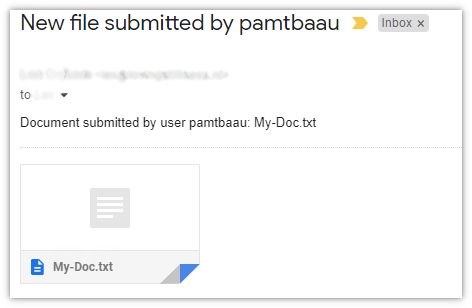
  • Got the following email sent to me:
    Untitled|472x308
👍 1
last edited 08/20/21 by pamtbaau
5 years ago

I tried it, but it doesn't work for me, the attachment won't be sent, I also found that it was solved here:

But the new version should have it fixed.

Others advise you to set the final upload folder without characters like: "-", "_" ...

I've checked the server that sends it again, thinking it's deleting my attachments, but that wasn't it.

Another advice is to simplify writing, but in the end only the developer of the form plugin writes that he fixed it, I updated everything, but it still doesn't work for me and there is no error anywhere 😦

last edited 08/23/21 by Daniel Dobiášovský

Suggested topics

Topic Participants Replies Views Activity
Forms & Blueprints · by Ton Haarmans, 5 years ago
13 1140 4 months ago
Forms & Blueprints · by Hugo Oliveira, 5 months ago
0 63 5 months ago
Forms & Blueprints · by Flachy Joe, 6 months ago
9 138 6 months ago
Forms & Blueprints · by Augustus, 7 months ago
7 114 7 months ago
Forms & Blueprints · by Julien, 7 months ago
10 132 7 months ago