Skip to content
Grav 2.0 is officially stable. Read the announcement →

Community guidelines

Please keep discussions civil and on-topic. Repeated violations may lead to a temporary ban.

Forms & Blueprints

Struggling with Blueprint: Custom header data form in Admin area

blueprints

Started by Flo 3 years ago · 8 replies · 767 views
3 years ago

Hi All,
I'm struggling with some header data, that I want to save for a custom content type - and I'm not sure where the problem lies.

Error message on Admin page, after attempting to save: Failed to save entry: Bad form data for field collection 'site': string used instead of an array

Context:
Based on the Learn Grav cookbook recipes I'm establishing a private area on my site. I've created a group "Private",

YAML
Private:
  access:
    site:
      private: true
  readableName: Private
  description: 'Private User'
  enabled: true

Pages, that are exclusively for this group, then have this in their frontmatter - and it works fine.

YAML
access:
    site.private: true

Reproducing the problem
Now, for each page created I want to make sure, the editors can choose in the backend, whether the page is Private or not.

I've created a blueprint for the content type:

YAML
extends@: default

form:
  fields:
    tabs:
      fields:

        newtab:                        # Create new tab
          type: tab
          title: Custom Settings        
          ordering@: content    # attaching it right to the content tab
          fields:
            privacy:
              type: section
              title: Privacy Settings
              underline: true

              fields:
                header.access.site.private:
                  type: toggle
                  toggleable: true
                  label: Test - access.site.private
                  highlight: 1
                  options:
                    1: PLUGIN_ADMIN.YES
                    0: PLUGIN_ADMIN.NO
                  validate:
                    type: bool

This results in a form, that works fine.
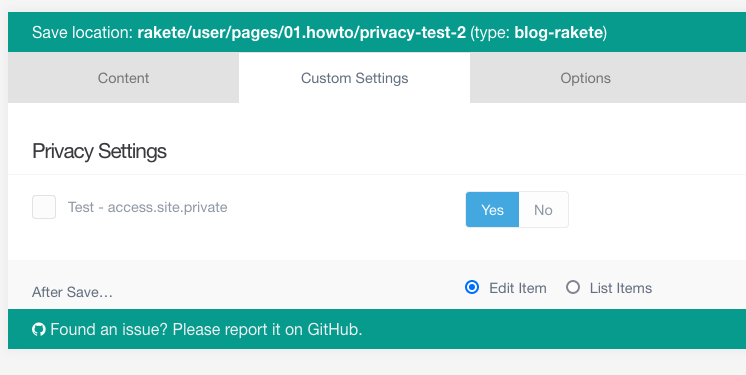
Screenshot 2023-01-23 at 10.53.31|690x346

Ticking the box results in this frontmatter entry, which seems fine for me.

YAML
---
title: 'Privacy Test 2'
access:
    site:
        private: true
---

Now - anytime I try to save the file again, edits or not, I get shown the error code above and the file is not saved again.
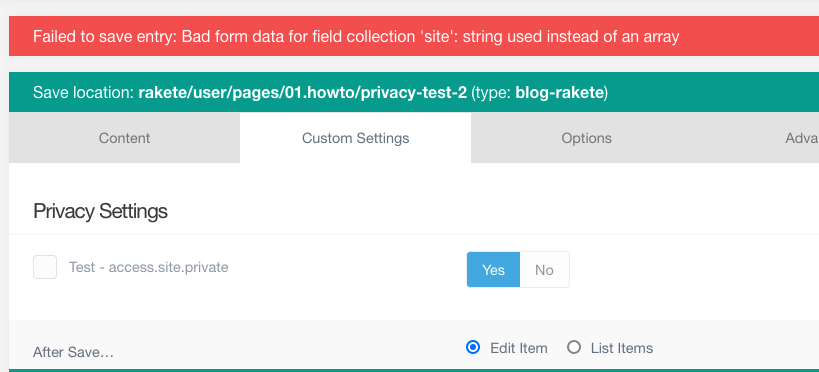
Screenshot 2023-01-23 at 10.56.54|690x313

Any pointers? Where is my mistake? What am I missing? (Also, is this a Admin Plugin issue? Where would be the right place to ask?)

Super grateful for any help - thanks a lot!!!
3 years ago

@Flop, Unfortunately I can reproduce the behaviour. I would suggest to add an issue at the repo of Admin

👍 1
3 years ago

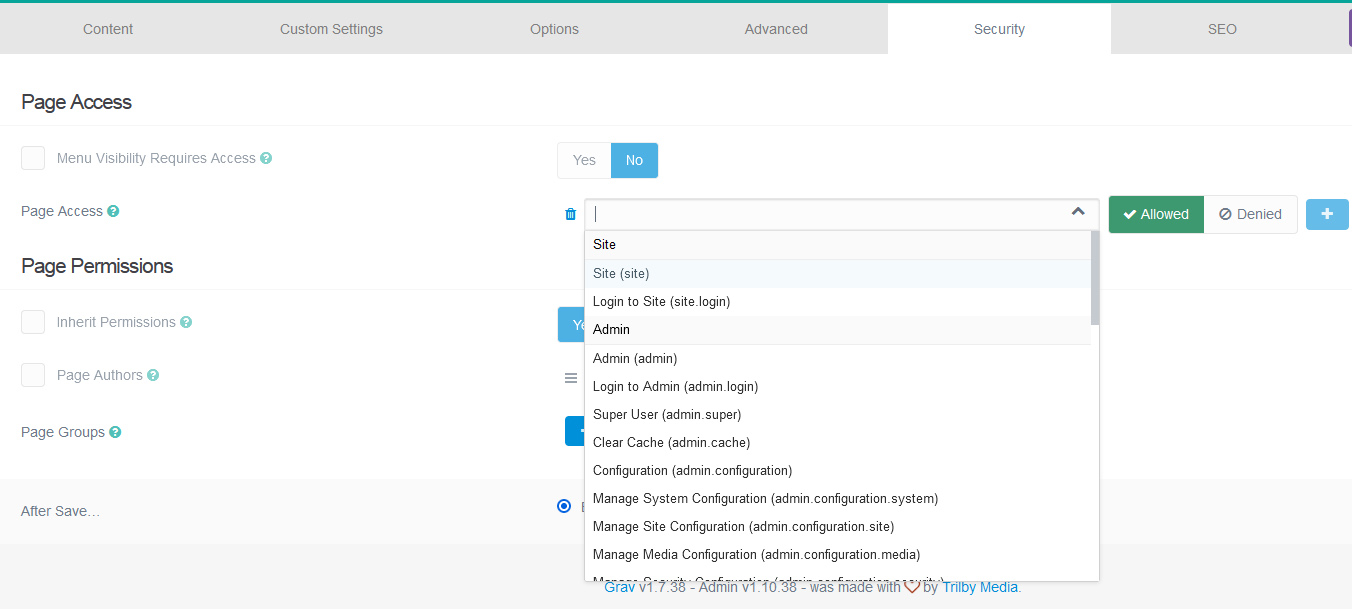
@Flop, this happened because header.access: already exist in the security tab (Page Access - which is quite new) with validate: type: array
for the test purpose you must remove a field (unset@: true) first.
so, @pamtbaau no 🐞 here.

_page_access|690x310

👍 1
3 years ago

@b.da, You might be right. My suggestion to create an issue is not because I'm saying it is a bug. I just had no clue where the problem might stem from and suggested to create an issue:

  • because the team might help,
  • the team might improve the error message shown,
  • it might be a bug after all,
  • etc.

To increase the value of your solution for the benefit of the community, would you mind adding how one can unset the header.access field in the security tab?

3 years ago

Thanks for the pointers, certainly something to play around with.
I've added the following to my blueprint, but it still throws the same error.

YAML
        security:  # existing security tab
          type: tab
          title: PLUGIN_ADMIN.SECURITY
          fields:
            header.access:
              unset@: true

Any suggestions how to properly unset the header.access value?
Or - why does a sub-arrary field (?) access.site.private, that was previously undefined an error?
In that case, wouldn't it make more sense to use a custom header entry to organise access, e.g. header.private_site : true or similar? Would that work?
Thanks already!

3 years ago

@Flop ok, working solution, but I haven't figured out yet how to make it safe when updating the admin plugin. The idea is to add an option site.private to field type acl_picker (with data_type: access)

  1. modify permissions.yaml file in admin plugin folder (user/plugins/admin/permissions.yaml) by adding actions: private
YAML
actions:
  site:
    label: PLUGIN_ADMIN.ACCESS_SITE
    actions:
      login:
        label: PLUGIN_ADMIN.ACCESS_SITE_LOGIN
      private:
        label: Private Area

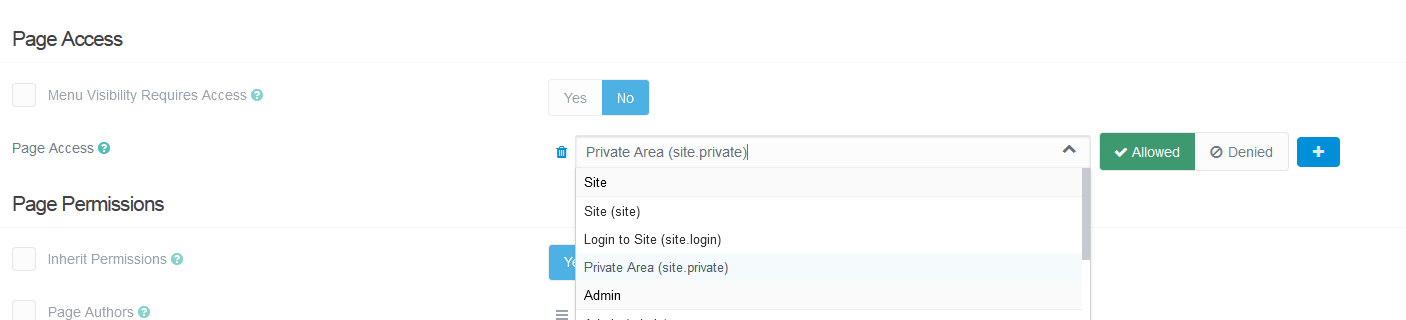
this will add to the Page Access field in security tab what you are looking for.

private|690x157

<details>
<summary>The second part (about @unset)</summary>

i won't dig in that direction, but @unset not working as i expected
but again for the test purpose you can (i did that + @unset and thought it worked):

  1. copy security.yaml
  2. create folder partials in blueprints ( <yourtheme/blueprints/partials> ) and paste the file there
  3. delete header.access

</details>

3 years ago

Alright, more to fiddle with /// thanks so much for trying and putting forward possible solutions.

Re unset@:
I've only managed to make it NOT throw out error messages by unsetting@ the entire Security tab.

YAML
form:
  fields:
    tabs:
      fields:

        security:  # existing security tab
          type: tab
          title: PLUGIN_ADMIN.SECURITY
          fields:
          unset@: true # TODO Do I really need to unset the whole thing?

I don't like that solution though, so I will take some of yours and try around a little. thanks!

3 years ago

I wanted to find a solution that didn't remove built-in functionality, finally got it to working 😅 So, we are registering a new permission in our theme.

<details>
<summary>1. <YourTheme>.php</summary>

PHP
<?php
namespace Grav\Theme;
use Grav\Common\Grav;
use Grav\Common\Theme;
use Grav\Events\PermissionsRegisterEvent;
use Grav\Framework\Acl\PermissionsReader;
class <YourTheme> extends Theme
{
    public static function getSubscribedEvents()
    {
        return [
            PermissionsRegisterEvent::class => ['onRegisterPermissions', 100],
        ];
    }

    public function onRegisterPermissions(PermissionsRegisterEvent $event): void
    {
        $permissions = $event->permissions;
        $actions = PermissionsReader::fromYaml("theme://permissions.yaml");
        $permissions->addActions($actions);
    }
}

</details>

<details>
<summary>2. add permissions.yaml (in theme root folder)</summary>

YAML
actions:
  site:
    label: PLUGIN_ADMIN.ACCESS_SITE
    actions:
      login:
        label: PLUGIN_ADMIN.ACCESS_SITE_LOGIN
      private:
        label: Private Area
types:
  default:
    type: access

</details>

@Flop, if you still want to use @unset

  • create folder partials in your theme blueprints (<YourTheme>/blueprints/partials)
  • create security.yaml file
  • add the following code
    TXT
    
    extends@:
    type: partials/security
    context: blueprints://pages
    

form:
fields:
_site:
fields:
header.access:
unset@: true

TXT

In any case, i would prefer to register the permission first, as it allows you to manage the user's permissions through admin panel.
last edited 01/29/23 by Vadym

Suggested topics

Topic Participants Replies Views Activity
Forms & Blueprints · by Ton Haarmans, 5 years ago
13 1135 4 months ago
Forms & Blueprints · by Hugo Oliveira, 5 months ago
0 61 5 months ago
Forms & Blueprints · by Flachy Joe, 6 months ago
9 134 6 months ago
Forms & Blueprints · by Augustus, 7 months ago
7 108 7 months ago
Forms & Blueprints · by Julien, 7 months ago
10 128 7 months ago