Skip to content
Grav 2.0 is officially stable. Read the announcement →

Community guidelines

Please keep discussions civil and on-topic. Repeated violations may lead to a temporary ban.

Forms & Blueprints

Moving Taxonomies field in Admin blueprint to another tab

admin

Started by Hugh Barnes 4 years ago · 2 replies · 452 views
4 years ago

I have created a custom editing tab in my custom blueprint for a client. I would like to move Taxonomies (of which I have only declared the Tags field) into my new tab. The docs cover replacing, unsetting etc but not repositioning (it seems).

I think I could undefine the field and then copy it into my new tab as a new field but this seems repetitive. I tried import@ but it didn't work, possibly because I wasn't referencing the Taxonomies field properly.

I also tried overriding it in my custom blueprint (options.fields.taxonomies.header.taxonomy) and setting ordering@ but that had no effect either.

I suspect there is a simpler way to simply move the field.
4 years ago

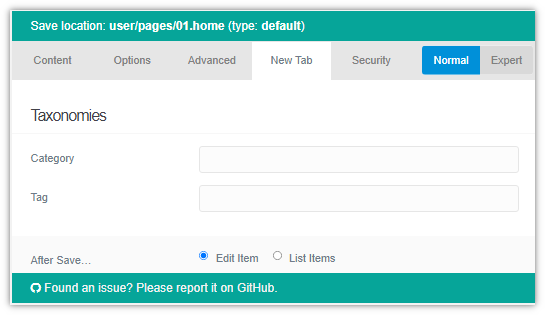
@hughbris, Using Quark and its /blueprints/default.yaml, the following blueprint:

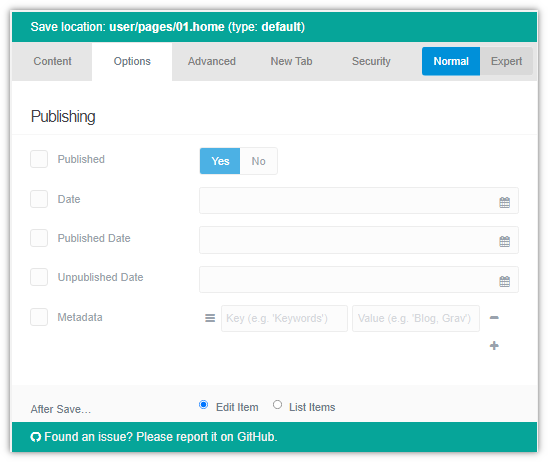
  • Removes field Taxonomies from tab Options
  • Creates a new tab NewTab containing field Taxonomies
YAML
extends@: default

form:
  fields:
    tabs:
      fields:

        options:                       # Existing Options tab
          fields:
            taxonomies:                # Existing Taxonomies section
              unset@: true             # Unset entire section

        newtab:                        # Create new tab
          type: tab
          title: New Tab
          fields:
            taxonomies:                # Create Taxonomies section
              type: section
              title: PLUGIN_ADMIN.TAXONOMIES
              underline: true

              fields:
                header.taxonomy:       # Create Taxonomy field
                  type: taxonomy
                  label: PLUGIN_ADMIN.TAXONOMY
                  multiple: true
                  validate:
                    type: array

Result:
Untitled|548x462

Untitled|545x315

Note:

  • I'm not aware of a simpler and less repetitive way...
  • unset@: true must be the only or last line in a field definition. Keeping an existing field definition and adding unset@: true as first property won't work. It must be the last property or only property.
👍 3
last edited 03/25/22 by pamtbaau
4 years ago

Thank you, I've done that for now and it works. I didn't know those rules about @unset.

I hope you don't mind me not marking that as a solution. I find if I am lucky enough to have a workaround and then move on, that my solution turns up when I am not looking for it.

Suggested topics

Topic Participants Replies Views Activity
Forms & Blueprints · by Ton Haarmans, 5 years ago
13 1139 4 months ago
Forms & Blueprints · by Hugo Oliveira, 5 months ago
0 63 5 months ago
Forms & Blueprints · by Flachy Joe, 6 months ago
9 137 6 months ago
Forms & Blueprints · by Augustus, 7 months ago
7 112 7 months ago
Forms & Blueprints · by Julien, 7 months ago
10 131 7 months ago