Skip to content
Grav 2.0 is officially stable. Read the announcement →

Community guidelines

Please keep discussions civil and on-topic. Repeated violations may lead to a temporary ban.

Forms & Blueprints

How do you split a blueprint horizontally (side by side)

Solved by Pedro M View solution

Started by Dean Bateman 4 years ago · 2 replies · 510 views
4 years ago

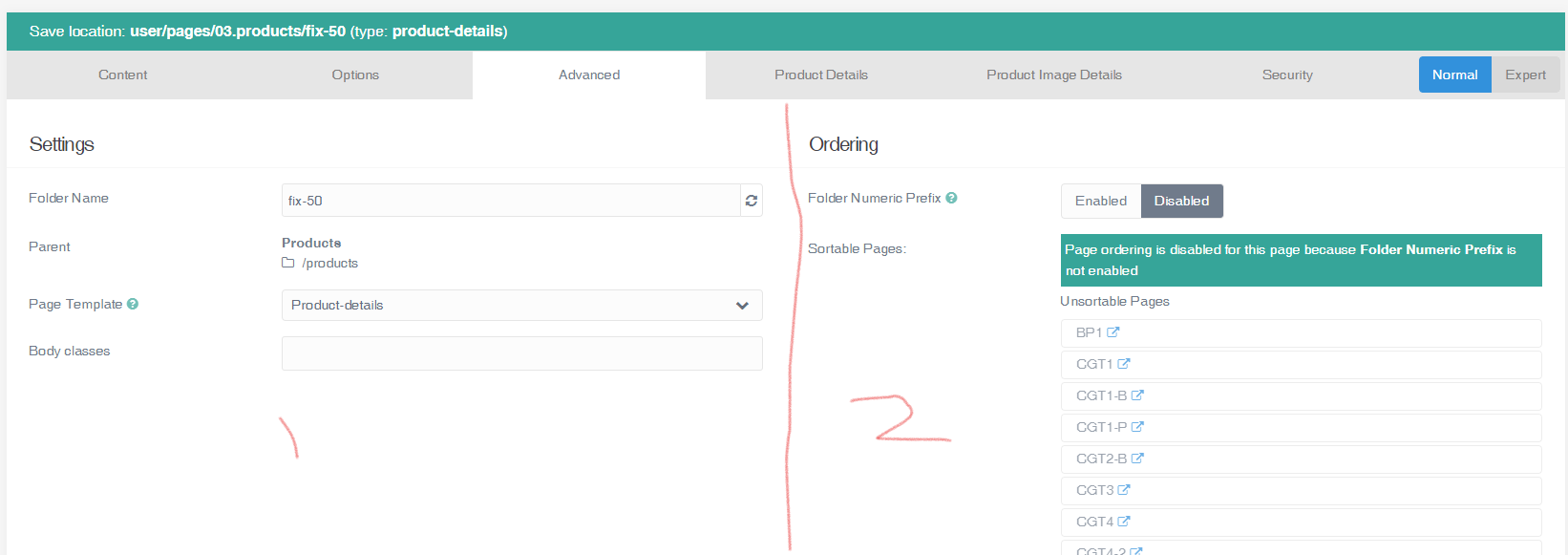
How do you split a blueprint horizontally (side by side)?
image|690x244

to put it in another tab is like this, but i cannot find how to split the page, can anyone help?

YAML
extends@: default

form:
  fields:
    tabs:
        fields:
            product:
                type: tab
                title: Product Details
                fields:
                    header.product.options:
                    type: section
                    title: Product Options
                    underline: true
            images:
                type: tab
                title: Product Image Details
                fields:
4 years ago Solution

Hello.
Take a look at the Grav help. You have to use a column-type blueprint, with two columns, and place the content you want in each of them.

You can see an example if you see the default.yaml code in the system/blueprints/pages folder

4 years ago

Thanks appreciate the help,

I had looked for examples in the system folder just didn't know what I was looking for.

But this is perfect. Thanks

Suggested topics

Topic Participants Replies Views Activity
Forms & Blueprints · by Ton Haarmans, 5 years ago
13 1139 4 months ago
Forms & Blueprints · by Hugo Oliveira, 5 months ago
0 63 5 months ago
Forms & Blueprints · by Flachy Joe, 6 months ago
9 137 6 months ago
Forms & Blueprints · by Augustus, 7 months ago
7 112 7 months ago
Forms & Blueprints · by Julien, 7 months ago
10 131 7 months ago