Forum Pro
A real community forum, running inside your Grav site
Forum Pro is a complete, self-hosted discussion platform that lives inside your Grav site. Not an iframe, not a hosted widget, not a monthly per-seat bill. Your members get everything they expect from a modern forum (topics, reactions, private messages, notifications, live updates, real moderation and search) as first-class Grav pages that inherit your theme, share one login with the rest of your site, and store every post in a database you own. Built for Grav 2 and Admin Next, it runs the identical schema on SQLite, MySQL/MariaDB or PostgreSQL, so a hobby board and a community of tens of thousands are a config change apart, not a rewrite. And when you outgrow a hosted forum, the one-command Discourse importer brings your members, content and files across intact. We are not asking you to take that on faith: the Grav Community Forum runs Forum Pro, with over 41,000 posts across 9,300 topics from 3,800 members, and it runs great.
Already a customer? Sign in to your licenses
Forum Pro is built for Grav 2 and requires the free API plugin. It is not compatible with Grav 1.7.
We run our own community on it
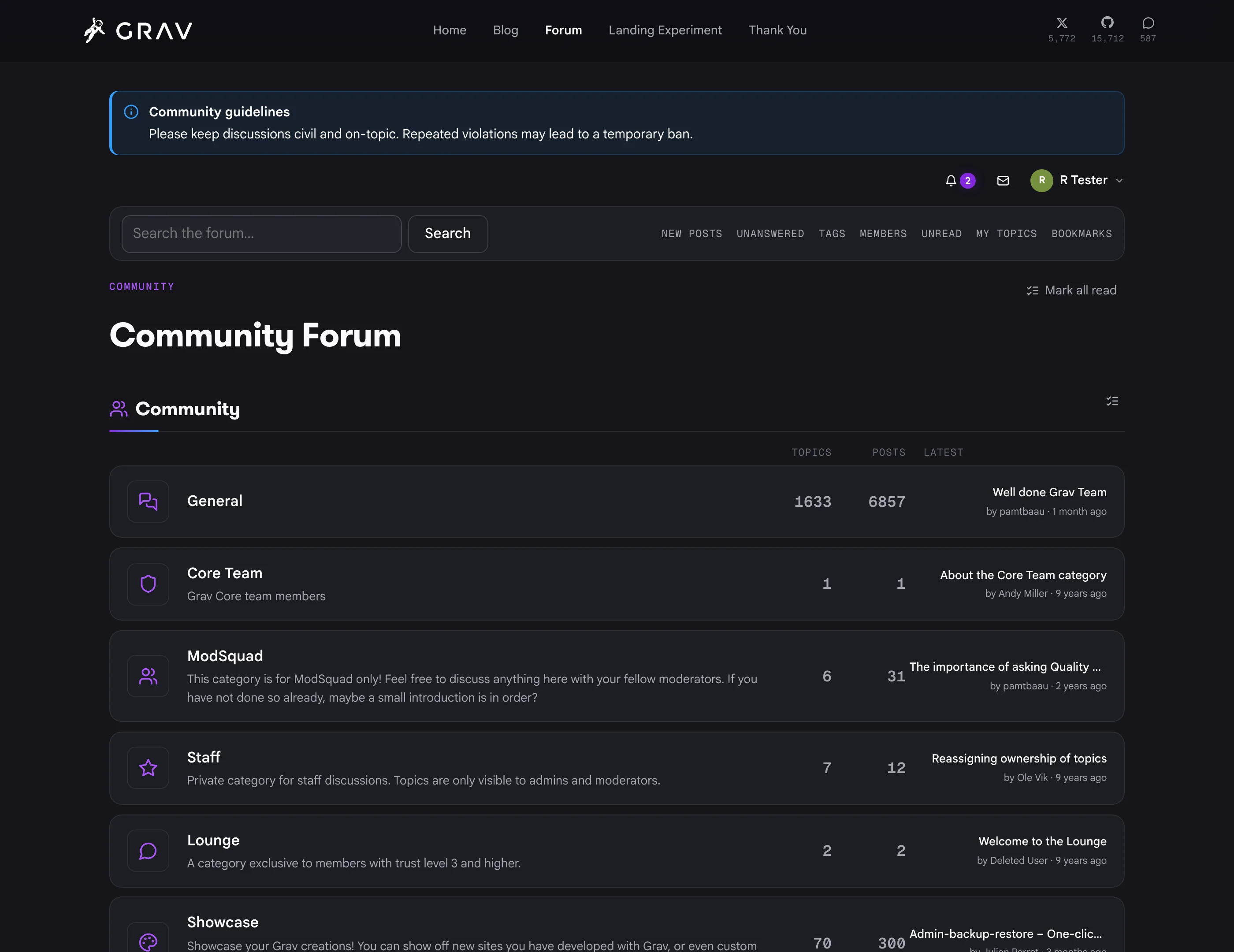
The Grav Community Forum is not a demo instance we spun up for this page. It is Forum Pro, it is where the Grav team works, and anyone is welcome to sign up and take part.
Nine years of community history, imported out of Discourse in a single command, with every member's password still working. Full-text search, live updates, private messages, badges, ranks and the full spam pipeline are all switched on. And it runs great.
Everything you need. Nothing you don’t.
Over 84 distinct features and integrations, out of the box.
Discussions & Content
The reading and writing experience your members spend all of their time in. Everything is server-rendered first, so the forum works with JavaScript off and search engines index it like the rest of your site.
Members & Community
Everything that makes contributors feel recognized and gives your community a sense of identity. Forum Pro runs its own account system, so members never need a Grav account, but your existing Grav admin and staff accounts link in automatically and keep working.
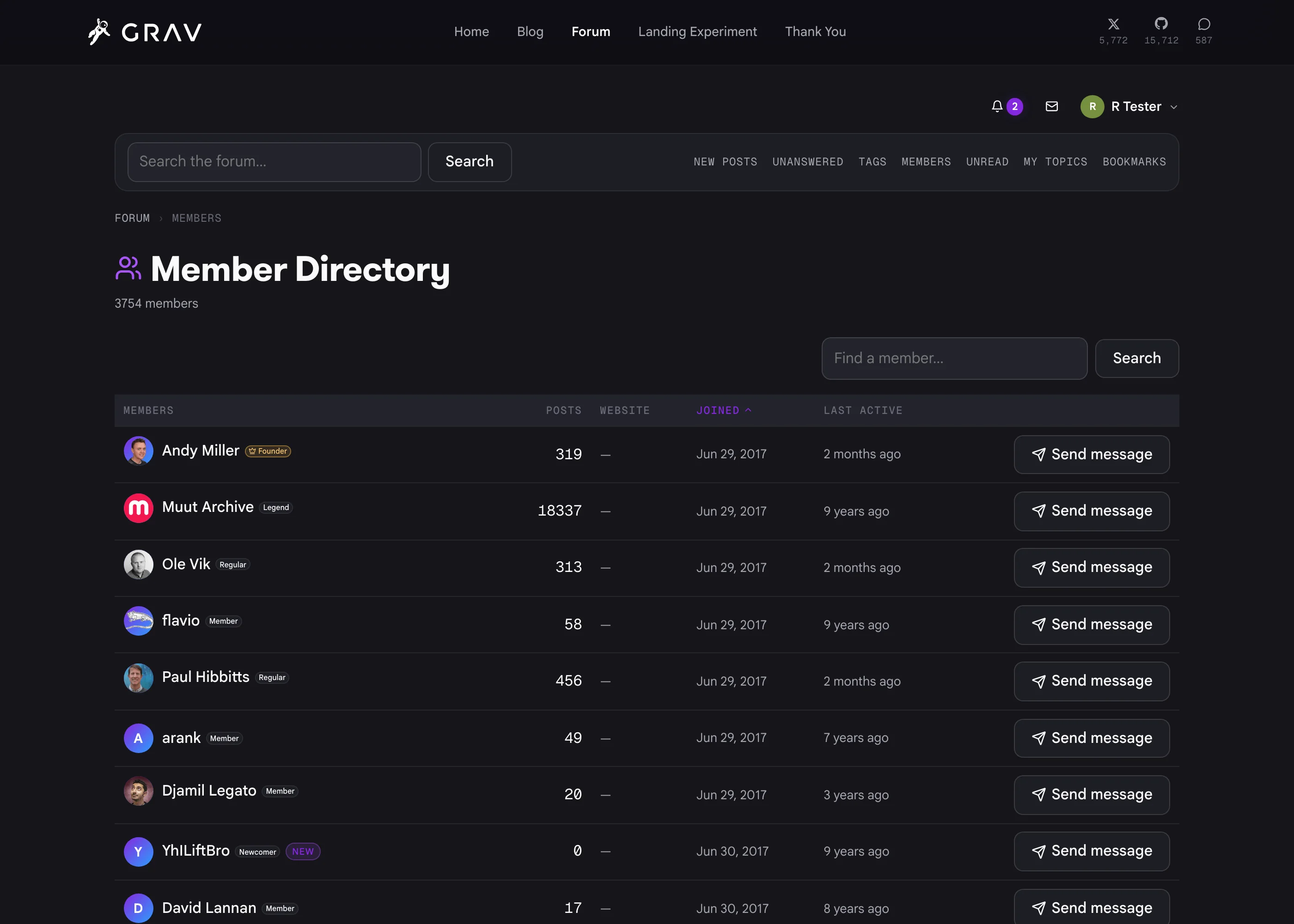
/forum/members, filterable and searchable, with an always-online window and who's-online counts.
Moderation & Safety
Tools that scale from a hobby board to a large community without turning moderation into a second job. Most of it happens on the forum itself, so your moderators never need admin access.
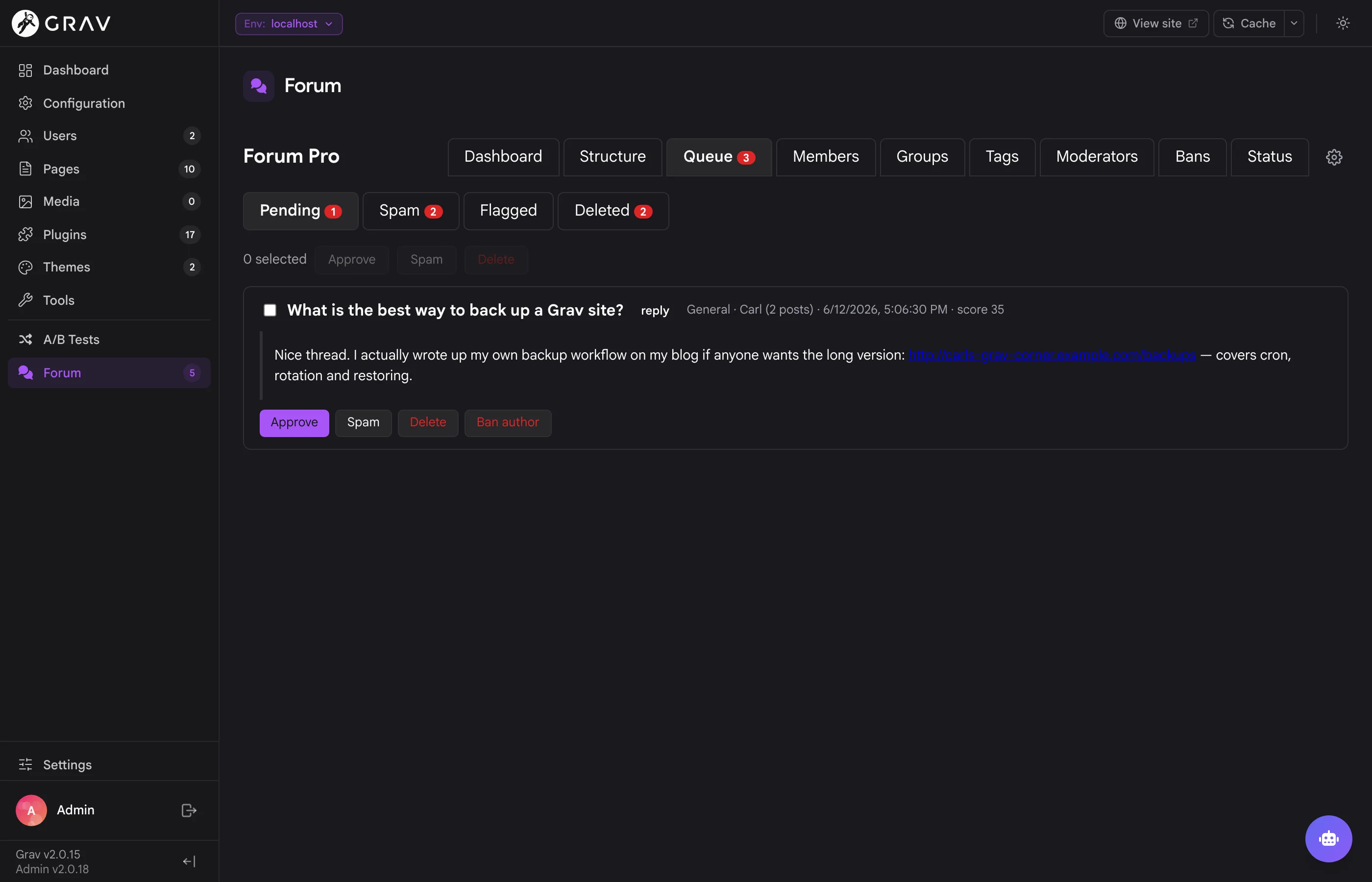
/forum/queue with one-click publish, delete, or delete-and-ban, a jump to the post in its topic, and a step-through review mode that clears the whole queue in place.
Spam Defense
Three independent stages plus account-level gates, so unproven newcomers can't turn your board into a link farm. Everything any stage catches lands in the review queue, never deleted automatically before the retention window.
noindex, show a New badge, and block uploads and private messages. Every restriction is its own switch.
Notifications, Email & Private Messages
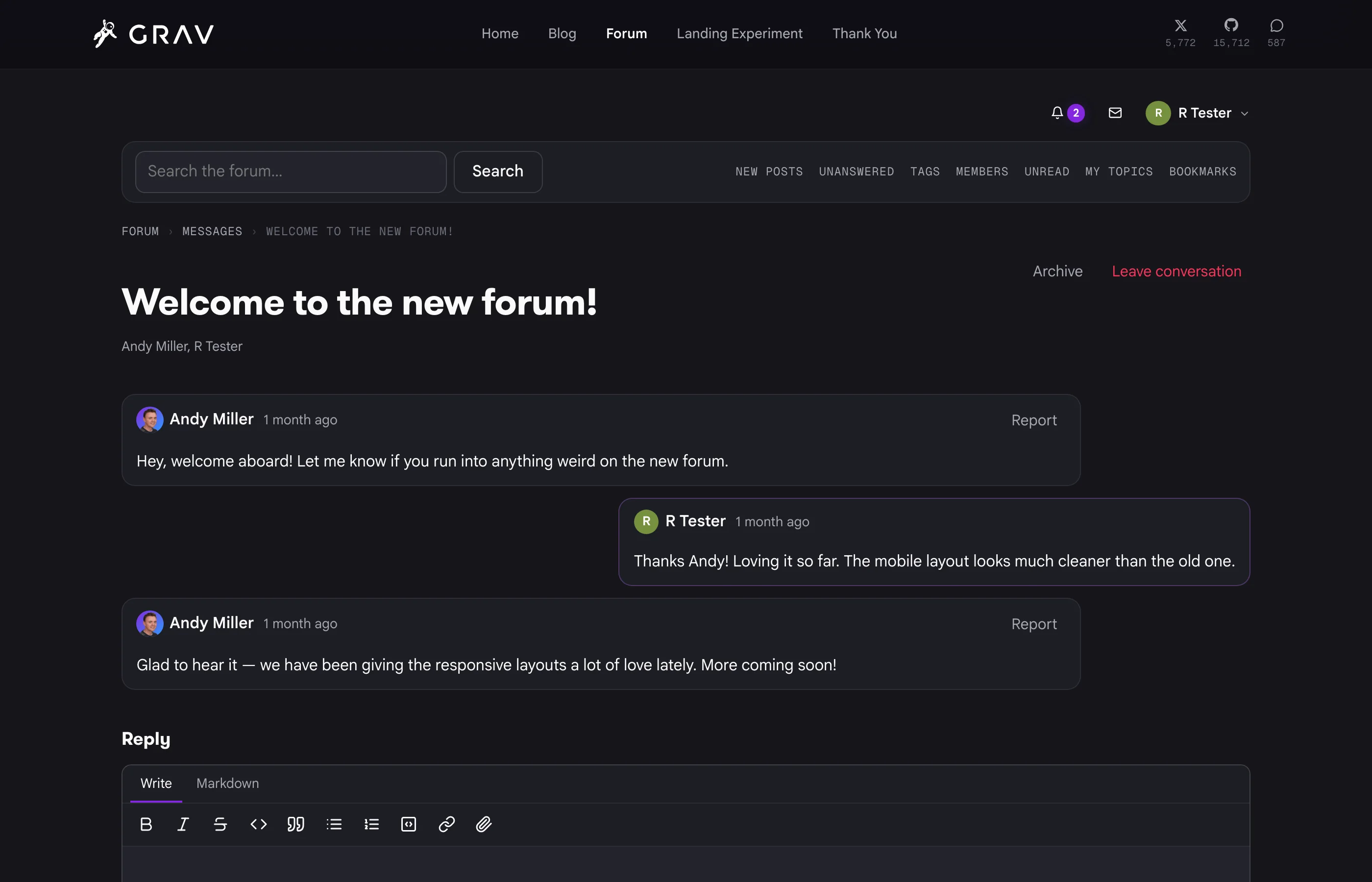
Keep members in the loop without flooding their inbox, and let them talk to each other privately when a thread isn't the right place.
/forum/messages, one-to-one or in groups, with a toolbar envelope carrying a live unread count and new replies appearing without a refresh.
Search & Live Updates
Finding things, and seeing them happen. Search is always constrained by the visitor's category permissions, and live updates are a progressive enhancement that degrades to a perfectly good server-rendered forum.
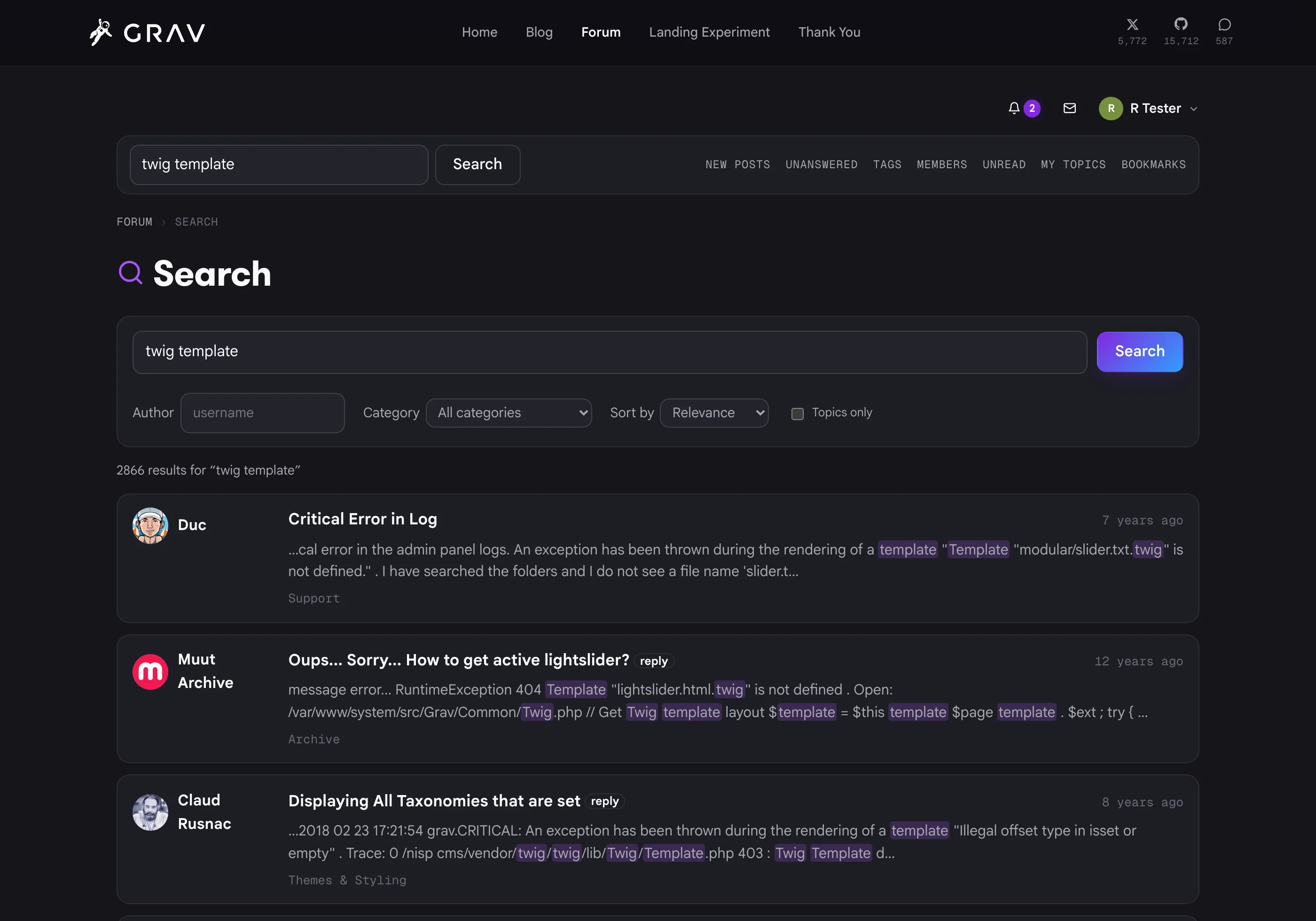
/forum/search over published posts, with filters for keywords, author, a single forum and topics-only.
builtin uses SQLite FTS5, MySQL FULLTEXT or PostgreSQL tsvector with zero setup, or hand indexing to YetiSearch Pro for fuzzy matching and tuned relevance. The index maintains itself and rebuilds with a single CLI command.
Comments for Your Whole Site
Turn any page, blog posts especially, into a commentable article whose discussion lives in the forum. This is the classic comments backed by a real board model with none of the iframe or JS-embed friction, because the forum runs in the same Grav install.
forum_comments(page) Twig call and a forum_comments_count(page) helper for 12 comments links on your listings.
Theming, Accessibility & SEO
The forum is theme-agnostic by design. Every color, radius, font and shadow resolves through a token chain, so a theme that publishes design tokens gets a forum that looks native to the site with no work at all.
--forum-* site overrides fall back to --grav-* theme tokens, then to --theme-accent, then to accessible neutral defaults.
--theme-accent and is done. Labels sitting on a filled accent pick black or white automatically from how light that accent resolves.
data-theme, data-bs-theme and a dark class on html or body, and falling back to the Canvas system color for popovers and dialogs.
noindex on provisional or hidden profiles.
Privacy, Storage & Operations
The engineering that makes all of the above dependable at scale, plus the compliance controls you need when you are the one holding the data.
Migrating from Discourse
A genuine replacement, not a fresh start. Point the importer at a standard Discourse admin backup (the .sql.gz kind) and it stream-parses the dump in PHP. No PostgreSQL install required.
[details] blocks converted, post revision history, likes as reactions, tags, accepted answers, bookmarks, polls with votes, watched and muted topics, and private messages.
--download-files pass pulls every referenced image, attachment and avatar off the old CDN into content-addressed storage and rewrites the posts that use them. Resumable and rate-limited.
/t, /p, /c, /u) to their Forum Pro equivalents, which makes the DNS cutover a non-event for search engines and old bookmarks.
A real forum, not an embed
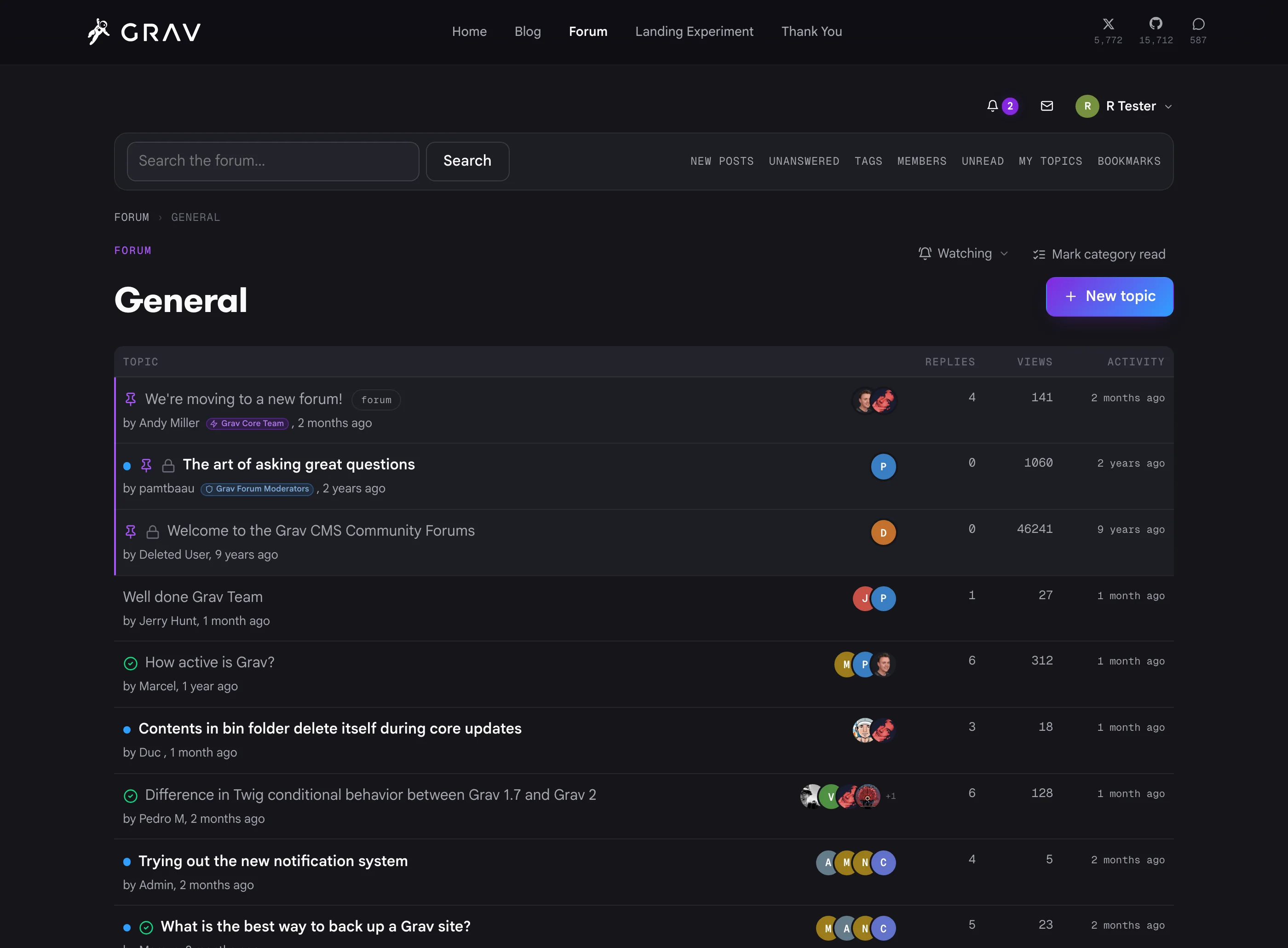
Topic lists that do the work: pinned and locked states, group badges under author names, solved checkmarks, unread dots with a jump-to-first-unread counter, overlapping avatars of everyone in the conversation, tags, replies, views and activity. It's a Grav page, at whatever route you choose (including your home page), rendered by your theme, indexed by search engines, and served from your own database.
Posts worth reading
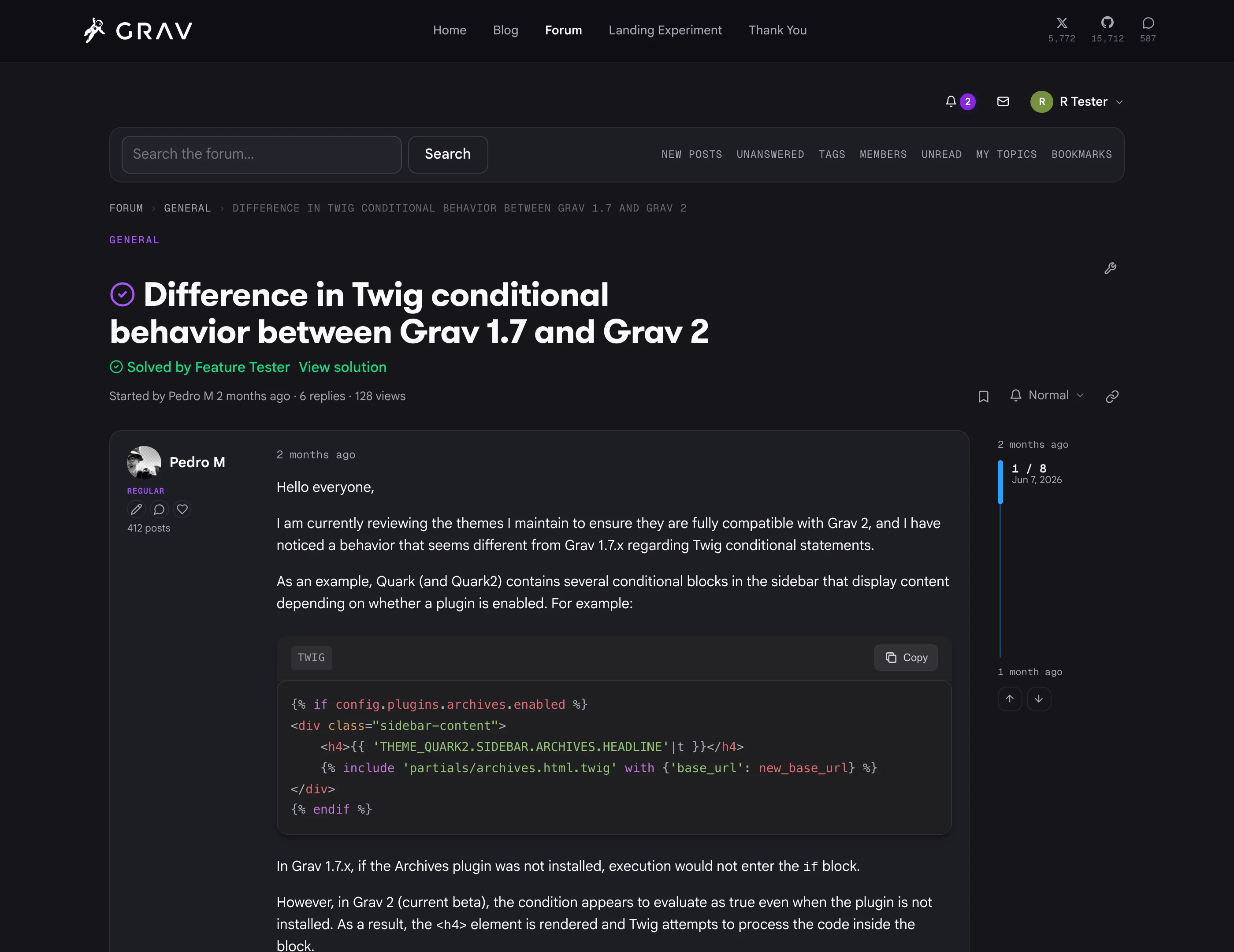
Markdown with @mentions, quotes, and server-side syntax highlighting with automatic language detection. Accepted answers get called out at the top of the topic with a jump to the solution. A timeline rail tracks where you are in a long thread and lets you scrub through it. Every edit is kept, so authors and staff can browse the full history of a post and restore any prior version.
Spam stops before your members see it
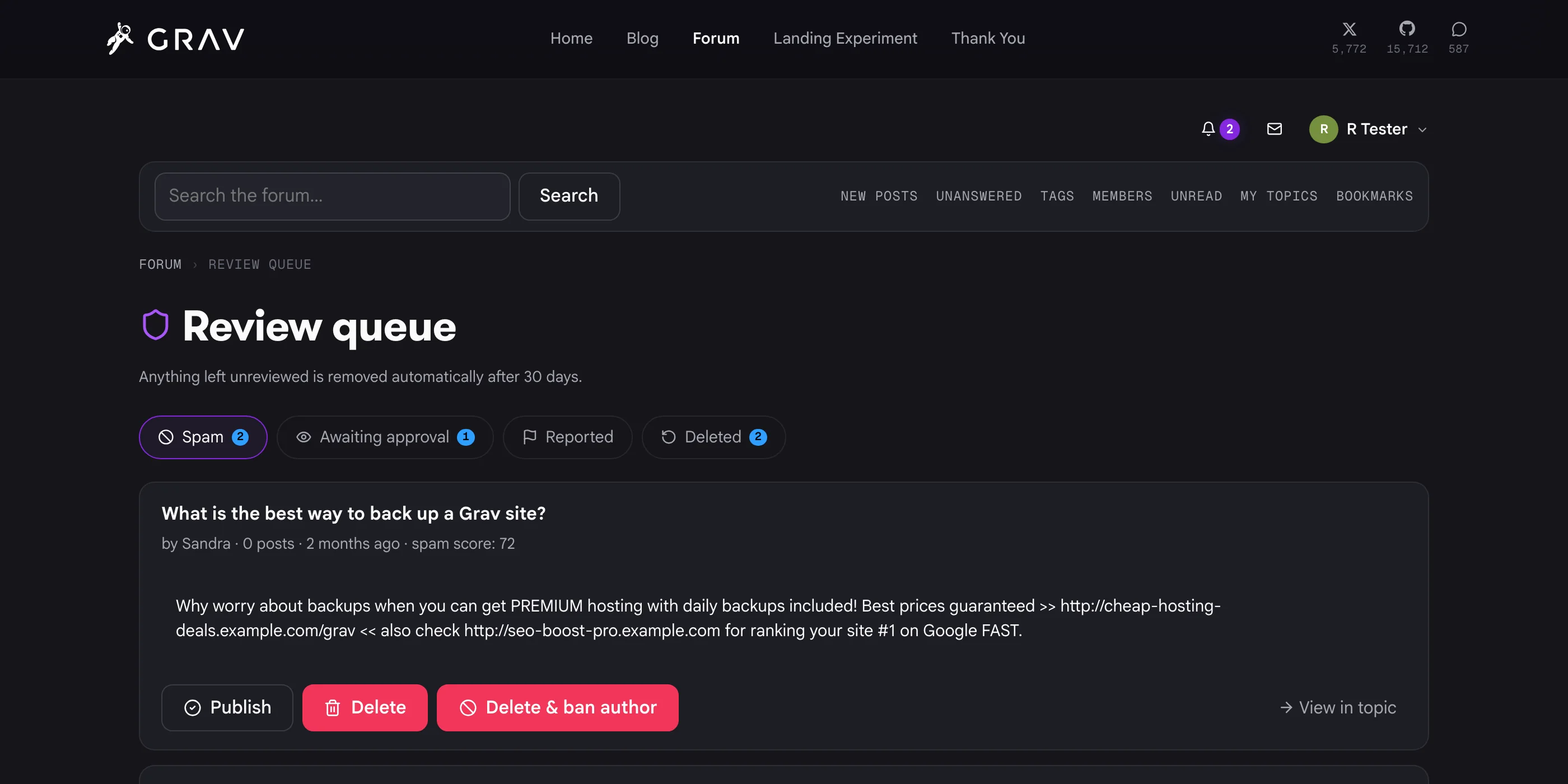
Moderators work the review queue right on the forum, no admin login needed. Spam, awaiting approval, reported and deleted each get their own tab with a live count, every card shows its spam score, and one click publishes, deletes, or deletes and bans the author. A step-through mode clears the entire queue in place. Nothing is ever hard-deleted before your retention window, so an accidental removal is always recoverable.
Recognition that keeps people around
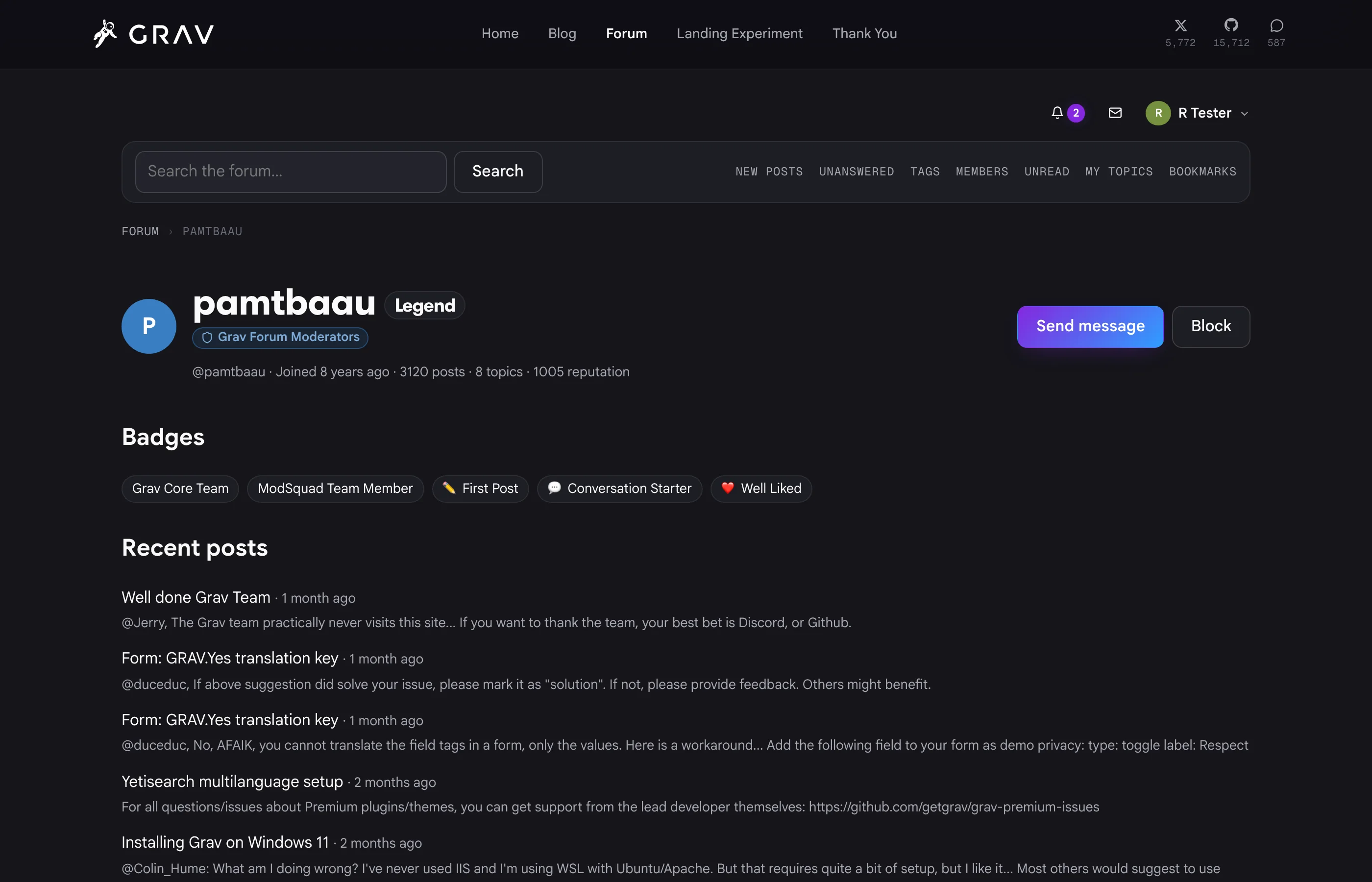
Profiles pull together ranks, reputation, group badges and award badges alongside recent activity and a send-message button. Ranks climb automatically as people post, or staff can grant a custom honor like Founder with its own icon. Groups get a color and an icon and show up as badge bars everywhere the member appears.
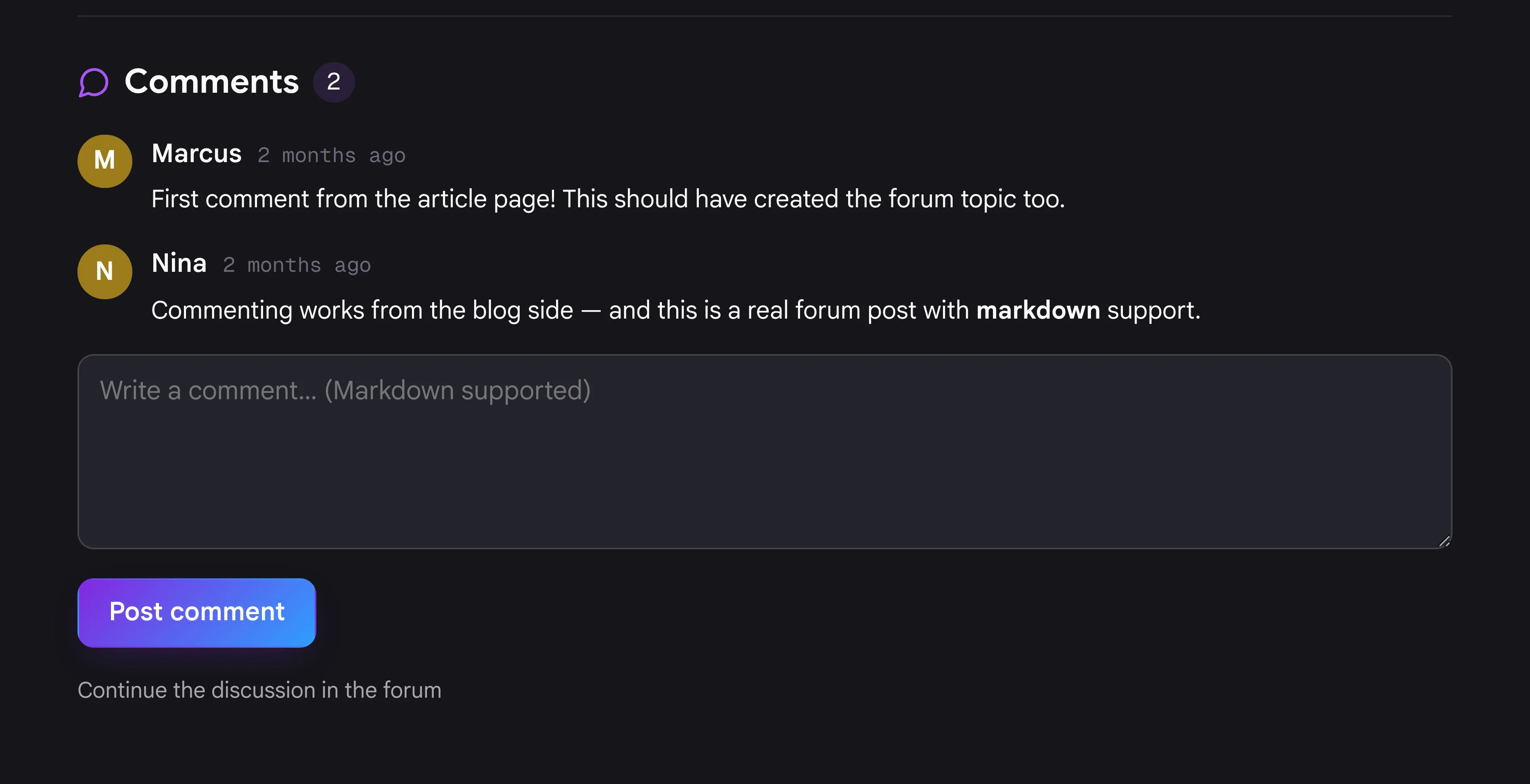
Comments for your whole site
Drop one Twig call into your article template and your blog posts get a comment section backed by a real forum topic. The first comment opens the thread automatically, seeded with the article excerpt and a link back. From there it's an ordinary forum post: moderated, scored for spam, searchable, notified on, and continuable in the forum itself. One account covers both.
Run it from Grav Admin
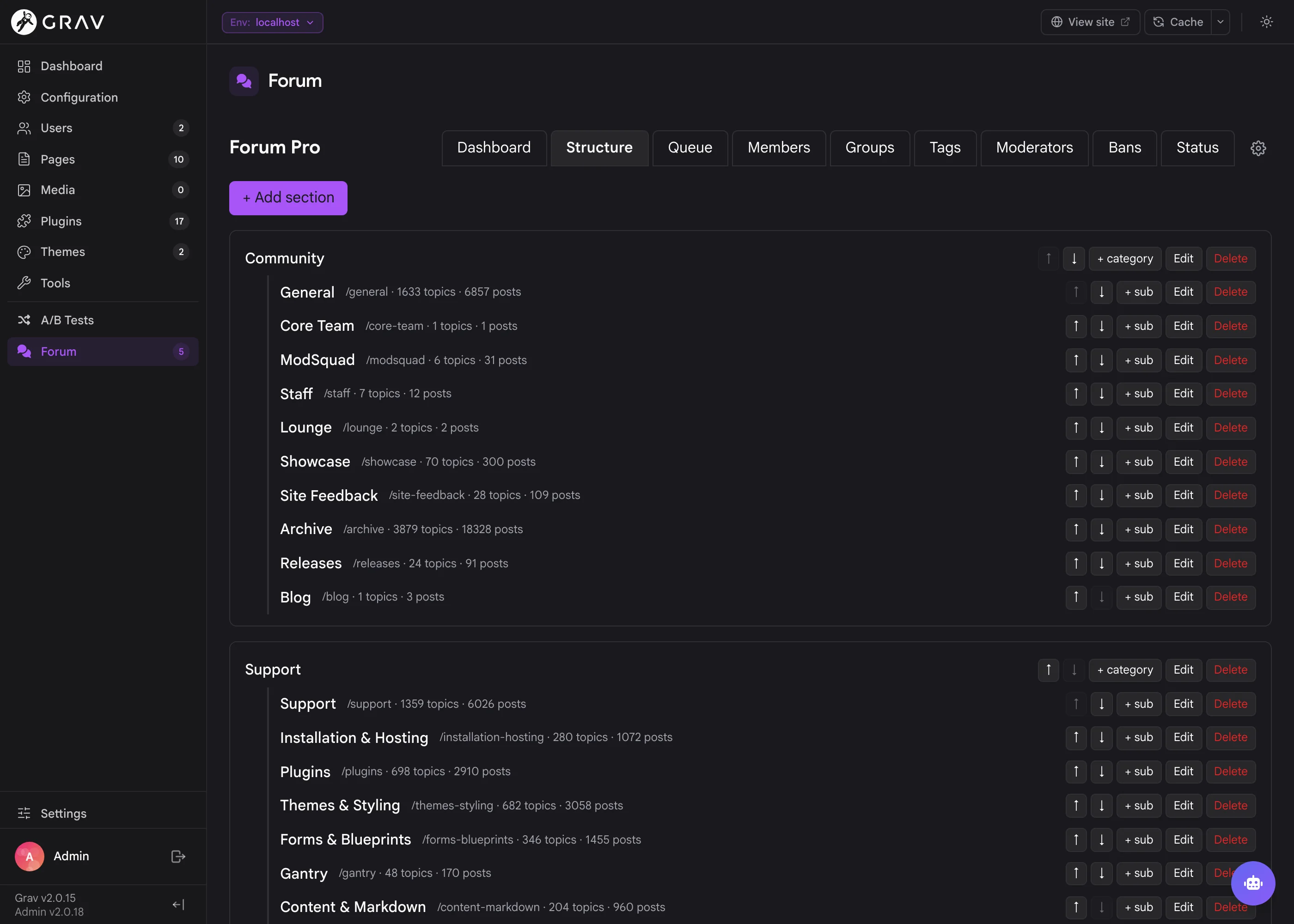
Admin Next gets a full Forum section: Structure for sections and categories with icons, ordering and permissions, plus Queue, Members, Groups, Tags, Moderators, Bans and a Status panel that reports on your database, schema, background jobs, scheduler and real-time health. Settings live in seven tabs covering everything from posting limits to retention windows.
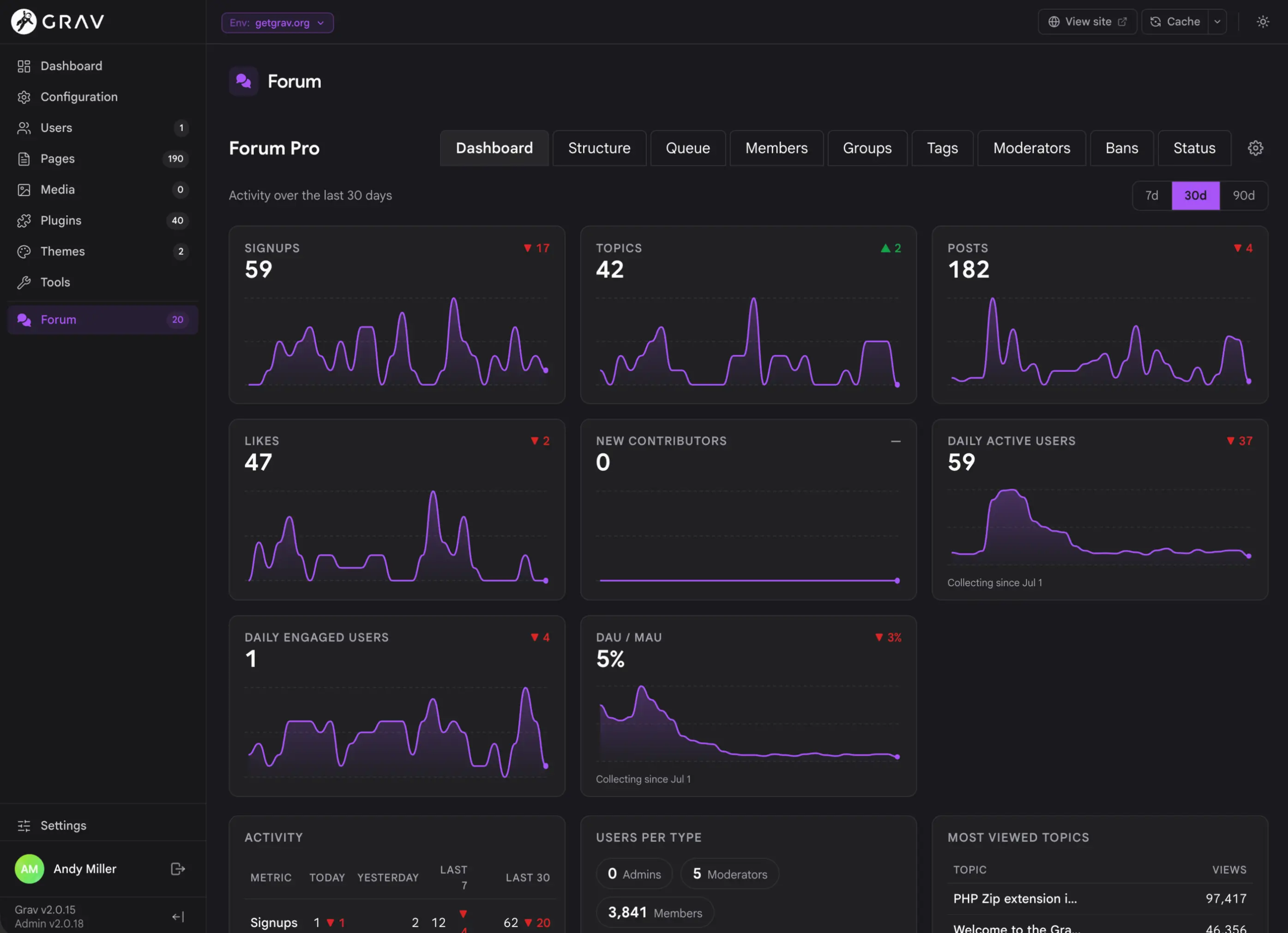
Know how your community is doing
A metrics ledger tracks signups, topics, posts, likes, new contributors, daily active users, engaged users and the DAU/MAU ratio over 7, 30 or 90 days, alongside top posters, most viewed topics and queue health. There's a Forum Activity report in Tools, and an optional widget that puts the same numbers on your site-wide admin dashboard.
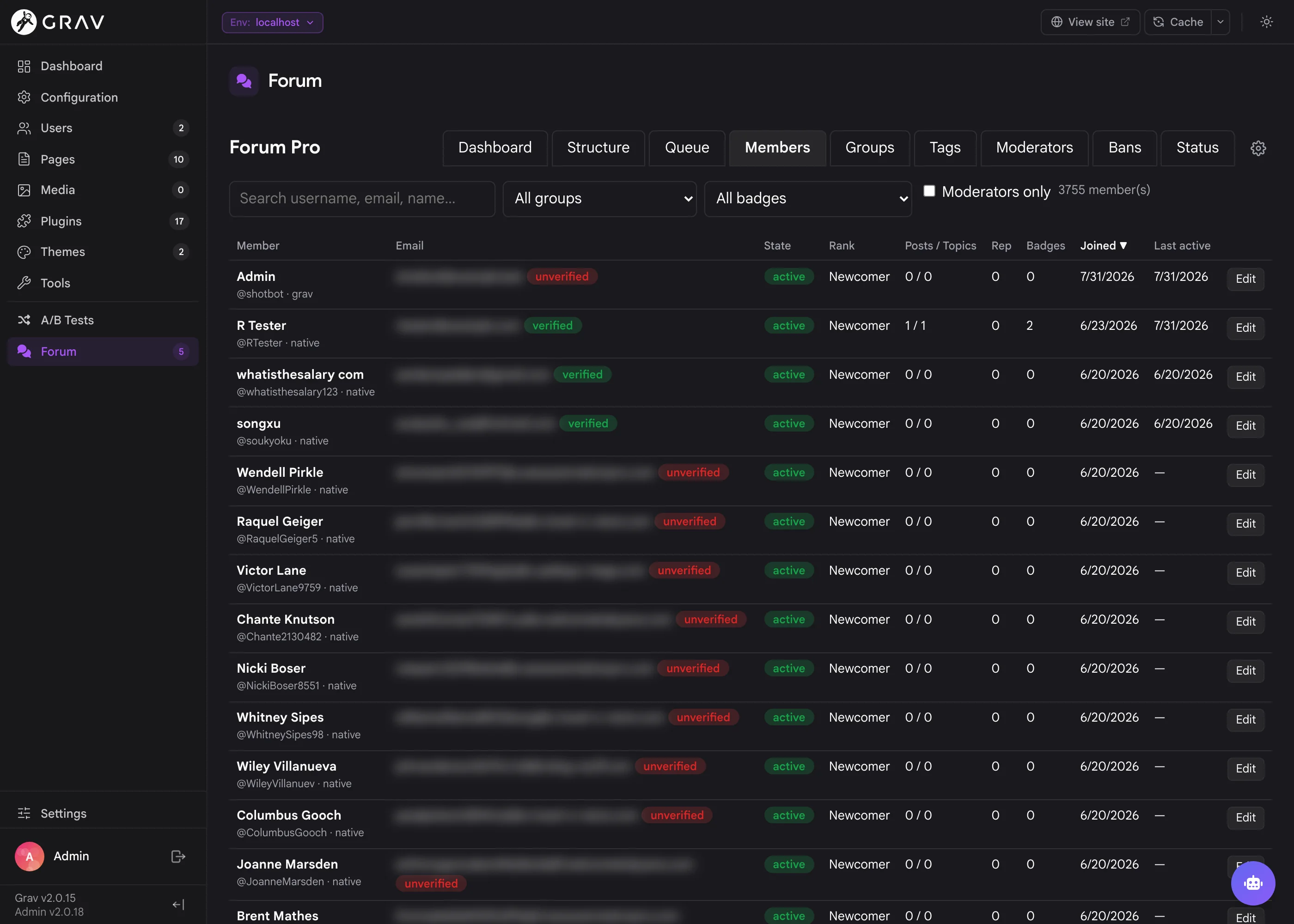
Member management that scales
Search and filter thousands of members by group, badge or moderator status, and edit accounts, ranks, badges, passwords and suspensions in place. Grav admin and staff accounts link in automatically and coexist with native forum accounts, so one login covers your whole site without you juggling two user systems.
Your community, on your infrastructure
No per-seat pricing, no data sitting on someone else's servers, no vendor lock-in. Forum Pro runs on the same host as your Grav site, backs up with it, and moves with it. Members sign in once for the forum, your blog comments, and the rest of your site. And because it is built on a portable database layer rather than Grav's file-based users, a community of tens of thousands is a config change, not a rewrite.
Up and running in about five minutes
- Install the plugin and enable it.
- Set
frontend.enabled: trueand visit/forum. The schema migrates itself on first use and the forum is live immediately on SQLite. - Add the Grav scheduler to your crontab. The admin Status tab prints the exact line for your install. The worker delivers email, awards badges, purges expired content and runs the scheduled scans.
- Open Admin → Forum to create your sections and categories, then work through the settings tabs.
Want it somewhere other than /forum? Create a page with the Forum page type and the forum takes over that route, including your home page. Real site pages always win over forum routes, so nothing else on your site breaks.
A full CLI for the operational side
bin/plugin forum-pro status            # connection, schema, jobs, scheduler health
bin/plugin forum-pro migrate           # apply pending migrations (--status to preview)
bin/plugin forum-pro work              # process background jobs once
bin/plugin forum-pro recount           # repair denormalized counters
bin/plugin forum-pro reindex           # rebuild the full-text search index
bin/plugin forum-pro integrity         # read-only consistency report
bin/plugin forum-pro import-discourse  # migrate a Discourse backup
bin/plugin forum-pro files-sync        # push local blobs to S3/R2
Full setup, configuration and migration documentation lives on the Learn site.
Screenshots & Examples
A peek at sites running Forum Pro.
Frequently Asked Questions
The most commonly asked questions about the Forum Pro plugin
Can I see it running somewhere?
You can, and it is not a sandbox. The Grav Community Forum is Forum Pro. It is our main working environment, it is where we answer questions and talk about releases, and anyone is welcome to sign up and take part.
It currently holds 41,000+ posts across 9,300+ topics from 3,800+ members, nine years of community history imported out of Discourse, and it runs great. Every screenshot on this page comes from the same software you would be installing.
How well does it handle a big forum?
Our own forum is the answer we point people at: 41,000+ posts, 9,300+ topics, 3,800+ members, with full-text search, live updates, private messages and the spam pipeline all switched on. Listings and topics are server-rendered with denormalized counters and efficient view counting rather than counting rows on every page view, so a busy board stays quick.
If you outgrow SQLite, moving to MySQL/MariaDB or PostgreSQL is a config change. The schema and the migrations are identical across all three engines, and our CI runs the full test suite against each of them on every commit.
Is this a one-time purchase or a subscription?
Forum Pro is a one-time purchase. You get all future updates and new features for free as long as your license stays active. There are no recurring fees, no per-seat pricing, and no cap on how many members your community can have. Compare that to a hosted forum that bills you monthly and gets more expensive the more successful your community becomes.
Does Forum Pro work on Grav 1.7?
No. Forum Pro is built for Grav 2 and requires the API plugin for its Admin Next integration. It uses a real database layer, the Grav 2 event and permission model, and Admin Next UI extension points that simply don't exist in 1.7. If you are still on 1.7, take a look at the Migration chapter on the Learn site.
Do I need a database server?
No. SQLite works out of the box with zero configuration. The database file is created under user/data/forum-pro/ with deny-all protection files written next to it, and the schema migrates itself on first use. When you outgrow it, point the config at MySQL 8+, MariaDB 10.6+ or PostgreSQL 14+ and the identical schema and migrations run there instead. Our CI runs the full test suite against all three engines on PHP 8.3 and 8.4.
How does it look with my theme?
Forum Pro resolves every color, radius, font and shadow through a token chain: --forum-* site overrides, then --grav-* theme design tokens, then --theme-accent, then accessible neutral fallbacks. If your theme publishes --grav-* tokens, the forum matches it automatically. If it doesn't, you get contrast-checked neutral styling in both light and dark schemes, and a single line of CSS (:root { --theme-accent: #8428df; }) is enough to give the forum your brand color. Anything you want to tune independently is a --forum-* custom property away.
Can I move my existing Discourse forum over?
Yes, and this is one of the things we are proudest of. Take a standard Discourse admin backup (Settings, then Backups, the .sql.gz kind) and run:
bin/plugin forum-pro import-discourse backup.sql.gz \
    --source-url https://discourse.example.com --download-files
The dump is stream-parsed in PHP, so you don't need a PostgreSQL install anywhere. Members keep working passwords because Discourse's pbkdf2 hashes verify natively and upgrade to bcrypt on first login. Categories, topics, posts, revision history, likes, tags, badges, titles, accepted answers, bookmarks, polls, watched topics and private messages all come across, internal links are rewritten, and --download-files rehosts every image and attachment into your own storage. Every row carries its Discourse id, so re-running an interrupted import never duplicates anything.
This is exactly how the Grav Community Forum got here: nine years and 41,000 posts, moved across in one command.
I'm on a different forum platform. Can you help?
Very likely, yes. Talk to us about building an importer for your platform. The Discourse importer is built on a general import layer (id mapping for idempotency, a Markdown conversion pipeline, password-hash adapters, resumable file rehosting), so adding a new source is mostly a matter of teaching it to read your export format.
Get in touch at [email protected] with what you're running and what an export looks like, and we'll tell you honestly what's involved. If your platform is a common one, other people are asking for it too.
Where do uploaded files live?
By default, on local disk under user/data/forum-pro/, served from a content-addressed path with immutable caching. You can point storage.driver at any S3-compatible store (we recommend Cloudflare R2) and new uploads go to the bucket while staying locally cached. A locally missing blob pulls back through on first request, so serving never depends on the bucket being reachable. Set a public_url and pages reference your CDN instead, applied at render time so flipping it on or off is instant with no database rewrite.
What does the forum need to run properly?
Grav 2 (>= 2.0.0-rc.8), PHP 8.3 or newer, and the API plugin. That's it for the core experience. Several optional plugins each unlock more:
- Email for outbound notification mail
- Sync and Sync Mercure for live updates and presence
- AI Pro for the hourly AI spam review
- YetiSearch Pro for fuzzy search with tuned relevance
- CodeSH for server-side syntax highlighting in code blocks
- Form for the invisible captcha on register and login
You'll also want the Grav scheduler in your crontab. The admin Status tab prints the exact line for your install. The background worker delivers email, awards badges, purges expired content and runs the scheduled scans.
Can the forum live at my site root?
Yes. By default the forum mounts at /forum, but create a page with the Forum page type and the forum takes over that page's route, including the home page. Real site pages always win over forum routes, so a home-mounted forum coexists happily with the rest of your content, and /forum keeps working when no mount page exists.
Do members need a Grav account?
No. Forum Pro runs its own account system with registration, email verification and password reset under reserved routes, and members never touch your Grav user files. At the same time, authenticated Grav users are treated as forum members automatically (a linked forum account is created on first visit), so your admins and staff are already there. You can turn that off entirely if you would rather keep Grav logins out of the forum.
How much spam is this actually going to stop?
Quite a lot, and in three independent stages. The heuristic scorer runs on every post instantly: honeypot, submit speed, link counts, blocklists, flood limits and new-member weighting, with thresholds you control for pending versus spam. An optional self-hosted ML classifier adds a second opinion on posts from low-trust members in about 200ms, and it fails open so it can never block posting. An optional hourly AI review through AI Pro then reads new members' posts with full context and queues confident spam with its reasoning logged. On top of that, provisional-member restrictions stop brand-new accounts from posting live links, uploading files or sending private messages until they have earned it.
Can I use Forum Pro on multiple sites?
Per the Grav Premium License, you need a license for each site. Development and staging copies of the same site are covered by the same license. Get in touch if you need bulk pricing.