Forms Pro
Build any form visually, and keep it plain YAML
Forms Pro is a drag-and-drop form builder for Admin Next. You build a form by dragging fields onto a canvas, and Forms Pro saves it as ordinary Form plugin YAML, the same fields, buttons and process you would write by hand. So validation, nonces, file uploads and every process action you already know keep working, and a form you edit in a text editor still opens in the builder. On top of that you get 11 pro fields (name, address, phone, rating, slider, rich text, date and time pickers, calculation, recipients and a repeater), multi-step forms, conditional logic that is enforced on the server as well as in the browser, entries you can search, star, annotate and export, email notifications with merge tags, webhooks, and a calculator mode for live quote, loan and conversion calculators that never submit and keep your pages cached. If you have been holding on to a WordPress site just because of a forms plugin, this is the piece that was missing.
Already a customer? Sign in to your licenses
Forms Pro is built for Grav 2 and requires the free API, Admin Next, Form (9.2.1 or newer) and Email plugins. It is not compatible with Grav 1.7.
Everything you need. Nothing you don’t.
Over 101 distinct features and integrations, out of the box.
The Form Builder
Drag it, drop it, and it's still YAML
Open Forms Pro in the Admin Next sidebar and you get three columns: the field palette on the left, your form in the middle, and the properties of whatever you clicked on the right. Drag a field in, click its label to rename it, add options right on the canvas, and drop fields into columns, tabs, fieldsets or steps. The property panel uses the same blueprint vocabulary as the rest of Grav, so a slider asks for its minimum, maximum and step, and a dropdown asks for its options. When you save, the builder writes a clean YAML file to user/data/forms-pro/forms/, and that file is the whole form.
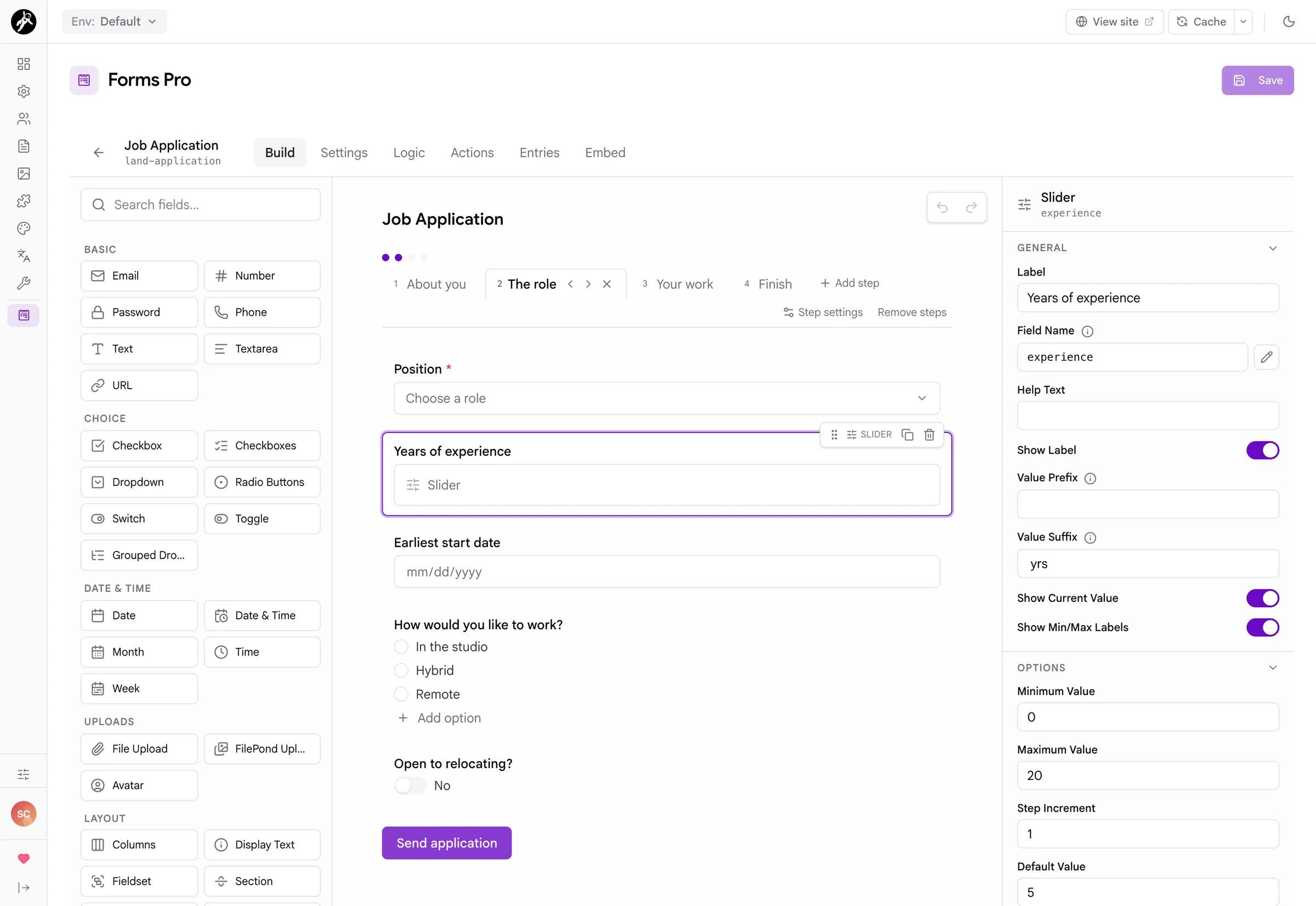
form: YAML in user/data/forms-pro/forms/. Edit one by hand, save it, and the builder opens it without losing a thing.
Pro Fields
The fields the Form plugin never had
The Form plugin covers the basics well, and Forms Pro keeps every one of its fields. The 11 pro fields fill the gaps people kept asking about: a proper name field, a full address, a phone number with a country code, star ratings, sliders, rich text, friendly date and time pickers, live calculations, recipient routing and a repeater for lists of things. Here a workshop booking takes any number of attendees, works out the total with a discount for five seats or more, and asks for a quick star rating.

$ or yrs, and the current value shown as you drag.
Multi-Step Forms
Long forms people actually finish
A job application or a booking form with twenty questions on one page looks like work. Split it into steps and people get through it. Each step has a title and a short description, and Forms Pro checks the fields on a step before it lets the visitor move on, so nobody finds out about a mistake on step one after pressing send on step four. There is still only one submit, at the end, and the server checks everything again when it arrives.
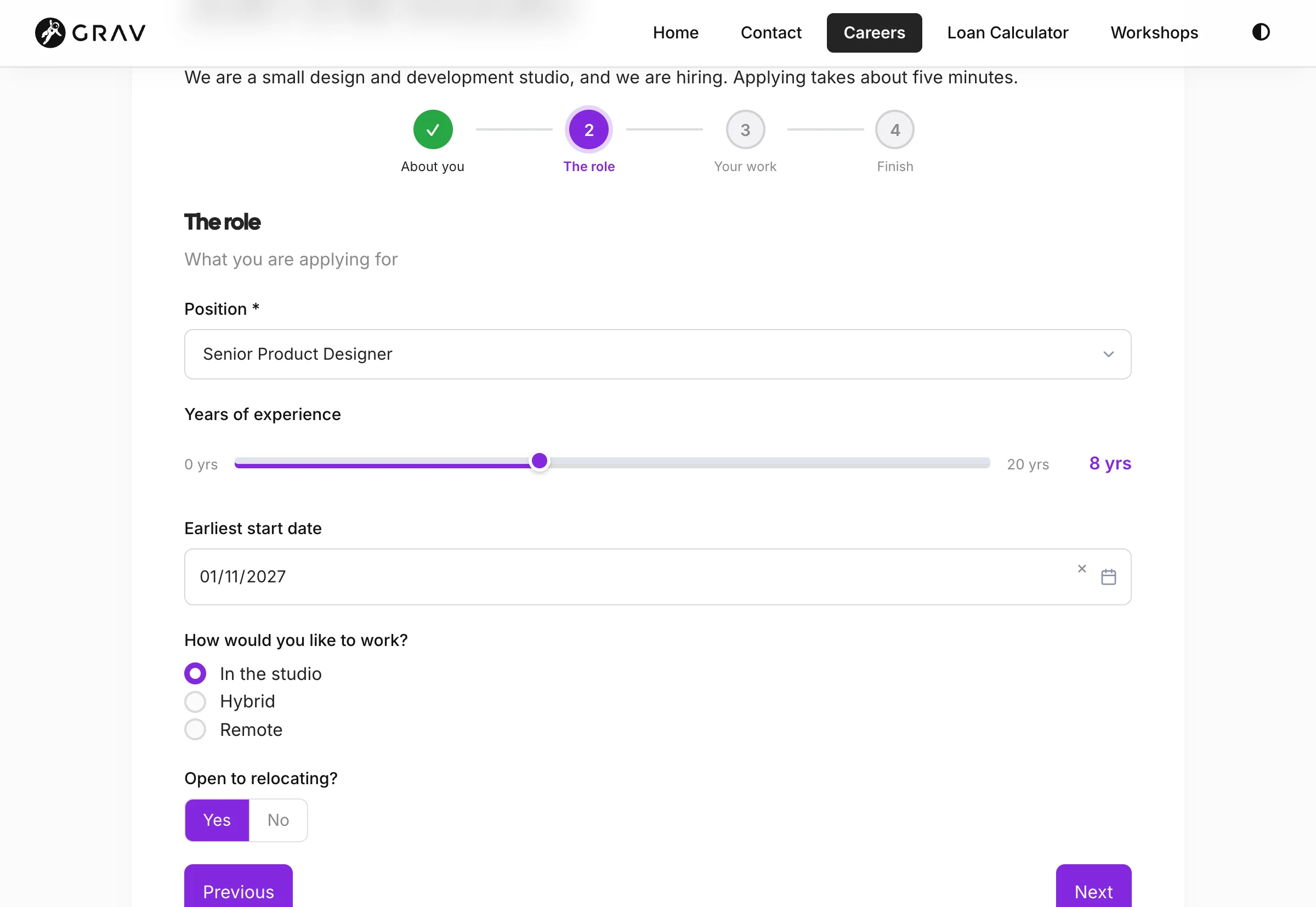
Conditional Logic
Ask only what matters
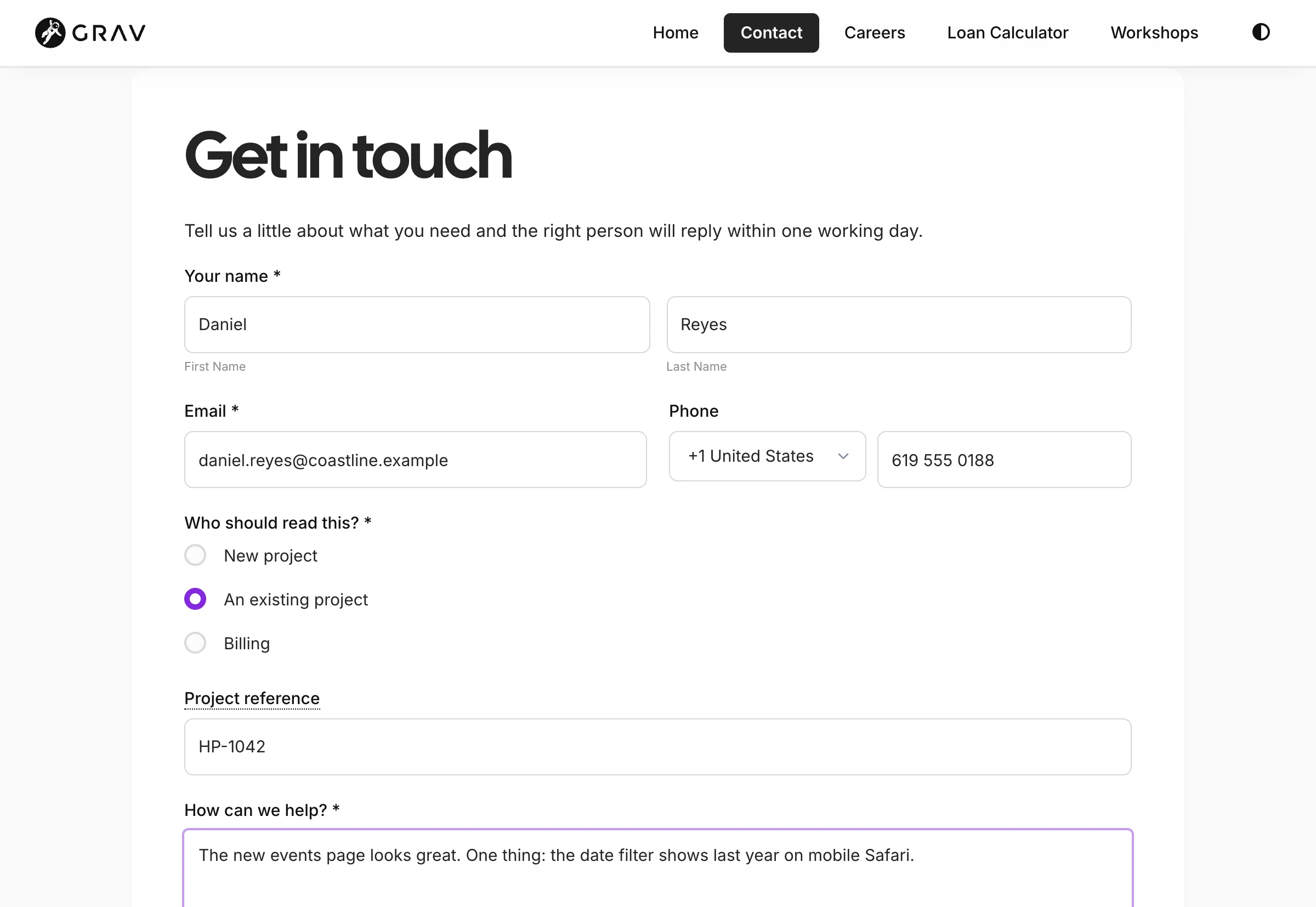
The Logic tab reads like a sentence: show Project reference when any of these rules match: Who should read this? is An existing project, or Who should read this? is Billing. Pick the field, pick show or hide, choose all or any, and add rules. And this isn't only a browser trick. The server runs the same rules when the form is sent, so a hidden field can't hold up a submission by being required, and whatever a visitor typed into a field they then hid is thrown away before any action sees it.
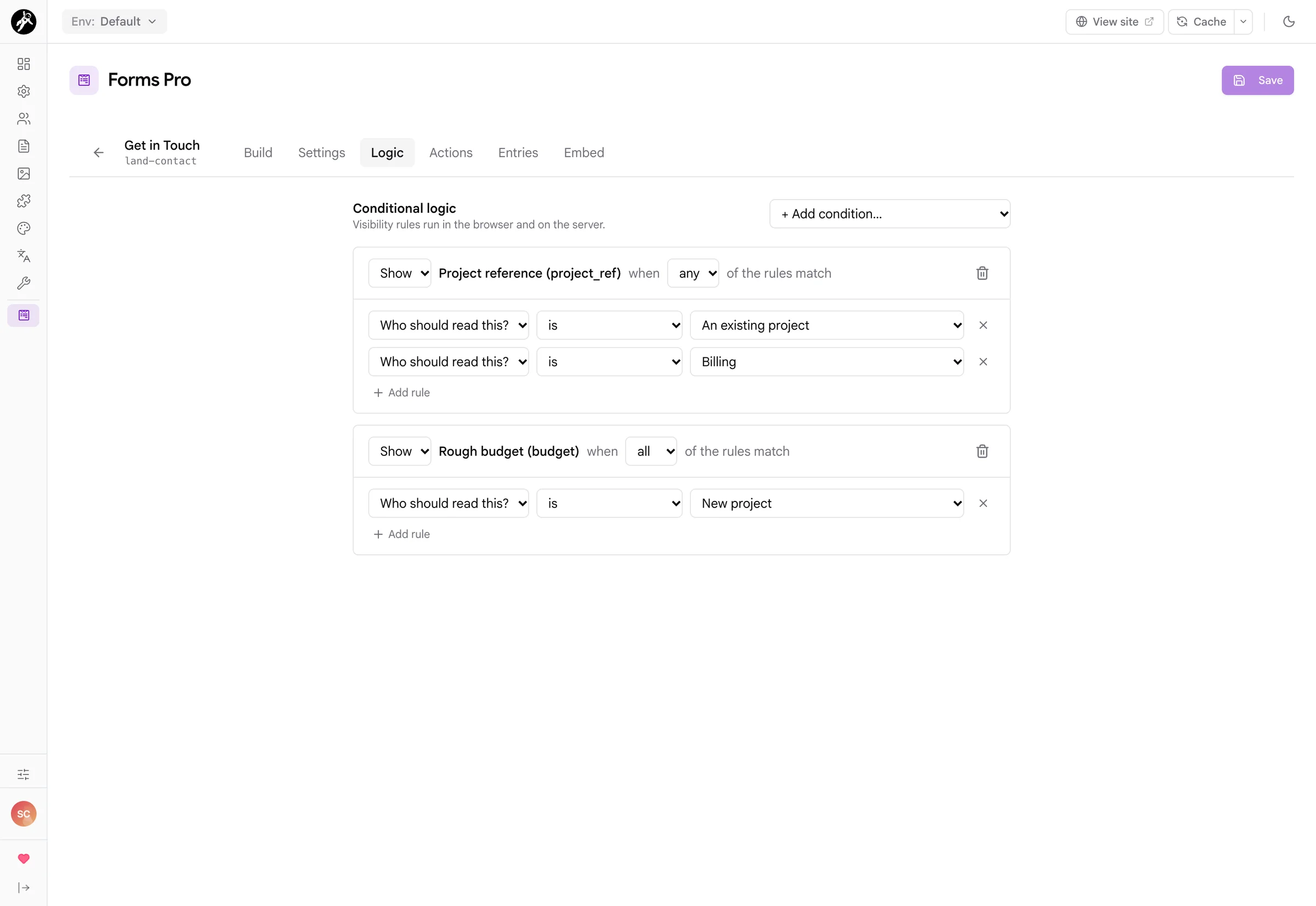
conditions: on the field, so hand-written rules show up in the Logic tab and the other way round.
Calculators & Formulas
Live calculators that stay cached
This is the part I'm most pleased with. Add Calculation fields to any form and set a formula like quantity * price, and the result updates as people type. Then switch on Calculator Mode and the form becomes a pure calculator: no buttons, no actions, nothing is ever sent, and because there's nothing per-visitor in it, the page stays in Grav's cache like any other page. Loan repayments, quotes, shipping costs, BMI: if you were running one of these on WordPress with Calculated Fields Form, WPForms or Gravity Forms, you can build it here.
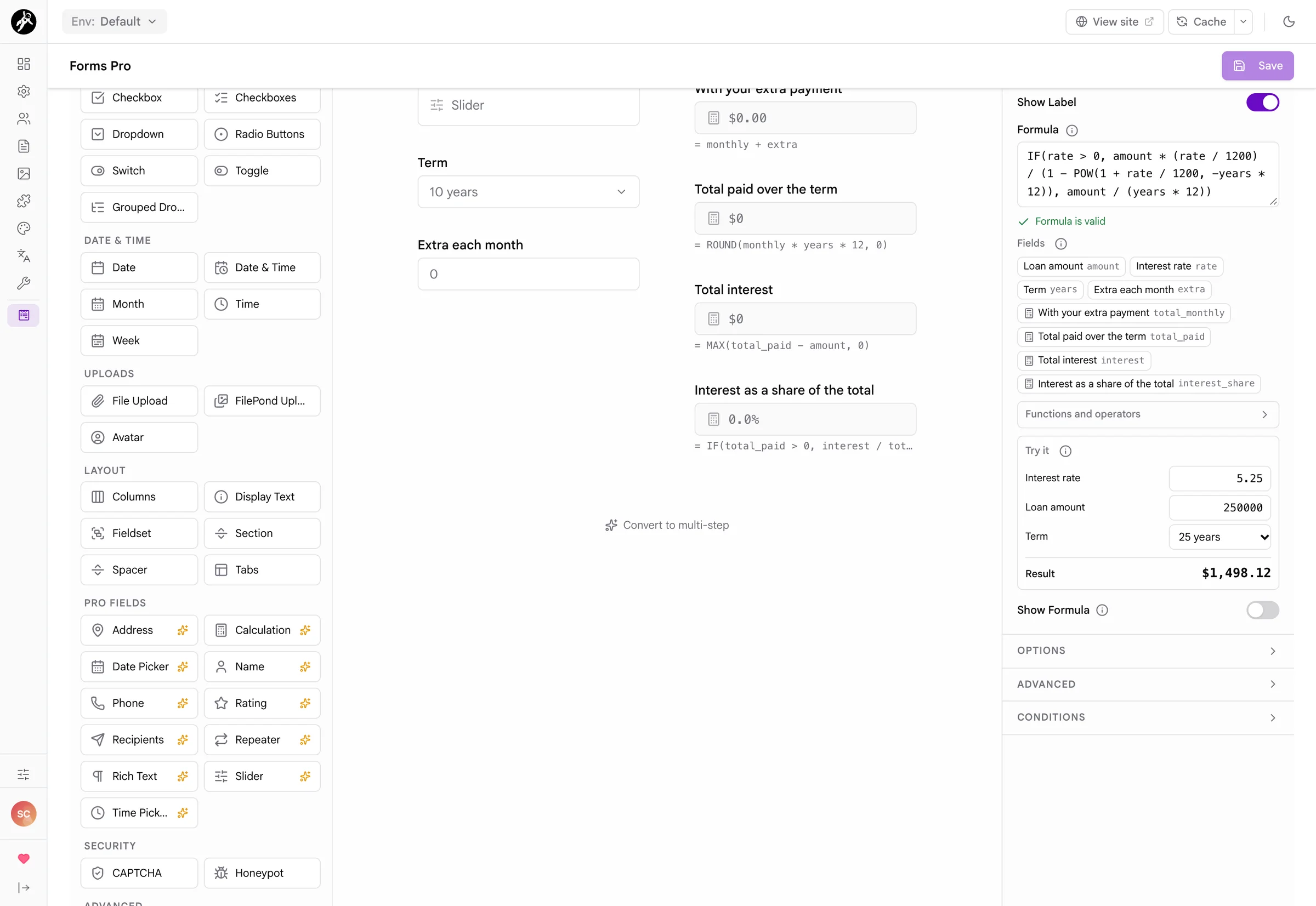
IF, ROUND, PREC, FLOOR, CEIL, ABS, SQRT, POW, MIN, MAX, SUM, AVG and PI, plus + - * / %, comparisons, &&, ||, ! and condition ? a : b.
Entries
Every submission, readable
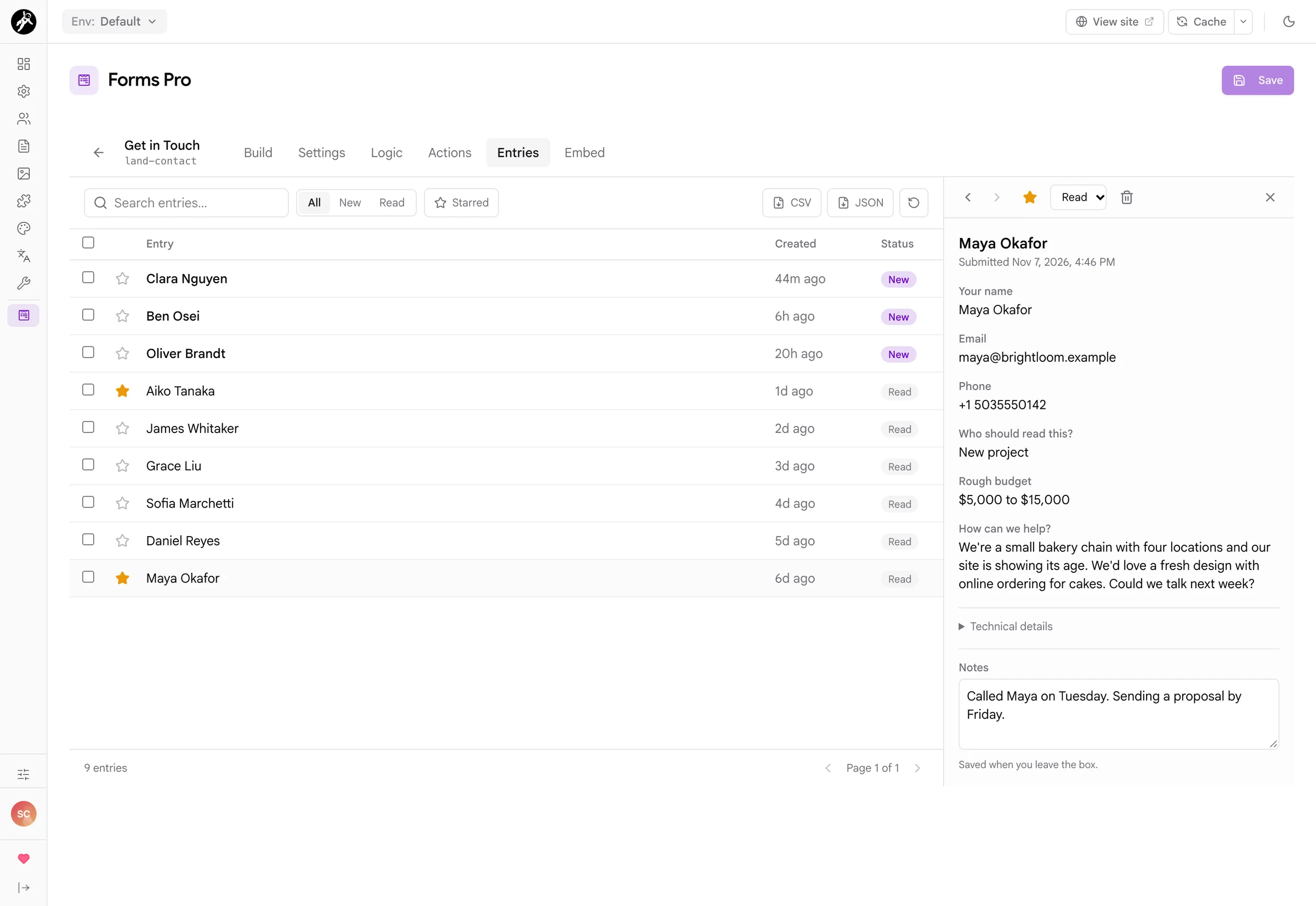
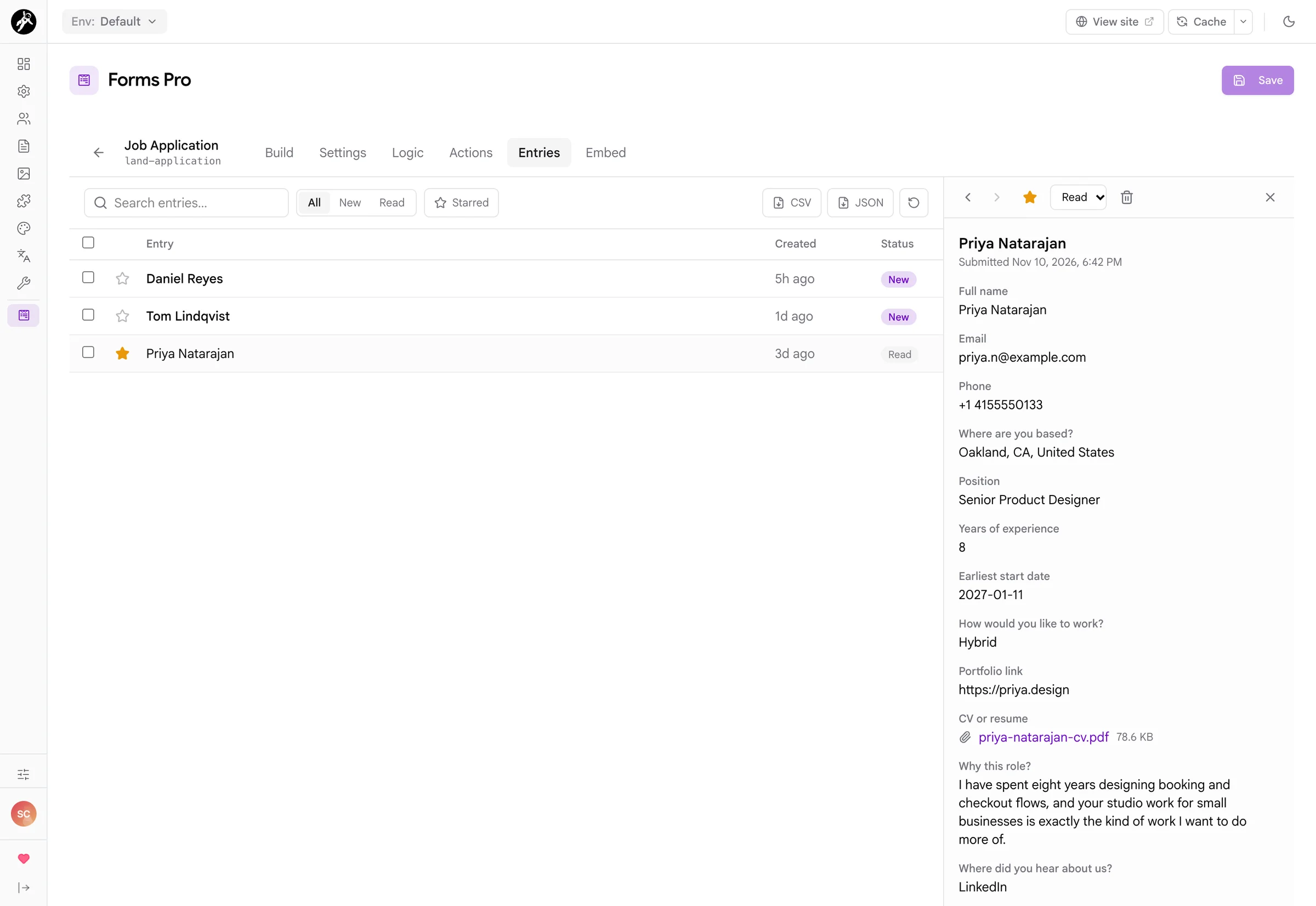
Add the Store Submission action and every submission lands in the form's Entries tab. The list shows who sent it, when and whether anyone has read it, and clicking one opens it beside the list instead of on a new page, so working through a morning's enquiries is quick. Answers are shown the way people gave them: option labels instead of keys, names and addresses joined up, rich text as text, and uploaded files as links you can download.
Notifications & Recipient Routing
The right inbox, without exposing it
A contact form usually needs to reach more than one inbox. Add a Recipients field, give each choice a label and an email address, and use {{ recipients.department }} as the notification's To address. The visitor picks Billing and the email goes to accounts. The addresses live in the form definition on the server and never appear in the page, so spammers can't harvest them, and an address someone sneaks into the posted data is ignored.
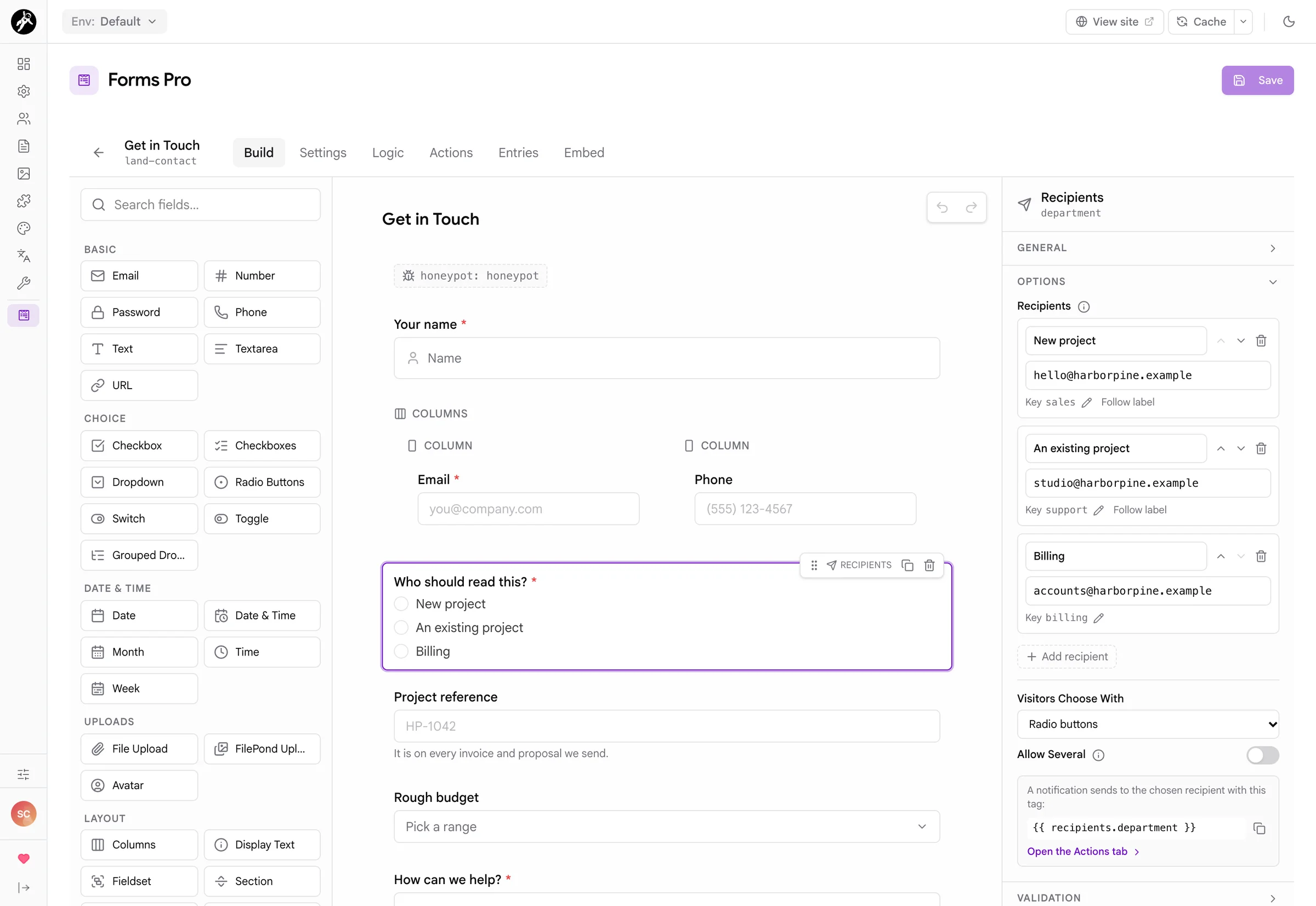
{{ form.value.email }} for any field, {{ all_fields }} for the lot, plus the form name, the page title and its address, with a picker that lists them so you don't have to remember them.
Actions & Webhooks
What happens after Send
The Actions tab is the form's process: list drawn as cards, in the order they run. Validation actions like captchas go first, redirects and page displays go last, and everything else sits in between in the order you choose. Each card has its own options. The Webhook action sends each submission as JSON to a URL, which is how you get leads into a CRM, a Slack workflow, Zapier or Make, or your own little service.
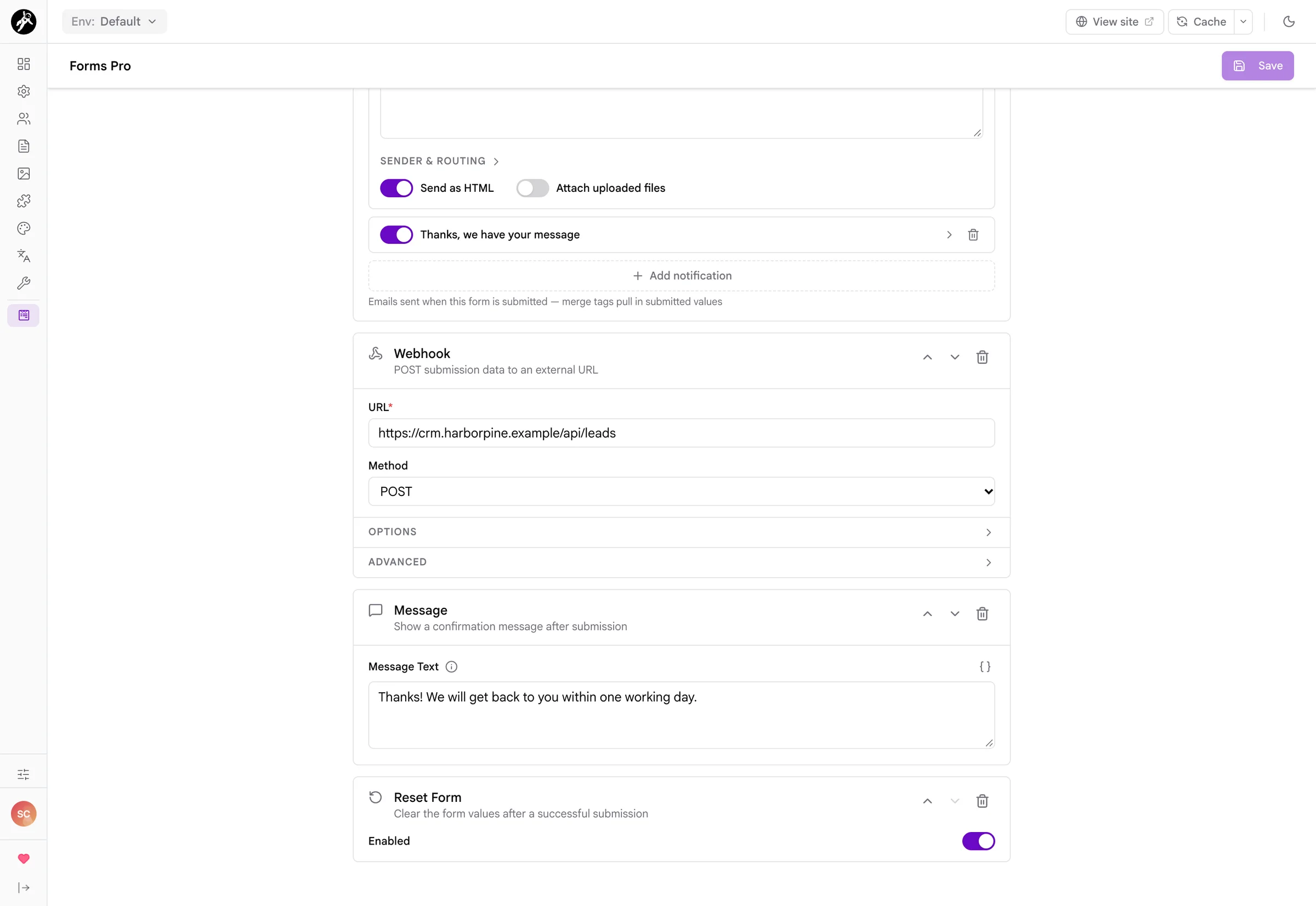
call action stays hidden unless you switch on Expose Call Action, because running PHP from a form is something you should choose on purpose.
Spam Protection & Form Settings
One switch per decision
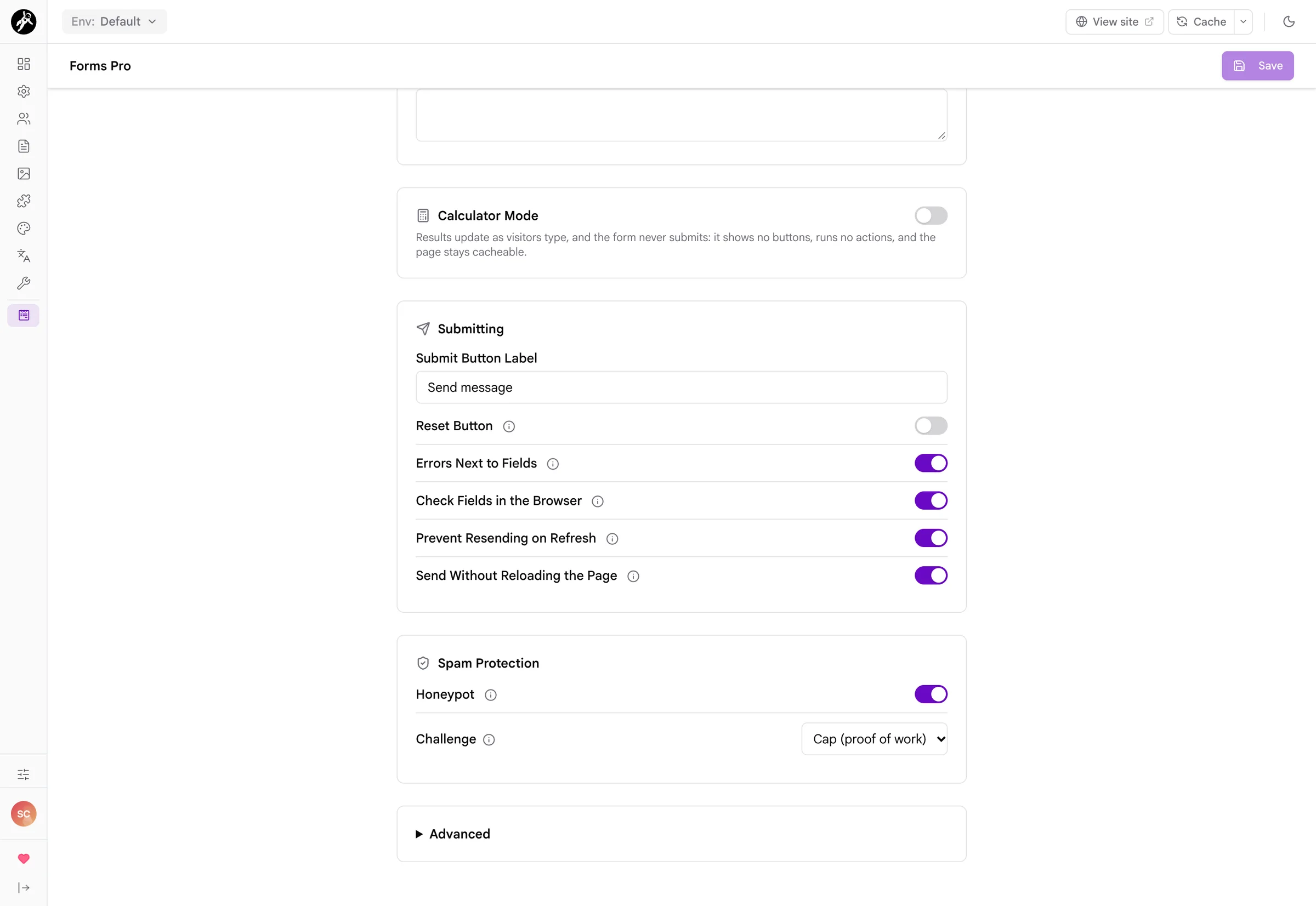
The Settings tab collects the decisions that used to mean looking up YAML keys: the submit button's label, a reset button, where errors appear, whether the browser checks fields first, whether a refresh can send the form twice and whether it sends without reloading the page. Spam protection lives here too. Switch on the honeypot and pick a challenge, and Forms Pro adds both the field that draws it and the action that checks it, because one without the other protects nothing.
Embedding, Permissions & Developers
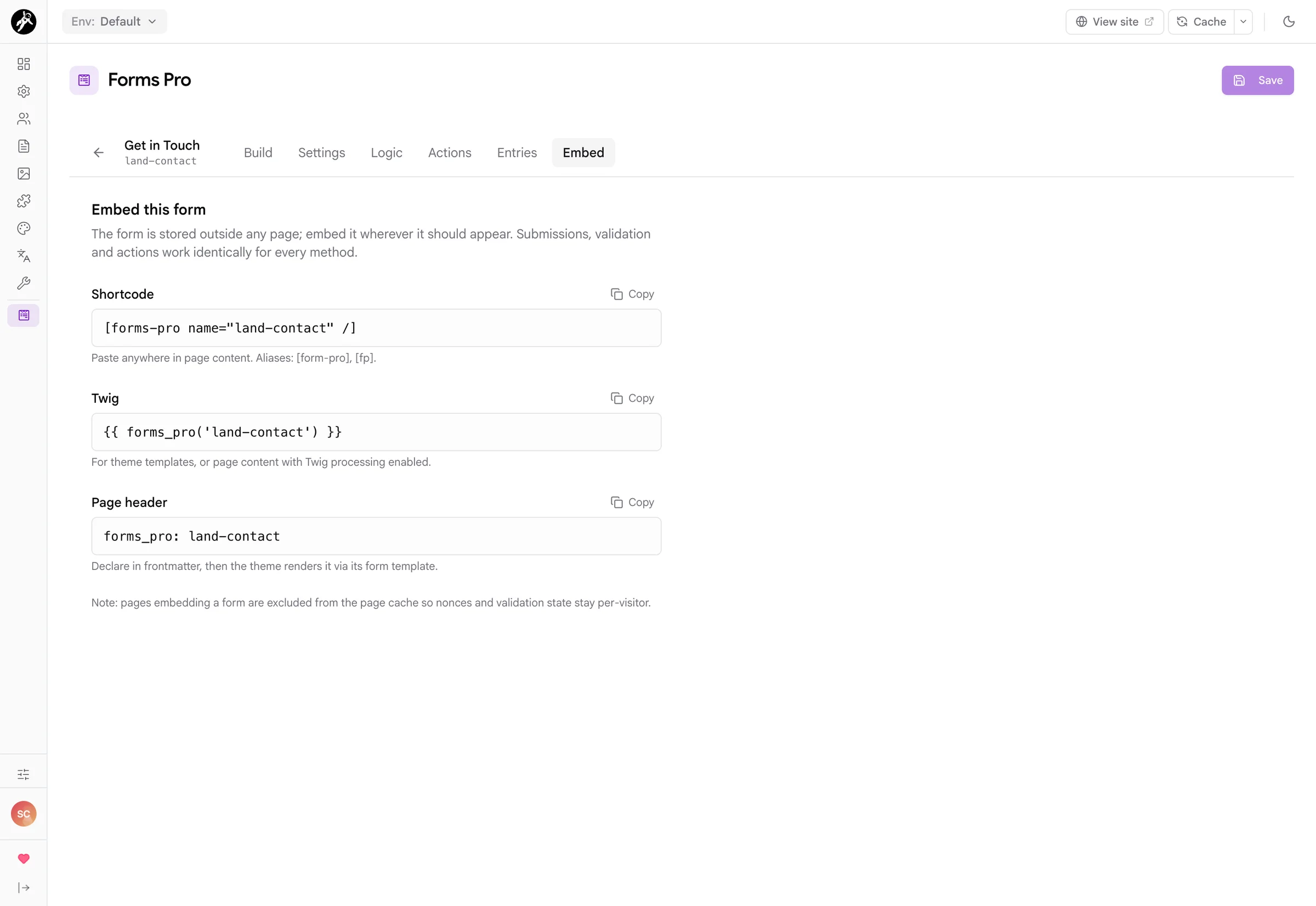
A form lives outside any one page, so you can use the same form on several pages and its entries stay together. The Embed tab gives you the snippet for whichever way you like to work.
[forms-pro name="contact" /] in page content, {{ forms_pro('contact') }} in Twig, or forms_pro: contact in a page's frontmatter.
user/data/forms-pro/, so they back up and move with the rest of user/. There's no database to set up.
forms-pro/fields/ or forms-pro/actions/ and it appears in the builder, with an onFormsProRegisterActions event for the code that runs on submit.
call action, and nothing else to worry about.
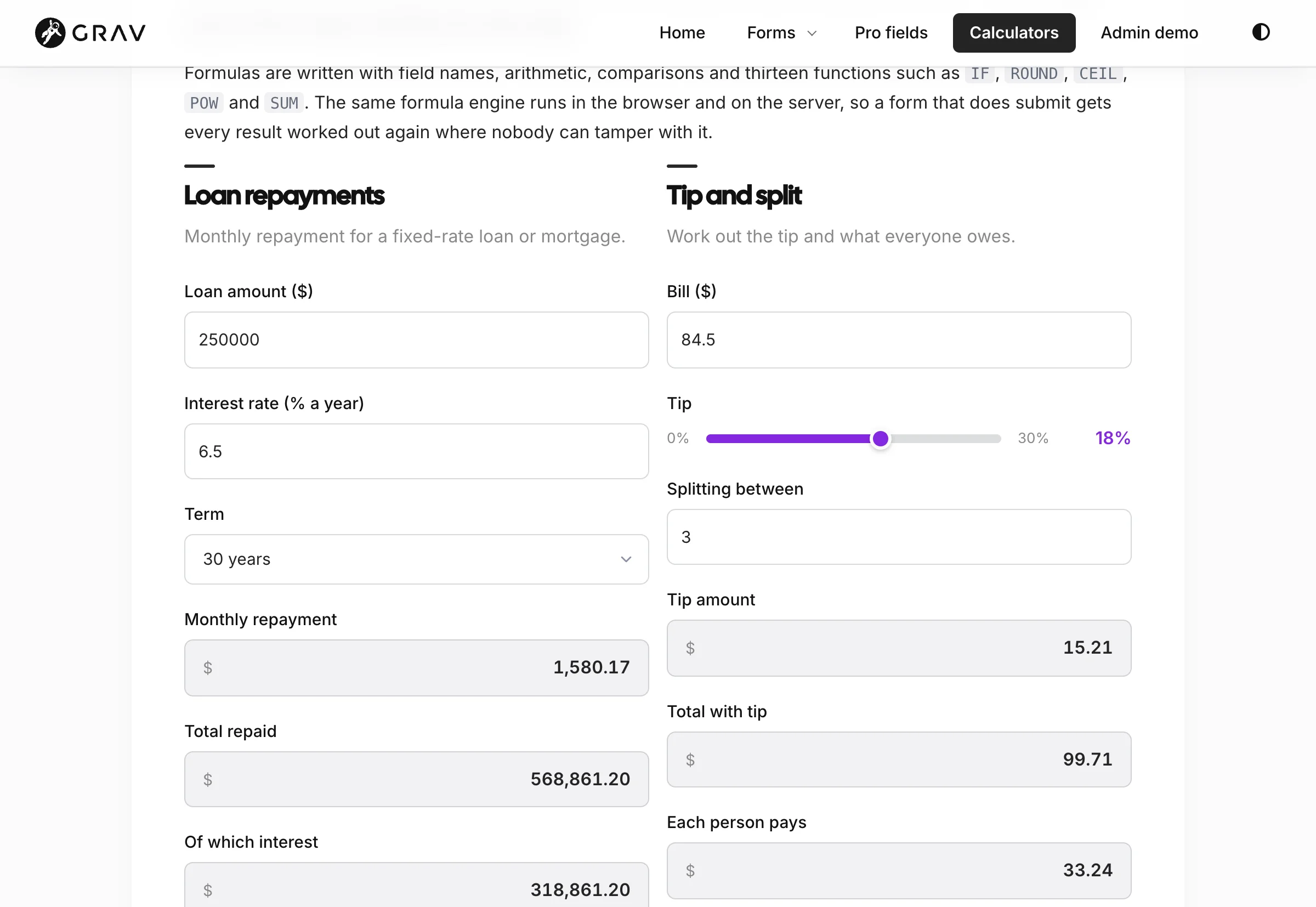
Calculators that don't need WordPress
A loan calculator, a quote estimator, a shipping cost table: the numbers change as people type, formatted the way your visitors expect. Calculator Mode never submits, so there's no token in the page and nothing per visitor, which means the page stays in Grav's cache and loads as fast as any other. The formulas use IF, ROUND, POW, MIN and MAX, so moving a calculator over from Calculated Fields Form is mostly a matter of copying the formula.
Every submission, readable
An entry shows answers the way the visitor gave them: their name, their city and state, the role they picked rather than its key, the years from the slider and the rich text they wrote. Uploaded files are download links with the file size. Star the good ones, add a note, mark it read, and step to the next with the arrows.

Comfortable at phone width
Most forms are filled in on a phone, so every Forms Pro field stacks into one column on a small screen, the step circles shrink to numbers, and sliders, pickers and phone fields stay big enough for a thumb. The styles follow your theme's own colors in light and dark, and if you'd rather do it all yourself, switch the built-in CSS off.
Ask only what matters
Choose An existing project and a Project reference field appears. Choose New project and you're asked for a budget instead. Conditional logic keeps a form short for everyone, and because the server runs the same rules, a hidden field never blocks a submission and never sneaks into an email.
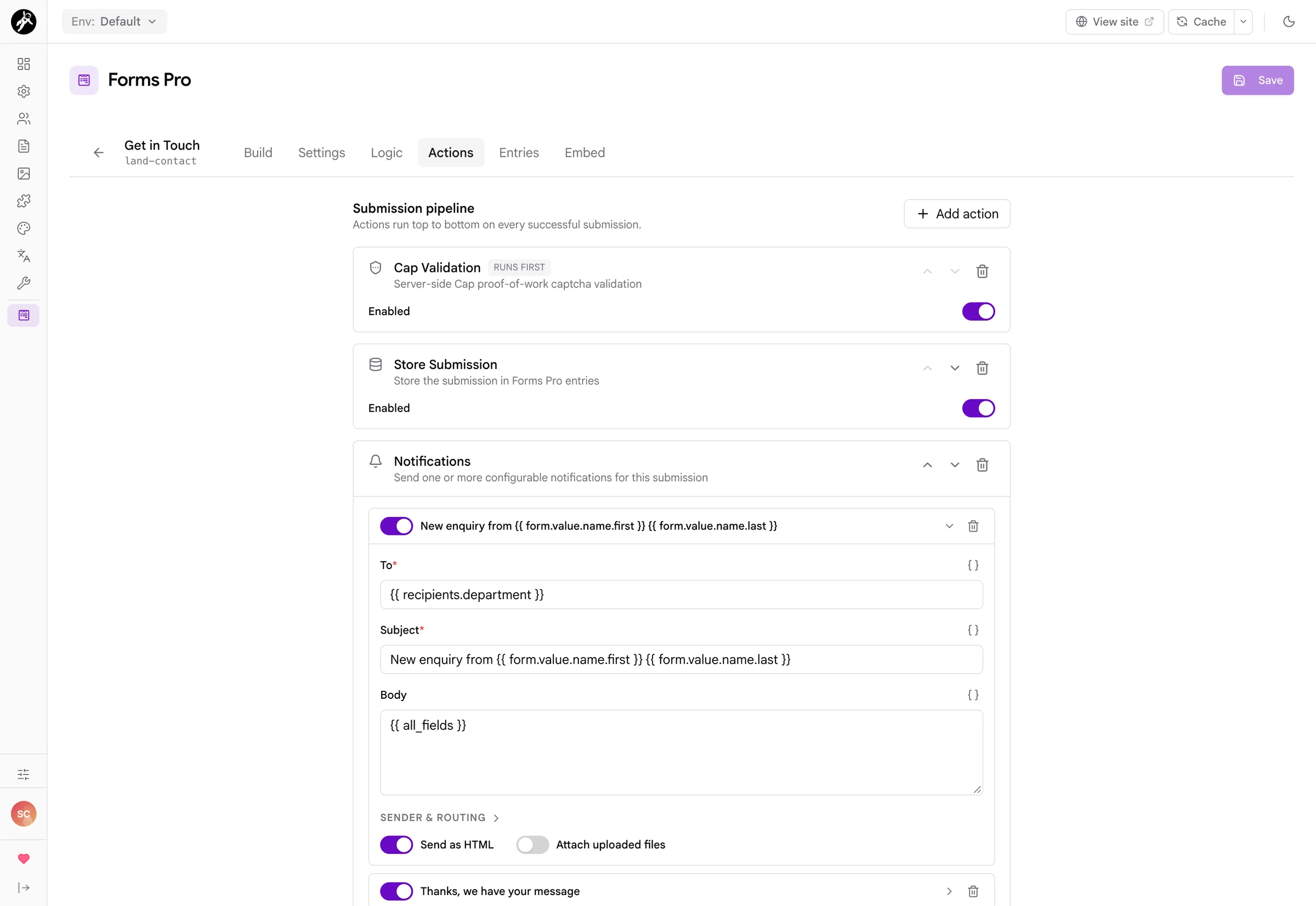
Notifications that go to the right person
Each notification is a card with To, Subject and Body, and a merge tag picker on every line. Send the team an email with {{ all_fields }}, send the visitor a friendly receipt, and route the team email with {{ recipients.department }} so sales, support and billing each get their own. A Cap check sits first, so spam is stopped before anything is stored or sent.
Right at home in Admin Next
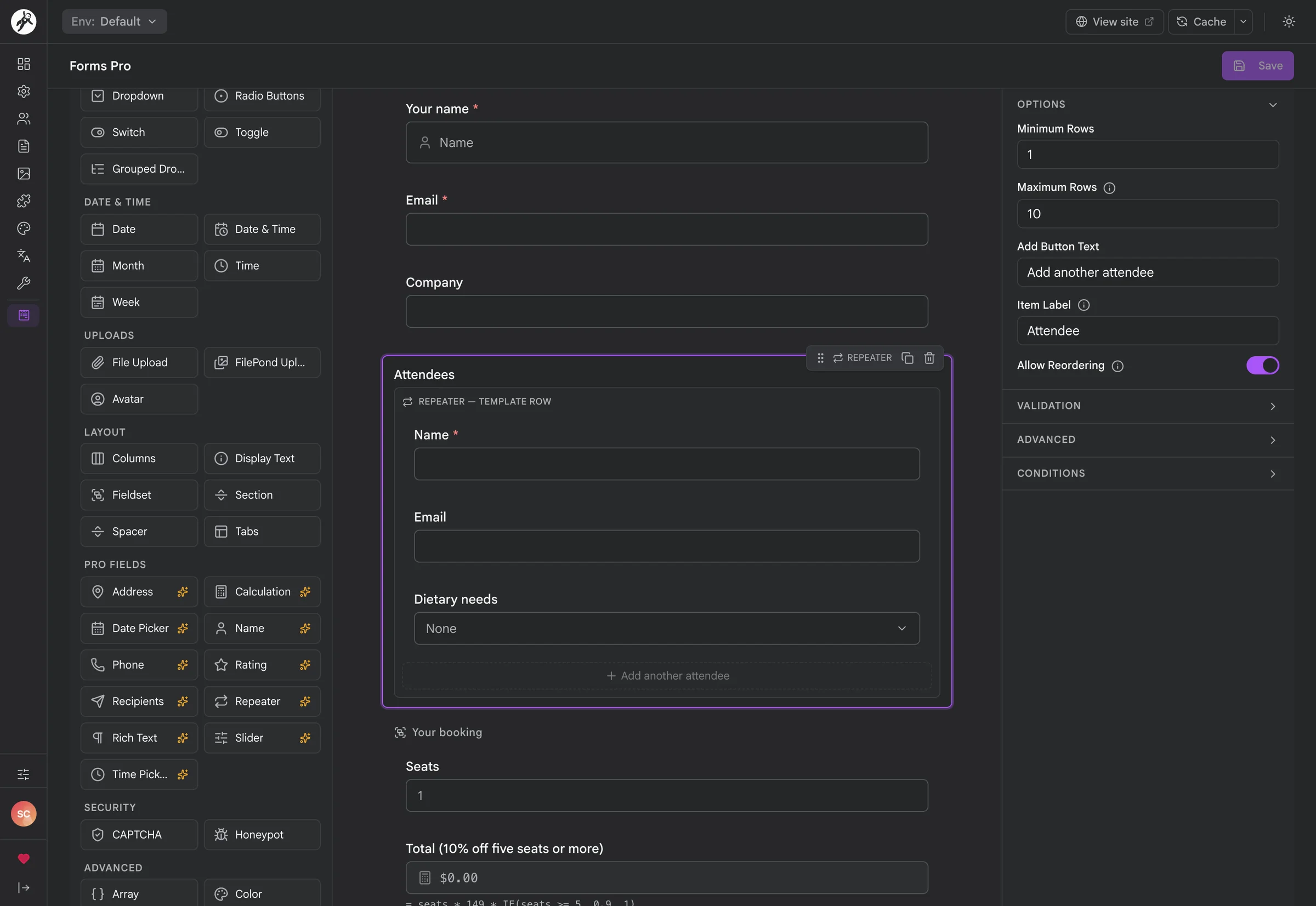
Forms Pro is built into Admin Next, not bolted on beside it. It uses the same sidebar, the same light and dark modes, the same keyboard shortcuts for saving, and the same permissions. Here a repeater of attendees is selected, with its minimum and maximum rows, button label and reordering switch in the panel on the right.
Your forms, on your own site
I've lost count of the people who told me they would move their site to Grav tomorrow, except for one thing: the forms. A quote calculator, a multi-page application, a contact form that emails the right department. With Forms Pro you build them visually in Admin Next, the entries stay on your server, and the form itself is a YAML file you can read, edit and keep in git.
Up and running
- Install the plugin along with the API, Admin Next, Form and Email plugins, and enable it.
- Open Forms Pro in the Admin Next sidebar, click New Form, and drag in your fields.
- On the Actions tab, make sure Store Submission is there to keep entries, and add a Notification so you hear about them.
- Copy the shortcode from the Embed tab into any page.
- Give staff who only answer submissions the read and manage entries permissions, and they get an Entries section without the builder.
Three ways to put a form on a page
[forms-pro name="contact" /]       {# shortcode in page content #}

{{ forms_pro('contact') }}         {# Twig in a template #}

forms_pro: contact                 {# page frontmatter, with a form template #}
Full setup and configuration documentation lives on the Learn site.
Screenshots & Examples
A peek at sites running Forms Pro.


Frequently Asked Questions
The most commonly asked questions about the Forms Pro plugin
Is this a one-time purchase or a subscription?
Forms Pro is a one-time purchase. You get all future updates and new features for free as long as your license stays active. There's no limit on the number of forms, fields or entries.
Do my existing Form plugin forms keep working?
Yes. Forms Pro doesn't touch forms defined in your pages' frontmatter, and the Form plugin keeps processing them exactly as before. Forms Pro forms use the same fields, buttons and process vocabulary, so moving one over is a matter of copying those into a file in user/data/forms-pro/forms/ and opening it in the builder.
What happens to my forms if I stop using Forms Pro?
Your forms are YAML files you can read and edit, and every standard field and action in them is plain Form plugin YAML. The pro fields (name, address, rating, repeater and the rest) and the Forms Pro actions need Forms Pro to render and run, so those are the parts you would replace. Your entries are YAML files too, and you can export them as CSV or JSON at any time.
I'm moving off WordPress. Can I rebuild my calculators?
Yes, and that's a big part of why Calculator Mode exists. If you used Calculated Fields Form, WPForms or Gravity Forms for quotes, loan payments or shipping costs, the formulas will look familiar: field names, arithmetic, IF, ROUND, MIN, MAX, POW and comparisons. There's no importer, so you rebuild each form in the builder, but the Try it box lets you check every formula against the numbers your old calculator gave before it goes live.
Does Forms Pro work on Grav 1.7?
No. Forms Pro is built for Grav 2 and Admin Next, and it needs the API plugin for the builder. If you are still on 1.7, take a look at the Migration chapter on the Learn site.
Where are submissions stored? Do I need a database?
No database. Each entry is a YAML file under user/data/forms-pro/submissions/<form>/, with a small index beside it so the list stays quick. Uploaded files go wherever the file field's destination points. It all backs up and moves with your site like the rest of user/.
By default Forms Pro also stores each sender's IP address and browser. Switch either off in the plugin settings if you don't want them.
Can people upload files?
Yes. The Form plugin's File Upload and FilePond fields are both in the palette, with a list of accepted file types, a size limit and a destination folder. Uploaded files can be attached to notifications with one switch, and each entry links to its files so you can download them from Admin Next.
Can I use the same form on more than one page?
Yes. A form lives in its own file, outside any page, so embed it wherever you like with the shortcode, Twig or a page header. Every submission ends up in the same list of entries, whichever page it came from.
Will visitors see our email addresses?
No. A Recipients field only sends the choice's key to the browser. The server looks up the address in the form definition when the form is sent, and an address included in the posted data is never used.
Does a form stop my page from being cached?
A page with a regular form is kept out of the page cache, because each visitor needs their own security token and their own validation messages. A form in Calculator Mode has neither, so its page stays cached like any other.
Can a client handle entries without being able to change forms?
Yes. Give their group the permissions to read and manage entries, and leave out the ones for changing forms. They get an Entries section in Admin Next with search, stars, notes and export, and no builder at all. An account that can read forms but not change them sees the builder in read-only mode.
How does it look with my theme?
Forms Pro's fields use your theme's own form styles wherever it can. On a Pico-based theme such as Quark2 they pick up Pico's colors, borders and spacing in light and dark mode with no work at all, and on other themes they fall back to neutral defaults. If you'd rather style everything yourself, switch off Built-in CSS in the plugin settings, and every field keeps plain, predictable class names to work with.
What does Forms Pro need to run?
Grav 2.0.4 or newer, PHP 8.3 or newer, and these free plugins:
- API 1.0.8 or later, for the builder and entries
- Admin Next 2.0.11 or later, where the builder lives
- Form 9.2.1 or later, which processes every form
- Email 5.0.1 or later, for notifications and the email action
Can I use Forms Pro on multiple sites?
Per the Grav Premium License, you need a license for each site. Development and staging copies of the same site are covered by the same license. Get in touch if you need bulk pricing.