
One of the biggest lessons we took from the 1.8 beta cycle is that in-place upgrades across a generational library change are inherently fragile. When the PHP stack moves, the Symfony vendor packages move, and Twig moves all at the same time, even a well-tested upgrade path can fall over the moment opcache pinning, file locks, or partially-loaded code from the running process get involved. We tried very hard to make safe upgrade work and it kept finding new ways to break.
For Grav 2.0, we've taken a different approach: a side-by-side staged install, driven by a dedicated Migrate to Grav 2.0 plugin. Your existing 1.7 or 1.8 site keeps running, untouched, while we build a fresh Grav 2.0 next to it (in a configurable subfolder, served via a small .htaccess patch). You test against your real content. When you're happy, you promote. If you're not, you reset, and your original site is exactly as it was.
This post walks through how that works in practice.
Why Side-by-Side Instead of In-Place?
In-place upgrade means mutating a running system: code already loaded in memory, libraries swapped underneath, plugins in uncertain states. The wider the version jump, the more ways that mutation can go wrong. The 1.8 safe upgrade tried to make this work and hit too many real-world edge cases.
A side-by-side staged install sidesteps every one of those problems:
- The staged Grav 2.0 install is unzipped into a fresh subdirectory. There's no in-place mutation of your live install
- The migration wizard runs in a fresh PHP process with no 1.x code loaded, so there's no opcache or vendor-stack contamination
- Your original site is reachable and serving traffic the entire time the migration is running
- If anything goes wrong, the staged site can be wiped and your
.htaccessrestored in a single click. Your 1.x install is byte-for-byte unchanged - You can iterate. Reset, retry, change plugin policies, retry again. There's no "I've committed to this, please hold" moment
When you finally promote, you do it on your terms, with a verified-working staged site.
The Migrate to Grav 2.0 Plugin
The migration tool ships as a Grav plugin, installable into your existing 1.7 or 1.8 site.
Note
The whole flow is admin-driven and starts with switching your GPM Releases channel to testing, where the migrate plugin and the 2.0 release artifacts currently live during the RC period.
Once you've flipped that switch:
- Refresh the admin dashboard. A banner appears offering to install the Migrate to Grav 2.0 plugin
- Click through to install it via the standard admin install flow
- The dashboard banner updates and now shows a Start Migration button. Click it
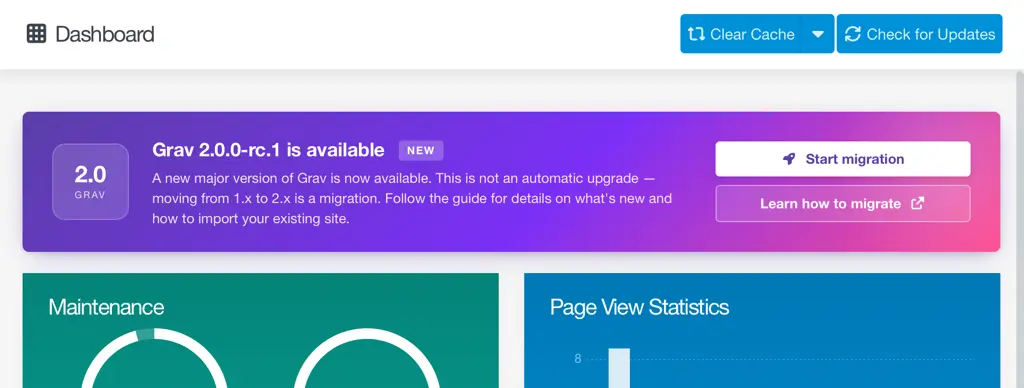
That Start Migration button is what kicks off the actual migration. The plugin downloads the Grav 2.0 release, drops a single self-contained migrate.php file at your webroot, and redirects your browser there. From that point on, the migration is being driven by migrate.php running in a fresh PHP process, completely independent of your 1.x install. No 1.x autoloader, no 1.x code, no risk of corrupted state.
A key point about the plugin's role: it doesn't perform the migration itself. Its job is to make the handoff boring. The actual wizard work happens in the standalone PHP file, by design.
CLI users can kick it off with bin/plugin migrate-grav init, but the admin path is significantly easier because the migration UI itself is HTML-based and has to run in the browser anyway.
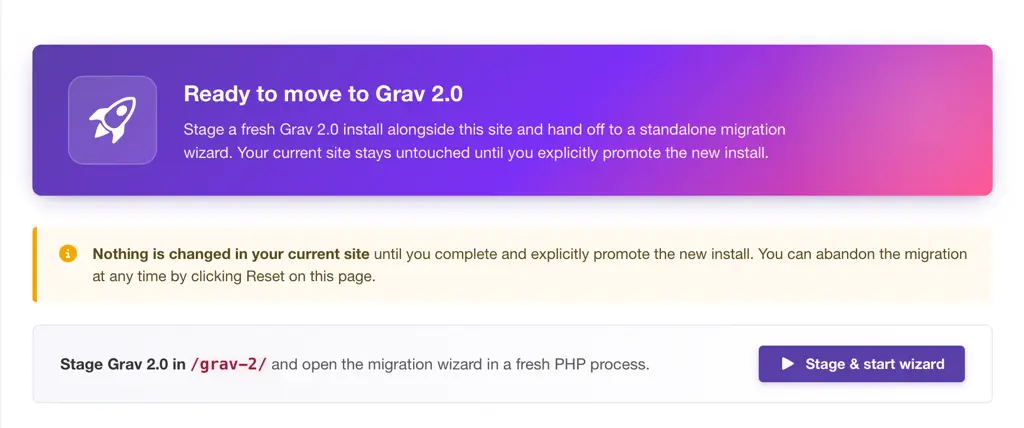
The Wizard, Step by Step
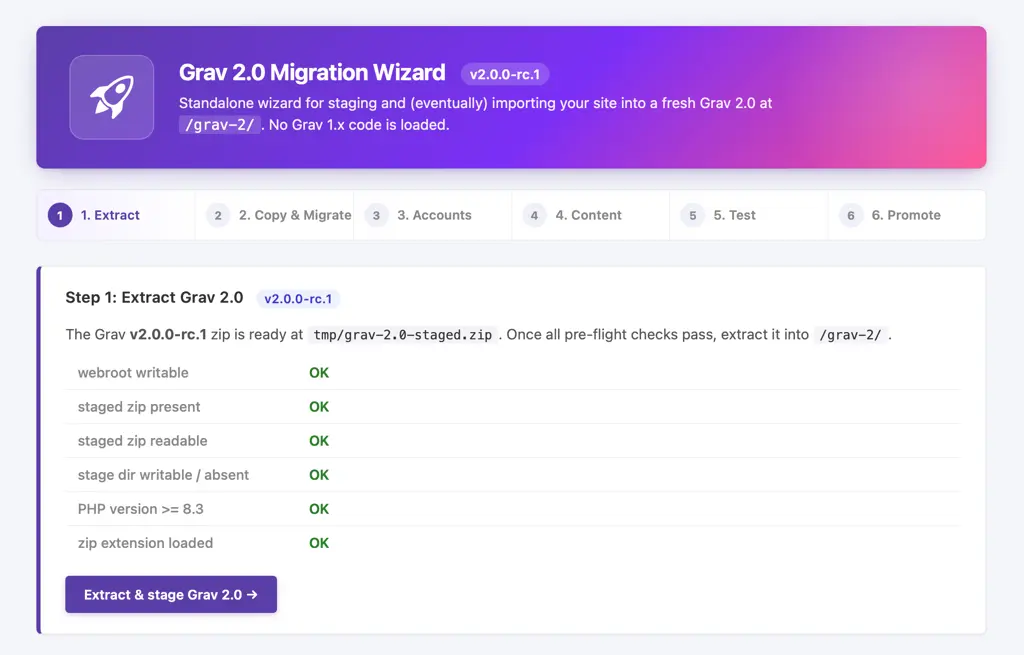
Step 1: Extract
The wizard unzips the staged Grav 2.0 release into a configurable subdirectory of your webroot. The default is grav-2/, but you can change it by editing the migrate-grav plugin configuration options before kickoff.
Step 2: Copy & Migrate
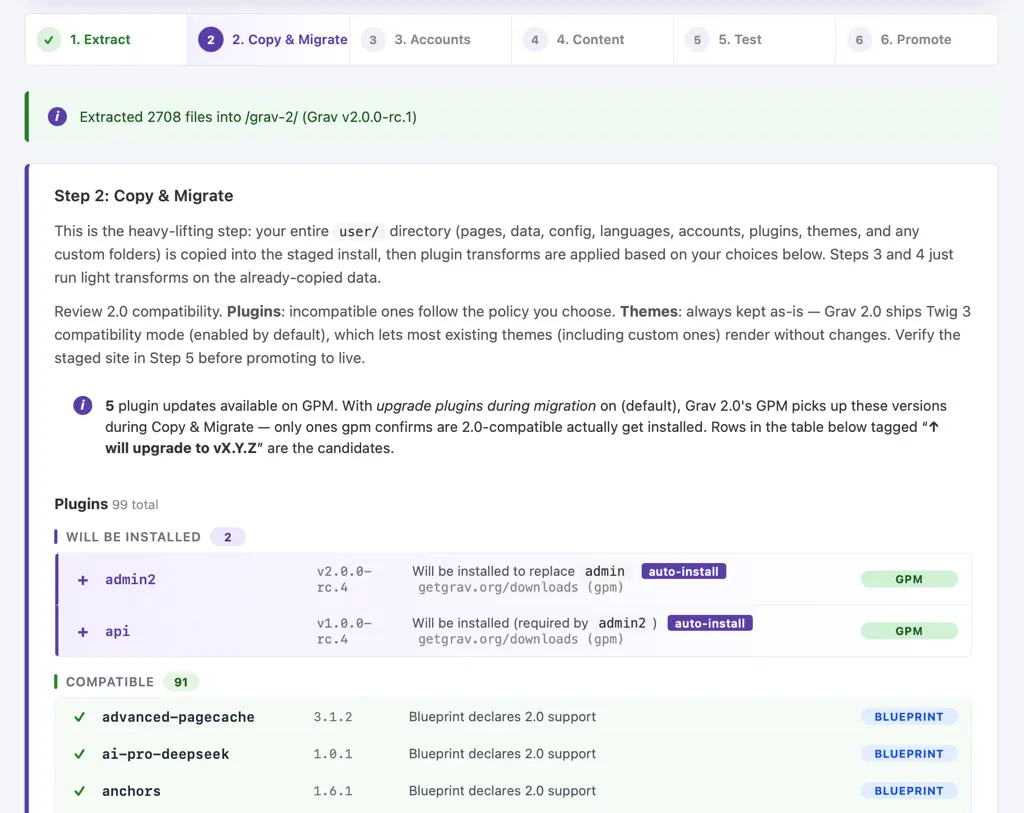
This is where the heavy lifting happens. The wizard:
- Bulk-copies your entire
user/directory (pages, data, config, languages, accounts, plugins, themes, custom folders) into the staged Grav 2.0 - Runs every plugin through the compatibility check, using the new
compatibilityblueprint flag and falling back to inference rules for plugins that haven't been flagged yet - For 2.0-compatible plugins, runs GPM upgrade to pull the latest 2.0-compatible versions
- For plugins that are still incompatible after the upgrade pass, applies your chosen policy:
- Skip removes the plugin entirely from the staged install
- Disable keeps the files in place but writes a config entry that disables the plugin in 2.0
- Installs the Admin Next and API plugins automatically (they're required for the new admin)
- Removes the classic admin plugin, which is incompatible with 2.0 and is replaced by Admin Next
- Keeps themes as-is. Grav 2.0 ships Twig 3 compatibility mode enabled by default, which lets the vast majority of existing themes (including custom ones) render without changes
You also choose between strict and permissive compatibility modes. Strict trusts the registry and blueprint flags as-declared. Permissive promotes inferred-incompatible plugins to "compatible" so you can test them on 2.0 even though their authors haven't formally flagged them yet (curated explicit incompatibles still hard-block in either mode).
Step 3: Accounts
Your user/accounts/ directory was already copied in Step 2. This step optionally mirrors admin.* permissions to api.* in the staged accounts, so the same users keep full access in Admin Next and via the API on day one.
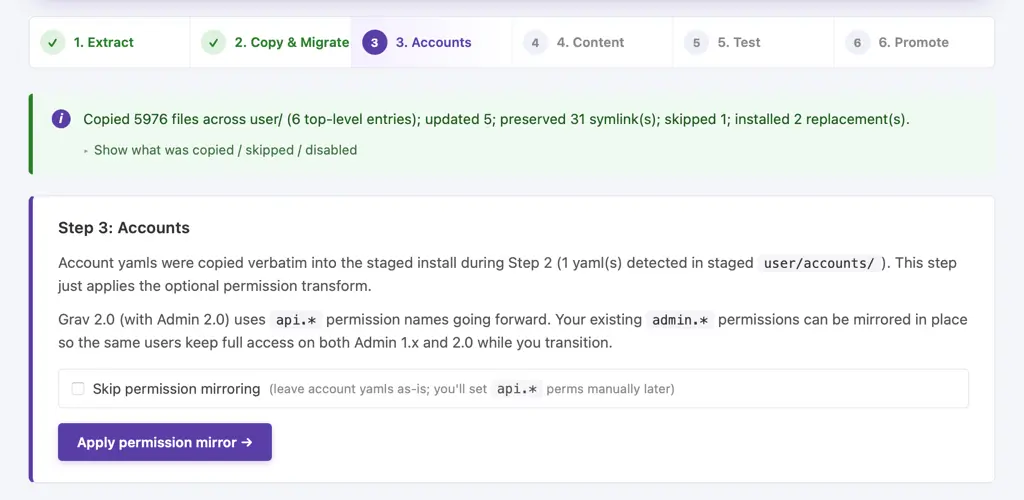
Step 4: Content
Content was bulk-copied in Step 2. This step is a summary view: it lists what landed under the staged user/ directory so you can confirm everything's where you expect.
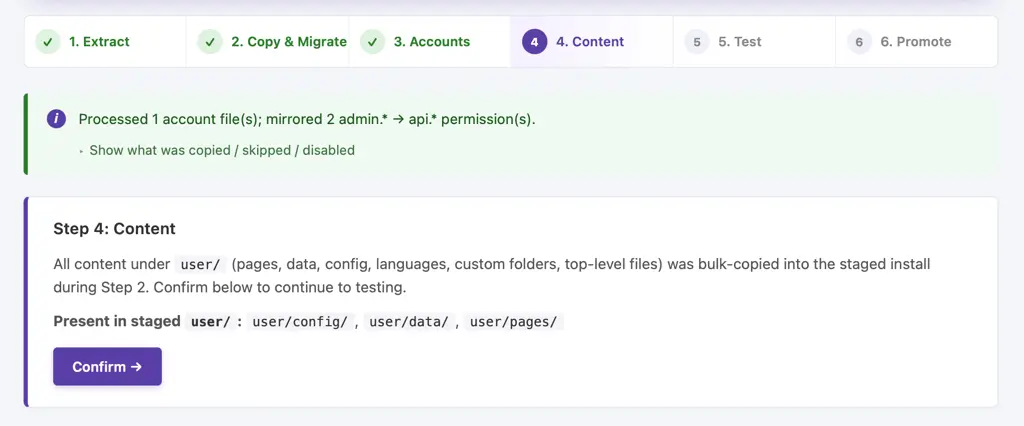
Step 5: Test
This is the step that makes the whole side-by-side approach work. The wizard patches your live .htaccess to exclude requests under your stage path (default /grav-2/) from the catch-all rewrite, and patches the staged site's .htaccess to set a correct RewriteBase for the subfolder. End result: your live 1.x site continues to serve at the root, and your staged Grav 2.0 is reachable at /grav-2/ (or whatever you configured).
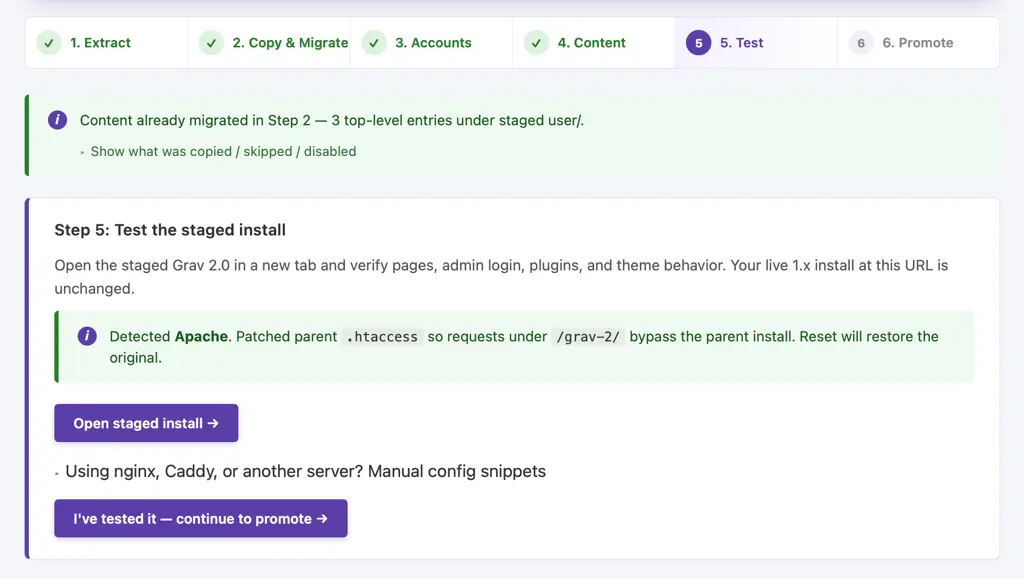
If you're on Nginx, Caddy, or another web server, the wizard prints the rewrite/exclude rule you'll need to add manually before this step works. The Apache case is the path we've actively tested end-to-end. The Nginx and Caddy hand-offs are designed to work but haven't yet been validated against a wide range of real-world configs, so if you hit something on those platforms during the RC, please file an issue with your config and what you saw. That feedback is exactly the kind of testing we need before GA.
Log in to the staged site, exercise Admin Next, browse content, edit a page, upload media, install a plugin. This is real-world testing on real-world content, with zero risk to your live site.
Step 6: Promote
When you're satisfied, hit Promote. The wizard:
- Creates a backup zip of your 1.x install inside
backup/(everything that's about to be replaced:system/,vendor/,user/,index.php,.htaccess, etc.) - Promotes the staged 2.0 contents up to your webroot
- Removes the staging-only files (
migrate.php,.migrating, the staged zip)
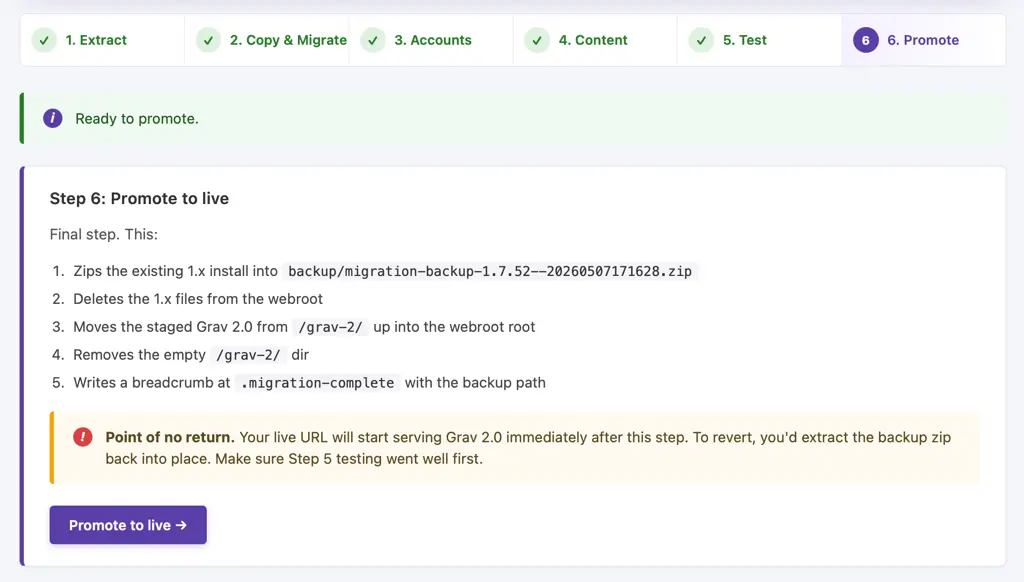
Your site is now running Grav 2.0 at the root, with a full snapshot of your 1.x install in backup/ in case you ever need to look back at it.
Reset, Restart, Re-run
The wizard exposes three different "go back" options, each suited to a different situation:
- Reset is the full teardown. It removes the staged
grav-2/directory, deletesmigrate.phpand the staged zip, and restores your.htaccess. Your 1.x install is byte-for-byte unchanged. Use this when you want to abandon the migration entirely (or come back to it later) - Restart is the light teardown. It clears the staged directory and
.htaccesspatch but keeps the downloaded Grav 2.0 zip and the wizard. That lets you re-run the whole wizard from Step 1 without re-downloading. Useful when you want to try different plugin policies or compatibility modes - Re-run step is the surgical option. It lets you go back and re-run a specific step (e.g. re-do the plugin migration with a different policy choice) without throwing away the work the earlier steps did
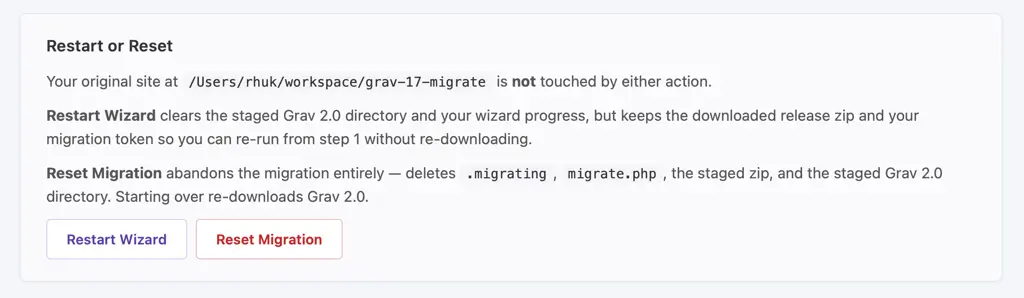
You can iterate as many times as you like. The whole tool is designed for this.
What About Plugins That Aren't Flagged Yet?
The migrate plugin's compatibility checks lean on the new compatibility field in plugin blueprints (covered in detail in the Compatibility Flags post). When that field is set, things are unambiguous. When it's not, the wizard falls back to inference rules:
- Plugin's
dependencies: grav >= 1.7.xand no compatibility flag → assumed 1.7 only - Plugin's
dependencies: grav >= 1.8.xand no compatibility flag → assumed 2.0 (1.8 maps forward to 2.0) - No dependency info at all → assumed 1.7 only (conservative default)
- Curated explicit incompatibility → always blocks, in both strict and permissive modes
In permissive mode, plugins that strict mode would have rejected on inference alone are promoted to "compatible" and force-included. This is the right setting for testing: you want to know whether your plugins actually work on 2.0, not just whether their authors got around to setting the flag.
Staying on Grav 1.7
Not ready to migrate? That's completely fine. Grav 1.7.53 is the latest stable 1.7 release. Going forward, the 1.7 branch will only receive major critical security fixes. All active development is happening in 2.0, but 1.7.53 is a perfectly valid long-term home if you want it to be.
FAQ
Do I have to migrate?
No. Grav 1.7.53 will continue to work and receive major critical security fixes for the foreseeable future.
Will my plugins work?
Most will. The wizard's plugin step tells you exactly which ones are 2.0-compatible, which got upgraded, and which fell back to your skip-or-disable policy.
Can I run 1.7 and 2.0 side by side to test?
Yes, that's literally how the migrate plugin works. Your 1.x site stays at the root and the staged 2.0 sits at /grav-2/ (or your configured subfolder).
What if the staged site is broken?
Hit Reset in the wizard. The staged install is gone and your live 1.x site is exactly as it was. There's no commit point until you choose to promote.
What if I have a large site with many custom plugins?
The side-by-side staging is exactly the workflow you want. Run the wizard, log into the staged site, walk through every part of your admin and frontend that matters, and either promote or reset. Iterate as many times as you need before committing.
Is there a deadline to migrate?
No. Migrate when you're ready.
Do I need to be on Apache?
The .htaccess step is fully automated for Apache, and Apache is the path we've actively tested end-to-end. Nginx, Caddy, and other web servers need a small manual rewrite-rule addition before the staged site is reachable at the subfolder path. The wizard prints the rule you need, but the non-Apache configurations haven't yet been validated against a wide range of real-world setups, so if you hit anything during the RC, please file an issue with your config. That's the exact category of feedback we want.
What happens to my old 1.x install after promote?
It's zipped into backup/<date>.zip inside your webroot before promote starts. Nothing is deleted without being backed up first.
What's Next
Up next is the developer series, starting with an overview of what's changed for plugin developers, then deep dives into compatibility flags, API integration, and Admin Next integration patterns.
Important
Next in the series: Grav 2.0 for Plugin Developers: Overview