Skip to content
● Grav 2.2 is out: 2x faster cold starts and 96% less memory on big sites. Read the announcement →
Premium / Mailroom
Premium Plugin · v1.0.0

Mailroom

A complete newsletter, running inside your Grav site

Mailroom is a newsletter that runs inside your own Grav site. People sign up with a form on your pages, you write campaigns in Admin Next, and they go out through the Email plugin you already use. Every subscriber, list, campaign, open and click sits in a database you own, on your server, and backs up with the rest of your site. There's no per-subscriber pricing, so a bigger list never means a bigger bill from us, and when you change mail providers your history stays right where it is. Mailroom keeps a real consent record for every person: what they agreed to, when, and from where, plus every change after that. People choose the lists they want, leave one without leaving them all, and look after all of it themselves from a preference center on your site.

Grav 2.0+

Mailroom is built for Grav 2 (2.1 or newer) and requires the free API and Email plugins, with Admin Next for the admin screens. It is not compatible with Grav 1.7.

Everything you need. Nothing you don’t.

Over 62 distinct features and integrations, out of the box.

Campaigns

Several lists, one email each

Campaigns are written in Markdown, with a live preview beside the editor drawn through the real email layout and a sample subscriber. Send one to a single list, check more lists under Also send to, or pick All lists, with a segment to mail everybody on any list who matches. Somebody on two of those lists still gets one email. And the count under the pickers tells you how many people that is before you press anything.
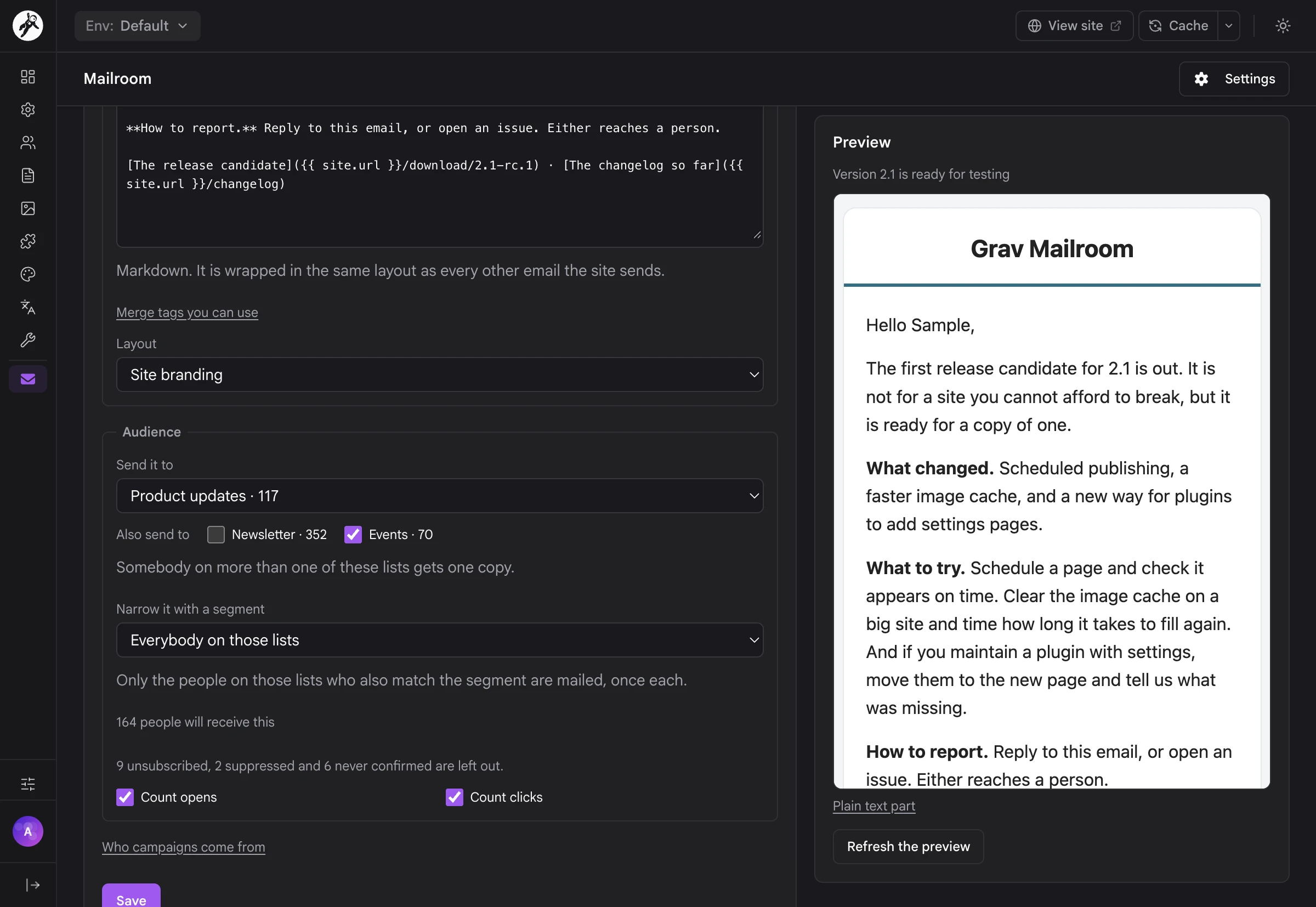
The campaign editor sending to Product updates and Events, with the live preview beside it
01
Markdown with merge tags like {{ subscriber.first_name }}, {{ site.name }} and {{ site.url }}, a live preview through the real layout, and a plain-text part on every email.
02
Templates for the layout and wording you keep retyping. A campaign copies one when it's created and never reads it again, so editing a template never changes what already went out.
03
Several lists, or all of them with a segment: one send and one email per person, however many of the lists they're on. The unsubscribe link takes them off that campaign's lists and leaves their other lists alone.
04
Test two subjects: part of the list gets each subject, and after the wait you choose, everybody else gets the one more people opened.
05
Send a test to any address first. It goes out with [Test] in front of the subject, and nothing is counted.
06
Schedule it or send it now, then pause, resume or cancel while it goes out. A campaign also stops itself when too many sends fail.
07
Send to newcomers: people who joined after a campaign went out can get it later, and nobody is mailed twice.
08
Sending limits so a big list never floods your provider: messages per minute and per batch, set once in the plugin settings.
09
Link tagging with UTM parameters, for the whole site or per campaign.
10
Your own From address, or leave it empty and mail goes out as the Email plugin already sends it.
11
Proper list headers: List-Unsubscribe with one-click unsubscribe (RFC 8058), so the unsubscribe button in people's mail apps just works.

Subscribers & Consent

Who agreed to what, and when

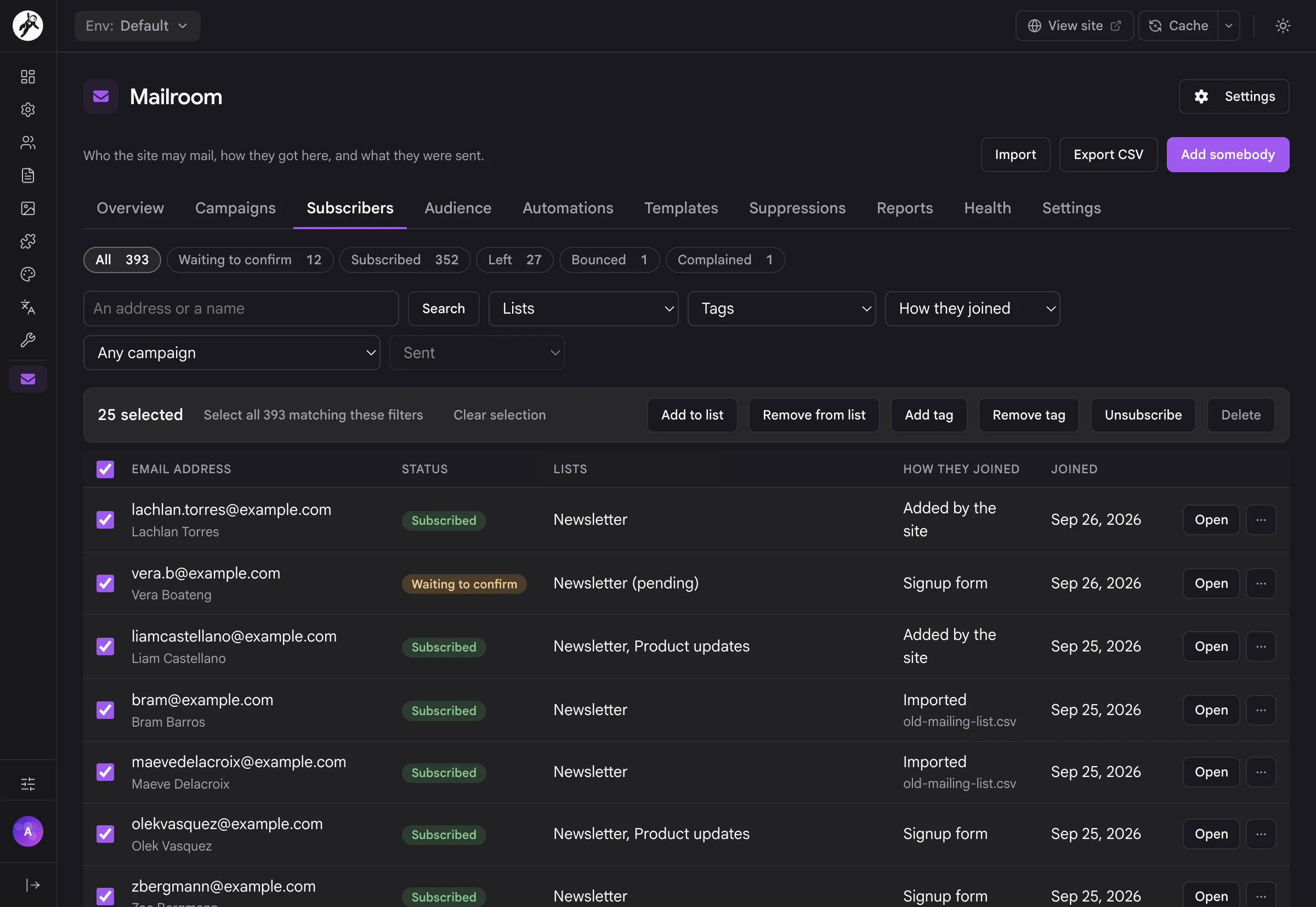
Every person has a page with where they stand on each list, their tags, and a consent history: every signup, confirmation, admin add, unsubscribe and return, with the date, the list, how it happened and where it came from. Change their lists and tags right there. Nothing is ever written over, because each change to somebody's consent is a new row.
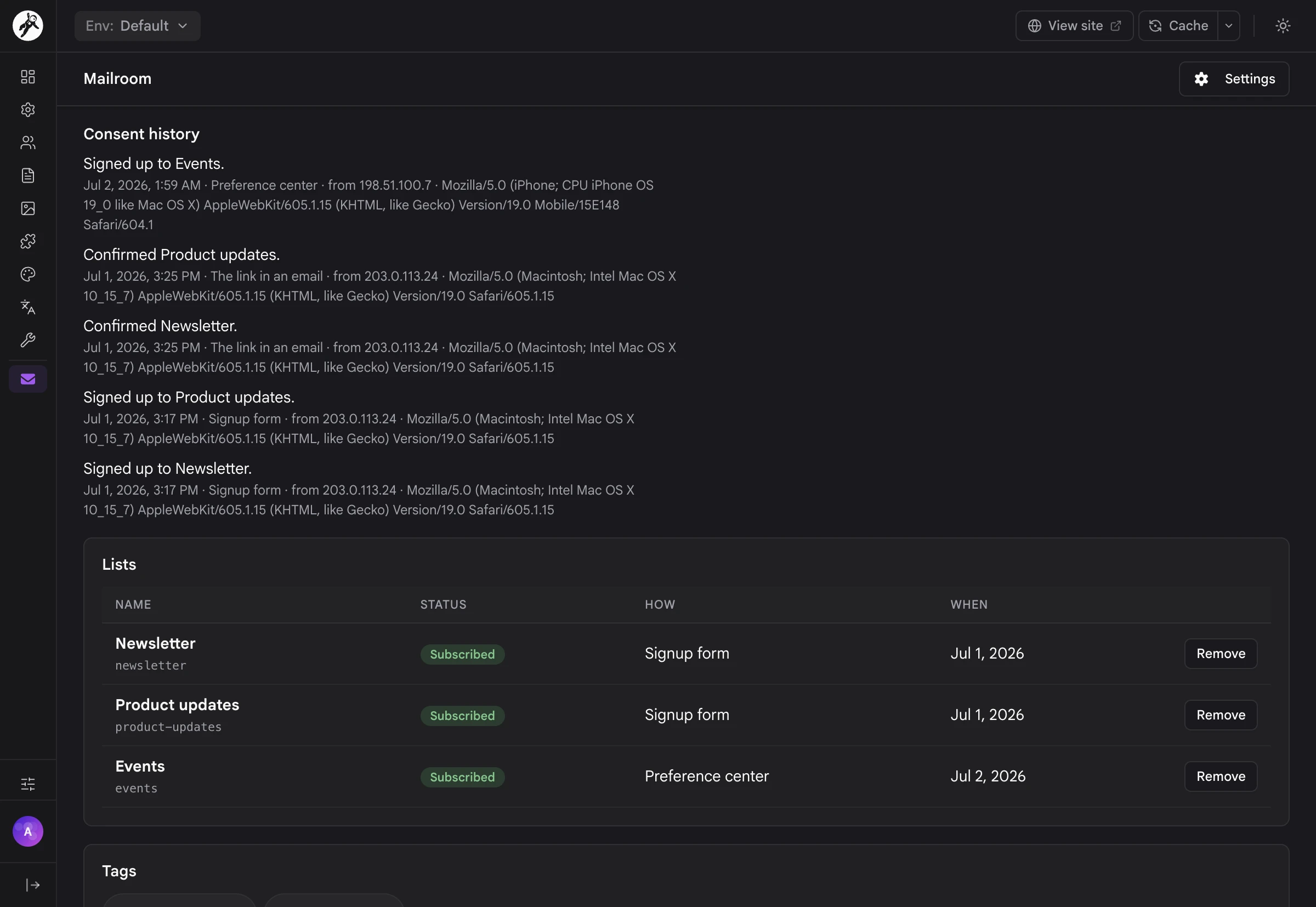
A subscriber's consent history, lists and tags
01
Double opt-in, per list: each list decides whether people confirm by email first, and one confirmation email covers every list waiting on them.
02
Lists people leave one at a time, and tags for what the site noticed about them, like came to a webinar or early adopter.
03
A subscribers table with filters for status, list, tag, how people joined and which campaigns they got, plus a bulk bar: add to a list, take off a list, add or remove a tag, unsubscribe or delete, for a selection or everybody matching the filters.
04
Adding somebody asks how: send them an invite to confirm, or add them as subscribed with a note saying where they agreed. The note goes into their consent history.
05
People who left stay left: nobody who unsubscribed by their own hand is put back by an admin, an import or an automation. Put them back on is the one way back, and it asks how they asked.
06
Suppressions: addresses that are never mailed again, whatever a list or an import says.
07
CSV import with a preview that says how many people would be new, already here, skipped or suppressed, and why, before you press Start. An EmailOctopus export is recognized, and a plain email column needs no mapping at all.
08
CSV export of the subscribers table, with the same filters.

Signup Forms & the Preference Center

A signup box anywhere on your site

Put {{ mailroom_form() }} in a template or a page and you have a signup box, drawn by your theme. Offer more than one list and they become checkboxes, so people choose what they want instead of getting everything. Every email carries a link to the preference center, where they can change their name, pick lists or leave just one.
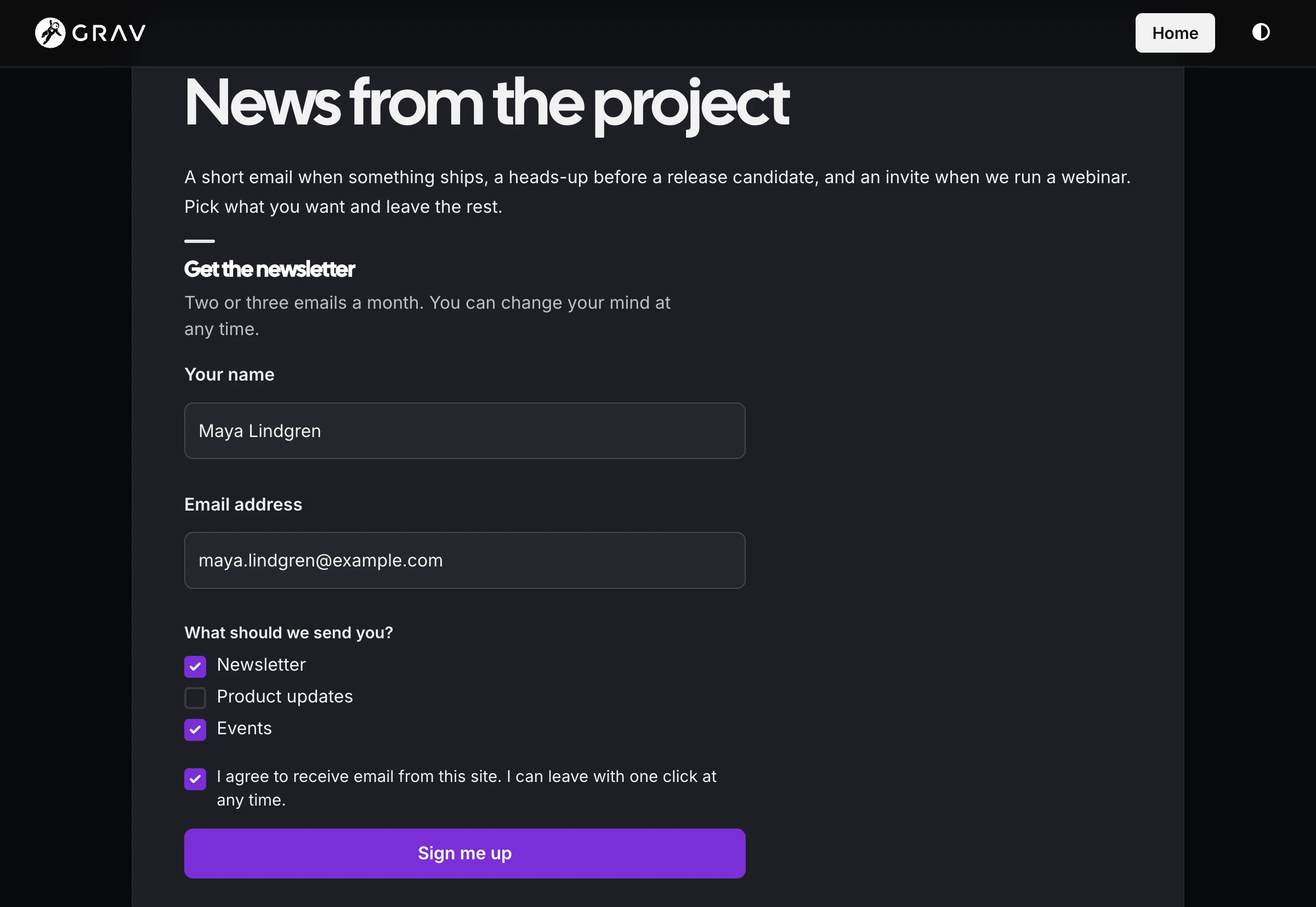
A signup form on the site offering Newsletter, Product updates and Events as checkboxes
01
mailroom_form() with options for the heading, intro, button text, a name field, tags, your own note of where people came from, a consent sentence per form, and the lists to offer.
02
The Form plugin's mailroom action when you'd rather build the signup form yourself.
03
A public subscribe endpoint: POST /newsletter/subscribe takes JSON, so a form on another site or an app can add people too. The answer never says whether an address was already known.
04
Spam protection with a honeypot field, the site's nonce on form posts, and a limit of 10 signups an hour per visitor.
05
Pages that look like your site: confirm, unsubscribe, preferences and the browser view all extend your theme's base template, and every template can be overridden from your theme.
06
Leaving is easy: the link in every email and the one-click button in people's mail apps both work, and nobody needs a password for any of it.
07
Safe from link scanners: somebody an admin invited has to press the confirm button themselves, so a mail scanner that opens every link can't confirm them.
08
Your own address: the public pages live under /newsletter unless you choose another route.

Segments

Ask a question of your list

A segment is a saved question, like people who came to a webinar but aren't early adopters. Build it from conditions in three groups, All of these, Any of these and None of these, and the editor shows how many people match right now, with the first ten by name. Then use it to narrow a campaign or decide who enters an automation.
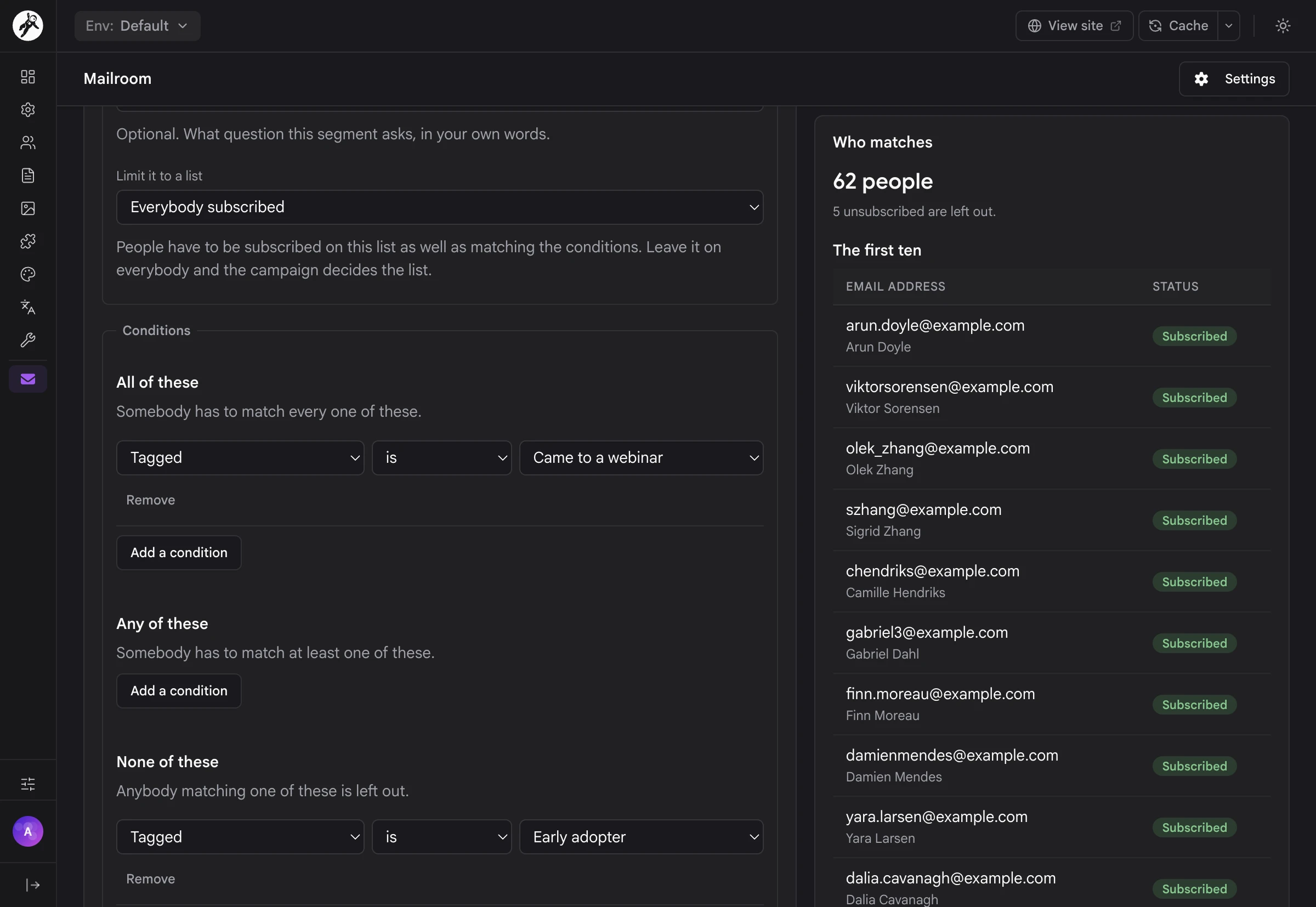
The segment editor with All, Any and None condition groups and the people who match
01
Conditions on the person: their lists, tags, status, when they joined, how they joined and their language.
02
Conditions on what they did: received, opened or clicked a campaign, or haven't opened anything in so many days.
03
Limit a segment to one list, or leave it on everybody and let the campaign decide the list.
04
Counts kept fresh in the background, and a live count in the editor while you change it.
05
segments:count and segments:preview for the same answers on the command line.

Automations

A welcome series that runs itself

Automations send a series of emails when something happens to a person: they sign up, they confirm, or a tag is added. Each step is an email, a wait, a tag change, a list add, or a branch on whether they opened or clicked the last email. The automation's page shows every step with its own numbers, and everybody who has been through it with where they are now.
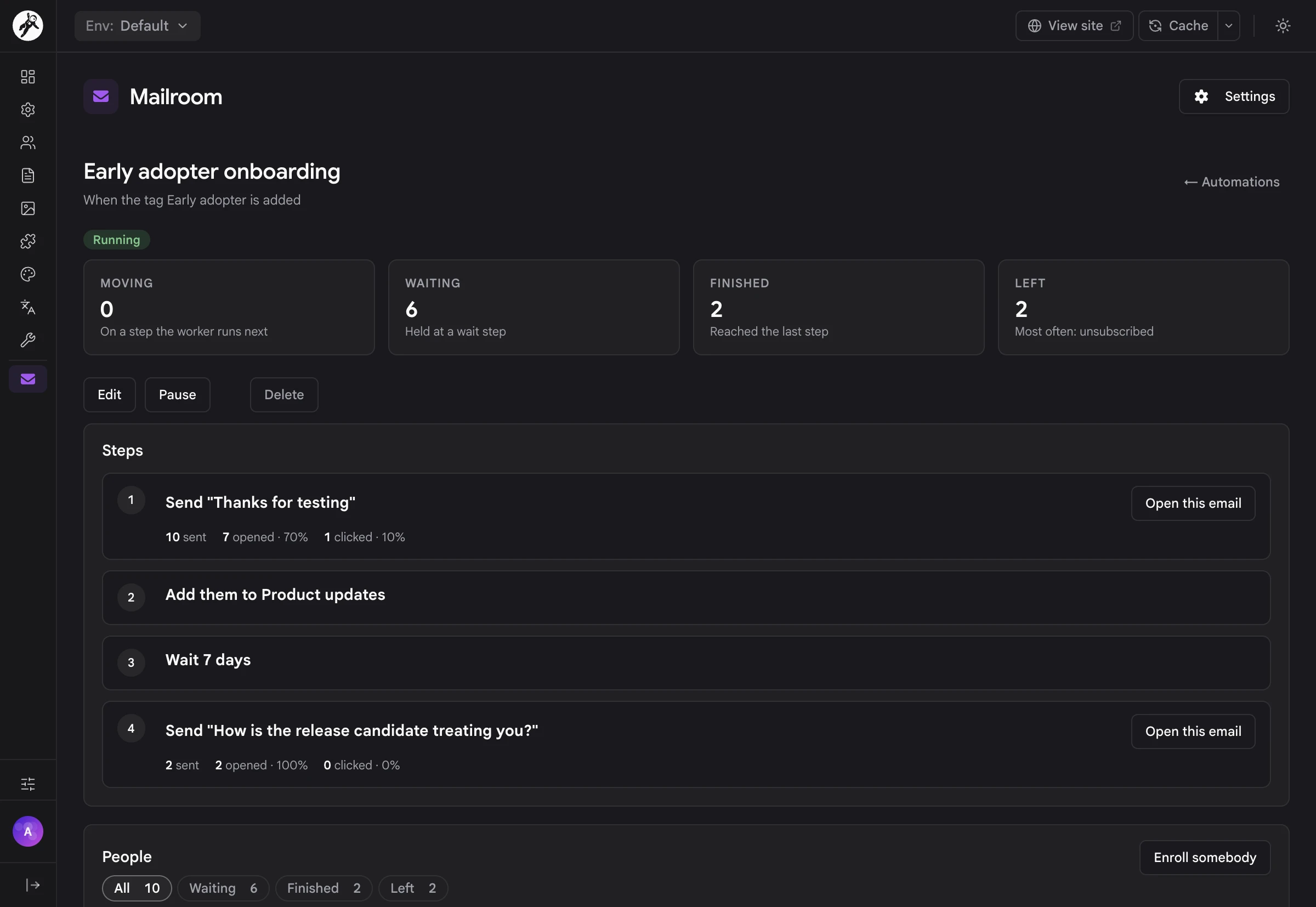
An automation's steps with sent, opened and clicked numbers for each email
01
Three triggers: somebody signs up, somebody confirms, or a tag is added to them.
02
Six kinds of step: send an email, wait (for a time, or until a day and hour), add a tag, remove a tag, add them to a list, and branch on whether they opened or clicked the last email.
03
Who it applies to: only people on one list, only people matching a segment, and whether somebody can go through it more than once.
04
People leave on their own when they unsubscribe, bounce or mark a message as spam. You can also enroll somebody by hand, or take them out.
05
Pause an automation and resume it later.
06
Every step's email gets the same layout, preview and tracking as a campaign.
07
A ready-made welcome series to start from, instead of an empty page.

Tracking & Reports

The numbers stay yours

Opens and clicks are timestamps against a send row in your own database. Mailroom stores no IP address, browser or location for them, and when you move to another mail provider the history stays. Seven reports read those rows over the last 7, 30 or 90 days, this year, all time or your own dates, and every one of them downloads as CSV.
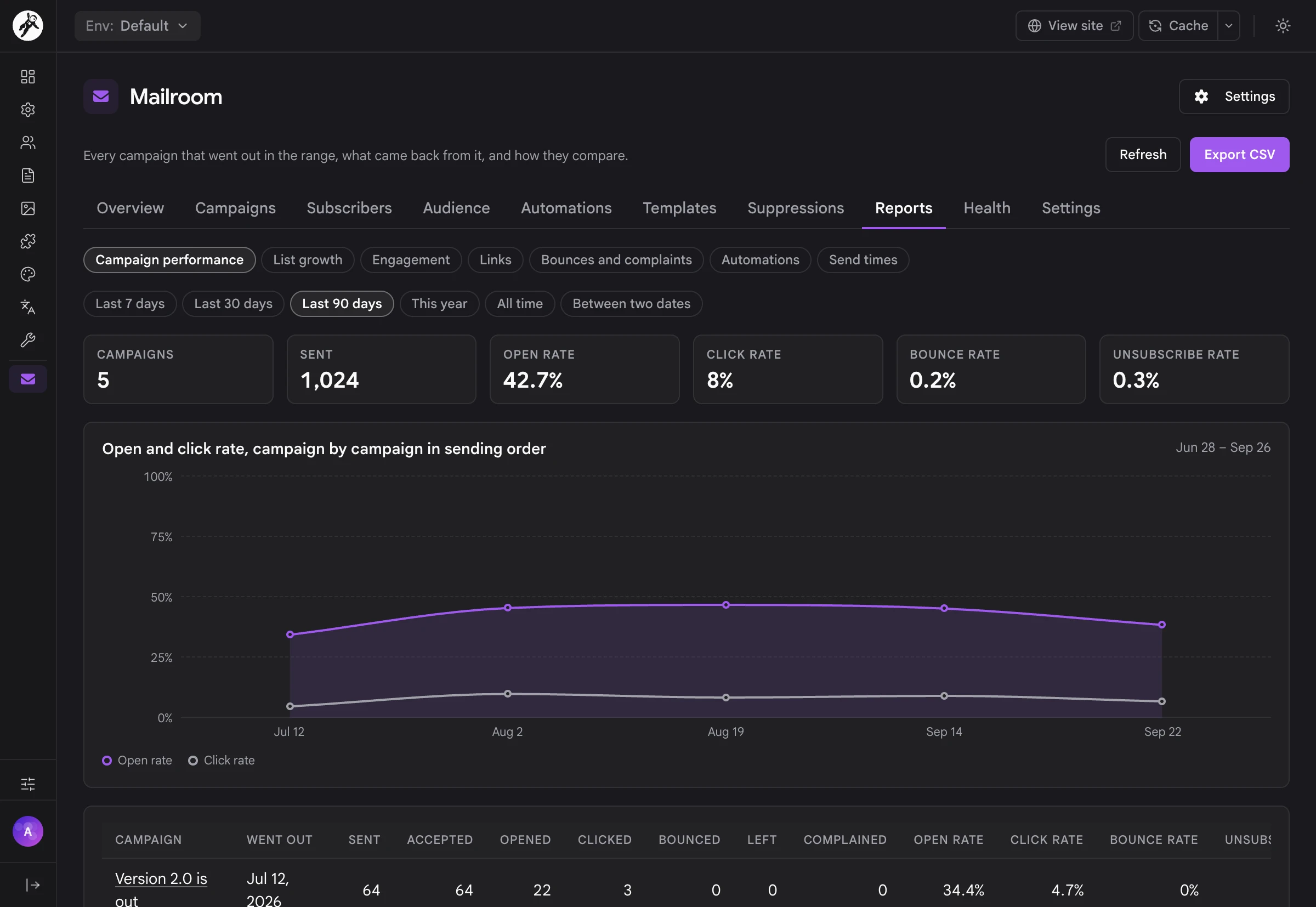
The Campaign performance report over the last 90 days
01
Campaign performance: every campaign in the range with sent, accepted, opened, clicked, bounced, left and complained, and the rates side by side.
02
List growth, Engagement, Links, Bounces and complaints, Automations and Send times, a heatmap of when people actually read your mail.
03
A report on every campaign: the first 48 hours hour by hour, each link with its clicks, and which subject won if you tested two.
04
Tracking you control: switch opens or clicks off per campaign or for the whole site, and old tracking rows are cleared after the number of days you choose.
05
Honest definitions: every figure explains what it counts, and open counts are called a floor, because people who read with images off never count.

Deliverability & Provider Webhooks

Know before the spam folder does

The Health tab checks what the companies receiving your mail will check: your domain's SPF, DKIM and DMARC records, your From address, the plain-text part, your unsubscribe headers, your bounce and complaint rates, your sending speed, your provider webhooks and the queue worker. Any check that needs attention says what it found and what to do about it, in plain words.
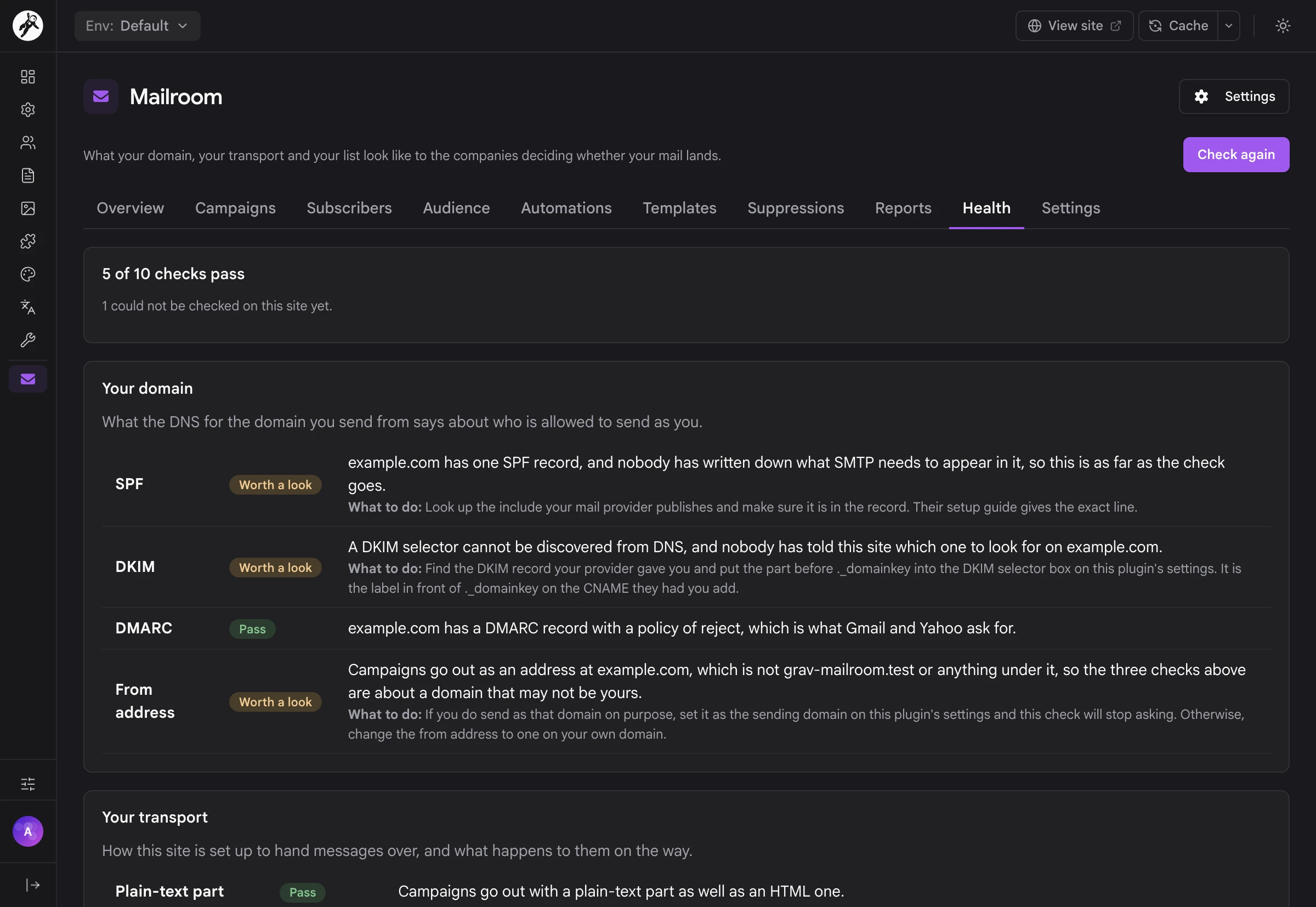
The Health tab checking SPF, DKIM, DMARC and the From address, with what to do about each
01
Ten checks in three groups (your domain, your transport and your list), run again whenever you press Check again, or with deliverability:check.
02
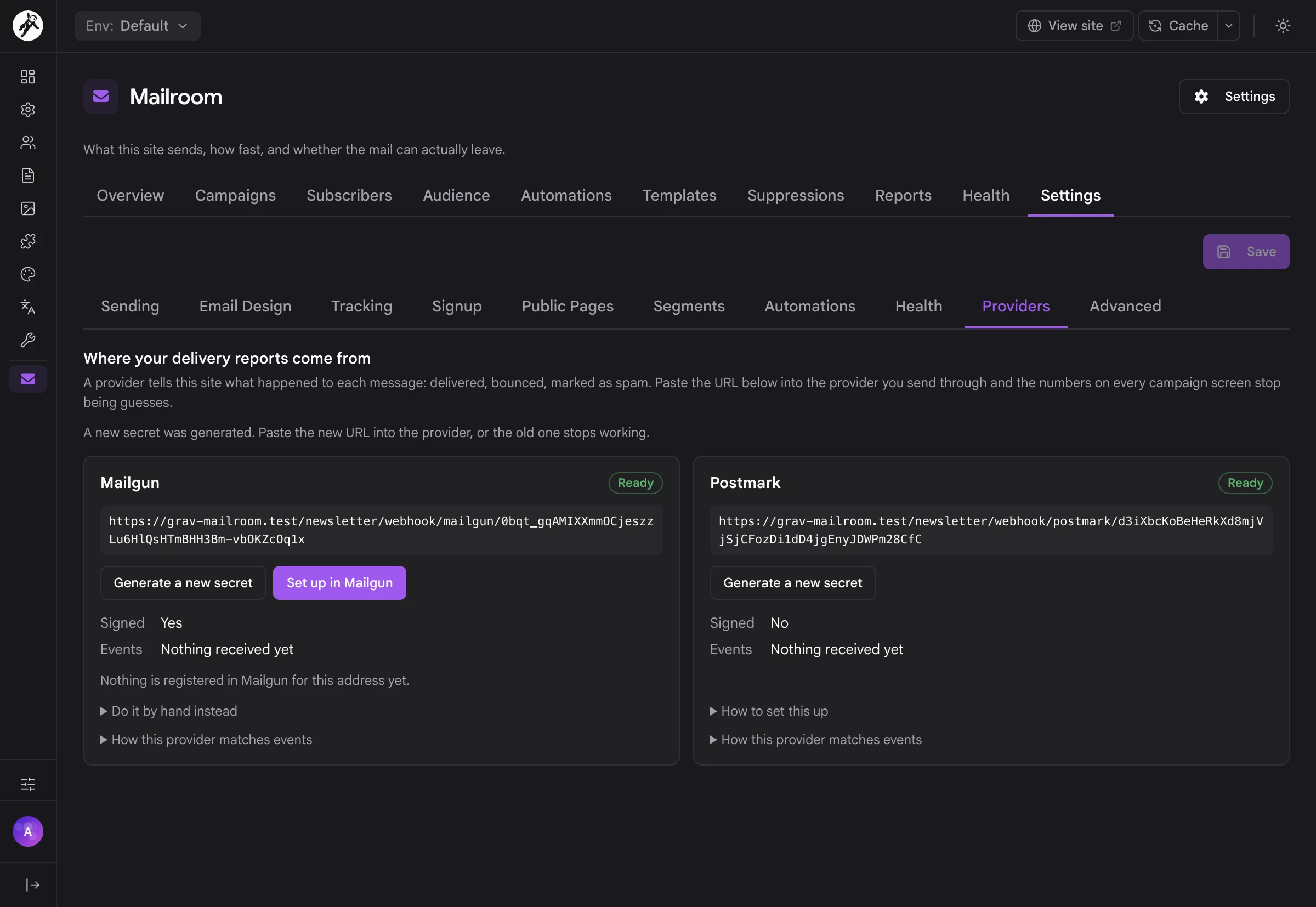
Provider webhooks for deliveries, bounces and complaints from Mailgun, Postmark, SendGrid, Amazon SES, SMTP2GO, MailerSend and Resend, through their Email plugin transports. Generate a secret, paste the address into your provider, and the campaign numbers stop being guesses.
03
Set up for you where the provider allows it: press Set up in Mailgun and Mailroom registers the webhook itself.
04
Bounces and complaints handled: a hard bounce or a complaint suppresses the address, and so do three soft bounces. A webhook the provider sends twice is counted once.
05
Dashboard banners in Admin Next when mail can't leave, a campaign stopped itself, the bounce rate climbs or a webhook goes quiet.
06
webhook:replay to run a stored provider event through again, and see what it would do first.

Privacy & Your Data

Everything you hold about someone

When you run the list, you hold the data, and Mailroom makes it easy to answer for it. A person's page shows when they agreed, from which address, and when they confirmed. Export their data downloads everything Mailroom holds about them as one JSON file. An erasure removes them completely while remembering, as a hash, never to mail that address again.
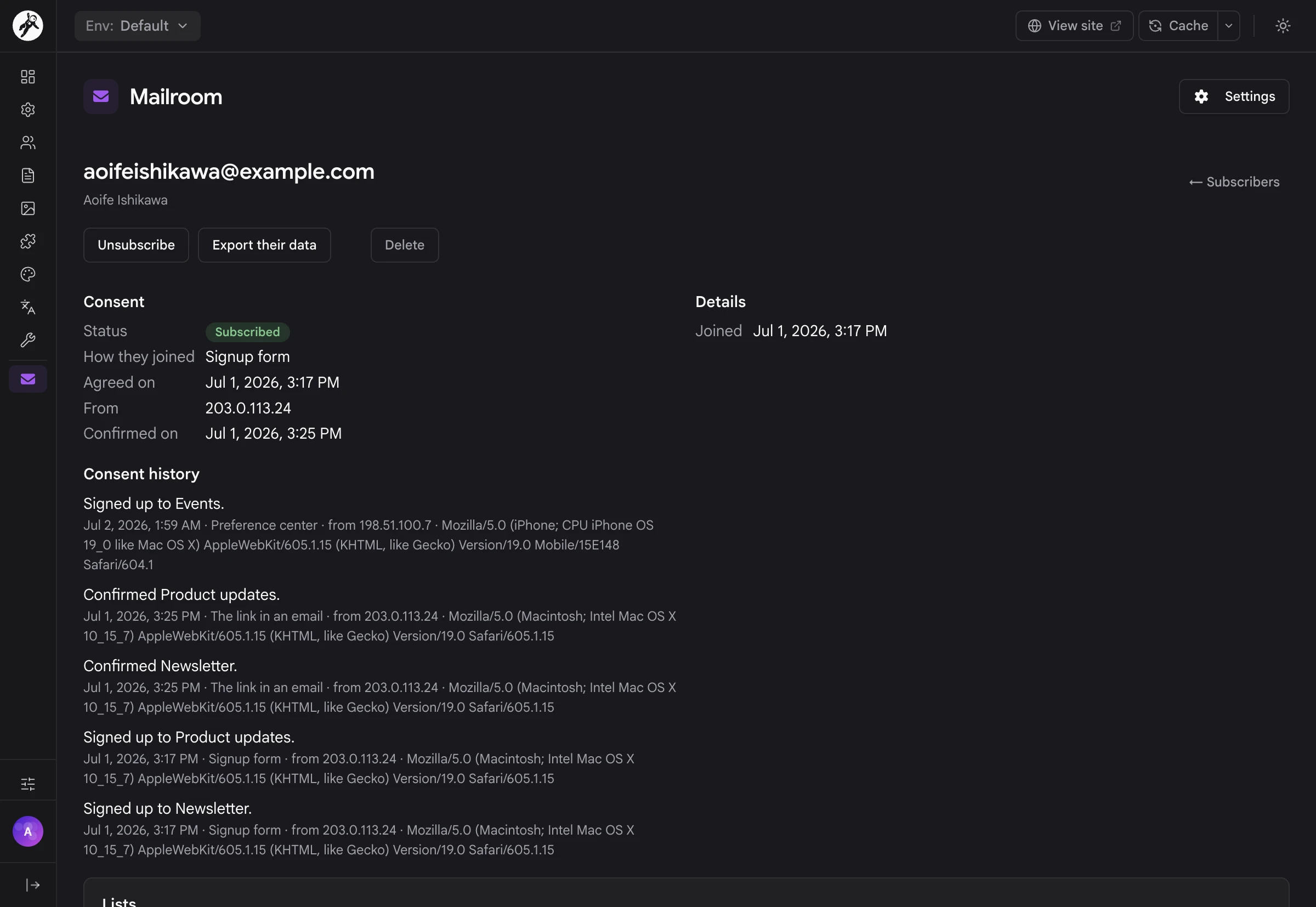
A subscriber's page with Export their data, when they agreed and their consent history
01
Your data stays on your server, in SQLite at user-data://mailroom/mailroom.sqlite by default, or in MySQL or PostgreSQL if you'd rather.
02
Export one person's data: their details, lists, tags, consent history, every message they were sent with its opens and clicks, their automations, what the mail provider reported and any suppression.
03
Erasure with bin/plugin mailroom erase or the API removes a person with their lists, tags, sends, consent history and mail log. The suppression on their address stays as a hash, so somebody who asked never to be mailed stays unmailed.
04
Provider reports without the address: what a mail provider said about a message is kept against a hash of the address, never the address itself.
05
Trusted proxies: consent records and rate limits only believe X-Forwarded-For from a proxy you listed.
06
Links built from your settings, never from a visitor's request, so nobody can make your confirmation emails point somewhere else.

For Developers & AI Agents

Every Mailroom screen in Admin Next is built on Mailroom's own API, so anything you can do there, a script or an AI agent can do too.

01
A REST API under /api/v1/mailroom/ on the Grav API plugin, with the same permissions as the admin.
02
73 MCP tools through grav-mcp, so Claude, Cursor and other AI clients can manage subscribers, write campaigns, build segments and check deliverability with exactly the permissions of their API key.
03
Three permissions: mailroom.view to read, mailroom.manage to change things, and mailroom.send to start a campaign, kept apart because a sent campaign can't be taken back.
04
A command line for status, the worker, migrations, CSV import and export, segments, deliverability checks, webhook replays, erasure and demo data.
05
A demo to look around in: bin/plugin mailroom seed fills an empty Mailroom with three months of a small project's newsletter, and seed --purge removes exactly what it added.
06
Fully translatable: every word your subscribers and your team see comes from the plugin's language files.
Everything that needs looking at, in one place

Everything that needs looking at, in one place

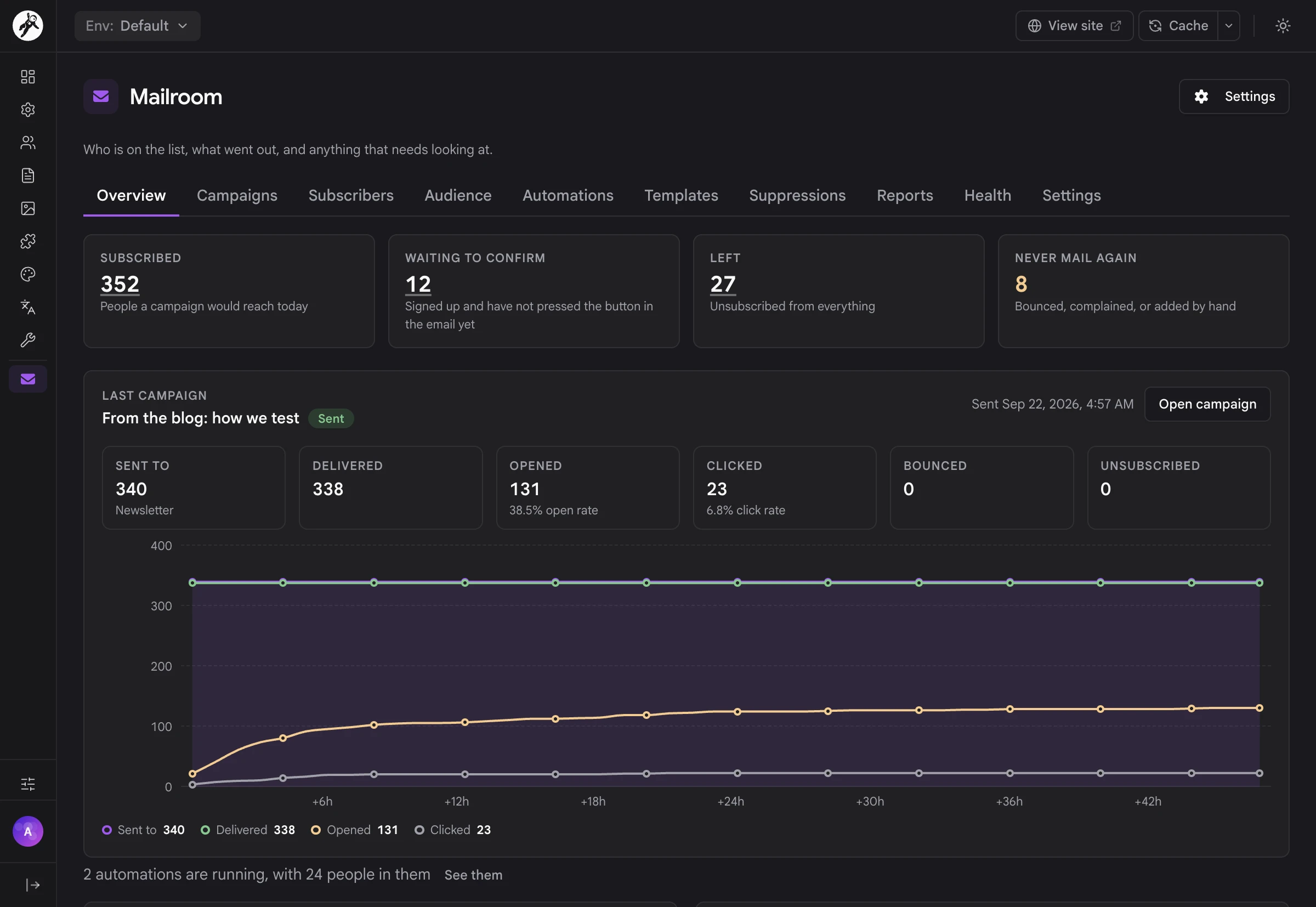
Mailroom opens on an overview: who's subscribed, who's still waiting to confirm, who left, and who will never be mailed again. Under that sits your last campaign, hour by hour, and charts of your recent campaigns and new subscribers. When something is wrong (mail can't leave, a campaign stopped itself, the bounce rate is climbing) it says so right here.

Test two subjects, send the winner

Check Test two subjects and write the other one. Choose how much of the list takes part and how long to wait, and the editor tells you how many people get a subject now and when the rest get the winner. The winner is the subject more people opened (or clicked, on a campaign that isn't counting opens), and the campaign report says which one won.
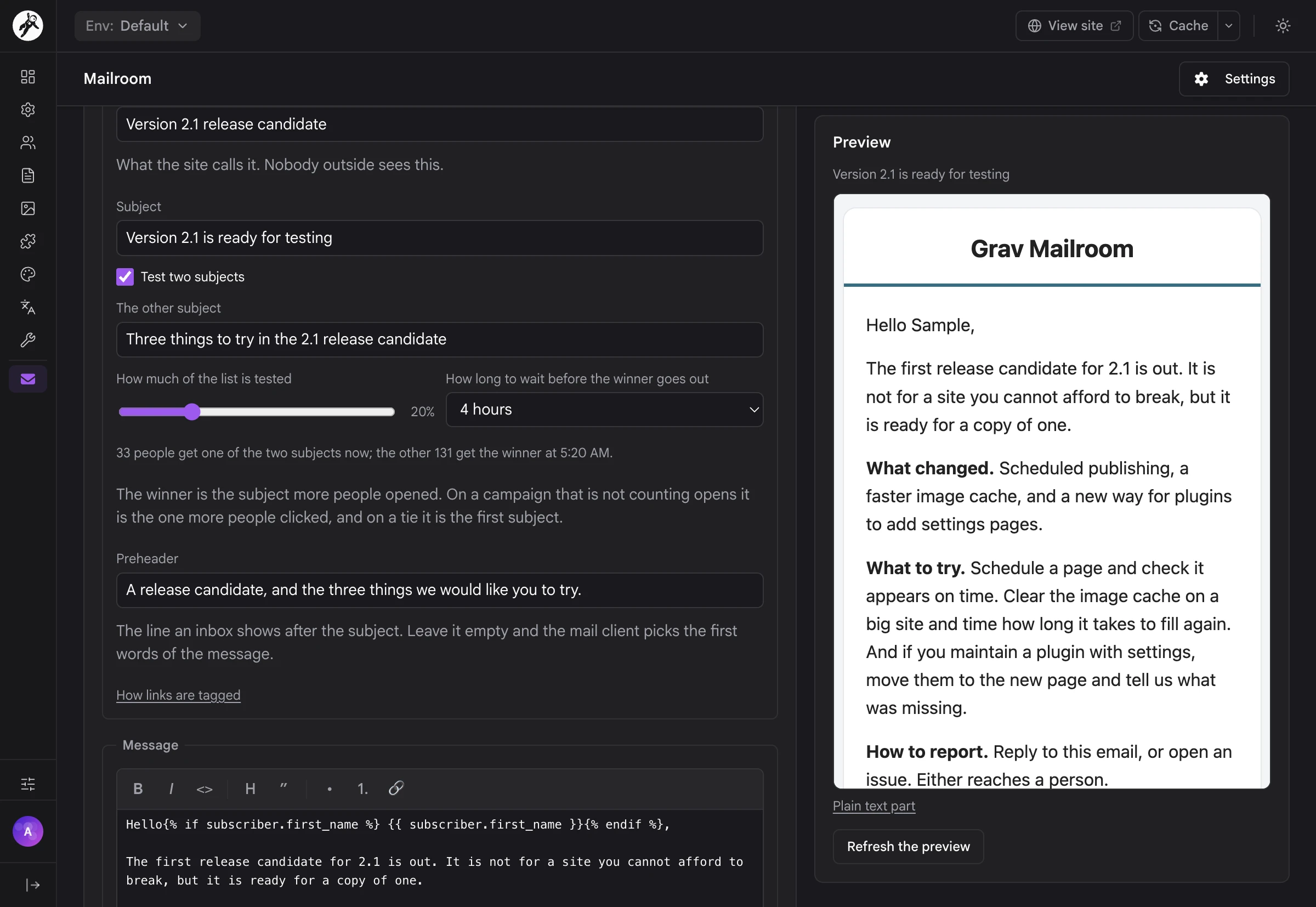
Test two subjects, send the winner
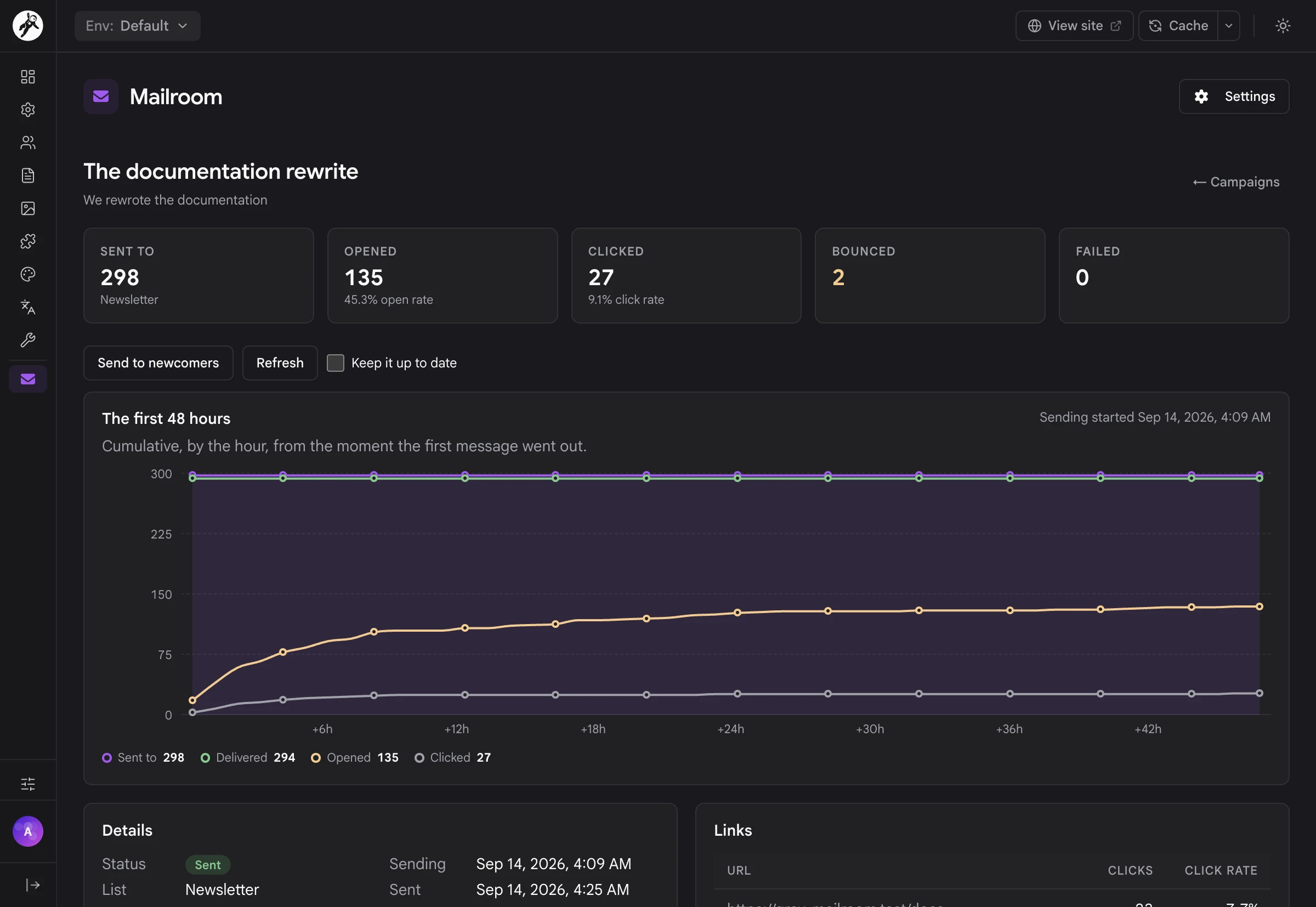
Every campaign, measured

Every campaign, measured

Each campaign has its own report: how many it went to, how many were delivered, opened and clicked, what bounced and what failed. The first 48 hours are drawn hour by hour, so you can see how fast people read it, and every link shows its clicks. With a provider webhook set up, delivered and bounced are what your provider reported, not a guess.

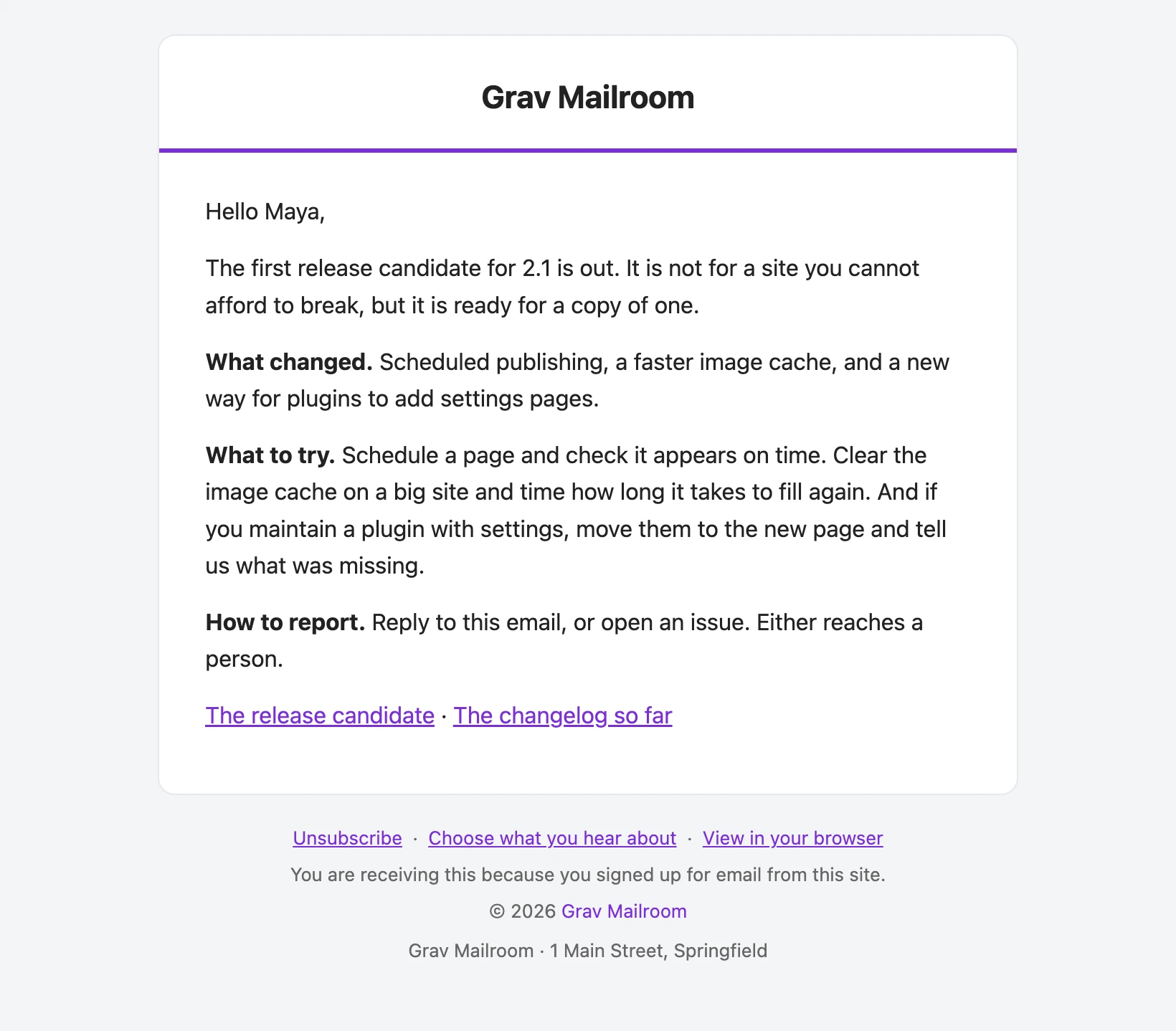
Email in your colors

Every campaign, confirmation and automation email is wrapped in one layout with your logo, accent, background and text colors, a footer line and your postal address. The footer always carries Unsubscribe, Choose what you hear about and View in your browser, and every message has a plain-text part with the same links.
Email in your colors
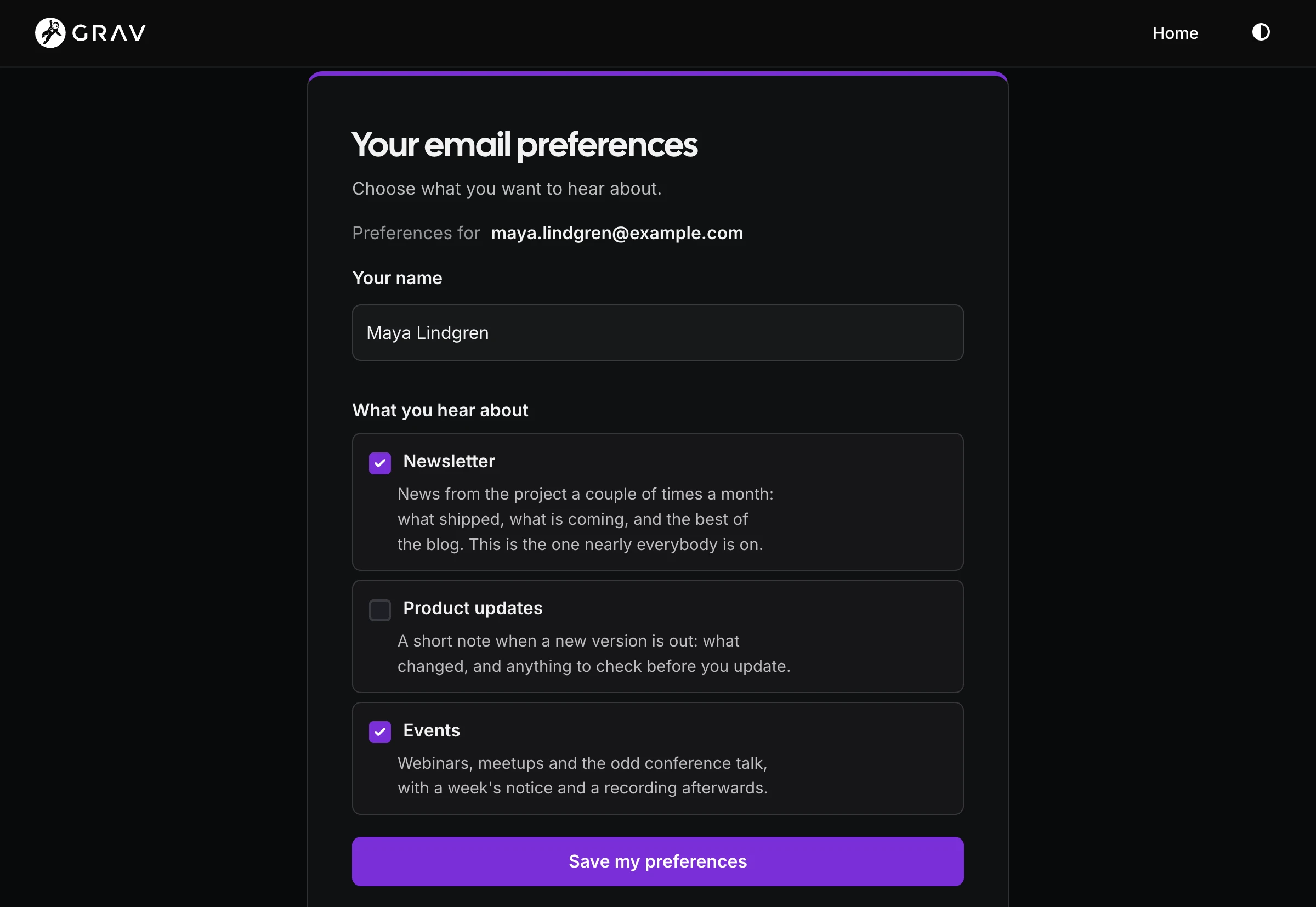
People look after their own lists

People look after their own lists

The preference center is a page on your site, drawn by your theme, where people change their name and choose the lists they want, each with its own description. Nobody needs an account or a password: the link in every email is all it takes. Each change goes into their consent history, just like a signup.

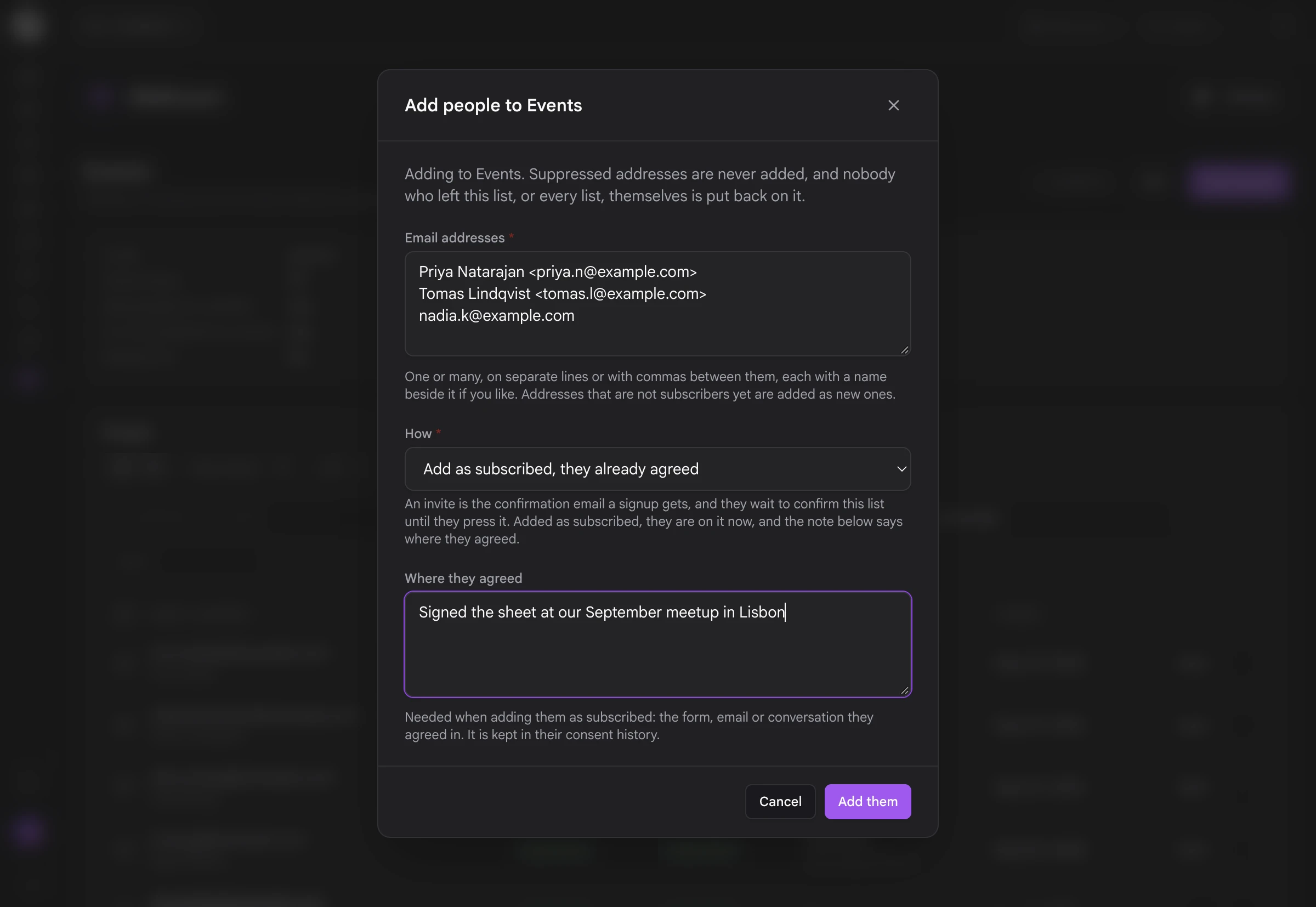
Add people the honest way

Paste in addresses, with names if you like, and Mailroom asks how they're joining: send them an invite to confirm, or add them as subscribed with a note saying where they agreed. Suppressed addresses are never added, and nobody who left the list by their own hand is put back on it.
Add people the honest way

Your newsletter, on your own site

I wanted the newsletter to live where the rest of the site lives. No second dashboard, no list sitting on someone else's servers, and no bill that goes up every time a few hundred people sign up. Mailroom runs on the same host as your Grav site, backs up with it and moves with it. You write in the Admin Next you already use, your subscribers deal with your site and your email address, and the numbers belong to you.

Up and running

  1. Install Mailroom along with the free API and Email plugins, and make sure the Email plugin can send.
  2. Open Mailroom from the Admin Next sidebar. Over HTTPS, that first visit fills in the Site URL every email link starts with, unless you've already set one.
  3. Set a From address on the Sending tab, or leave it empty to send as the Email plugin does.
  4. Put {{ mailroom_form() }} in a template or a page for a signup box.
  5. Add the Grav scheduler to your crontab, and check everything with bin/plugin mailroom status.

Want to look around before you have a list? Run bin/plugin mailroom seed for three months of demo data, and bin/plugin mailroom seed --purge when you're done.

A CLI for the operational side

BASH
bin/plugin mailroom status                # database, worker and sending health
bin/plugin mailroom work                  # run the queue now
bin/plugin mailroom migrate               # set up a MySQL or PostgreSQL database
bin/plugin mailroom import:csv <file>     # import a list (export:csv to get one out)
bin/plugin mailroom segments:count        # count a segment (segments:preview to see who)
bin/plugin mailroom deliverability:check  # run the Health checks
bin/plugin mailroom webhook:replay        # run a stored provider event again
bin/plugin mailroom erase <email>         # forget one address

Full setup and configuration documentation lives on the Learn site.

A peek at sites running Mailroom.

Frequently Asked Questions

The most commonly asked questions about the Mailroom plugin

Is this a one-time purchase or a subscription?

Mailroom is a one-time purchase. You get all future updates and new features for free as long as your license stays active. There's no per-subscriber pricing and no cap on how many people or lists you have, so your newsletter doesn't get more expensive as it grows. Your mail provider still charges for sending, the same as it does today.

Does Mailroom work on Grav 1.7?

No. Mailroom is built for Grav 2 (2.1 or newer) and Admin Next, and it needs the API plugin for its admin screens. If you are still on 1.7, take a look at the Migration chapter on the Learn site.

Do I need a database server?

No. Mailroom stores everything in one SQLite file at user-data://mailroom/mailroom.sqlite, created and migrated the first time it's needed. It backs up and moves with your site like the rest of user/.

If you'd rather keep it in a server database, MySQL and PostgreSQL work too. Choose one on the Advanced tab of the plugin settings and run bin/plugin mailroom migrate.

Which mail services does it work with?

Mailroom sends through the Grav Email plugin, so anything the Email plugin can send through works, from plain SMTP to the transport plugins for the big providers.

Delivery reports, bounces and complaints come back by webhook from Mailgun, Postmark, SendGrid, Amazon SES, SMTP2GO, MailerSend and Resend. Without a webhook everything still sends, you just won't see what the provider did with each message.

Can I bring my list over from another service?

Yes. Export a CSV from where your list lives now and import it on the Subscribers screen, or with bin/plugin mailroom import:csv. Before anything is written, the preview tells you how many people would be new, already here, skipped or suppressed, and why. Say where these people agreed and it's kept in each person's consent history, and nobody who already left is put back.

Do I need cron?

You should add the Grav scheduler to your crontab, because it runs the worker that sends campaigns, moves automations along and retries anything that failed. Confirmation emails go out straight after the signup either way. bin/plugin mailroom status tells you when the worker hasn't run for a while, and prints the exact crontab line for your site.

Do my subscribers need an account?

No. Signing up, confirming, changing preferences and unsubscribing all work from the links in Mailroom's emails. Nobody gets a Grav account, and nobody needs a password.

How does it look with my theme?

The confirm, unsubscribe, preferences and browser view pages extend your theme's base template, so they carry your header, footer and fonts. Mailroom adds a small stylesheet you can switch off, and any of its templates can be overridden from your theme by keeping your own copy under the same name. The signup box works the same way.

Can AI agents run the newsletter?

Yes. Mailroom describes its API as 73 MCP tools, and grav-mcp hands them to Claude, Cursor and other AI clients. A tool can never do more than the API key it runs with, and starting a campaign needs mailroom.send, a permission of its own, so you can let an agent draft without letting it send.

What does Mailroom need to run?

Grav 2.1 or newer, PHP 8.3 with pdo_sqlite (or PDO MySQL or PostgreSQL for a server database), and these free plugins:

  • API 1.0.31 or later, for the admin screens, the REST API and MCP
  • Email 5.1.0 or later, configured and sending

The Form plugin is optional, for a signup on a form of your own.

Can I use Mailroom on multiple sites?

Per the Grav Premium License, you need a license for each site. Development and staging copies of the same site are covered by the same license. Get in touch if you need bulk pricing.

$100 Buy Now

Mailroom Changelog

v1.0.0

2 hours ago

    • First release. A newsletter for any Grav 2 site, with no store behind it: subscribers with a real consent record, lists people can leave one at a time, double opt-in, branded campaigns with subject tests, segments, automations, CSV import and export, provider webhooks for bounces and complaints, deliverability checks, and campaign and audience reports
    • Its own database, set up by itself. SQLite by default at user-data://mailroom/mailroom.sqlite, created and migrated on first use. MySQL and PostgreSQL are supported too, migrated with bin/plugin mailroom migrate (or by themselves with database.auto_migrate: auto). Every table is named mailroom_*. The remembered "schema is up to date" answer is kept against the engine's migration definitions as well as Mailroom's wrappers, so an update that adds a step to one is always looked for. A table a later migration adds is looked for before it is used, so on MySQL or PostgreSQL an unsubscribe, a signup or a send keeps working, and one line in the log says so, until somebody runs the migrate command. While migrations are waiting, the public routes answer 503 with Retry-After rather than an error
    • Public pages under a route base of your choosing, /newsletter by default (and when the setting is left empty, since pages at the site root would sit in front of the site's own): subscribe, confirm, unsubscribe, the preference center, the web view, the open pixel, the click redirect and provider webhooks. The confirm, unsubscribe, preference and message pages extend the theme's base template (pages.base_template, partials/base.html.twig when empty) and carry a small neutral stylesheet that can be switched off. They talk about a site, never a store or an account: the unsubscribe page says only that the emails stop
    • A signup box anywhere: {{ mailroom_form() }} in a theme or a page, or the Form plugin's mailroom action on a form of your own. Signups through the Form plugin count in the same per-visitor limit as the signup route (rate_limits.subscribe, 10 an hour). {{ mailroom_form('newsletter', {lists: ['security', 'events']}) }} offers several lists as checkboxes, under their own names and none checked for them, and signs the person up to the ones they check; the form will not send with none. Each list keeps its own double opt-in and one confirmation email covers them all. A signup through the box, with JavaScript or without, is recorded as form; JSON from elsewhere is api, and a caller may say which with the route's source field. A form's own consent_text is the sentence recorded for the people who sign up through it, carried back signed with the site secret. Mailroom's small stylesheet is on every front-end page (switch it off with pages.builtin_css), so the box is styled wherever it is, with square checkboxes
    • Branded email layout. Every campaign, confirmation and automation email is wrapped in one layout with your logo, accent, background and text colors, footer text and postal address (branding.*). A campaign set to the plain layout, and the text part of every message, still carry the footer text and the postal address. The accent is left empty by default: email is then teal, and the public pages and the signup box take the theme's own accent where it has one (Quark2's), so they match the site
    • A worker that runs itself. bin/plugin mailroom work runs every minute from Grav's scheduler, and the jobs a request queued (a confirmation email after a signup) run straight after its response, so mail goes out before cron is even set up. Daily housekeeping sweeps finished jobs, old tracking rows, stale uploads and the mail log on the retention settings
    • status says when the scheduler is not running. bin/plugin mailroom status no longer calls a site healthy when the worker has not run for more than 15 minutes (or never has), even with nothing waiting, because that means Grav's scheduler is not being called. The warning says to add the scheduler to the crontab and prints the exact line for the site, built by Grav itself the way bin/grav scheduler --install builds it: * * * * * cd <site root>;<php> bin/grav scheduler 1>> /dev/null 2>&1. A confirmation sent by the inline drain after a signup does not count as the worker running
    • Its own mail log. Every message Mailroom hands the Email plugin is logged with who, what, when, and its first open and bounce, and a job that runs twice never sends the same message twice. Addresses in it are kept lower-cased, the way the engine keeps every address, so looking up what one address was sent reads the index
    • Admin API and MCP tools. Every admin screen is a route under /mailroom, every route is an MCP tool (mailroom_*), with three permissions: mailroom.view, mailroom.manage and mailroom.send. POST /mailroom/erase and bin/plugin mailroom erase forget everything about one address, keeping a suppression on it as a hash with the address removed
    • Sends as the Email plugin until you say otherwise. Mailroom's own From name and address are an override: left empty, mail goes out as the Email plugin's From, and the "no From address" banner, the status line and the Health check speak up only when neither has one
    • Dashboard banners in Admin Next for mail that cannot leave, a campaign that stopped itself, no From address anywhere, a transport that strips the unsubscribe header, a segment that could not be counted, a failing deliverability check, a high bounce rate, and webhooks that went quiet or have no secret
    • Command line: migrate, status, work, erase, import:csv, export:csv, segments:count, segments:preview, deliverability:check, webhook:replay and seed, all under bin/plugin mailroom
    • A demo to look around in. bin/plugin mailroom seed fills an empty Mailroom with three months of a small project's newsletter: lists Newsletter, Product updates and Events, tags for people who signed up on the site, came to a webinar or try every release early, four hundred people who joined through the signup form, an import, the admin or the API, seven campaigns with real numbers, four segments and two automations (a welcome series on a confirmed signup, and one on a tag). Nothing is sent, and seed --purge removes exactly what it added
    • A Welcome series of its own. The ready-made Welcome series on the automations screen is two emails about the site (a welcome that says what you send and how often, and a few good places to start three days later), not a shop's, with no purchase exit
    • Mailroom's own names throughout. The admin's heading is Mailroom, and nothing on a Mailroom site talks about a store: no customer record on a subscriber, no checkout or account in the ways somebody joined, and automations that start on a signup, a confirmation or a tag. The signup form's ids are mailroom-1, mailroom-1-email and so on
    • An admin inside Admin Next. Mailroom's own page at /plugin/mailroom in the sidebar, with every screen on its own address (#/campaigns/12, #/settings/sending) so a reload or Back lands where you were: the overview, campaigns and their editor, subscribers, the import, audience and segments, automations, templates, suppressions, reports, health and settings. It is drawn with Admin Next's own colors, borders and controls, so it follows the light and dark themes, and asks before leaving an editor with changes that have not been saved
    • Settings on the Settings screen. The plugin's settings form is drawn inside Mailroom's page, and the admin's own Configure button and /plugins/mailroom go there. The mail transport, queue worker and provider cards on it read Mailroom's own API
    • Trusted proxies. Consent records and rate limits use the visitor's address, read from X-Forwarded-For only when the request came from a proxy listed in security.trusted_proxies, with a port a proxy wrote on a hop (203.0.113.9:5678, [2001:db8::1]:443) taken off. An IPv6 visitor is rate limited by their /64, so one connection cannot take a fresh budget from every address it was handed. Rate-limit keys are stored hashed
    • Subscribers in bulk, and every list on a person. The Subscribers table has a checkbox per row, one for the page and "Select all N matching these filters", with a bar that adds people to a list or takes them off one, adds or removes a tag, unsubscribes or deletes them (POST /mailroom/subscribers/bulk, mailroom.manage, MCP tool mailroom_bulk_subscribers). A subscriber's page shows every list with where they stand on it, an Add to list or Remove beside each, and their tags as chips with a box to add one. A list on the Audience tab opens its own page with its settings, Edit, "Add people" (paste addresses, with names if you like) and its people, and a list or tag count opens the Subscribers table filtered to it, with the filter in its picker and in the address
    • Adding somebody to a list asks how. Every add from the admin ("Add somebody", "Add to list" on a person's page, the bulk bar, a list's "Add people", and the MCP tools mailroom_add_subscriber and mailroom_bulk_subscribers) offers "Send them an invite to confirm" (the ordinary confirmation email; they wait on that list until they press it, and have no consent date until they do) or "Add as subscribed, they already agreed" with a note saying where, kept in their consent history. The default follows the list's "Ask people to confirm". Suppressed addresses are never added, and nobody who left a list, or every list, themselves is put back on it: not by an admin's add, not by the list boxes on their page, and not by an automation's "add to list" step, which skips them and says so in the log. How somebody left stays theirs when an admin later unsubscribes or suppresses them too, and their consent history is read as well. "Put them back on" is the way back for somebody who asked, and it needs a note saying how they asked. A confirmation page for an invite they never asked for (an admin's, or an import's) waits for them to press the button rather than pressing it itself
    • A consent history for every person. Every change to somebody's consent is a row in mailroom_consent_events (migration 0014_consent_events): signing up, confirming, an admin's add or invite with its note, leaving (by the link in a campaign, their mail client's button, the preference center, an admin, a bounce or a complaint), coming back, an import with its file, and an automation putting them on a list, with the admin who did it or the address and browser a person's own change came from. It is kept for as long as they are, drawn under Consent on their page (the newest eight, the rest behind "Show N earlier"), answered by GET /mailroom/subscribers/{id} and the mailroom_get_subscriber tool, and erased with them: bin/plugin mailroom erase and POST /mailroom/erase count it as consent history rows
    • A campaign can go to several lists, or to every list with a segment. Pick the first list in "Send it to" and check the others under "Also send to", or choose "All lists, with a segment" to mail everybody on any list who matches it. Somebody on two of the lists gets one email, and the count under the pickers is worked out the same way. The unsubscribe link, and the unsubscribe button in the mail client, take them off whichever of the campaign's lists they are on and leave their other lists alone. The campaign's page says "Sent to: Newsletter, Events" (or "All lists, matching" the segment), and the performance report names the lists too. A campaign to one list works exactly as before. Migration 0015_campaign_lists adds mailroom_campaign_lists
    • Export one person's data. A subscriber's page has "Export their data", which downloads everything Mailroom holds about that person as <address>-data.json: their details, every list with where they stand on it and when, their tags, the whole consent history, every message they were sent with when it was opened and each link they pressed, their automation walks, what the mail provider reported about them (deliveries, bounces, complaints), any suppression on their address, the import that brought them in, and every row in Mailroom's message log addressed to them. It holds everything an erasure deletes about them, and leaves out their signing secret and anybody else's details. The same document is GET /mailroom/subscribers/{id}/export and the MCP tool mailroom_export_subscriber_data, both needing mailroom.manage, like the CSV export
    • {{ site.name }} and {{ site.url }} merge tags. The editors' lists of merge tags offer them for the site's title and address, and the demo seed writes its copy with them. {{ store.name }} and {{ store.url }} still work and render the same words
    • The segment editor files the subscriber's own fields under Subscriber, rather than under the engine's "Newsletters"
    • Form dialogs name their button. The page hands the admin's form dialog the section's confirmLabel as its submitLabel, so "Add somebody", "Save" and the rest read on the button rather than the admin's default
    • Links in email come from the site's settings, never from a visitor's request. Mailroom has its own Site URL (site_url, on the Public Pages tab), read before Grav's system.custom_base_url. A request's Host header is anybody's to write, so a signup sent with somebody else's Host no longer decides where its confirmation link points. With neither setting, only an admin's own request (an account with mailroom.manage, or a super user) may name the site, and an email the worker would otherwise build with links that go nowhere waits on the queue, costing none of its attempts, until one of the two is set. A dashboard banner, a status line and a Health check say so
    • The Site URL fills itself in. With neither Mailroom's Site URL nor Grav's system.custom_base_url set, the first time an admin who can manage Mailroom (or a super user) opens the Admin Next dashboard or Mailroom's page, the address they came in on is written into site_url, the same way Mailroom's settings are saved, with one line in Grav's log. Only over HTTPS, or plain HTTP on a local site (localhost, .test, .local, a private address), never from the CLI, never from anybody else's request and never over a value that is already there. So most sites never see the banner, and the emails held waiting for it go out on the next worker run rather than sitting out the rest of their wait
    • Provider reports without the address. What a mail provider's webhook said about a message (a delivery, a bounce, a complaint) is kept with the address's hash and without the address itself, in the payload or in the provider's reason text, and an erasure (bin/plugin mailroom erase, POST /mailroom/erase) or the admin's Delete takes them with the person, counted as provider reports. Migration 0016_event_addresses takes the address out of the reports already stored
    • A mail client's unsubscribe button always works. Its request comes from the mail provider's servers, so one with a valid link is not counted against that address's hourly limit; one with a link that does not check out is counted as usual
    • The Health tab watches the worker. Its Transport group has a queue worker line that warns when the worker has not run for 15 minutes while jobs are waiting, from the same run mark status reads, and says to run bin/plugin mailroom status for the crontab line
    • Imports that say what they will do. The import screen shows, before you press Start, how many people would be new, already here, skipped and suppressed against the list you picked, and why; a file headed plain email (or Name, First name and the like) needs no column picked; "Where did these people agree?" (basis on the API, --basis on import:csv) is kept in each person's consent history, the file name when it is empty; and nobody who left a list, or every list, by their own hand is put back by an import
    • A provider's retried webhook counts once. Every provider event carries a key of its own (migration 0017_event_keys), so a webhook the provider sends again, or one replayed with webhook:replay, is recorded once and a single temporary failure is never counted as three soft bounces
    • A signup's answer appears where the person is looking. When the box takes a signup, its fields and button give way to the answer in place, and the answer takes the focus so a screen reader reads it out (it was printed under the button, often out of view). A refusal scrolls into view and leaves the fields to correct
    • The admin reads as one page under its header. The screens under Mailroom's header no longer leave an empty band where a second "Mailroom" heading used to be; the line that says what each screen is for sits right under the header. A table's Open and ⋯ stay on one line. #/health opens the Health tab, the same as #/deliverability
    • Built on the newsletter kit 1.0.3. An automation's trigger and tag steps name the tag ("When the tag Early adopter is added"), not its code. The preference center is "Preference center" in a subscriber's consent history and in how they joined or left a list. Report charts write their dates the way the rest of the admin does ("Jul 12"). The preference center says "Choose what you want to hear about." and the consent box asks you to check it, not tick it. Under "Sent to" a campaign names the lists it went to (or "of 298" while it is still sending) rather than repeating the number, an automation's Left card reads "Most often: marked it as spam", and a webhook address wraps where its line is full