Helpdesk Pro
A complete helpdesk, running inside your Grav site
Helpdesk Pro is a helpdesk and request tracker that runs inside your own Grav site. Your team works tickets in Admin Next, your clients follow their requests in a client portal on your site, and your knowledge base is ordinary Grav pages you already know how to write. Every ticket, reply and file sits in a database you own, on your server, and backs up with the rest of your site. There's no per-agent monthly bill, so adding a colleague to the desk costs nothing. Clients never need a password: they sign in with a link we email them, or just reply to our emails, because email works both ways. Replies, new requests and follow-ups arrive by webhook from your mail provider or from an IMAP mailbox, thread onto the right ticket, and go back out as clean, branded email that reads like it came from a person.
Already a customer? Sign in to your licenses
Helpdesk Pro is built for Grav 2 and requires the free API, Login, Email and Form plugins. It is not compatible with Grav 1.7.
Everything you need. Nothing you don’t.
Over 85 distinct features and integrations, out of the box.
The Staff Desk
Run the whole desk from the keyboard
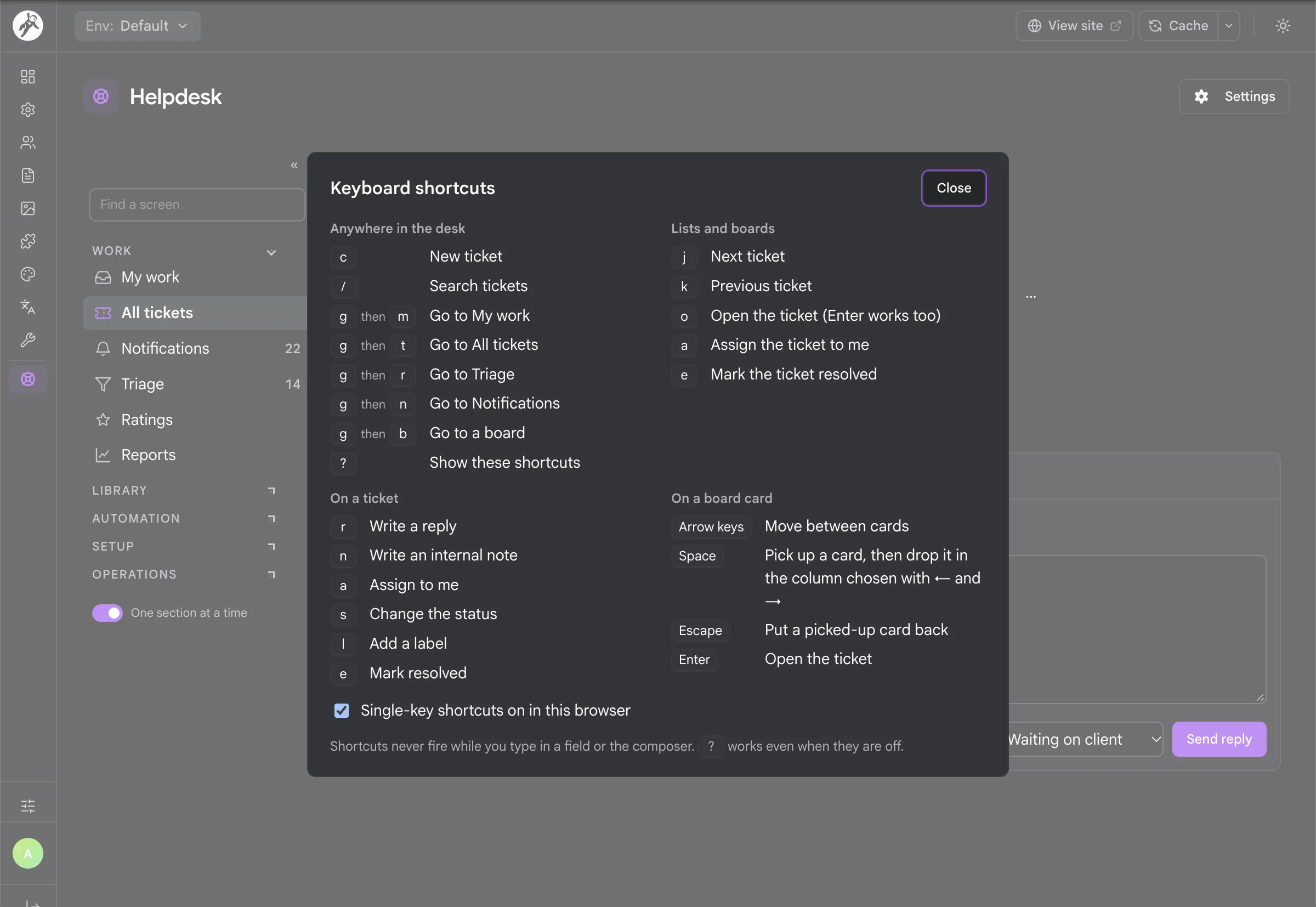
Your team works tickets inside Admin Next, and every screen has its own address, so a filtered list, a board or a ticket is a link you can bookmark or send to a colleague. Press ? anywhere for the shortcut sheet shown here: c starts a new ticket, / jumps to search, g and a letter moves between My work, All tickets, Triage and Notifications, and r or n opens a reply or a note. Shortcuts never fire while you type, and single keys can be turned off per browser.
{{client.first_name | there}}, personal or shared, plus saved views and bulk edit of up to 200 tickets at once.
c for a new ticket, / to search, j and k in lists, r to reply, n for a note, ? for the full sheet) that never fire while you type and never clash with Admin Next's own keys.
Email In and Out
Test an email before a real one arrives
Most people who write to a helpdesk just want to use their mail app, so Helpdesk Pro lets them and keeps every conversation on the right ticket. The Email screen shows how mail reaches the desk and when the last message came in. Try an email takes a pasted message and runs it through the same checks a real one gets: the loop guard, who sent it, which ticket it belongs on, and what is left once the signature and quoted history are trimmed. Nothing is saved and nobody is emailed.
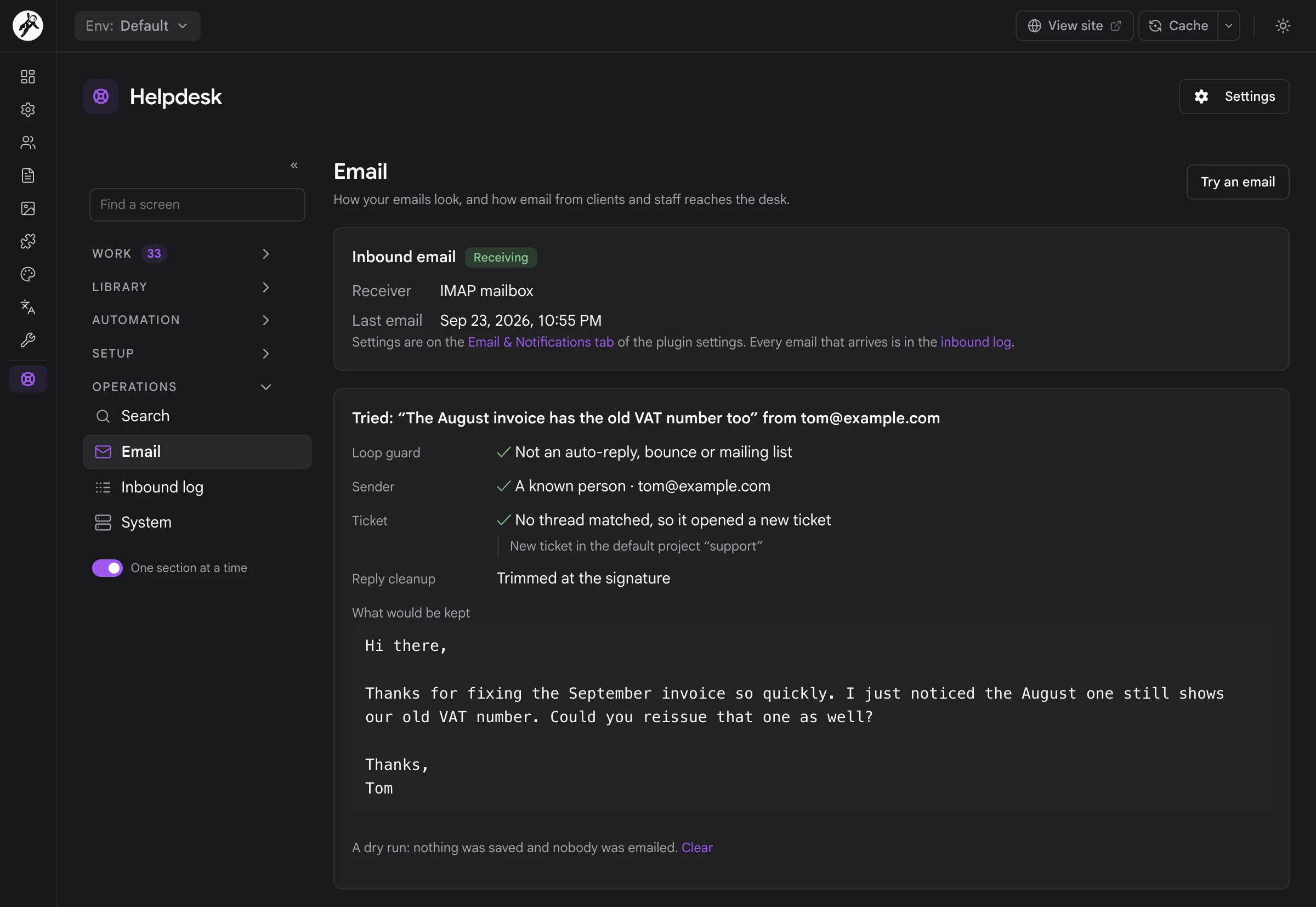
support+t…@), or a hidden signed reference, and only when the sender is allowed to add to that ticket. A staff member's reply by email posts as them, and a reply to a note email becomes a note.
Auto-Submitted and X-Auto-Response-Suppress, all sent through whatever engine your Email plugin already uses.
The Client Portal
A request form that tries to answer first
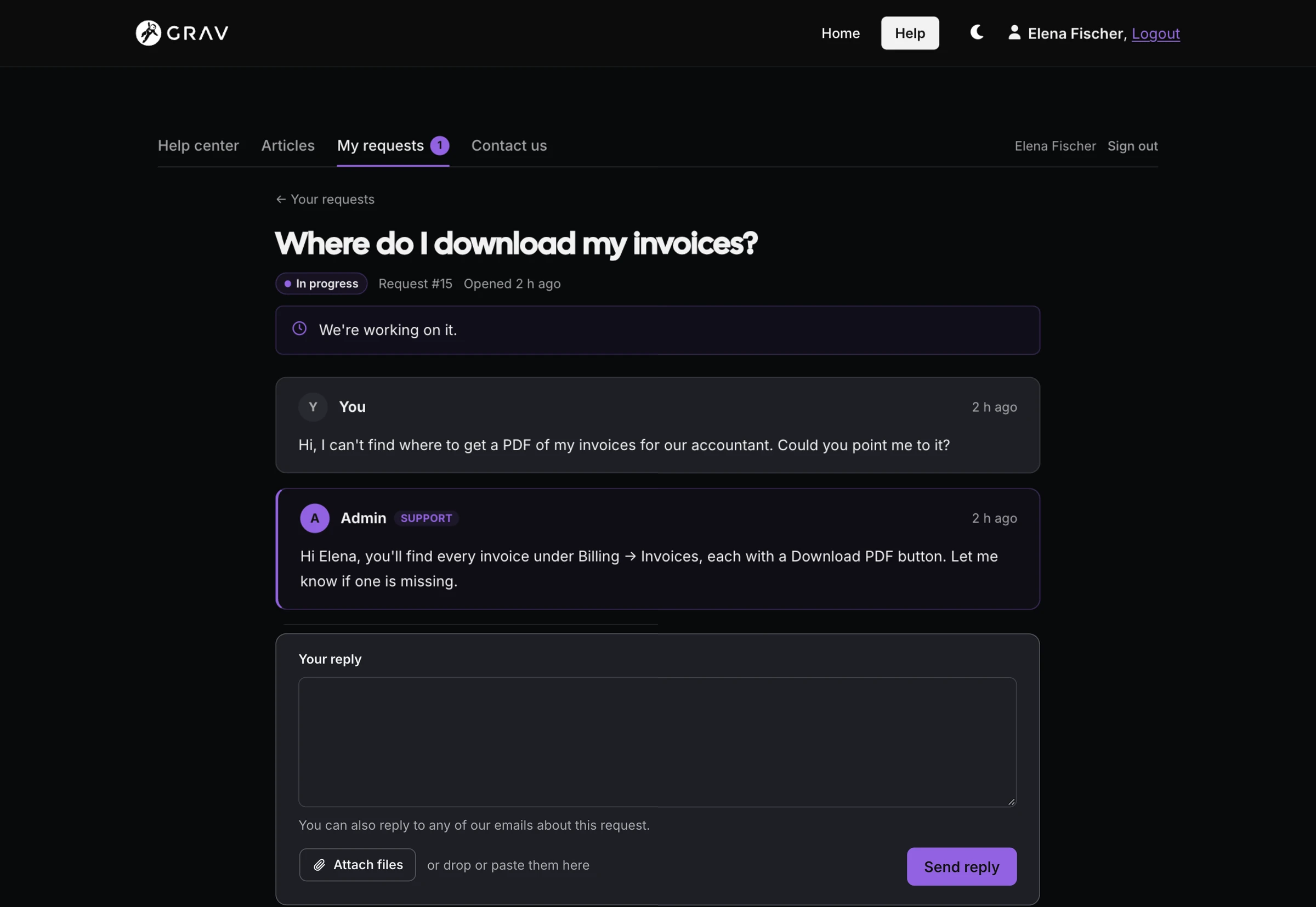
The portal is a page on your own site, at /help or wherever you put it, drawn by your theme and written for people who aren't technical. Guests write in with the request form: their name and email, a short summary and the message, any custom fields you ask for, and files dropped in. As they type, the form suggests help articles that match, so plenty of questions are answered before a ticket exists. Nobody sets a password: the email that confirms the request carries a link to follow it.
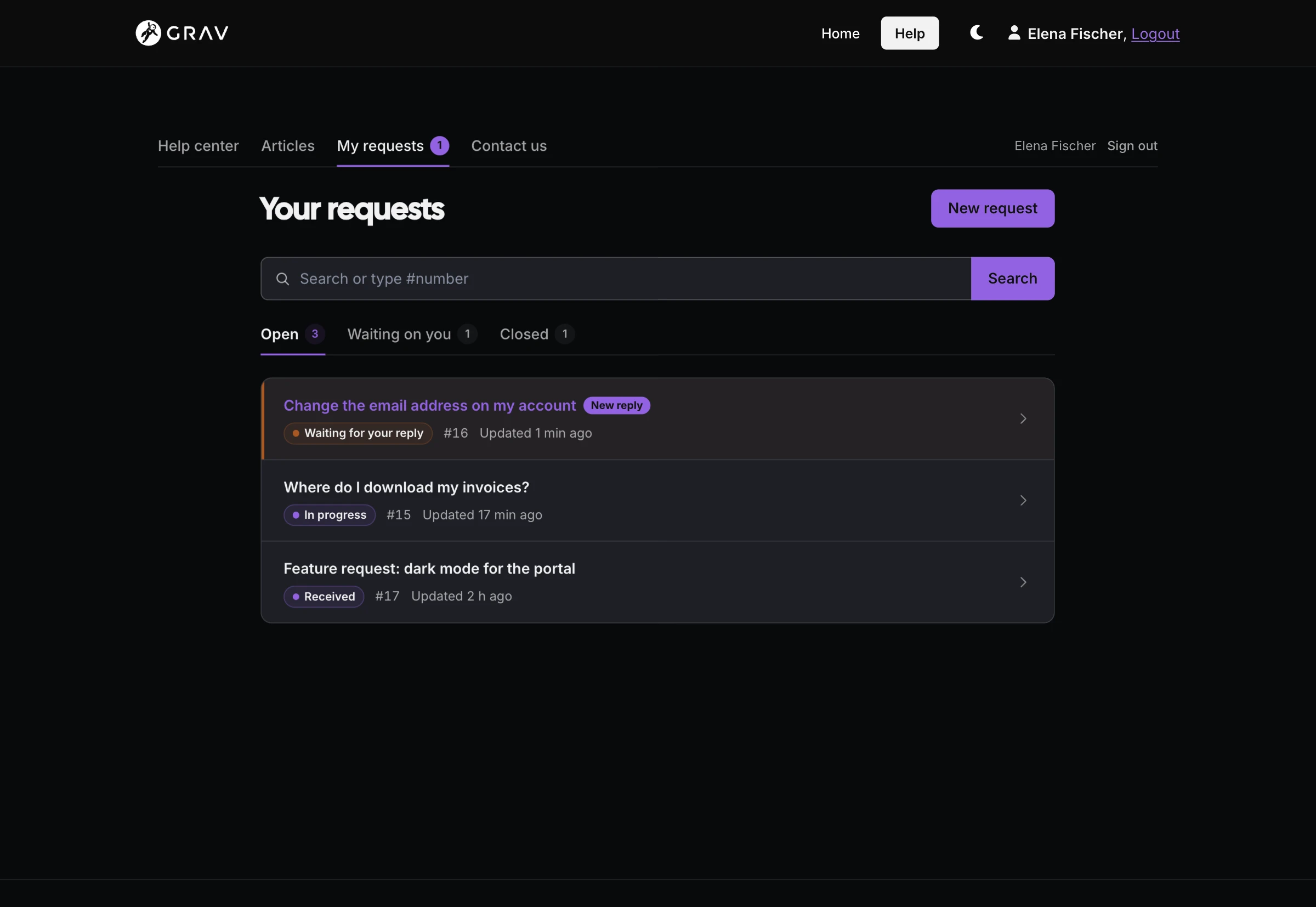
--helpdesk-* custom properties that follow your theme's Pico variables when it has them, in light and dark mode and at phone width. Every template can be overridden from your theme.
helpdesk_url(), helpdesk_ticket_form(), helpdesk_my_requests() and helpdesk_nav().
Knowledge Base & Search
Search that knows what people mean
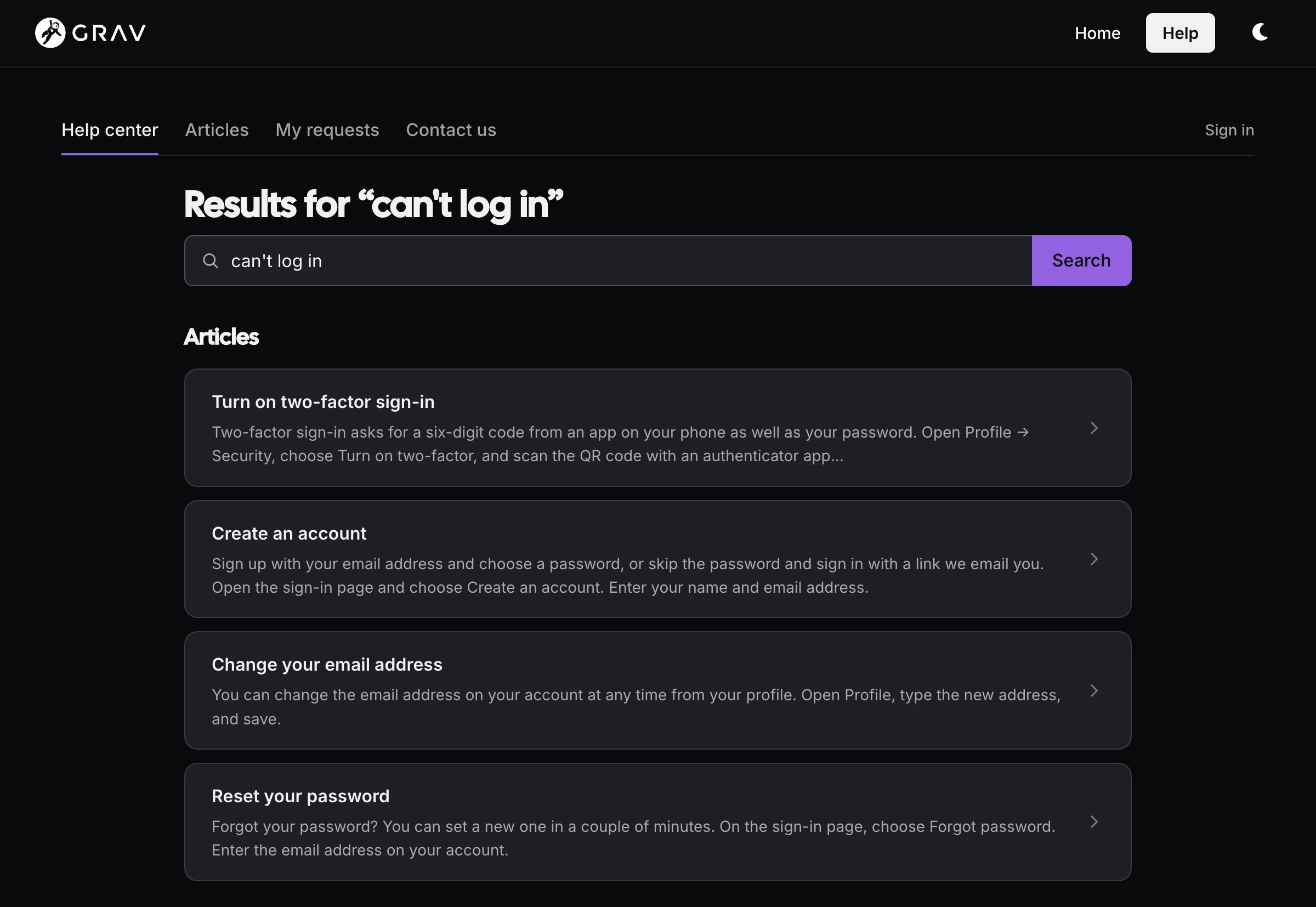
People rarely search with the words your articles use, and they don't have to. Here the help center answers can't log in with articles about signing in, thanks to a synonym list and typo correction on the bundled YetiSearch index, which holds tickets and articles together and needs nothing extra installed or running. Every result respects who is asking, so a guest only finds public articles. When nothing fits, Still stuck? opens the request form with their search already filled in.
Rules, Macros & SLA
Saved replies that also do the busywork
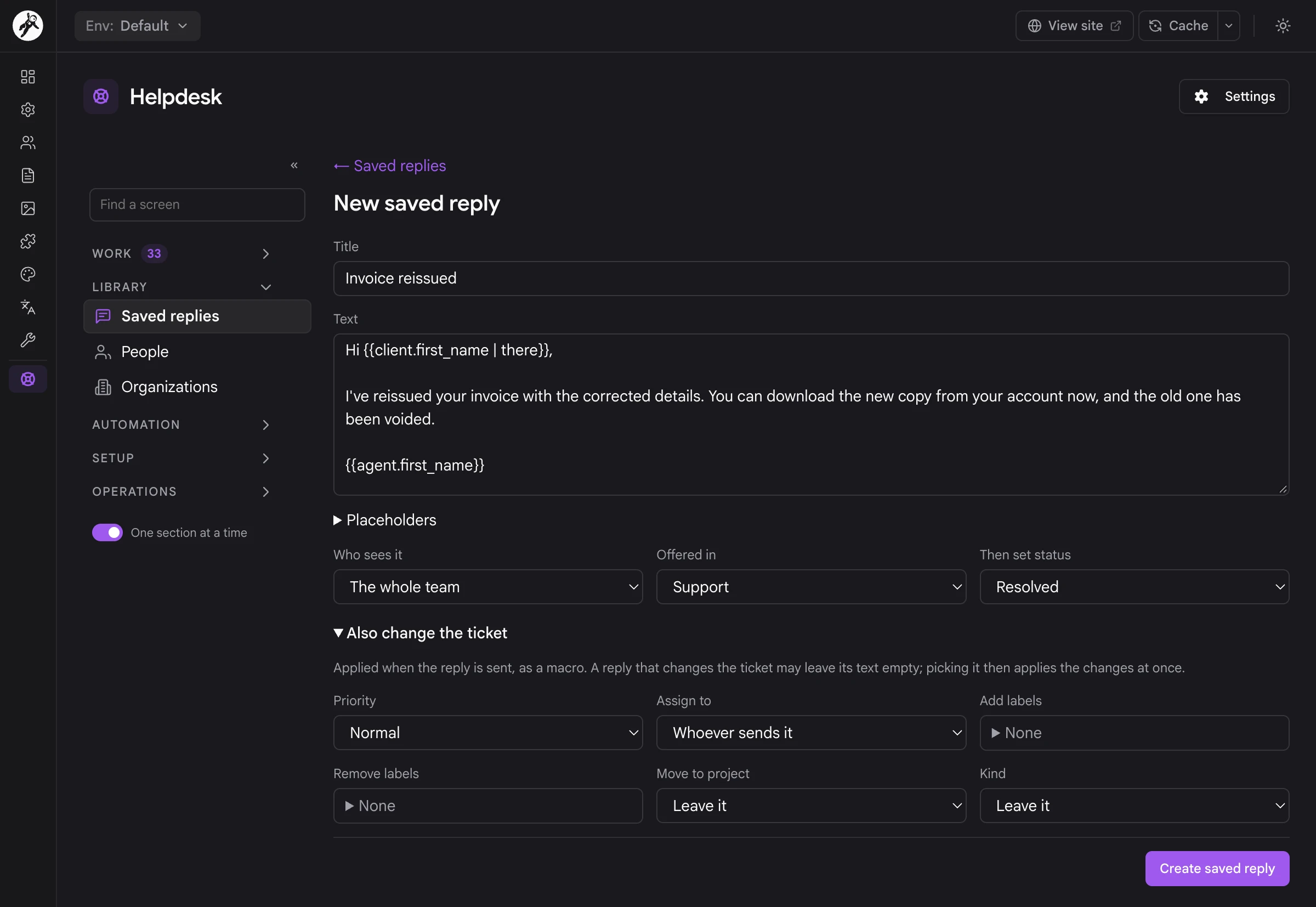
Rules and SLA targets run in the background, and saved replies speed up the part people still do by hand. A saved reply fills in names and ticket details through placeholders like {{client.first_name | there}}, stays yours or is shared with the team, and can be offered in one project only. Open Also change the ticket and it becomes a macro: sending it can set the status and priority, assign the ticket to whoever sends it, add or remove labels, move it to another project and change its kind.
Notifications & Live Updates
Staff hear about what matters to them without drowning in email, and the whole team can follow along in the tools it already watches.
Clients, Organizations & Custom Fields
The details your business runs on
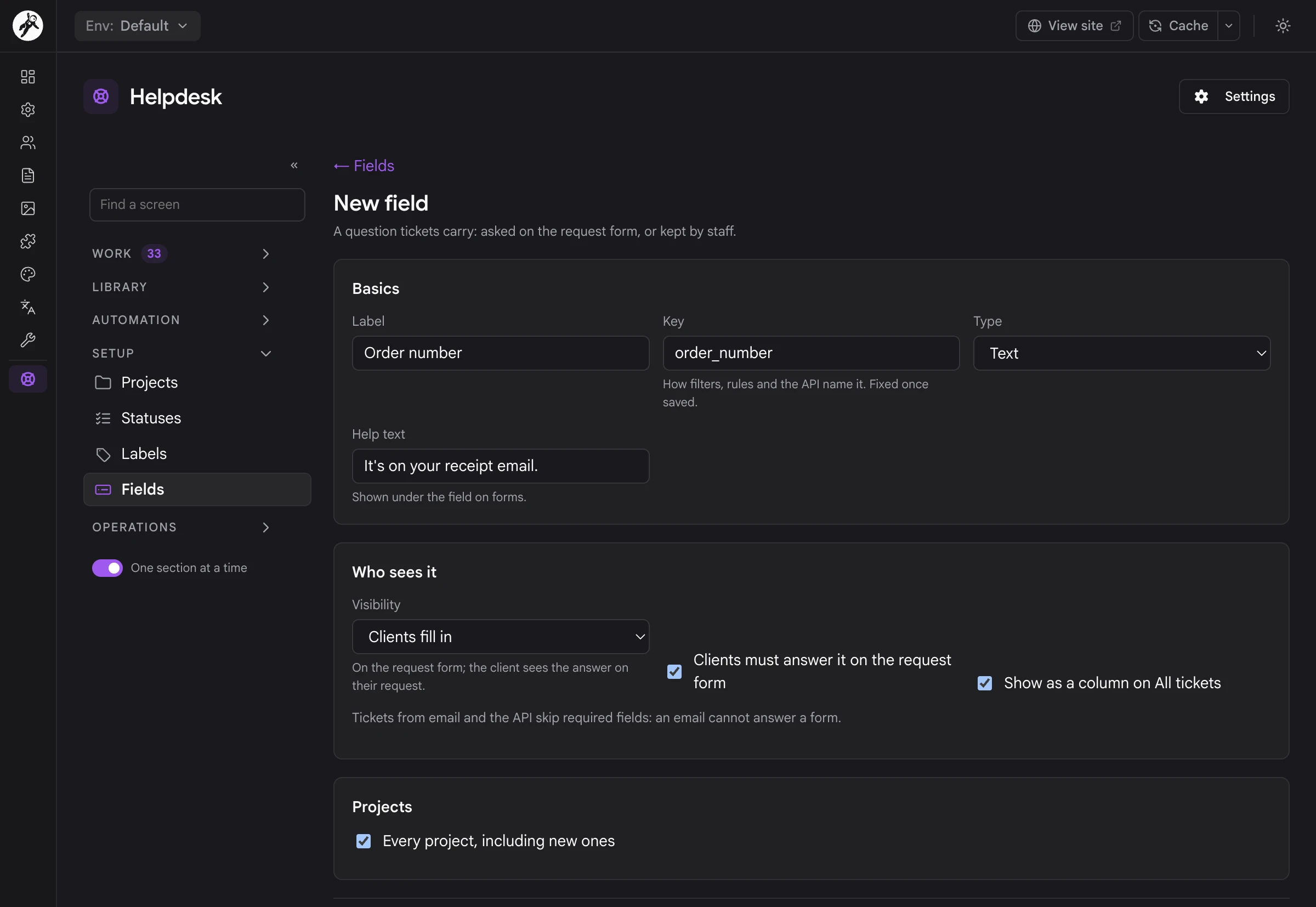
Know who you're talking to, which company they're with, and the details that matter to your business. Custom fields add questions like an order number or a plan, in nine types from text and dates to select lists. Each field decides who sees it: clients fill it in on the request form, clients can only read it, or it stays with staff. A field can be required, shown as a column on All tickets and limited to some projects, and filters, rules and the API all find it by its key.
Reports & Satisfaction
Know how the desk is really doing
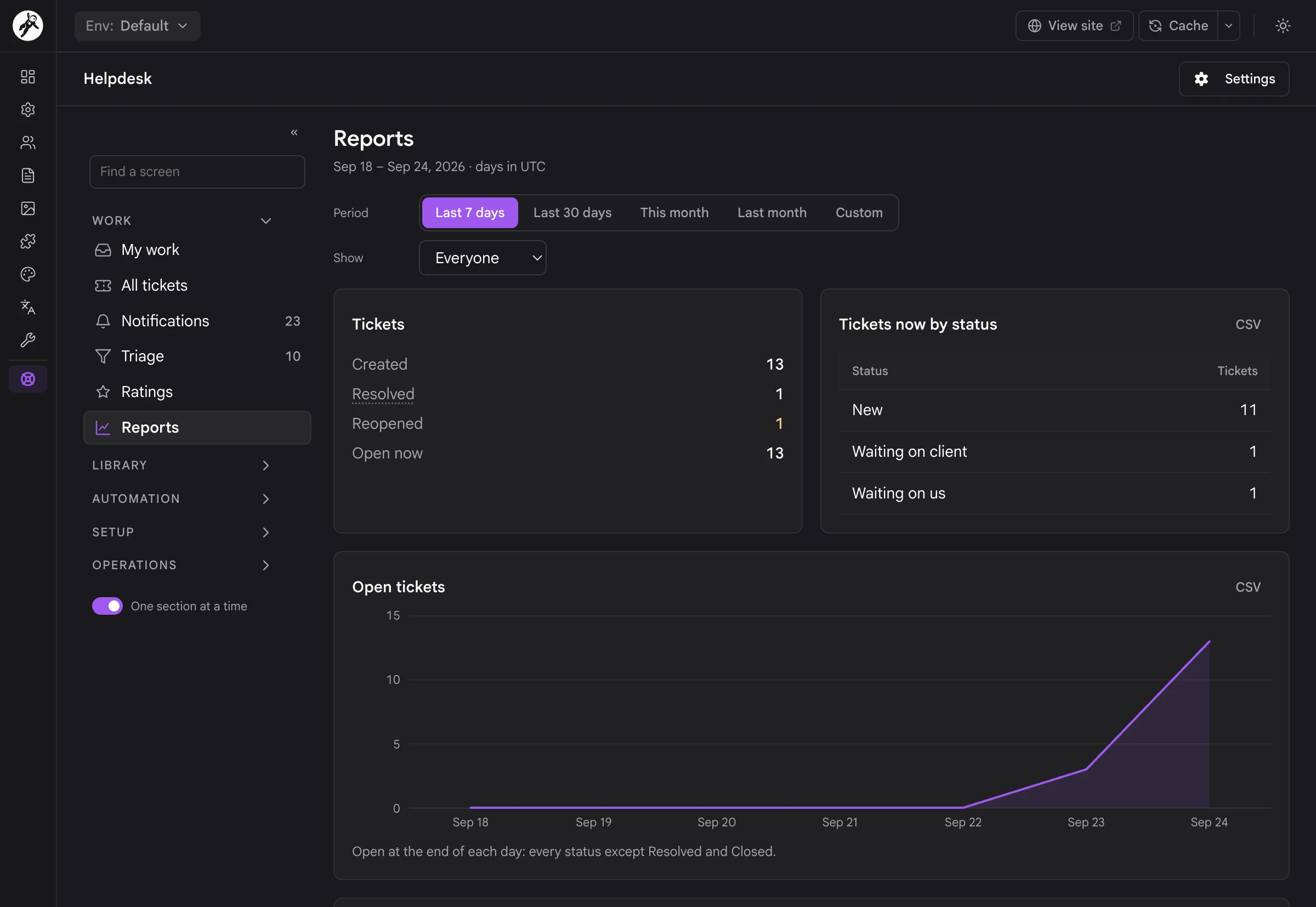
Reports are counted from what every ticket already records, so they cover your whole history from the first ticket, with nothing to switch on. Choose the last 7 or 30 days, this month, last month or your own range, for one project or all of them, for everyone or one person. Then read tickets created, resolved and reopened, the open backlog day by day, reply and resolution times, SLA results and satisfaction, and breakdowns by channel, assignee, organization and custom field, each of which can be downloaded as CSV.
Privacy, Files & People's Data
Everything you hold about someone
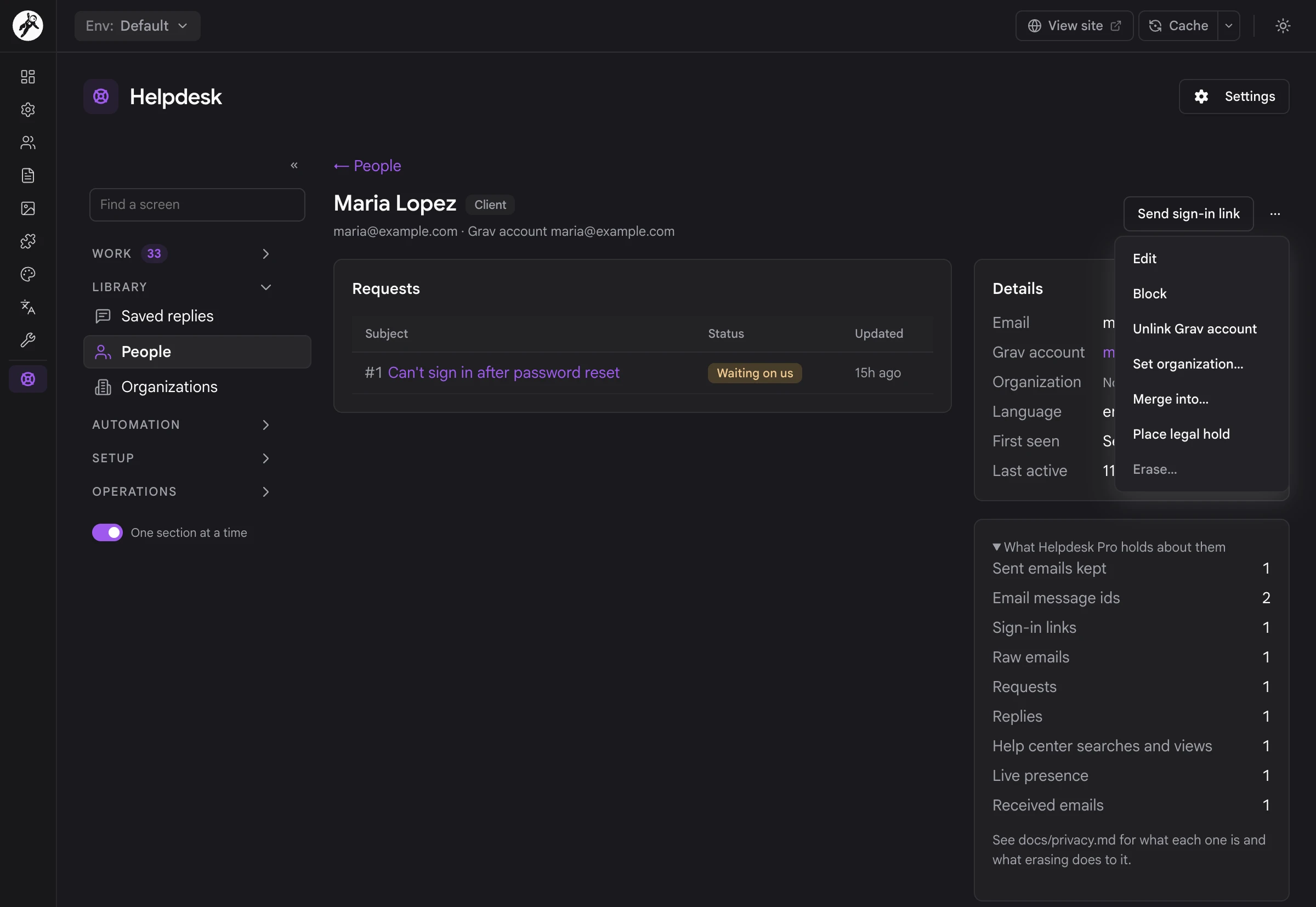
When you run the helpdesk, you're the one holding the data, and a person's page shows exactly what that means. It lists their requests and details, and What Helpdesk Pro holds about them counts every kind of record, from received emails and replies to sign-in links and help center searches: the starting point for a subject access request. The same menu blocks them, merges them into another person, places a legal hold or erases them. All of it lives in one SQLite file on your own server.
user/data/helpdesk-pro/, with deny-all protection written next to it.
For Developers & AI Agents
The desk in Admin Next is built entirely on Helpdesk Pro's own API, so anything a person can do there, a script or an AI agent can do too.
/api/v1/helpdesk-pro/ on the Grav API plugin, with paging, ETags, problem-details errors and the same access rules as the desk.
helpdesk-pro.desk can't delete a ticket, even when its owner is an admin.
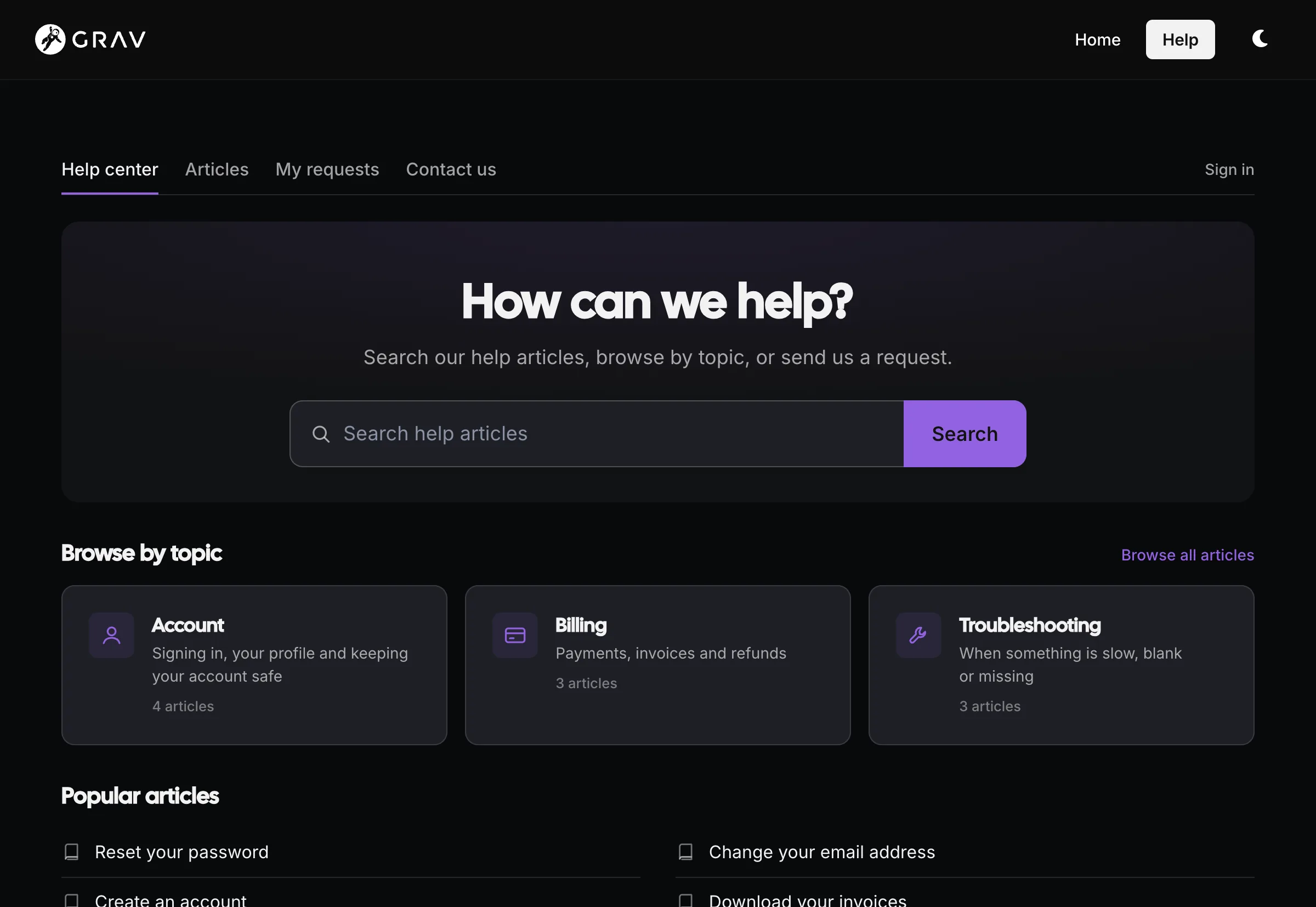
A help center on your own site
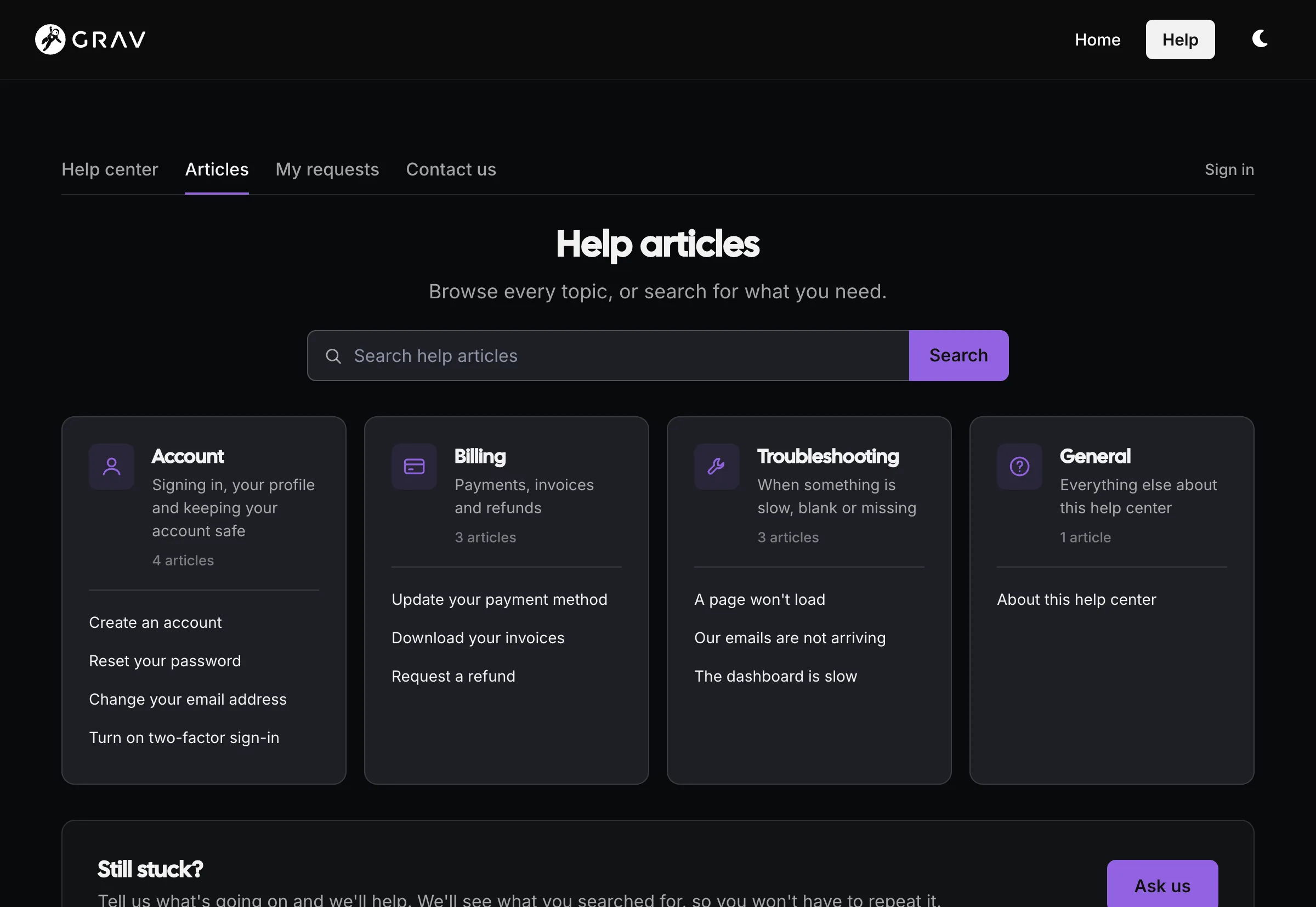
Clients land on a help center that looks like the rest of your site, because it is the rest of your site: a Grav page, rendered by your theme, in light or dark. They search first, browse topics if they'd rather, and Contact us is always one click away. When they do write in, they never have to set a password. A sign-in link in every email takes them straight to their request.
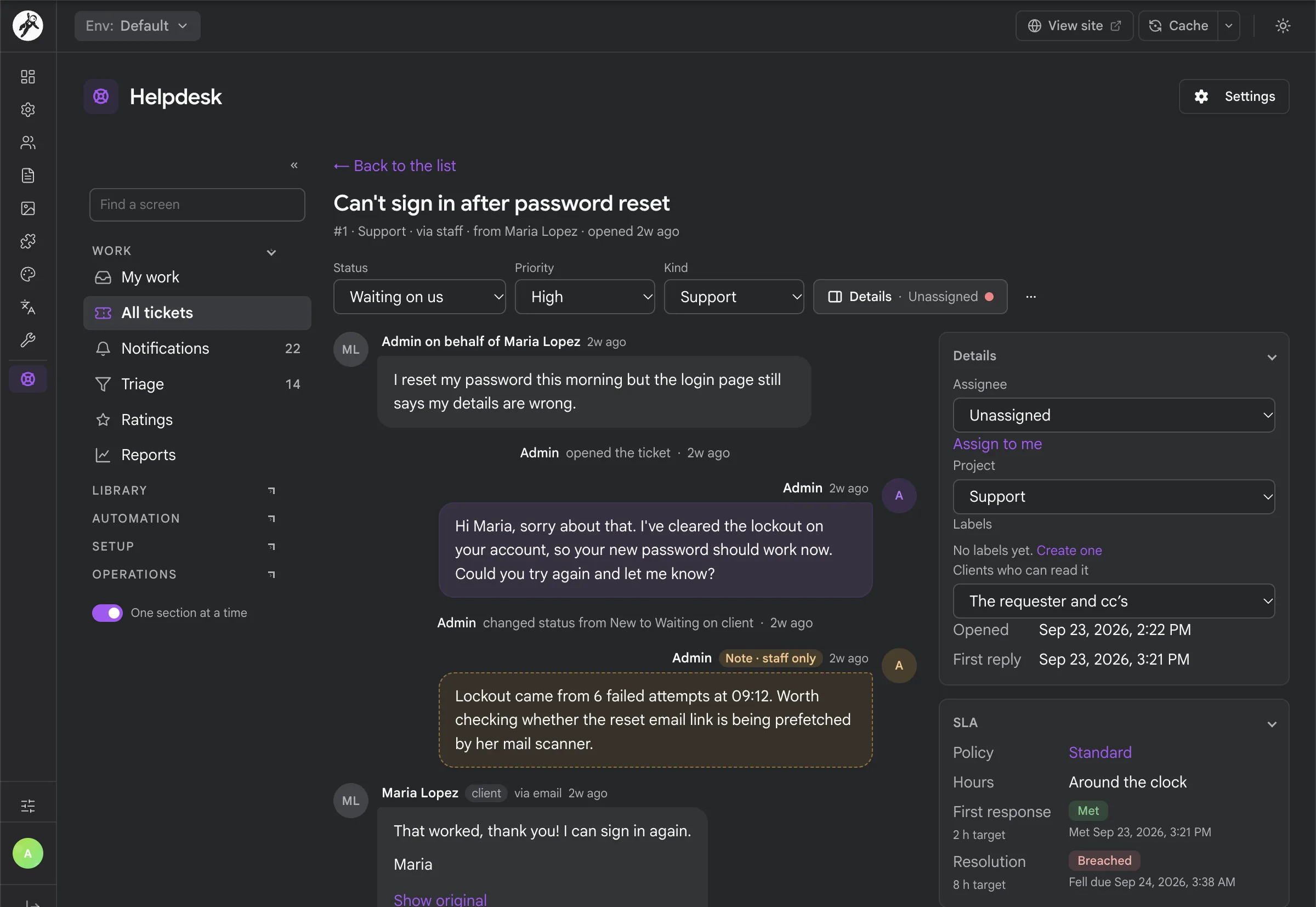
Every ticket, the whole story
The ticket screen puts the conversation in the middle and the details beside it: status, priority, kind, assignee, project, who can read it, and the SLA clock with how long is left. Internal notes sit in the same thread, tinted so they can never be mistaken for a reply, and they never reach the client. Replies that came in by email say so, with a Show original link to the email as it arrived.
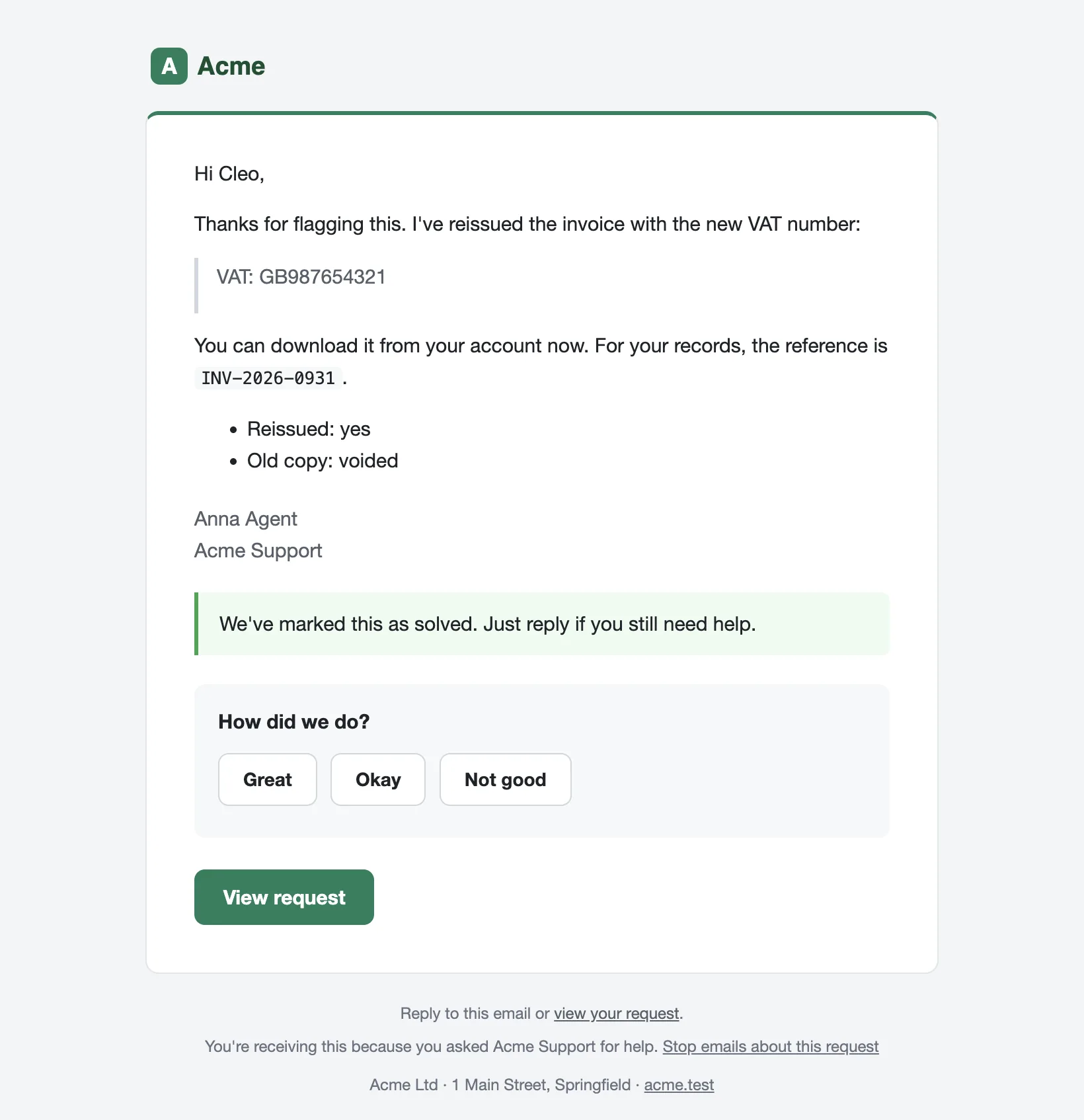
Email that reads like a person wrote it
Client email carries your logo, colors and footer, the agent's name and the reply, with a proper View request button and no ticket numbers or quoted history. When a reply also solves the request, it goes out as one email with How did we do? underneath. The client can just hit reply: with inbound email on, their answer goes straight back onto the ticket.
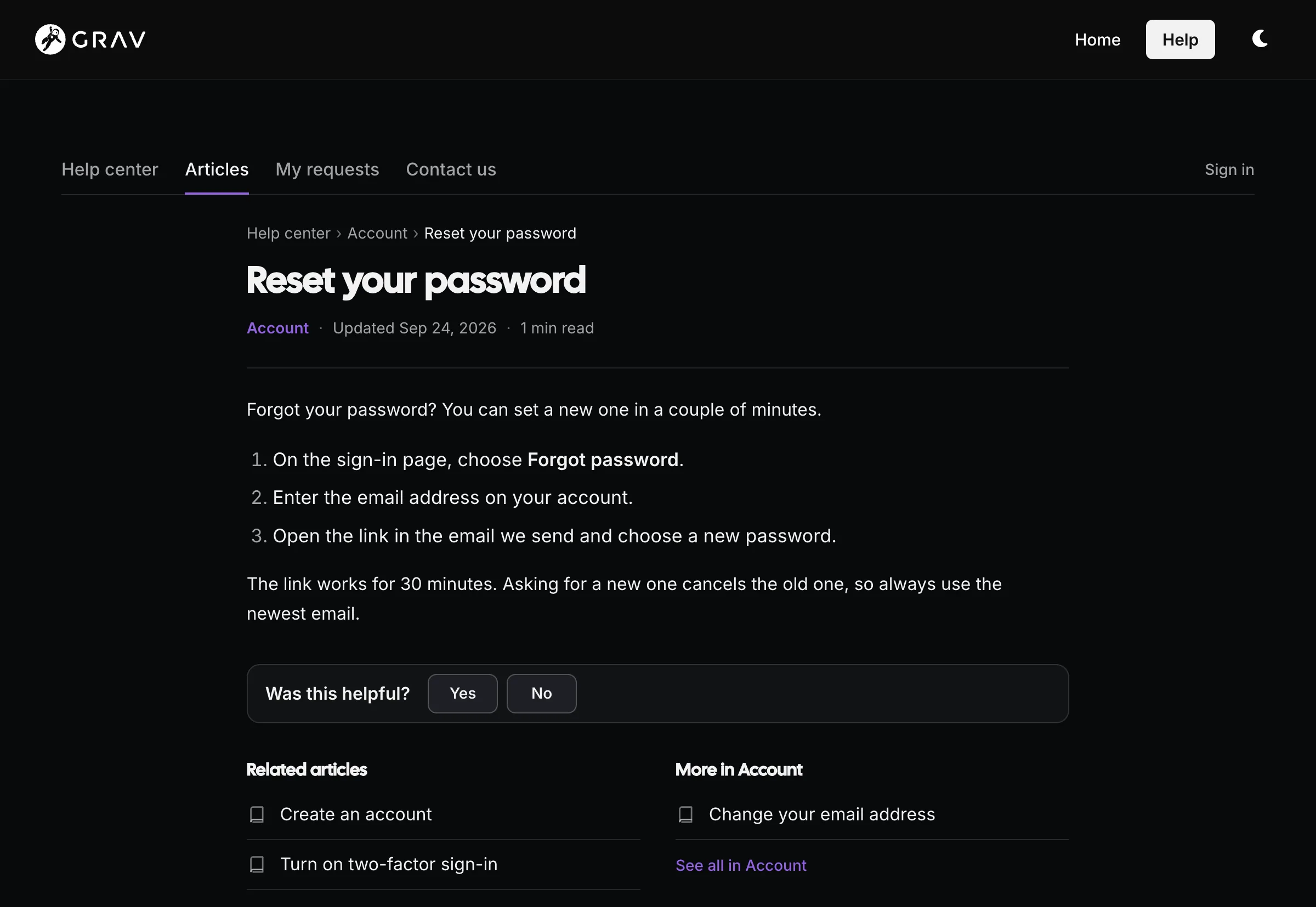
A knowledge base made of pages
Articles are ordinary Grav pages with the Help Article page type, so there's no second editor to learn and no separate content store. Each one gets breadcrumbs, related articles, More in this topic and Was this helpful? Answer No and the request form opens already filled in with what you searched for, and the ticket shows staff which articles you read before writing in.
Rules you can test before they run
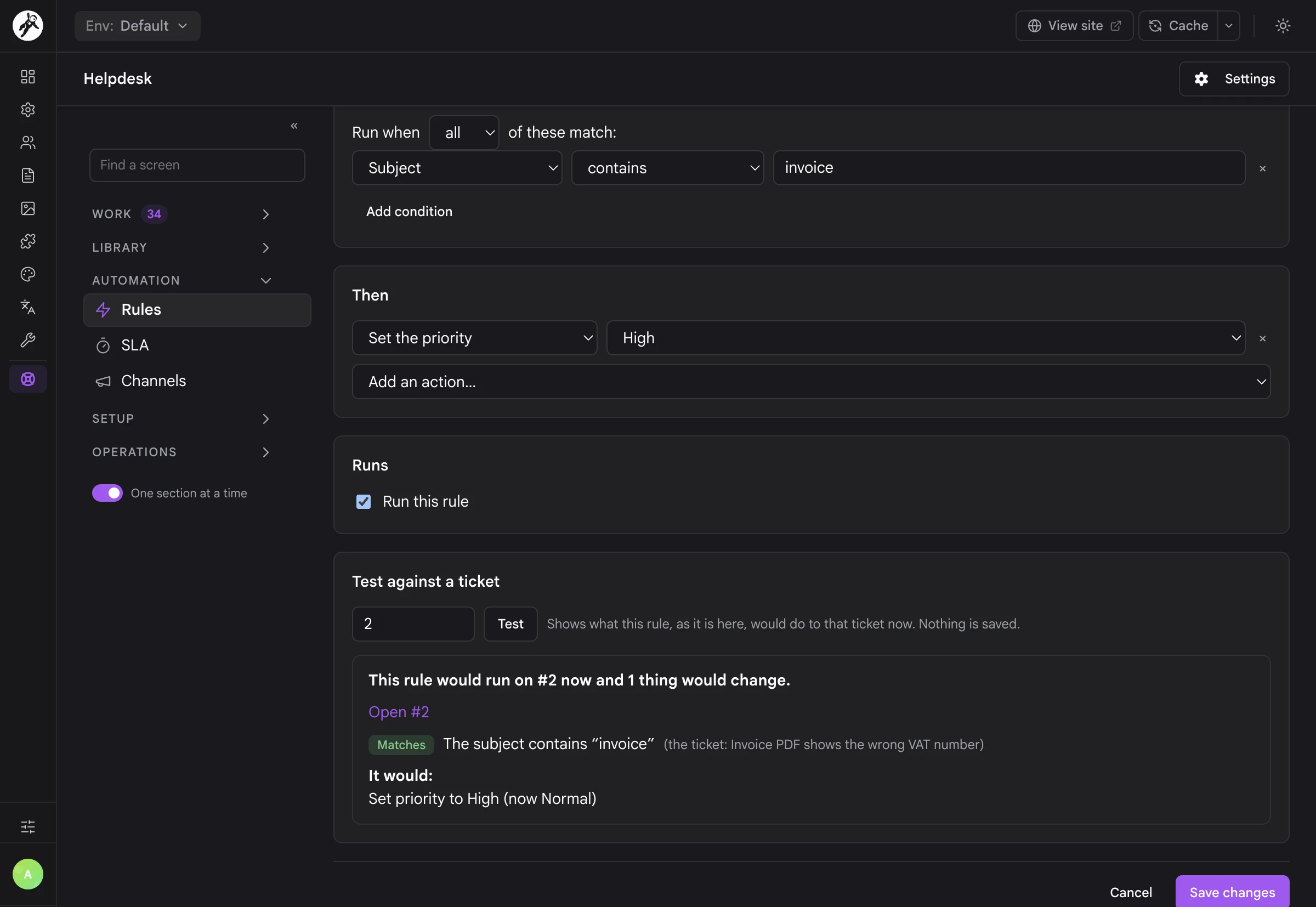
Rules read like sentences: when a ticket is created, if the subject contains invoice, set priority to High. Conditions cover projects, statuses, labels, channels, requesters, message text, custom fields, organizations, SLA state and ratings. Test against a ticket shows what a rule would do to a real ticket right now, and saves nothing.
SLA clocks that know your hours
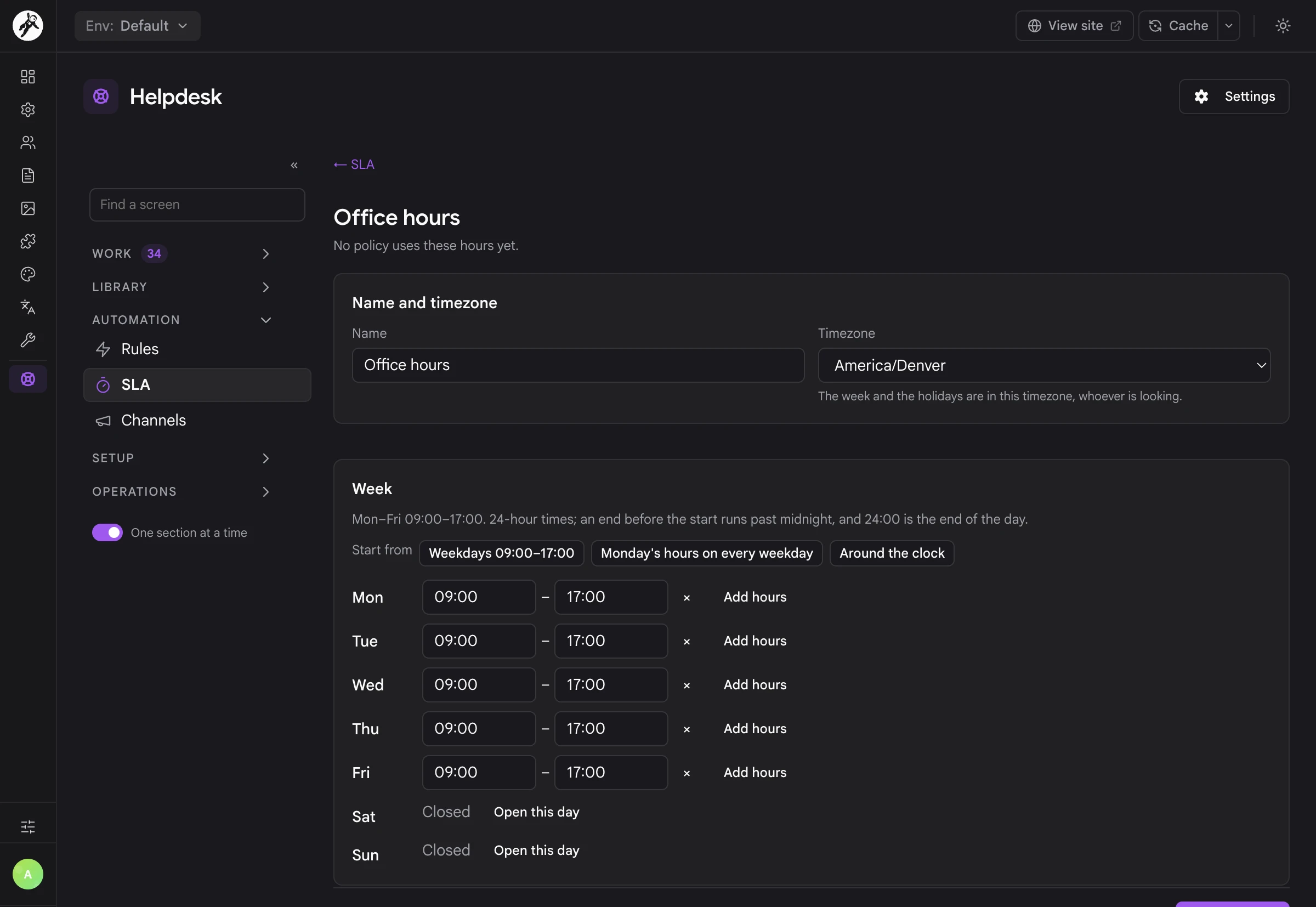
Set first response and resolution targets per project, priority or kind, and count them in business hours with your own timezone, several ranges a day and holidays, or around the clock. The clock pauses while you wait on the client. Staff see in 2h or 35m late on every ticket, get warned before a target slips, and your clients never see any of it.
Your helpdesk, on your own site
No per-agent pricing, no support history sitting on someone else's servers, and no second login for your clients to forget. Helpdesk Pro runs on the same host as your Grav site, backs up with it and moves with it. Your staff work in the Admin Next they already use, and your clients deal with your site and your email address, nothing else.
Up and running
- Install the plugin along with the API, Login, Email and Form plugins, and enable it.
- In Admin Next, add a page with the Help Center page type, for example Help. Its route becomes your help center, and its content becomes the welcome text.
- Give your staff
api.accessandhelpdesk-pro.desk(ahelpdesk-agentsgroup is a good start). The Helpdesk item appears in the Admin Next sidebar. - Set your support address, and add the Grav scheduler to your crontab.
- Write a few articles with the Help Article page type.
When you're ready, turn on inbound email on the Email & Notifications tab of the plugin settings, and your clients can reply straight from their inbox.
A CLI for the operational side
bin/plugin helpdesk-pro status        # database, schema, job queue and worker health
bin/plugin helpdesk-pro migrate       # apply pending migrations (--status to preview)
bin/plugin helpdesk-pro work          # run one worker pass
bin/plugin helpdesk-pro jobs          # list, retry or cancel background jobs
bin/plugin helpdesk-pro reindex       # rebuild the search index
bin/plugin helpdesk-pro imap:poll     # read the IMAP mailbox now
bin/plugin helpdesk-pro blocklist     # manage blocked addresses, domains and words
bin/plugin helpdesk-pro erase         # erase a person's data
Full setup and configuration documentation lives on the Learn site.
Screenshots & Examples
A peek at sites running Helpdesk Pro.
Frequently Asked Questions
The most commonly asked questions about the Helpdesk Pro plugin
Is this a one-time purchase or a subscription?
Helpdesk Pro is a one-time purchase. You get all future updates and new features for free as long as your license stays active. There's no per-agent pricing and no cap on how many staff or clients you have, so your helpdesk doesn't get more expensive as your team grows.
Do my clients need an account or a password?
No. Clients can write in by email or through the request form as a guest, and someone who only ever emails you never gets a Grav account at all. When they want to see their requests, they type their address and we email them a sign-in link. The link in every client email signs them in too.
The first time a client uses a link, Helpdesk Pro creates a Grav account for them with site login only, in the groups you choose. An account that can reach the admin is never signed in this way, and staff never get sign-in links.
Does Helpdesk Pro work on Grav 1.7?
No. Helpdesk Pro is built for Grav 2 and Admin Next, and it needs the API plugin for the desk. If you are still on 1.7, take a look at the Migration chapter on the Learn site.
Do I need a database server?
No. Helpdesk Pro stores everything in one SQLite file, created and migrated the first time it's needed, at user/data/helpdesk-pro/db/helpdesk.sqlite. There's nothing to set up and no MySQL or PostgreSQL option to think about. It backs up and moves with your site like the rest of user/.
Helpdesk Pro writes a deny-all .htaccess next to the database for Apache. On nginx, Caddy or any other server that ignores .htaccess, deny that folder in your server config.
How do replies by email work?
Point your mail provider's inbound webhook at the address Helpdesk Pro gives you under Operations → Email in the desk, or let it read an IMAP mailbox every couple of minutes. Postmark, Mailgun, SendGrid, Amazon SES, Resend and MailerSend work through their Email plugin providers, Cloudflare Email Routing works with a small Email Worker, and a Postfix or Exim alias can pipe mail straight in.
Inbound email needs Email plugin 5.3.0 or later. Until you switch it on, everything else works as normal: client emails say View or reply to your request and link to the portal, and replies land in your support mailbox.
Do I need cron?
You should add the Grav scheduler to your crontab, because it runs the background worker that delivers email, digests, SLA warnings, time-based rules and IMAP polling. Most jobs run straight after the request that queued them anyway, and on a site whose cron hasn't run for a couple of minutes a small catch-up pass keeps notification email going. Treat that as a safety net, not a plan.
How does it look with my theme?
The portal inherits your theme's fonts and colors. Every color, radius and space comes from --helpdesk-* custom properties, and on a Pico-based theme such as Quark2 they follow Pico's own variables, so links and buttons use your theme's primary color with no work at all. One line of CSS (:root { --helpdesk-accent: #8428df; }) sets the accent anywhere else, and every portal template can be overridden from your theme.
Can AI agents work the desk?
Yes. Helpdesk Pro describes its API as 132 MCP tools, and grav-mcp hands them to Claude, Cursor and other AI clients. A tool can never do more than the API key it runs with, and tools that key can't use aren't offered. Ask the agent for an internal note first if you want to review a draft before the client sees anything.
What does Helpdesk Pro need to run?
Grav 2, PHP 8.3 or newer with pdo_sqlite, sqlite3, mbstring and dom, and these free plugins:
- API for the desk, the REST API and MCP
- Login for signing in
- Email for sending mail (5.3.0 or later for inbound email)
- Form for the request form and its captcha
The Sync plugin is optional and adds live updates. With Sync Mercure (1.2.2 or later) or Sync Ably, updates arrive instantly instead of by polling. Search is bundled, so you don't need YetiSearch Pro.
Can I use Helpdesk Pro on multiple sites?
Per the Grav Premium License, you need a license for each site. Development and staging copies of the same site are covered by the same license. Get in touch if you need bulk pricing.