Skip to content
● Meet Grav Guard: keep every Grav site you run secure and up to date, all from one place. Free for up to 3 sites. Read more →
Premium / Lightbox Gallery
Premium Plugin · v1.3.4

Lightbox Gallery

Easy, reliable and mobile friendly Lightbox

A light and versatile Lightbox Gallery plugin built on top of the fantastic GLightbox Gallery. With support for the new [lightbox-gallery] shortcode as well as Twig partials for use in templates, it is extremely easy to add appealing zoomable images and galleries to your site. Tell a story with powerful HTML descriptions that can be added for each item individually.

Grav 1.7+
Live Demo Documentation

Everything you need. Nothing you don’t.

Over 16 distinct features and integrations, out of the box.

01
Built on top of the fantastic GLightbox Gallery.
02
NEW Grav Shortcodes - Custom [lightbox-gallery] and [lightbox] shortcodes for easy use in Grav content
03
NEW Editor-Pro Integration - Editor pro integraton via shortcodes for WYSIWYG creationg and editing of galleries and individual lightbox uses.
04
Small - only 11 KB Gzipped.
05
Framework Agnostic - No jQuery or other JavaScript framework required.
06
Fast and Responsive - works with any screen size.
07
Gallery Support - Create multiple galleries.
08
HTML Descriptions - HTML descriptions supported for each individual item.
09
Video Support - Youtube, Vimeo and self hosted videos with autoplay.
10
Inline content support - display any inline content.
11
IFrame support - need to embed an iframe? no problem.
12
Keyboard Navigation - esc, arrows keys, tab and enter is all you need.
13
Touch Navigation - mobile touch events.
14
Zoomable images - zoom and drag images on mobile and desktop.
15
API - control the lightbox with the provided methods.
16
Themeable - create your skin or modify the animations with some minor css changes.

Gallery mode

Create gorgeous and professional looking galleries with minimal effort using the new [lightbox-gallery] wrapper shortcode.

HTML Descriptions

You have the option to easily add descriptions to your images. Thanks to Lightbox Gallery support for Markdown or plain HTML syntax highlighting words, adding links or creating buttons on the fly, has never been easier.
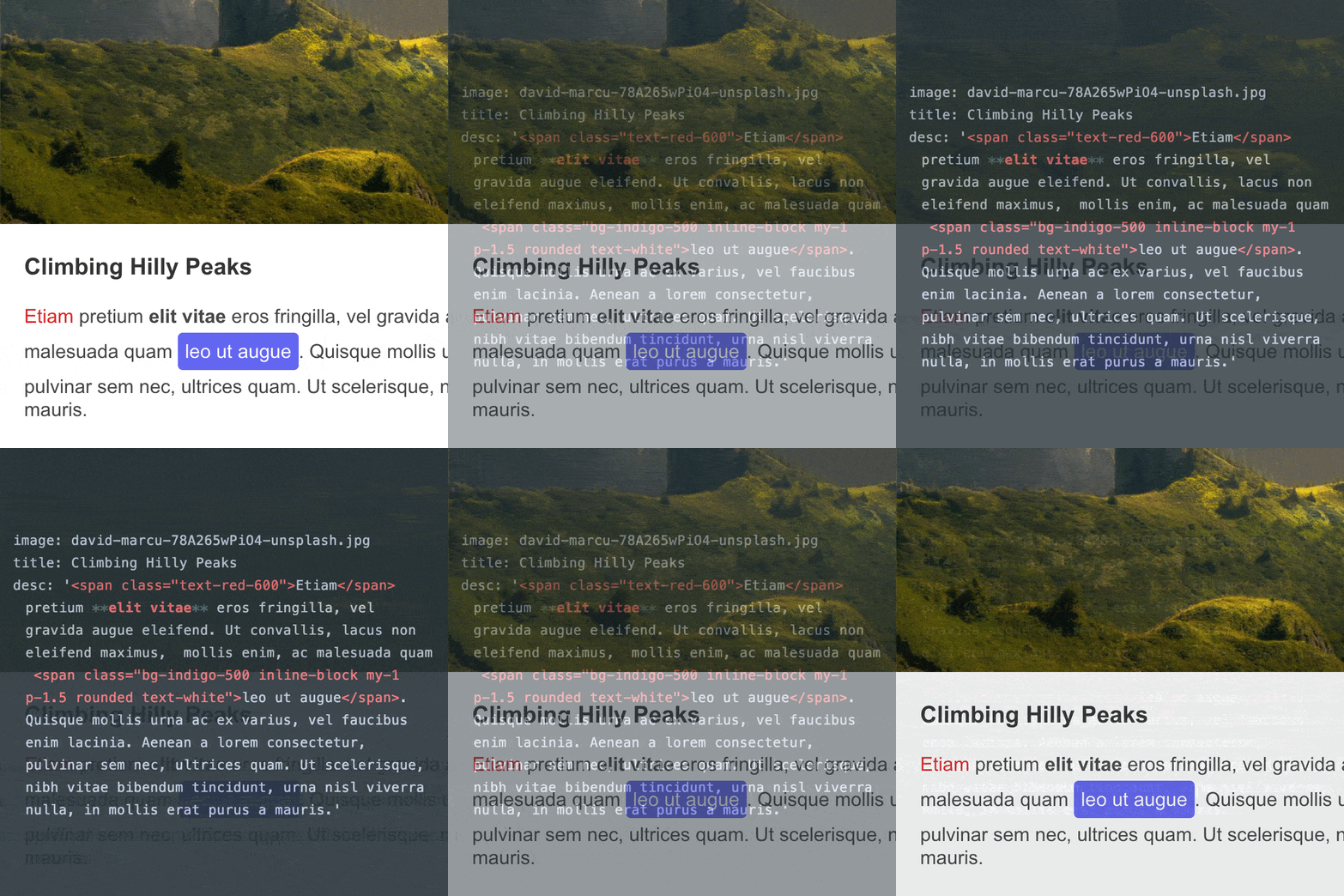
HTML Descriptions

Mobile friendly

Enjoy a great experience on mobile devices with swipe and pinch-to-zoom gestures that naturally elevate the gallery navigation. Let your pictures speak for themselves without the descriptions polluting the mobile experience. A smart read more button will be available to expand the descriptions on-demand.

Lightbox Gallery Changelog

v1.3.4

2 weeks ago

    • The lightbox dialog is marked as modal for screen readers, and its Close, Previous and Next labels follow the site's language (English, German, French, Spanish and Italian), with settings to set your own getgrav/grav-premium-issues#634

v1.3.3

3 weeks ago

    • Pages with a lightbox render again on Grav 1.7, where 1.3.1 and 1.3.2 stopped them with a Twig error about the "defined" test

v1.3.2

3 weeks ago

    • [security] Media actions in the image, thumb and thumb_options shortcode values now follow the same rules as image URLs in page content, and an invalid action no longer stops the page from rendering. Thanks @slalabs

v1.3.1

3 weeks ago

    • Watermark Lightbox Images now also works for galleries built by a theme's gallery module (Quark's, Quark2's, Typhoon's and copies of them), not only for the shortcode grav-premium-issues#627

v1.3.0

4 weeks ago

    • New Watermark Lightbox Images option adds the site watermark to the full-size lightbox image, with per-page, per-gallery and per-image overrides grav-premium-issues#627
    • A custom thumb made from the same file as image now keeps its crop, and the lightbox opens the original image instead of a reprocessed copy

v1.2.3

1 month ago

    • Lightbox captions are now readable in dark mode on Quark 2 and other themes that mark dark mode on the page, and themes can set their own caption colors grav-premium-issues#412

v1.2.2

4 months ago

    • Gallery thumbnails now display in a proper grid on any theme by shipping the grid-cols-* and gap-* helper styles the documented class="grid grid-cols-4" relies on

v1.2.1

6 months ago

    • Added Grav 2.0 compatibility

v1.2.0

11 months ago

    • Fix missing video support in new shortcode syntax
    • Fix extra <p> tags getting put around thumbnails breaking layout
    • Fix for empty 'content' in lightbox shortcode throwing JS error

v1.1.1

12 months ago

    • Fixed some bad logic in the lightbox shortcode that was not properly detecting content vs image accurately and was fallign back to using full size image.