---
title: 'Adding image to twig template from variable'
url: 'https://getgrav.org/forum/themes-styling/adding-image-to-twig-template-from-variable-t2670'
markdown: 'https://getgrav.org/forum/themes-styling/adding-image-to-twig-template-from-variable-t2670.md'
date: '2026-06-21'
description: 'I am trying to define three filenames to be included in a slider. Filenames are defined in the page as: --- slide1: myimage1.png slide2: myimage2.png slide3:'
---

[Themes & Styling](https://getgrav.org/forum/themes-styling)

#   Adding image to twig template from variable 

 Solved by Chris Jung [View solution](https://getgrav.org/forum/themes-styling/adding-image-to-twig-template-from-variable-t2670#post-19744)

  Started by Usk70 9 years ago · 9 replies · 14404 views    

 [9 years ago](https://getgrav.org/forum/themes-styling/adding-image-to-twig-template-from-variable-t2670#post-19707 "Permalink") 

I am trying to define three filenames to be included in a slider.

Filenames are defined in the page as:

```yaml
---
slide1: myimage1.png
slide2: myimage2.png
slide3: myimage3.png
---
```

And in the Twig template I would like to get something as:

```twig
<img src="{{ page.media[slide1].url }}" alt="MyPassion" />
<img src="{{ page.media[slide2].url }}" alt="MyPassion" />
<img src="{{ page.media[slide3].url }}" alt="MyPassion" />
```

But I am not being able to get the src properly filled.
Could someone help me to understand how to use a variable in a <img> inside a Twig template.

 [9 years ago](https://getgrav.org/forum/themes-styling/adding-image-to-twig-template-from-variable-t2670#post-19708 "Permalink") 

---

```yaml
slide1: myimage1.png
slide2: myimage2.png
slide3: myimage3.png
---
```

`slide1` is `header.slide1`

`<img src="{{ page.media[page.header.slide1].url }}" alt="MyPassion" />`

 [9 years ago](https://getgrav.org/forum/themes-styling/adding-image-to-twig-template-from-variable-t2670#post-19721 "Permalink") 

thanks, but I get unknown!
Note: myimage1.png, myimage2.png and myimage3.png are in the same folder as the markdown page definition (not in the template folder).

![image|690x28](https://cdn.getgrav.org/forum/files/9e/9e6897810725324732f4bd68148d8670418b0ce7a304581c1005ab5dc8025d8e.png)

 [9 years ago](https://getgrav.org/forum/themes-styling/adding-image-to-twig-template-from-variable-t2670#post-19728 "Permalink") 

it works, what is your folder structure ? Just tested with Antimatter

 [9 years ago](https://getgrav.org/forum/themes-styling/adding-image-to-twig-template-from-variable-t2670#post-19729 "Permalink") 

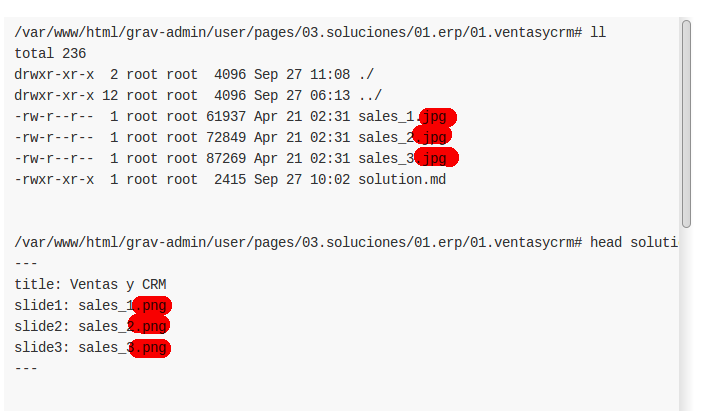
/var/www/html/grav-admin/user/pages/03.soluciones/01.erp/01.ventasycrm# ll
total 236
drwxr-xr-x 2 root root 4096 Sep 27 11:08 ./
drwxr-xr-x 12 root root 4096 Sep 27 06:13 ../
-rw-r--r-- 1 root root 61937 Apr 21 02:31 sales\_1.jpg
-rw-r--r-- 1 root root 72849 Apr 21 02:31 sales\_2.jpg
-rw-r--r-- 1 root root 87269 Apr 21 02:31 sales\_3.jpg
-rwxr-xr-x 1 root root 2415 Sep 27 10:02 solution.md

```twig
/var/www/html/grav-admin/user/pages/03.soluciones/01.erp/01.ventasycrm# head solution.md
---
title: Ventas y CRM
slide1: sales_1.png
slide2: sales_2.png
slide3: sales_3.png
---

/var/www/html/grav-admin/user/themes/new-theme/templates# head -50 solution.html.twig
{% extends 'partials/base.html.twig' %}

{% block content %}

        <!-- Content -->
        <section id="content">
            <div class="container">

                {{ include('partials/breadcrumbs.html.twig') }}

                <!-- Main Content -->
                <div class="main-content">
                    <p>{{ page.media[slide1].url }}</p>
                    <p>{{ page.media[slide2].url }}</p>
                    <p>{{ page.media[slide3].url }}</p>
                    <!-- Single -->
                    <div class="column-two-third single">
                        <div class="flexslider">
                            <ul class="slides">
                                <li>
                                    <img src="{{ page.media[page.header.slide1].url }}" alt="{{ page.header.slide1_alt }}" />
                                </li>
                                <li>
                                    <img src="{{ page.media[page.header.slide2].url }}" alt="{{ page.header.slide2_alt }}" />
                                </li>
                                <li>
                                    <img src="{{ page.media[page.header.slide3].url }}" alt="{{ page.header.slide3_alt }}" />
                                </li>
                            </ul>
                        </div>

                        {{ page.content }}
```

...

 [9 years ago](https://getgrav.org/forum/themes-styling/adding-image-to-twig-template-from-variable-t2670#post-19730 "Permalink") 

![06|333x145](https://cdn.getgrav.org/forum/files/d9/d9b2a795bfa71bdc9ca514c9ea3f0b52a26776b47aeb9221bcac78e8590c4076.png)

is that right ?

![51|413x231](https://cdn.getgrav.org/forum/files/74/7420bcefb3c2b7acda0cacf4a7e60826b65313b31fa720f4d912b4f0712ce681.png)

It works for me

 [9 years ago](https://getgrav.org/forum/themes-styling/adding-image-to-twig-template-from-variable-t2670#post-19731 "Permalink") 

> **@dimitrilongo:**
> <img src="{{ page.media\[page.header.slide1\].url }}" alt="MyPassion" /

I tried this in the template (solution.html.twig):
`<p>{{ page.header.slide1 }}</p>`

And I can't get the content of slide1, I get an empty html paragraph tag.

In the page solution.md I have:

```yaml
# more solution.md
---
title: Ventas y CRM
slide1: sales_1.png
slide2: sales_2.png
slide3: sales_3.png
slide1_alt: Sales 1
slide2_alt: Sales 2
slide3_alt: Sales 3
---
```

This works perfectly fine:

< img src="{{ page.media\['sales\_1.jpg'\].url }}" / >

So the issue seems to be in page.header.slide1.

BTW I am creating a new theme from scratch (I created the basic structuring following official documentation)

last edited 09/28/17 by Usk70

 [9 years ago](https://getgrav.org/forum/themes-styling/adding-image-to-twig-template-from-variable-t2670#post-19744 "Permalink")  Solution 

Guys, anyone checked the filenames?

```
slide1: sales_1.png
```

Won't work together with the .jpg files.

Please check the filenames 🙂 and use

```
slide1: sales_1.jpg
```

in your header ;-)
![grafik|690x397](https://cdn.getgrav.org/forum/files/d6/d6883e996603e0ba03954fbb708b99bf8a05513127d9e9e260da289258b72a5a.png)

 👍 1 

last edited 09/30/17 by Chris Jung

 [9 years ago](https://getgrav.org/forum/themes-styling/adding-image-to-twig-template-from-variable-t2670#post-19745 "Permalink") 

good catch, that's why it works in my test i have same filename ;-) and not in @Usk70 example

 [9 years ago](https://getgrav.org/forum/themes-styling/adding-image-to-twig-template-from-variable-t2670#post-19788 "Permalink") 

Wow, no comments.
I tried so many things I missed the most obvious one.

Thanks.

[Log in](https://getgrav.org/login?return=%2Fforum%2Fthemes-styling%2Fadding-image-to-twig-template-from-variable-t2670) to reply.

###  Suggested topics

 | Topic | Participants | Replies | Views | Activity |
|---|---|---|---|---|
| [Installing Photographer Site skeleton?](https://getgrav.org/forum/themes-styling/installing-photographer-site-skeleton-t9506)    [Themes & Styling](https://getgrav.org/forum/themes-styling) · by MarkP, 2 days ago |  | 2 | 65 | [21 hours ago](https://getgrav.org/forum/themes-styling/installing-photographer-site-skeleton-t9506 "by MarkP") |
| [Modular Pages - Change the Module Using a Submenu](https://getgrav.org/forum/themes-styling/modular-pages-change-the-module-using-a-submenu-t9507)    [Themes & Styling](https://getgrav.org/forum/themes-styling) · by TomW, 1 day ago |  | 0 | 33 | [1 day ago](https://getgrav.org/forum/themes-styling/modular-pages-change-the-module-using-a-submenu-t9507 "by TomW") |
| [Inheriting a Theme does not quite work correctly](https://getgrav.org/forum/themes-styling/inheriting-a-theme-does-not-quite-work-correctly-t9501)    [Themes & Styling](https://getgrav.org/forum/themes-styling) · by themetman, 1 week ago |  | 1 | 135 | [6 days ago](https://getgrav.org/forum/themes-styling/inheriting-a-theme-does-not-quite-work-correctly-t9501 "by themetman") |
| [Grav2 with Quark2 – All pages in the hamburger-menu of a one-pager](https://getgrav.org/forum/themes-styling/grav2-with-quark2-all-pages-in-the-hamburger-menu-of-a-one-pager-t9485)    [Themes & Styling](https://getgrav.org/forum/themes-styling) · by AH, 3 weeks ago |  | 1 | 250 | [7 days ago](https://getgrav.org/forum/themes-styling/grav2-with-quark2-all-pages-in-the-hamburger-menu-of-a-one-pager-t9485 "by AH") |
| [\[quark\] mobile menu as the modular page menu](https://getgrav.org/forum/themes-styling/quark-mobile-menu-as-the-modular-page-menu-t1132)    [Themes & Styling](https://getgrav.org/forum/themes-styling) · by Bruno, 4 years ago |  | 6 | 1428 | [7 days ago](https://getgrav.org/forum/themes-styling/quark-mobile-menu-as-the-modular-page-menu-t1132 "by AH") |