---
title: 'Upload file works one time'
url: 'https://getgrav.org/forum/general/upload-file-works-one-time-t7786'
markdown: 'https://getgrav.org/forum/general/upload-file-works-one-time-t7786.md'
date: '2026-06-21'
description: 'I’ve added an option to upload file in contact page. I’m able to drag or click on the upload box to select a file to upload. However, after submit , the upload'
---
[General](https://getgrav.org/forum/general)
# Upload file works one time
Started by Duc 1 year ago · 21 replies · 1590 views
[1 year ago](https://getgrav.org/forum/general/upload-file-works-one-time-t7786#post-40810 "Permalink")
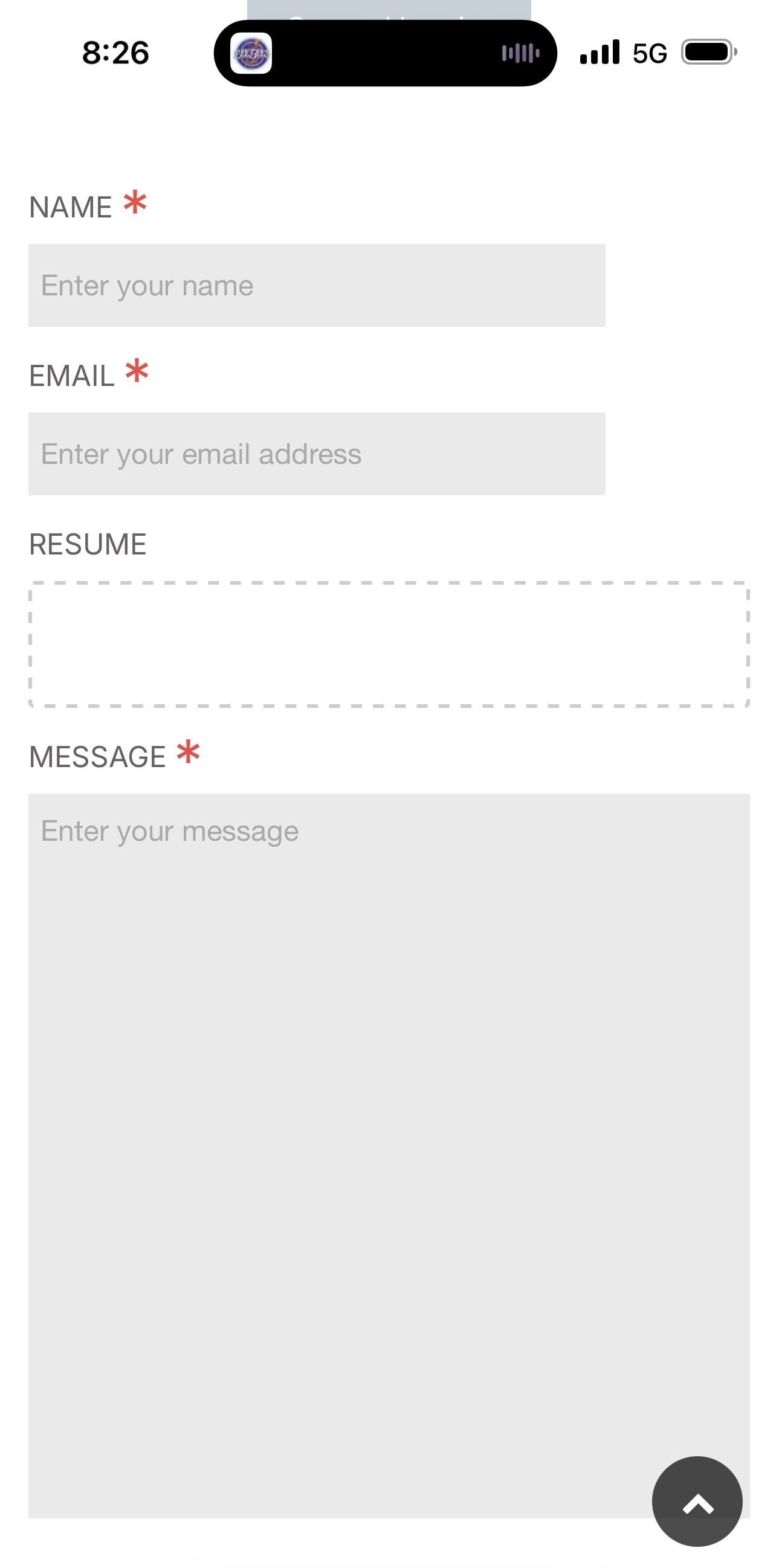
I’ve added an option to upload file in contact page. I’m able to drag or click on the upload box to select a file to upload. However, after submit , the upload button is gone. Not able to drag file or click on the box to search for a file.
The first submission went through. I received an email & the file is in its folder. I’m not by pc atm. The reset: true in process is not set since that causes issues
[1 year ago](https://getgrav.org/forum/general/upload-file-works-one-time-t7786#post-40811 "Permalink")
Can you post the markdown code for the page where you have the contact form?
[1 year ago](https://getgrav.org/forum/general/upload-file-works-one-time-t7786#post-40813 "Permalink")
This is partial codes that pertains to the file upload.
modular\_alt.md
```yaml
form:
name: email/inquiry
action: /contact
fields:
name:
id: name
label: Name
classes: 'form-control form-control-lg'
placeholder: 'Enter your name'
autocomplete: 'on'
type: text
validate:
required: true
email:
id: email
classes: 'form-control form-control-lg'
label: Email
placeholder: 'Enter your email address'
type: email
validate:
rule: email
pattern: "^\w([\w\.+-]*[\w-])?@([\w-]+\.)+[a-z]{2,5}$"
required: true
uploads:
type: file
label: Resume
destination: 'user/data/email/job/uploads'
multiple: true
autofocus: false
limit: 10
accept:
- image/*
- application/x-pdf
- application/pdf
- .xlsm
- .xlsx
- . docx
- .doc
message:
label: Message
classes: 'form-control form-control-lg'
size: long
placeholder: 'Enter your message'
type: textarea
validate:
required: true
captcha:
type: turnstile
theme: light
buttons:
submit:
type: submit
value: Submit
classes: 'btn btn-primary btn-block'
reset:
type: reset
value: Reset
classes: 'btn btn-primary btn-block'
process:
turnstile: true
upload: true
email:
from: '{{ config.plugins.email.from }}'
to:
- '{{ config.plugins.email.from }}'
subject: '[Inquiry] {{ form.value.name|e }}'
body: "{% include 'forms/data.html.twig' %}"
save:
fileprefix: 'inquiry-[{{ form.value.name|e }}]-'
dateformat: Ymd-His-u
extension: txt
body: "{% include 'forms/data.txt.twig' %}"
message: 'Your email was sent successfully.'
display: thank-you-inquiry
```
This is under chrome developer tool:
```html
```
last edited 10/03/25 by Duc
[1 year ago](https://getgrav.org/forum/general/upload-file-works-one-time-t7786#post-40814 "Permalink")
You have an extra space in docx extension, before the dot
[1 year ago](https://getgrav.org/forum/general/upload-file-works-one-time-t7786#post-40815 "Permalink")
Yes, I did noticed that,. Fix it, but still acts the same way.
[1 year ago](https://getgrav.org/forum/general/upload-file-works-one-time-t7786#post-40819 "Permalink")
Based on your screenshot, I'll assume the field has some JS processing on load. I'll also assume it's an XHR form. I'm guessing JS does nothing after form is submitted and DOM rendered
[1 year ago](https://getgrav.org/forum/general/upload-file-works-one-time-t7786#post-40837 "Permalink")
Really stumped as to why it does not work 100%. Disabling the form plugin and enabling again brings back the dropzone. From there I am able to create an email with an attachment. The file is saved inside the tmp folder and I received an email. After that the dropzone disappears.
I don’t event have to create email to make the dropzone disappear. After re enabling the form, hitting the refresh browser button toggles off the dropzone.

[1 year ago](https://getgrav.org/forum/general/upload-file-works-one-time-t7786#post-40839 "Permalink")
Any reason you're not using a normal file input?
1 reply
- [ Duc Back at it. I have removed the dropzone class in the plugin form file.html.twig to use the… ](https://getgrav.org/forum/general/upload-file-works-one-time-t7786#post-41362)
[1 year ago](https://getgrav.org/forum/general/upload-file-works-one-time-t7786#post-40840 "Permalink")
I was following the [cookbook](https://learn.getgrav.org/17/forms/blueprints/how-to-add-file-upload) example and read other posts using the same format. Figure this is the correct steps to take. I am not sure what is the normal file input is. Using the delivernext theme as a starting point.
[1 year ago](https://getgrav.org/forum/general/upload-file-works-one-time-t7786#post-40842 "Permalink")
What's the theme you use? Or do you have some plugin installed maybe? Or is it the browser, which renders file input that way?
Normal file inputs look something like this AFAIK
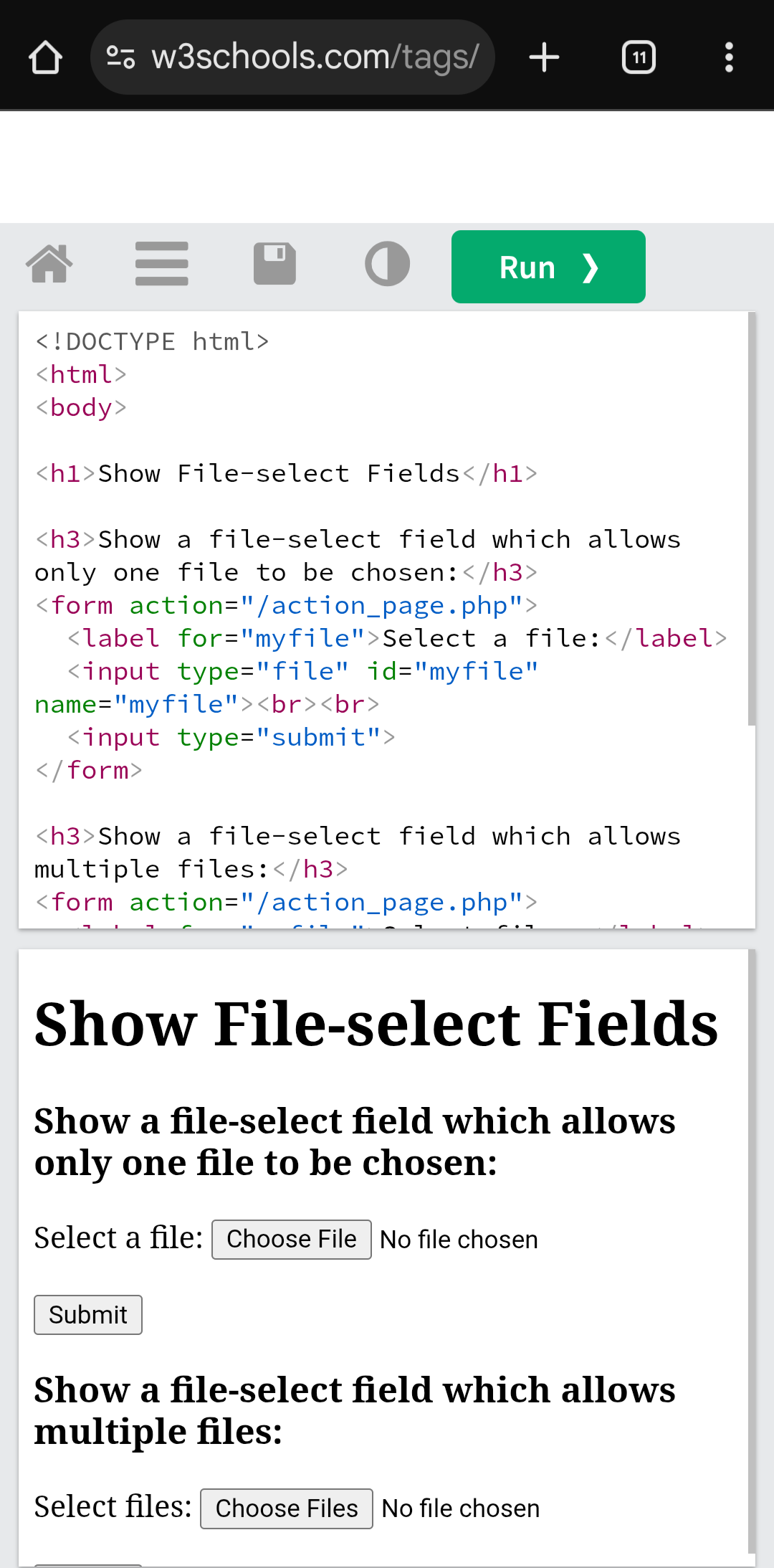
[https://www.w3schools.com/tags/tryit.asp?filename=tryhtml5\_input\_type\_file](https://www.w3schools.com/tags/tryit.asp?filename=tryhtml5_input_type_file)
Could you try your form on fresh Grav install with the Quark theme?
[6 months ago](https://getgrav.org/forum/general/upload-file-works-one-time-t7786#post-41362 "Permalink") [ Karmalakas Any reason you're not using a normal file input? ](https://getgrav.org/forum/general/upload-file-works-one-time-t7786#post-40839 "In reply to Karmalakas")
Back at it. I have removed the dropzone class in the plugin form `file.html.twig` to use the normal file input. This works.
The dropzone is added to the delivernext theme and was hoping to use it since it does have a nicer look to it
[6 months ago](https://getgrav.org/forum/general/upload-file-works-one-time-t7786#post-41364 "Permalink")
@duceduc, The information you provided is a bit meager, so I created my own site and test script.
**Setup:**
- Download and install skeleton DeliverNext
- Upgrade Grav, plugins and theme
- Add your "upload" field to file `/user/pages/08.contact/modular_alt.md`:
Note: I'm using the Array format ```yaml
-
name: uploads
type: file
label: Resume
destination: 'user/data/email/job/uploads'
multiple: true
autofocus: false
limit: 10
accept:
- image/*
- application/x-pdf
- application/pdf
- .xlsm
- .xlsx
- .docx
- .doc
```
- I also added the "attachments" to the "email" action ```twig
-
email:
from: '{{ config.plugins.email.from }}'
to:
- '{{ config.plugins.email.from }}'
- '{{ form.value.email }}'
subject: '[Feedback] {{ form.value.name|e }}'
body: "{% include 'forms/data.html.twig' %}"
attachments: uploads
```
- Add a proper `email.yaml` config file
**Test:**
- Run the website and fill in the fields
**Result:**
- Files got saved into `/user/data/email/job/uploads`
- Email is sent with attachments and following content:
> **Name**: My name
>
> **Email**:
>
> **Resume**:
>
>
> - New Text Document.pdf
> - New Text Document.pdf
> - application/pdf
> - 0
> - user/data/email/job/uploads/New Text Document.pdf
>
> **Message**: My message
- "Thank you" page is shown and contains:
> Your email was sent. Thank you !
>
> Thank you for your feedback!
>
> Here is the summary of what you wrote to us:
>
> **Name**: My name
>
> **Email**: myemail@gmail.com
>
> **Resume**:
>
>
> - New Text Document.pdf
> - New Text Document.pdf
> - application/pdf
> - 0
> - user/data/email/job/uploads/New Text Document.pdf
>
> **Message**: My message
- When refreshing the "Contact" page, the File field was working as expected.
**Conclusion:**
- I cannot reproduce your issue using the DeliverNext skeleton
- The "Thank You" page and email content, could use some improvements though...
[6 months ago](https://getgrav.org/forum/general/upload-file-works-one-time-t7786#post-41365 "Permalink")
I am going to have to start from scratch with a fresh deliverNext install and add my edits back.
Did you start with Grav2.0 or V1.7??
[6 months ago](https://getgrav.org/forum/general/upload-file-works-one-time-t7786#post-41366 "Permalink")
@duceduc, I started with what the skeleton contained: 1.7
[6 months ago](https://getgrav.org/forum/general/upload-file-works-one-time-t7786#post-41368 "Permalink")
If you are saying that the contact form file upload box loads fine for you from a fresh install, then there is something strange going on with my server. I've installed a fresh install of delivernext theme with Grav1.7. When I add the upload fields
```yaml
-
name: uploads
type: file
label: Resume
destination: 'user/data/email/job/uploads'
multiple: true
autofocus: false
limit: 5
accept:
- .docx
- .doc
- application/pdf
```
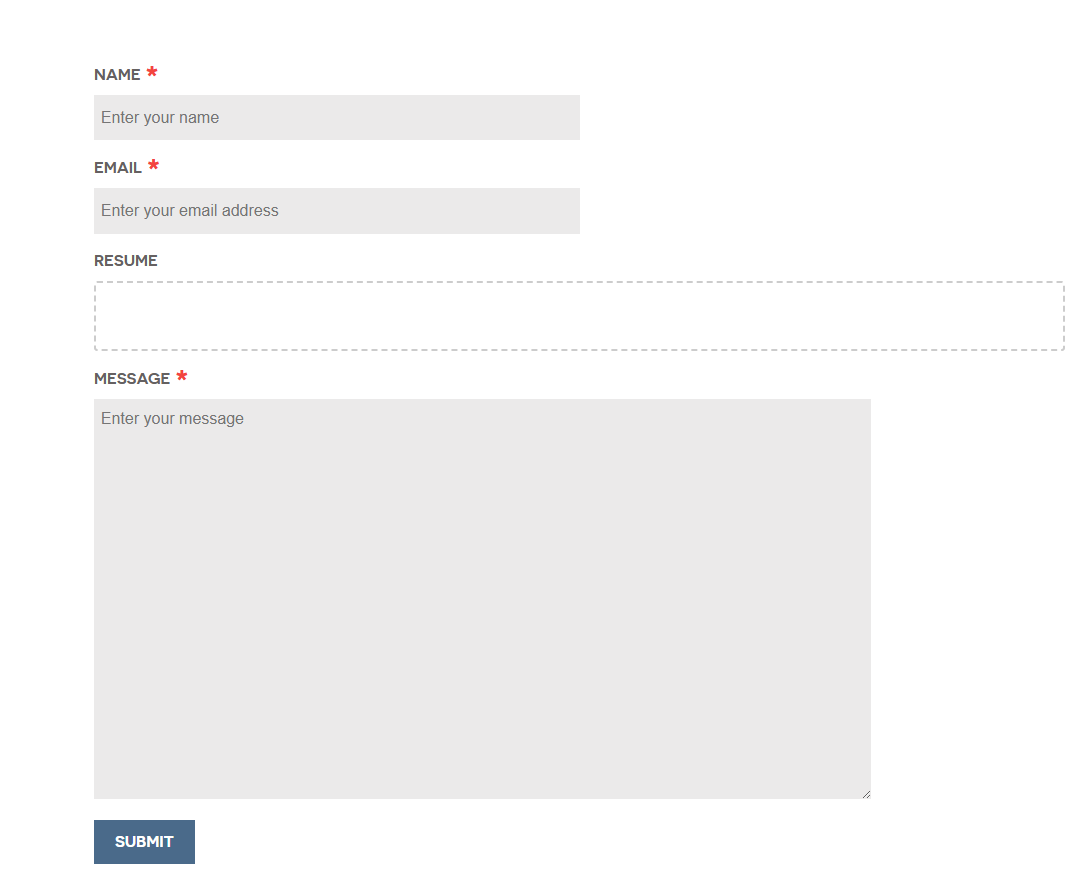
I see the below screenshot.

Not even trying to send a test email, a refresh of the browser page looses the blue box thus not able to upload any files. Deleting the cache brings it back only to disappear again with a load of the page.
1 reply
- [ KarmalakasIs it on a modular page and the form is on a module? ](https://getgrav.org/forum/general/upload-file-works-one-time-t7786#post-41372)
[6 months ago](https://getgrav.org/forum/general/upload-file-works-one-time-t7786#post-41369 "Permalink")
@duceduc,
> I’ve installed a fresh install of delivernext theme with Grav1.7.
Did you only install a fresh DeliverNext **theme** on an existing Grav 1.7 installation, or did you install a fresh DeliverNext **skeleton** as I did?
> a refresh of the browser page looses the blue box
Cannot reproduce. Refreshing the page does not make the blue box disappear.
[6 months ago](https://getgrav.org/forum/general/upload-file-works-one-time-t7786#post-41372 "Permalink") [ Duc If you are saying that the contact form file upload box loads fine for you from a fresh in… ](https://getgrav.org/forum/general/upload-file-works-one-time-t7786#post-41368 "In reply to Duc ")
Is it on a modular page and the form is on a module?
[6 months ago](https://getgrav.org/forum/general/upload-file-works-one-time-t7786#post-41375 "Permalink")
> Did you only install a fresh DeliverNext theme on an existing Grav 1.7 installation, or did you install a fresh DeliverNext skeleton as I did?
I've did it all manually. Installed Grav core and the delivernext theme seperately. Did not install the all-in-one skeleton way.
> Is it on a modular page and the form is on a module?
I believe so.
[6 months ago](https://getgrav.org/forum/general/upload-file-works-one-time-t7786#post-41376 "Permalink")
OK. I found the issue. In my system.yaml I have cache set to true. Setting it to false fixed it.
```yaml
cache:
enabled: false
```
I've read this somewhere when troubleshooting. Since I only wanted the contact page not to cache, I placed the above in the modular\_alt.md of the contact folder, but it didn't do anything.
Shouldn't all pages be cache other than the contact page???
[6 months ago](https://getgrav.org/forum/general/upload-file-works-one-time-t7786#post-41377 "Permalink")
@duceduc, Ah, an oversight on my part...
I just did a quick test with the File field for your issue and noticed the page had no `cache_enable: false` in its header. I didn't bother to look at it any further unfortunately...
Reading your latest reply, I had an "aha" moment.... The theme/skeleton contains a few issues:
- The skeleton has a `system.yaml` containing: ```yaml
cache:
enabled: false
```
That's why it worked in my test script using the skeleton.
Cache should be `enabled` by default. If not, the entire site build upon the skeleton will have cache switched off by default, resulting in less than optimal (to put it mildly) performance.
- Forms in modulars, need `cache_enable: false` in its header. (Unless cache is disabled for the entire site...).
According the [docs](https://learn.getgrav.org/17/forms/forms/how-to-forms-in-modular-pages):
> if you forget this the form will be cached, along with the nonce that is generated every 12 hours. So when reaching the 12 hours change, the form will stop working until the cache is refreshed. This step is not needed for standalone page forms.
- A suggested improvement for the demo content of the theme. According a note in the docs: > In Form v2.0, you can now define the form directly in the modular sub-page just like any other form. However, if not found, the form plugin will look in the 'current page', i.e. the top-level modular page for a form, so it's fully backwards compatible with the 1.0 way of doing things. !!!
last edited 05/29/26 by pamtbaau
[Log in](https://getgrav.org/login?return=%2Fforum%2Fgeneral%2Fupload-file-works-one-time-t7786) to reply.
### Suggested topics
| Topic | Participants | Replies | Views | Activity |
|---|---|---|---|---|
| [SSL-Error](https://getgrav.org/forum/general/ssl-error-t9502) [General](https://getgrav.org/forum/general) · by Hanns Mattes, 5 days ago | | 0 | 86 | [5 days ago](https://getgrav.org/forum/general/ssl-error-t9502 "by Hanns Mattes") |
| [localhost, Windows, bin/grav server: core upgrade deletes system/router.php, and bin/grav disappears after the server is stopped](https://getgrav.org/forum/general/localhost-windows-bin-grav-server-core-upgrade-deletes-system-router-php-and-bin-grav-disappears-after-the-server-is-stopped-t9495) [General](https://getgrav.org/forum/general) · by Dima, 1 week ago | | 1 | 114 | [1 week ago](https://getgrav.org/forum/general/localhost-windows-bin-grav-server-core-upgrade-deletes-system-router-php-and-bin-grav-disappears-after-the-server-is-stopped-t9495 "by pamtbaau") |
| [Proposal to list Commercial Themes + Plugins in GPM. Your thoughts are requested...](https://getgrav.org/forum/general/proposal-to-list-commercial-themes-plugins-in-gpm-your-thoughts-are-requested-t9490) [General](https://getgrav.org/forum/general) · by pamtbaau, 2 weeks ago | | 0 | 186 | [2 weeks ago](https://getgrav.org/forum/general/proposal-to-list-commercial-themes-plugins-in-gpm-your-thoughts-are-requested-t9490 "by pamtbaau") |
| [Multi-site health/status monitor for GRAV](https://getgrav.org/forum/general/multi-site-health-status-monitor-for-grav-t9425) [General](https://getgrav.org/forum/general) · by lynbor, 2 months ago | | 5 | 696 | [3 weeks ago](https://getgrav.org/forum/general/multi-site-health-status-monitor-for-grav-t9425 "by lynbor") |
| [Unified Login system - you might need to reset your password](https://getgrav.org/forum/general/unified-login-system-you-might-need-to-reset-your-password-t9463) [General](https://getgrav.org/forum/general) · by Andy Miller, 1 month ago | | 0 | 417 | [1 month ago](https://getgrav.org/forum/general/unified-login-system-you-might-need-to-reset-your-password-t9463 "by Andy Miller") |