---
title: 'CSS Image Loading'
url: 'https://getgrav.org/forum/general/css-image-loading-t118'
markdown: 'https://getgrav.org/forum/general/css-image-loading-t118.md'
date: '2026-06-21'
description: "Ok, so total noob question but I'm trying to understand how you load images in Grav. For example, lets say I have a blog post and for each post I want the"
---

[General](https://getgrav.org/forum/general)

#  CSS Image Loading 

  Started by Dan Hart 9 years ago · 18 replies · 5805 views    

 [9 years ago](https://getgrav.org/forum/general/css-image-loading-t118#post-19847 "Permalink") 

Ok, so total noob question but I'm trying to understand how you load images in Grav. For example, lets say I have a blog post and for each post I want the background image (hero) to be different for each blog post.

From what I gather it looks like I need to drop these images in the same folder as the markdown content.. but how I do load that into my template?

Here is a line from my template:
`style="background-image: url({{ hero_image.url }});"`

I'm unsure what "hero\_image" is referencing. I thought it was referencing the image when you are looking at in the admin view, which is:
`![hero_image](build_kit_hero.png)`

I'm getting nothing to show on the page, so something is not working. I've been combing through the documentation and forum and cannot find something that spells this out.

Any thoughts out there?`

 [9 years ago](https://getgrav.org/forum/general/css-image-loading-t118#post-19848 "Permalink") 

What does your blueprint file look like? Do you have a specific field for the hero image?

 [9 years ago](https://getgrav.org/forum/general/css-image-loading-t118#post-19851 "Permalink") 

`hero_image` is just variable and you should find something like `{% set hero_image = page.media.images|first %}` in your template. In this example the `hero_image` is first image in page media collection.

 [9 years ago](https://getgrav.org/forum/general/css-image-loading-t118#post-19853 "Permalink") 

You can do something like this:

1. Add this field in your page blueprint, so that you can choose the desired image from admin:

<details>
<summary>Blueprint field</summary>

header.hero\_image:
type: filepicker
folder: '@self'
label: Select Hero Image
preview\_images: true
accept:

- .png
- .jpg

</details>

1. Then in your twig template add this:

<details>
<summary>Set hero\_image</summary>

{% set style = ' style="background-image: url(\\'' ~ page.media.images\[page.header.hero\_image\].url() ~ '\\')"' %}

</details>

1. Finally add {{ style }} wherever you want: '<div {{ style }}></div>'

 👍 4 

 [9 years ago](https://getgrav.org/forum/general/css-image-loading-t118#post-19859 "Permalink") 

This is a good idea and would love to make this happen. I've got a blueprint in my blueprints folder that has what you suggested, but I'm not seeing anything yet in the admin. Should it display as another tab next to Advanced or something?

I think what I am missing is the Front Matter that sits at the top of the .md page. What should I have there?

last edited 10/06/17 by Dan Hart

 [9 years ago](https://getgrav.org/forum/general/css-image-loading-t118#post-19860 "Permalink") 

Hi there. I have a simple blog and most posts have images associated with them.

My `blog.item.html.twig` template contains the following:

```twig
{% if header_image %}
            {% if header_image_file %}
                {% set header_image_media = page.media.images[header_image_file] %}
            {% else %}
                {% set header_image_media = page.media.images|first %}
            {% endif %}
            {{ header_image_media.cropZoom(header_image_width, header_image_height).html }}
        {% endif %}
```

I add the image to the blog post's directory, and in the `item.md` frontmatter I have:

```yaml
header_image: '1'
header_image_width: 1280
header_image_height: 827
```

Dimensions will vary based on your image. You can see an example [here](https://andy.rip/0828). Is this what you're trying to achieve?

 [9 years ago](https://getgrav.org/forum/general/css-image-loading-t118#post-19861 "Permalink") 

Hey Andy, thanks for the reply and a link to your example! I'm trying to make it so that on the page I'm building it has a hero image for the background (via CSS and not inline) that a user could add from the admin panel.

My biggest problem is I'm still so new to Grav and just having a hard time wrapping my head around how it all ties together!

 [9 years ago](https://getgrav.org/forum/general/css-image-loading-t118#post-19862 "Permalink") 

Oh I see, so you want a fullscreen background image? The term 'hero image' is a bit ambiguous these days :upside\_down\_face:

 👍 1 

 [9 years ago](https://getgrav.org/forum/general/css-image-loading-t118#post-19863 "Permalink") 

Mmh well that depends, you can create another tab or just set a new field in one the default tabs. Anyway I'm going to explain you the easy way:

Let's suppose you have your blog-post twig template like 'item.html.twig', you should create a blueprint just for the blog-post following this folders structure:
themes > mytheme > blueprints > item.yaml

Inside the item.yaml file we set a new fieldset with a filepicker for your image. All this is going to be placed in the Content Tab:

<details>
<summary>item.yaml</summary>

title: item
'@extends':
type: default
context: blueprints://pages

```yaml
    form:
      fields:
        tabs:
          type: tabs
          active: 1
          fields:
            content:
              type: tab
              title: PLUGIN_ADMIN.CONTENT
              fields:
                hero:
                  type: fieldset
                  title: Page Hero Image
                  fields:
                    header.hero_image:
                      type: filepicker
                      folder: '@self'
                      label: Select here the desired hero image.
                      preview_images: true
                      accept:
                        - .png
                        - .jpg
```

</details>

 [9 years ago](https://getgrav.org/forum/general/css-image-loading-t118#post-19864 "Permalink") 

Your explanation definitely helps, thank you. My admin view is still not displaying anything for me. I cleared the cache on the dashboard to help but no luck. Here's what I've got:

**buildkit.yaml**
title: buildkit
'@extends':
type: default
context: blueprints://pages

```yaml
    form:
      fields:
        tabs:
          type: tabs
          active: 1
          fields:
            content:
              type: tab
              title: PLUGIN_ADMIN.CONTENT
              fields:
                hero:
                  type: fieldset
                  title: Page Hero Image
                  fields:
                    header.hero_image:
                      type: filepicker
                      folder: '@self'
                      label: Select here the desired hero image.
                      preview_images: true
                      accept:
                        - .png
                        - .jpg
```

**buildkit.html.twig**
{% extends "partials/base.html.twig" %}
{% block top %}
{% set hero = page.collection|first %}
{% set hero\_image = hero.media.images|first %}
<div class="top\_wrap" style="background-image: url({{ hero\_image.url }});">
{{ parent() }}
{{hero.content}}
</div>
{% endblock %}

## **buildkit.md**

```
title: TJ
---

asdfasdfasdfasdf

testing hello world
```

Am I overlooking something?

 [9 years ago](https://getgrav.org/forum/general/css-image-loading-t118#post-19865 "Permalink") 

Ok, the code you suggested worked great, it was a tabbing issue on my end. Guess I need to pay close attention to that. Thanks for the responses on all of this, very helpful!

 [9 years ago](https://getgrav.org/forum/general/css-image-loading-t118#post-19868 "Permalink") 

I spoke to soon it looks like..

**The variable is being set like so:**
`{% set style = page.media.images[page.header.hero_image] %}`

**And displayed like:**
`<div class="top_wrap" style="background-image: url("{{style}}");">`

**But what it renders is:**
`<div class="top_wrap" style="background-image: url("<img src="https://getgrav.org/themename/user/pages/02.builds/tj/build_kit_hero.png" />");">`

Looks like a IMG tag is being rendered when all I need is the image path, but I'm not sure why. Is there a way to just grab the url path?

last edited 10/06/17 by Dan Hart

 [9 years ago](https://getgrav.org/forum/general/css-image-loading-t118#post-19870 "Permalink") 

Don't make your life hard, my friend. Use the code I wrote you in the first message. Plus the answer to your last question is in that code ;)

> **@fjrfac:**
> {% set style = ’ style=“background-image: url(’’ ~ page.media.images\[page.header.hero\_image\].url() ~ ‘’)”’ %}

 [9 years ago](https://getgrav.org/forum/general/css-image-loading-t118#post-19886 "Permalink") 

Not trying to make life hard, just still trying to learn Grav. 😛

I went back through what you wrote versus what I had and saw where I screwed up.
**So right now I do have this:**
`{% set style = ’ style=“background-image: url(’’ ~ page.media.images[page.header.hero_image].url() ~ ‘’)”’ %}`

**and this:**
`<div {{ style }}>`

**But I'm getting this error:**
Twig\_Error\_Syntax
Unexpected token "name" of value "style" ("end of statement block" expected).
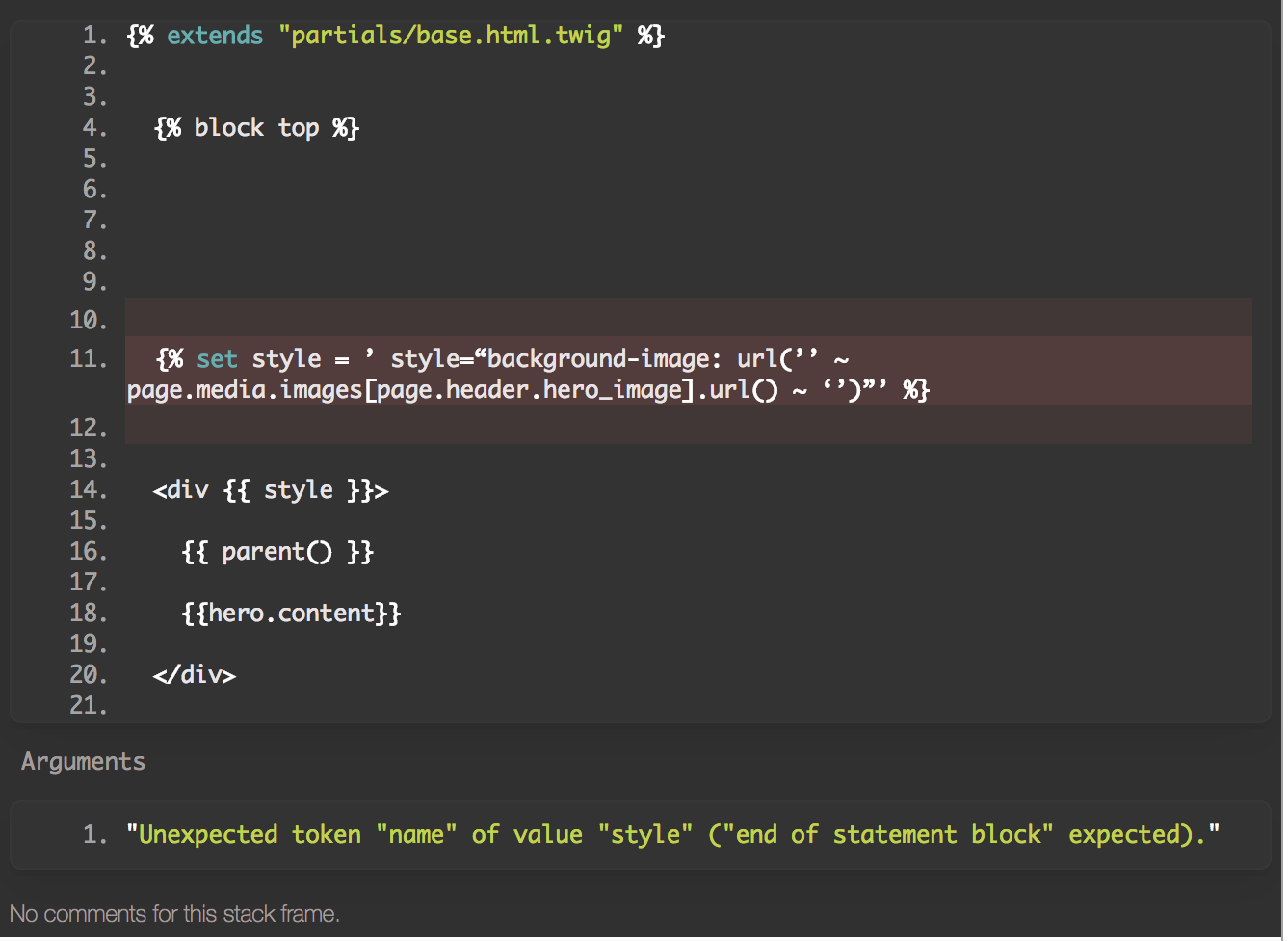
![30 AM copy|684x500](https://cdn.getgrav.org/forum/files/28/28c25e177f62903c374c7e19cdd9e73e2f9a196dd0de9926495bbcd362c13183.png)

 [9 years ago](https://getgrav.org/forum/general/css-image-loading-t118#post-19899 "Permalink") 

`{% endblock %}` is missed in the end of template

 [9 years ago](https://getgrav.org/forum/general/css-image-loading-t118#post-19918 "Permalink") 

Hey Underr, I've got an {% endblock %} in there, just doesn't show in that screenshot. Here's the full code of that:

```twig
{% extends "partials/base.html.twig" %}
  {% block top %}
  {% set style = ’ style=“background-image: url(’’ ~ page.media.images[page.header.hero_image].url() ~ ‘’)”’ %}
  <div {{ style }}>
  {% endstyle %}
    {{ parent() }}
    {{hero.content}}
  </div>
  {% endblock %}
  {% block content %}
      <div class="blog_post">
        <h1 class="blog_post_title"><a href="{{page.url}}">{{page.title}}</a></h1>
        <div class="blog_post_date">Posted on <span>{{page.date | date("d M")}}</span></div>
        <div class="blog_post_content">
          <p>TEST</p>
          {{page.content}}
        </div>
      </div>
  {% endblock %}
```

Does {% style = ......... %} need an end block as well? I tried that but no luck.

 [9 years ago](https://getgrav.org/forum/general/css-image-loading-t118#post-19920 "Permalink") 

Hi **dan**!
I will try to explain it with my bad English, sorry about that
At first - `{% block %} ... {% endblock %}` uses for `partials/base.html.twig` which is supplemented by the current template. These blocks are used in it - you can see references of this blocks into the `partials/base.html.twig`. Therefore, {% endblock%} is no needed for a {% set%} statement.
At second, it looks like your line `{% set style = ’ style=“background-image: url(’’ ~ page.media.images[page.header.hero_image].url() ~ ‘’)”’ %}` uses a wrong quotes because you just make copy-paste of @fjrfac answer ( *copy-paste - the worst enemy of a developer*) You need to replace wrong quotes - use only `'` and `"`

last edited 10/10/17 by andrii burkatskyi

 [9 years ago](https://getgrav.org/forum/general/css-image-loading-t118#post-19925 "Permalink") 

Sorry for the delay. Yeah underr is right.
It seems that when I copied the code, Discourse deleted some backslash (I don't know why) so I'm uploading a screenshot with the code.
style grav code|690x41

Anyway you can find a similar example of what you want to do in Antimatter theme templates:

<https://github.com/getgrav/grav-theme-antimatter/blob/develop/templates/modular/showcase.html.twig>

Let us know :)

 [9 years ago](https://getgrav.org/forum/general/css-image-loading-t118#post-19932 "Permalink") 

Hey guys, so I was able to get it working all the way through. Most of the reason I couldn't get things working because I didn't have enough understanding on how TWIG works and some of the naming conventions within GRAV. I found these 2 videos last night which really helped:

<https://www.dev-metal.com/6min-video-introduction-twig-php-templating-engine/>
<https://www.youtube.com/watch?v=Mg7ZIK6Xmos>

Here's where the code ended up:

**YAML**
title: buildkit
'@extends':
type: default
context: blueprints://pages

```yaml
form:
  fields:
    tabs:
      type: tabs
      active: 1

      fields:
        content:
          fields:
            header.hero_image:
              type: pagemediaselect
              label: Select hero image
```

**TWIG**
{% extends "partials/base.html.twig" %}
{% block content %}
<section id="hero-build-kit" class="intro-cover d-flex"
{% if page.header.hero\_image %}
style="background-image: url({{page.media\[page.header.hero\_image\].url}}) ">
{% else %}
Stuff
{% endif %}
{% endblock %}

```
etc...
```

## **MD**

```yaml
title: TJ
hero_image: testimage.jpg
---
Lorem ipsum
```

Really, thanks for helping me through this. I feel like I've started (just a little!) to understand how all of this pieces together. One follow up question to all of this...

Using my YAML file is it possible to reorder the fields in the CMS? I plan to have a decent amount of fields in there and would like the order of them to make sense to the user.

Thanks again!

 👍 1 

[Log in](https://getgrav.org/login?return=%2Fforum%2Fgeneral%2Fcss-image-loading-t118) to reply.

###  Suggested topics

 | Topic | Participants | Replies | Views | Activity |
|---|---|---|---|---|
| [SSL-Error](https://getgrav.org/forum/general/ssl-error-t9502)    [General](https://getgrav.org/forum/general) · by Hanns Mattes, 1 week ago |  | 0 | 122 | [1 week ago](https://getgrav.org/forum/general/ssl-error-t9502 "by Hanns Mattes") |
| [localhost, Windows, bin/grav server: core upgrade deletes system/router.php, and bin/grav disappears after the server is stopped](https://getgrav.org/forum/general/localhost-windows-bin-grav-server-core-upgrade-deletes-system-router-php-and-bin-grav-disappears-after-the-server-is-stopped-t9495)    [General](https://getgrav.org/forum/general) · by Dima, 2 weeks ago |  | 1 | 139 | [2 weeks ago](https://getgrav.org/forum/general/localhost-windows-bin-grav-server-core-upgrade-deletes-system-router-php-and-bin-grav-disappears-after-the-server-is-stopped-t9495 "by pamtbaau") |
| [Proposal to list Commercial Themes + Plugins in GPM. Your thoughts are requested...](https://getgrav.org/forum/general/proposal-to-list-commercial-themes-plugins-in-gpm-your-thoughts-are-requested-t9490)    [General](https://getgrav.org/forum/general) · by pamtbaau, 3 weeks ago |  | 0 | 231 | [3 weeks ago](https://getgrav.org/forum/general/proposal-to-list-commercial-themes-plugins-in-gpm-your-thoughts-are-requested-t9490 "by pamtbaau") |
| [Multi-site health/status monitor for GRAV](https://getgrav.org/forum/general/multi-site-health-status-monitor-for-grav-t9425)    [General](https://getgrav.org/forum/general) · by lynbor, 2 months ago |  | 5 | 724 | [4 weeks ago](https://getgrav.org/forum/general/multi-site-health-status-monitor-for-grav-t9425 "by lynbor") |
| [Unified Login system - you might need to reset your password](https://getgrav.org/forum/general/unified-login-system-you-might-need-to-reset-your-password-t9463)    [General](https://getgrav.org/forum/general) · by Andy Miller, 1 month ago |  | 0 | 451 | [1 month ago](https://getgrav.org/forum/general/unified-login-system-you-might-need-to-reset-your-password-t9463 "by Andy Miller") |
